Logs
Feature Overview
Logs as an extension component can be installed to the openFuyao platform through the application marketplace. You can view Pod and container log information, and configure log collection sources, collection tasks, and alert rules. The openFuyao logging system can effectively improve the efficiency of error identification on the platform and enhance the overall monitoring capability of the platform.
Application Scenarios
The openFuyao logging system is commonly used for log management of container platform infrastructure. Operations personnel can query, analyze, and quickly locate problems through the logging system, with the following application scenarios.
- Query faulty applications and trace factors: When an application or service in the container platform reports an error, you can locate the specific error log segment by querying its error time and specific container name, helping operations personnel quickly locate the specific error root cause and fix it in time.
- Custom application log query and filtering: When the application created by the user is not a Kubernetes native application, it is difficult to obtain logs for this part through command line instructions. This requirement can be achieved by customizing the log collection source path. The logging system will automatically collect user-added custom paths.
- Log record recognition: Identifying anomaly patterns or error information through log content to trigger alerts, helping operations personnel take quick measures for repair or optimization.
Capability Scope
View Logs: Users can view corresponding logs based on basic filter information such as namespace, container name, and log collection path.
Log Alerts: When logs in the cluster trigger the conditions of log alert rules, the logging system sends the corresponding alert information to the alert component.
High Availability: Supports high availability deployment configuration, running multiple instances to prevent single point of failure.
Support for Custom Log Collection Sources: Users can add or delete log collection sources, increasing the adaptability and flexibility of logs and the platform.
Custom Query Interval and Keyword Filtering: Users can quickly query expected filter results, including but not limited to keyword search, time interval restriction, log level classification, etc.
Highlight Features
Efficient Log Collection and Management Capability
Supports real-time log data collection and query for various services and containers based on user-defined filter conditions. Custom filter conditions include but are not limited to namespace, service name, container name, keyword, filter time, log collection path file name, and log type level. Users can combine multiple conditions to achieve precise query capabilities.
Precise Log Location Capability
Supports users to precisely locate all logs within a fine-grained time span after selecting a specific log source (such as a specific container, specific log path, etc.). Provides the ability to query context logs through custom time, allowing users to query context logs after locating a key log according to their needs.
Diverse Log Collection Capability
Supports users to set log collection paths to collect logs generated by user-defined applications. Add log collection sources without changing default configurations. Users can customize log collection jobs, allowing the log collection component to collect logs at user-specified paths, and perceive the application's logs in the query interface through the specific "path + file name" method.
Sensitive Log Alert Capability
Supports users to create log alert rules when installing log components, and provides log alert rule templates and preset log alert rules. After the logs collected by the system trigger the alert rule, alerts are sent to the alert component, implementing a one-stop fault detection system for log monitoring + alerts + location.
Log Export/Download Capability
Supports users to export log content they want to save in the log component. The current version supports users to export filtered result logs after a series of filter operations, and supports users to obtain detailed logs of a single container through time filtering in the log details interface.
Implementation Principle
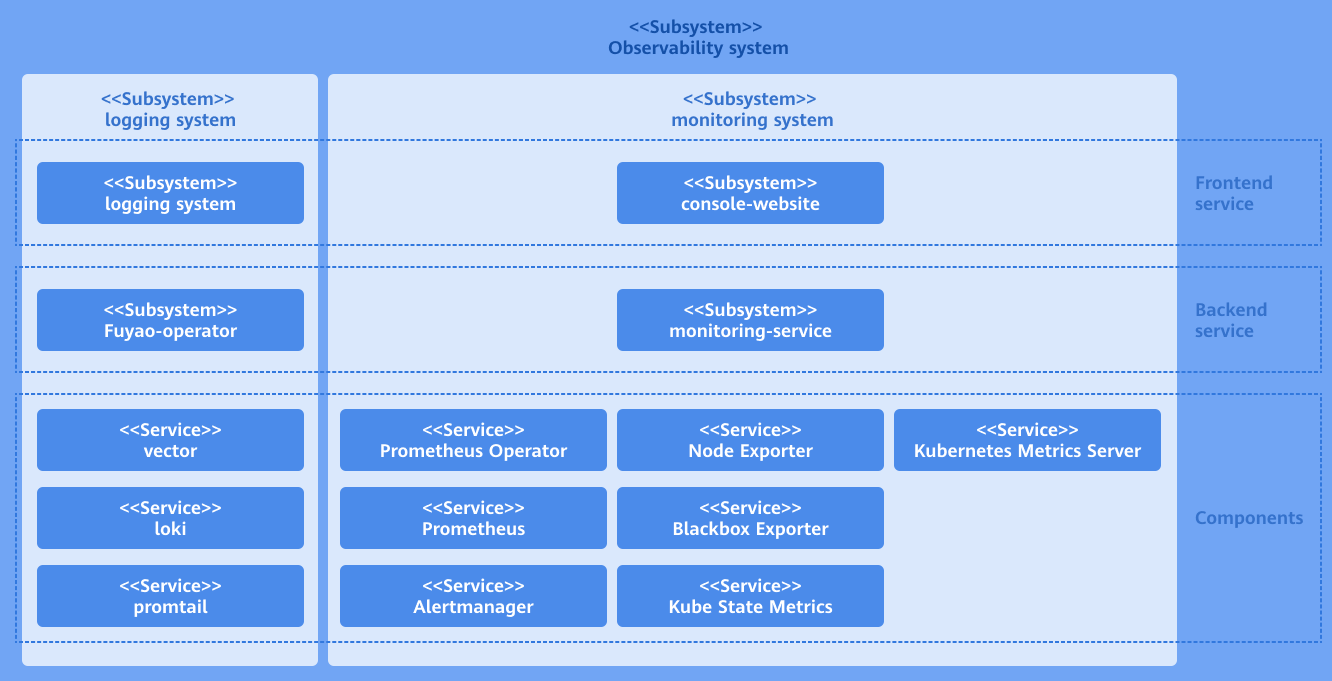
The log component as an ecological extension component of openFuyao consists of three parts: log backend layer, log UI layer, and open source software layer.
Log Backend Layer
logging-operator backend is deployed in the cluster as a microservice. The backend component provides log query and filter interfaces, log collection source query interfaces, log alert rule query interfaces, log collection job CRUD interfaces, log detail context query interfaces, etc., providing core capabilities for the log extension component.
The backend processing logic of logging-operator is to receive frontend call requests, create LogQL query statements used by Loki component based on specific request content, and assemble this LogQL into a query request calling Loki http interface, thereby obtaining query and filter results in Loki. Then perform operations such as assembly based on specific return logic, and finally return to the original calling interface. The collection source configuration function performs CRUD operations on K8s cluster resources by calling K8s client go interface.
Log UI Layer
The log frontend UI component is deployed independently in the openFuyao platform as a scalable pluggable component. After the UI interface is installed and deployed in the openFuyao platform, the log interface section will be automatically integrated in the sidebar navigation of console-website. Users can directly select and use the log component through the left tree menu navigation bar of the platform management interface. When the openFuyao platform is not installed in the cluster, the log UI can also be integrated and deployed with the log backend and log open source software as an independent log application, in which case the log UI layer is an independent interface.
Log Open Source Software Layer
The log open source software mainly provides underlying support capabilities for the logging system, mainly composed of log collection component (promtail) and log storage component (Loki). The log collection component is deployed on each node as a daemonset, sending logs from collection sources to the log storage component according to collection rules. After the log storage component Loki receives the http interface, it executes query statements in the log database and returns query results.
Figure 1 Log Extension Component Implementation Principle
Relationship with Related Features
Alerts: The alert system implements alert notifications by configuring different alert sources (Prometheus, Loki, etc.) and related alert rules.
Installation
openFuyao Platform
Log in to the openFuyao platform and enter the "Overview" interface by default. Select "Application Marketplace > Application List" from the left navigation bar to enter the "Application List" interface.
Select "Extension Component" under "Type" on the left.
Click the application card with the application name "logging-package" to enter the application details page.
Click "Deploy" in the upper right corner of the details page.
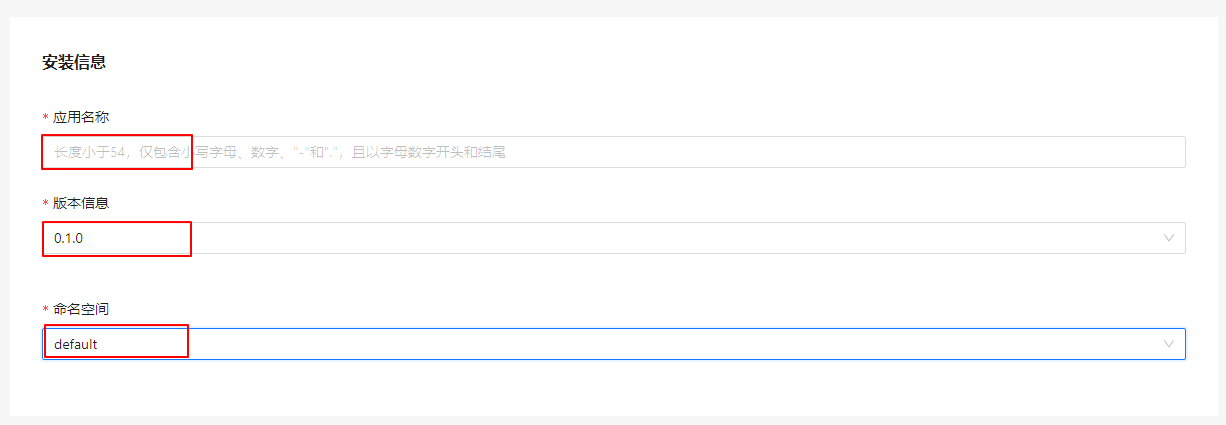
In the "Installation Information" module of the deployment interface, enter "Application Name", "Version Information" and "Namespace". The namespace can be specified as default.
Figure 2 Installation Information
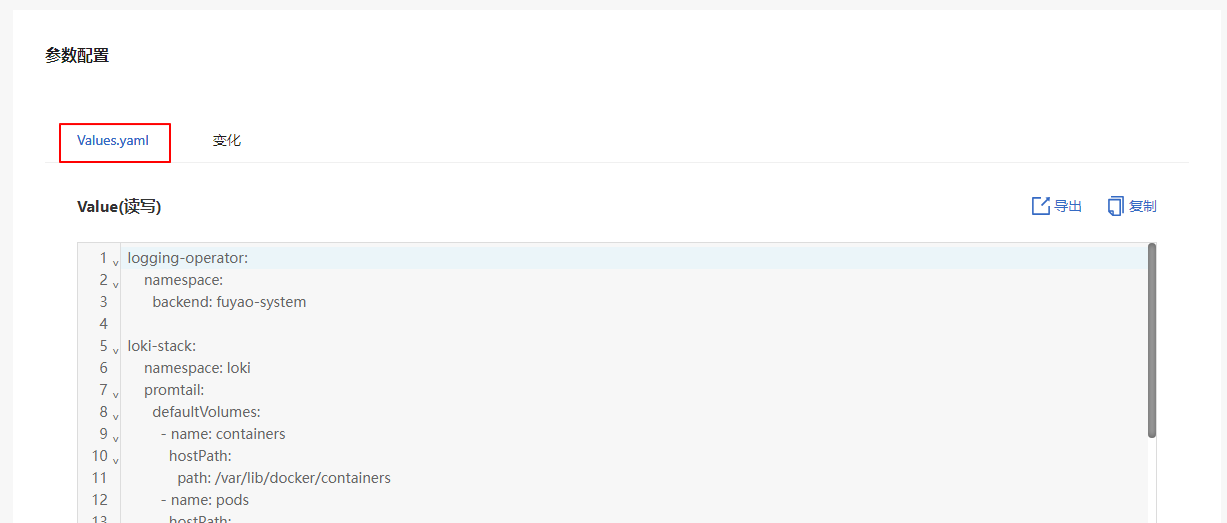
In the "Parameter Configuration" module, you can see the configuration of each user-configurable field in the Values.yaml preview interface.
Figure 3 Yaml Configuration
Click OK to deploy the extension.
Independent Deployment
Installation
1.1 Obtain the logging-package Helm chart.
wget https://harbor.openfuyao.com/chartrepo/openfuyao-catalog/charts/logging-package-0.13.0.tgz1.2 Configure the deployment values in the values.yaml file under parameter configuration.
1.3 Deploy using Helm.
tar -zxf logging-package-0.13.0.tgz
helm install logging -n default ./logging-package
1.4 Verify successful installation and access.
Verify that the logging package has been successfully deployed.
kubectl get pods -n default
kubectl get pods -n openfuyao-system
kubectl get pods -n loki
Verify that the service has been exposed.
kubectl get svc -n default | grep loggingAccess the logging-website interface.
http://<Node_IP>:<logging.service.nodePort>
Configure log age limit from creation and log storage update time policy.
reject_old_samples_max_age: This field specifies the maximum time span supported by the log collector, which is 168 hours (default configuration). This means the maximum duration from log creation to the current time. With the default configuration, if a container log is created more than 7 days ago, it will not be collected by the collection component.
retention_deletes_enabled: This field specifies whether to enable automatic deletion of old log data. The default configuration is false. With the default configuration, collected logs are permanently stored, and no automatic old log deletion policy is applied.
retention_period: This field takes effect only when retention_deletes_enabled is enabled. This configuration defines the time period after which collected logs stored in storage will be cleared.
yamlloki-stack: loki: config: limits_config: reject_old_samples_max_age: 168h table_manager: retention_deletes_enabled: false retention_period: 0sConfigure log collection source settings.
This configuration defines the detailed settings for log collection sources and specifies the root directory path where the collector operates. When configuring, you need to configure both defaultVolumes and defaultVolumeMounts simultaneously. Ensure that the path and mountpath in these two values are consistent, and that the collection source path is readable. If the path is not readable, this configuration will not take effect.
 Note:
Note:
After the collection source configuration takes effect, it cannot be changed.The content to be configured is as follows:
yamlloki-stack: namespace: loki promtail: defaultVolumes: - name: containers hostPath: path: /var/lib/docker/containers - name: pods hostPath: path: /var/log/pods - name: random hostPath: path: /var/log/random defaultVolumeMounts: - name: containers mountPath: /var/lib/docker/containers readOnly: true - name: pods mountPath: /var/log/pods readOnly: true - name: random mountPath: /var/log/random readOnly: trueThe following case demonstrates adding a new collection source named new_example and removing the existing collection source random:
yamlloki-stack: namespace: loki promtail: defaultVolumes: - name: containers hostPath: path: /var/lib/docker/containers - name: pods hostPath: path: /var/log/pods - name: new_example hostPath: path: /var/tem/my-application defaultVolumeMounts: - name: containers mountPath: /var/lib/docker/containers readOnly: true - name: pods mountPath: /var/log/pods readOnly: true - name: new_example mountPath: /var/tem/my-application readOnly: trueConfigure custom alert trigger rules for log alerting.
When configuring log alert rules, follow the format in the example for the rules to take effect. If the configuration format is incorrect, the component cannot properly recognize it, and the ineffective alert rules will not be visible on the log configuration page. To create a new alert rule, you need to fully configure a sub-item of alerting_groups. When creating alert details, follow the indentation structure below. The specific configuration items include:
name: Name of the alert rule.
rules: Specific alert rule details.
- alerts: Rule name, consistent with name.
- expr: Alert rule expression. If invalid, this configuration will not take effect. For alert rule expression configuration specifications, see Official Alert Rule Expression Configuration.
- for: Alert duration.
- labels: Labels for the alert rule, appearing in key:value format in this item.
- annotations: Annotations for the alert rule, appearing in key:value format, where value must be in string format.
yamlloki-stack: loki: alerting_groups: - name: GenericHighErrorRate rules: - alert: GenericHighErrorRate expr: | sum by (job, instance) (rate({job=~".+"} |= "error" [5m])) > 0 for: 5m labels: severity: critical loki: logging/k8s.io annotations: summary: "High error rate detected in {{ $labels.job }} instance {{ $labels.instance }}" description: "Job {{ $labels.job }} on instance {{ $labels.instance }} has a high rate of error logs." - name: GenericExceptionDetected rules: - alert: GenericExceptionDetected expr: | sum by (job, instance) (rate({job=~".+"} |= "Exception" [5m])) > 0 for: 5m labels: severity: warning loki: logging/k8s.io annotations: summary: "Exception detected in {{ $labels.job }} instance {{ $labels.instance }}" description: "Job {{ $labels.job }} on instance {{ $labels.instance }} has logs containing 'Exception'." - name: GenericLogVolumeSpike rules: - alert: GenericLogVolumeSpike expr: | sum by (job, instance) (rate({job=~".+"}[5m])) > 1 for: 5m labels: severity: warning loki: logging/k8s.io annotations: summary: "Log volume spike detected in {{ $labels.job }} instance {{ $labels.instance }}" description: "Job {{ $labels.job }} on instance {{ $labels.instance }} has a spike in log volume." - name: GenericErrorRateThresholdExceeded rules: - alert: GenericErrorRateThresholdExceeded expr: | (sum by (job, instance) (rate({job=~".+"} |= "error" [5m])) / sum by (job, instance) (rate({job=~".+"}[5m]))) > 0.05 for: 5m labels: severity: critical loki: logging/k8s.io annotations: summary: "High error rate threshold exceeded in {{ $labels.job }} instance {{ $labels.instance }}" description: "Job {{ $labels.job }} on instance {{ $labels.instance }} has an error rate exceeding the threshold." - name: GenericServiceUnavailable rules: - alert: GenericServiceUnavailable expr: | sum by (job, instance) (rate({job=~".+"} |= "service unavailable" [5m])) > 0 for: 5m labels: severity: critical loki: logging/k8s.io annotations: summary: "Service unavailable detected in {{ $labels.job }} instance {{ $labels.instance }}" description: "Job {{ $labels.job }} on instance {{ $labels.instance }} has logs indicating 'service unavailable'." - name: GenericApplicationStartupFailure rules: - alert: GenericApplicationStartupFailure expr: | sum by (job, instance) (rate({job=~".+"} |= "startup failure" [5m])) > 0 for: 5m labels: severity: critical loki: logging/k8s.io annotations: summary: "Application startup failure detected in {{ $labels.job }} instance {{ $labels.instance }}" description: "Job {{ $labels.job }} on instance {{ $labels.instance }} has logs indicating 'startup failure'."
How to configure your application.
5.1 Kubernetes native applications.
When Kubernetes native applications print logs, for the containerd container runtime environment, logs are printed to the default path:
/var/log/pods/{namespace}_{pod_name}_{pod_id}/{container_name}/0.log. In this case, users do not need to modify any log printing settings. The log collection system will automatically capture logs under this path and save them to the log storage component.5.2 User-defined applications.
User-defined applications print logs inside their containers and have a detailed log printing path. Users need to map this container internal path to a hostPath on the host machine. This hostPath represents the location where the user-defined application prints logs. Configure this hostPath according to the log collection source configuration in step 3 to enable collection of this path. After installation and deployment, configure the file name and application task name under this path in the collection task configuration.
 volumeMounts:
 - name: log-volume
   mountPath: /var/log
 volumes:
 - name: log-volume
   hostPath:
     path: /var/log/xxxx/xxxx
Standalone Deployment
Installation
1.1 Get the logging-package Helm package.
wget https://harbor.openfuyao.com/chartrepo/openfuyao-catalog/charts/logging-package-0.13.0.tgz1.2 Enter the values information to be deployed in "values.yaml" in the parameter configuration.
1.3 Deploy using Helm.
tar -zxf logging-package-0.13.0.tgz
helm install logging -n default ./logging-package
1.4 Verify successful installation and access.
Confirm that logging package has been successfully deployed.
kubectl get pods -n default
kubectl get pods -n openfuyao-system
kubectl get pods -n loki
Confirm that the service has been exposed.
kubectl get svc -n default | grep loggingAccess the logging-website interface.
http://<Node_IP>:<logging.service.nodePort>
Configure the time limit for collected logs from creation to current time and log storage update time policy.
reject_old_samples_max_age: This field indicates that the log collector supports a maximum time span of 168 hours (default configuration) for logs, i.e., the longest duration from log creation to current time. When selecting the default configuration, it means that a container's logs will not be collected by the collection component after more than 7 days since creation.
retention_deletes_enabled: This field indicates whether to enable the automatic deletion of old data for logs, default configuration is false. When selecting the default configuration, it means that collected logs will be permanently saved and will not perform the automatic deletion of old logs policy.
retention_period: This field only takes effect when retention_deletes_enabled is enabled. This configuration defines that collected logs will be cleared after being stored in storage for a certain time unit.
yamlloki-stack: loki: config: limits_config: reject_old_samples_max_age: 168h table_manager: retention_deletes_enabled: false retention_period: 0sConfigure log collection source configuration.
This configuration defines the detailed configuration of log collection sources, specifying the root directory path where the collector works. When configuring, users need to configure both defaultVolumes and defaultVolumeMounts, making sure that the path and mountpath values in these two are consistent. The entered collection source path must be a readable path. If the path is not readable, this configuration will not take effect.
Note:
After the collection source configuration takes effect, it cannot be changed.Content to be configured:
yamlloki-stack: namespace: loki promtail: defaultVolumes: - name: containers hostPath: path: /var/lib/docker/containers - name: pods hostPath: path: /var/log/pods - name: random hostPath: path: /var/log/random defaultVolumeMounts: - name: containers mountPath: /var/lib/docker/containers readOnly: true - name: pods mountPath: /var/log/pods readOnly: true - name: random mountPath: /var/log/random readOnly: trueThe following is an example case that shows adding a new collection source named new_example and deleting the existing collection source random:
yamlloki-stack: namespace: loki promtail: defaultVolumes: - name: containers hostPath: path: /var/lib/docker/containers - name: pods hostPath: path: /var/log/pods - name: new_example hostPath: path: /var/tem/my-application defaultVolumeMounts: - name: containers mountPath: /var/lib/docker/containers readOnly: true - name: pods mountPath: /var/log/pods readOnly: true - name: new_example mountPath: /var/tem/my-application readOnly: trueConfigure custom alert trigger rules for log alerts.
When configuring log alert rules, follow the format in the example to take effect. If the configuration format is incorrect, it cannot be normally perceived by the component, and alert rules that do not take effect will not be visible in the log configuration interface. To create new alert rules, you need to completely configure a sub-item of alerting_groups. Please follow the indentation structure below when creating alert details. Specific configuration items include:
name: The name of the alert rule.
rules: Specific alert rule details.
- alerts: Rule name, consistent with name.
- expr: Alert rule expression. If invalid, this configuration will not take effect. For alert rule expression configuration specifications, please refer to Alert Rule Expression Official Configuration Documentation.
- for: Alert duration.
- labels: Labels for the alert rule, appearing in this item in key:value format.
- annotations: Annotations for the alert rule, appearing in key:value format, value needs to appear as a string.
yamlloki-stack: loki: alerting_groups: - name: GenericHighErrorRate rules: - alert: GenericHighErrorRate expr: | sum by (job, instance) (rate({job=~".+"} |= "error" [5m])) > 0 for: 5m labels: severity: critical loki: logging/k8s.io annotations: summary: "High error rate detected in {{ $labels.job }} instance {{ $labels.instance }}" description: "Job {{ $labels.job }} on instance {{ $labels.instance }} has a high rate of error logs." - name: GenericExceptionDetected rules: - alert: GenericExceptionDetected expr: | sum by (job, instance) (rate({job=~".+"} |= "Exception" [5m])) > 0 for: 5m labels: severity: warning loki: logging/k8s.io annotations: summary: "Exception detected in {{ $labels.job }} instance {{ $labels.instance }}" description: "Job {{ $labels.job }} on instance {{ $labels.instance }} has logs containing 'Exception'." - name: GenericLogVolumeSpike rules: - alert: GenericLogVolumeSpike expr: | sum by (job, instance) (rate({job=~".+"}[5m])) > 1 for: 5m labels: severity: warning loki: logging/k8s.io annotations: summary: "Log volume spike detected in {{ $labels.job }} instance {{ $labels.instance }}" description: "Job {{ $labels.job }} on instance {{ $labels.instance }} has a spike in log volume." - name: GenericErrorRateThresholdExceeded rules: - alert: GenericErrorRateThresholdExceeded expr: | (sum by (job, instance) (rate({job=~".+"} |= "error" [5m])) / sum by (job, instance) (rate({job=~".+"}[5m]))) > 0.05 for: 5m labels: severity: critical loki: logging/k8s.io annotations: summary: "High error rate threshold exceeded in {{ $labels.job }} instance {{ $labels.instance }}" description: "Job {{ $labels.job }} on instance {{ $labels.instance }} has an error rate exceeding the threshold." - name: GenericServiceUnavailable rules: - alert: GenericServiceUnavailable expr: | sum by (job, instance) (rate({job=~".+"} |= "service unavailable" [5m])) > 0 for: 5m labels: severity: critical loki: logging/k8s.io annotations: summary: "Service unavailable detected in {{ $labels.job }} instance {{ $labels.instance }}" description: "Job {{ $labels.job }} on instance {{ $labels.instance }} has logs indicating 'service unavailable'." - name: GenericApplicationStartupFailure rules: - alert: GenericApplicationStartupFailure expr: | sum by (job, instance) (rate({job=~".+"} |= "startup failure" [5m])) > 0 for: 5m labels: severity: critical loki: logging/k8s.io annotations: summary: "Application startup failure detected in {{ $labels.job }} instance {{ $labels.instance }}" description: "Job {{ $labels.job }} on instance {{ $labels.instance }} has logs indicating 'startup failure'."
How to Configure Your Application.
5.1 Kubernetes Native Applications.
When Kubernetes native applications print logs, for the containerd container runtime environment, logs are printed to the default path:
/var/log/pods/{namespace}_{pod_name}_{pod_id}/{container_name}/0.log. In this case, users do not need to modify any log printing settings. The log collection system will automatically capture logs in this path and save them to the log storage component.5.2 User-defined Applications.
User-defined applications print logs inside their containers with a detailed log printing path. Users need to map the container internal path to the hostPath in the host machine, and this hostPath represents the location where the user-defined application prints logs. Configure this hostPath in the log collection source configuration in step 3 to collect logs from this path. After installation and deployment, configure the file name and application task name in detail in the collection job configuration.
 volumeMounts:
 - name: log-volume
   mountPath: /var/log
 volumes:
 - name: log-volume
  hostPath:
    path: /var/log/xxxx/xxxx
Using Log Query
Prerequisites
Loki and Loki-Promtail have been deployed and configured, ensuring log collection and storage services are running normally.
Background Information
The log query system helps users quickly locate problems, monitor system running status, and perform troubleshooting. Through filtering by tags, keywords, time range, and other conditions, the desired content can be filtered from a large amount of log data to accelerate problem location and analysis.
Usage Limitations
The log query system may have certain limitations on query complexity and data volume to prevent excessive occupation of system resources. Frequent or complex queries may be restricted.
Procedure
In the openFuyao platform, select "Observability Center > Logs > Log Query" from the left navigation bar to enter the "Log Query" interface.
Figure 3 Log Query

Query by Resource Type
Note:
The Loki component in the log component has concurrency limits, avoid excessively high concurrent calls to the query interface.2.1 On the "Log Query" interface, select "Query by Resource Type". You can query by "Namespace" (required), "Pod", and "Container".
2.2 Click the "Log Level" drop-down box to select log level, divided into error, warning, info, debug, critical.
2.3 Click the "Time" selector to select the time range.
2.4 Click the "Keyword" input box to enter keywords for fuzzy query.
2.5 Click "Query" to query logs of specified resource types.
Query by Collection Source
3.1 On the "Log Query" interface, select "Query by Collection Source". Enter "filename" (required) to query.
Figure 3 Query by Collection Source

3.2 Click the "Log Level" selector to select log level, divided into error, warning, info, debug, critical.
3.3 Click the "Time" selector to select the time range.
3.4 Click the "Keyword" input box to enter keywords for fuzzy query.
3.5 Click "Query" to query logs of specified resource types.
Using Log Configuration
In the openFuyao platform interface, select "Observability Center > Logs > Log Configuration" from the left navigation bar to enter the "Log Configuration" interface. You can select different tabs to view "Collection Sources", "Collection Jobs", and "Alert Rules" information for logs.
Creating Collection Job
Prerequisites
- Loki and Loki-Promtail have been deployed and configured, and log collection and storage services are running normally.
- The log directory to be collected has been created on the host machine and has read permission.
Background Information
Collection jobs implement log collection and pushing to Loki through Loki-Promtail, thus enabling real-time monitoring and storage analysis of logs. After creating a collection job, log files in different paths can be monitored, supporting subsequent queries and alerts.
Usage Limitations
- Collection paths should specify specific files or directories to avoid collecting a large number of irrelevant files that affect system performance.
- Large-scale collection jobs may consume significant resources. It is recommended to reasonably allocate priority and frequency of collection jobs.
Procedure
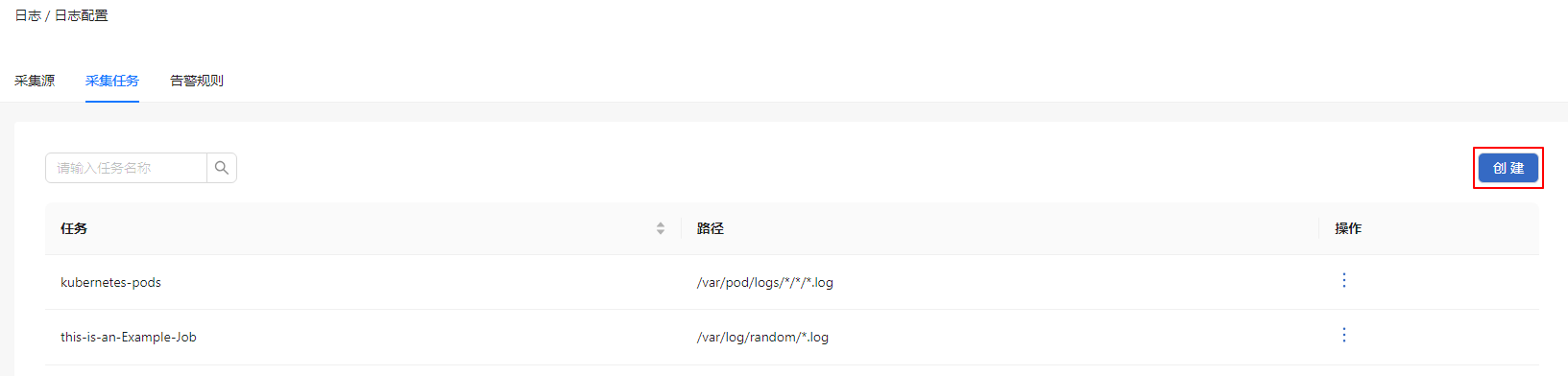
On the "Collection Jobs" tab, click "Create" to pop up the create collection job window.
Figure 4 Create
Enter the collection job name.
Select the collection source path and enter the path.
Figure 5 Create Collection Job
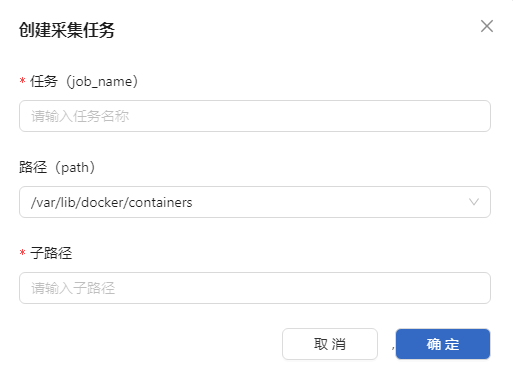
Click "OK" to complete the creation.
Related Operations
You can click  in the operation column on the list page to modify and delete collection jobs as needed.
Follow-up Operations
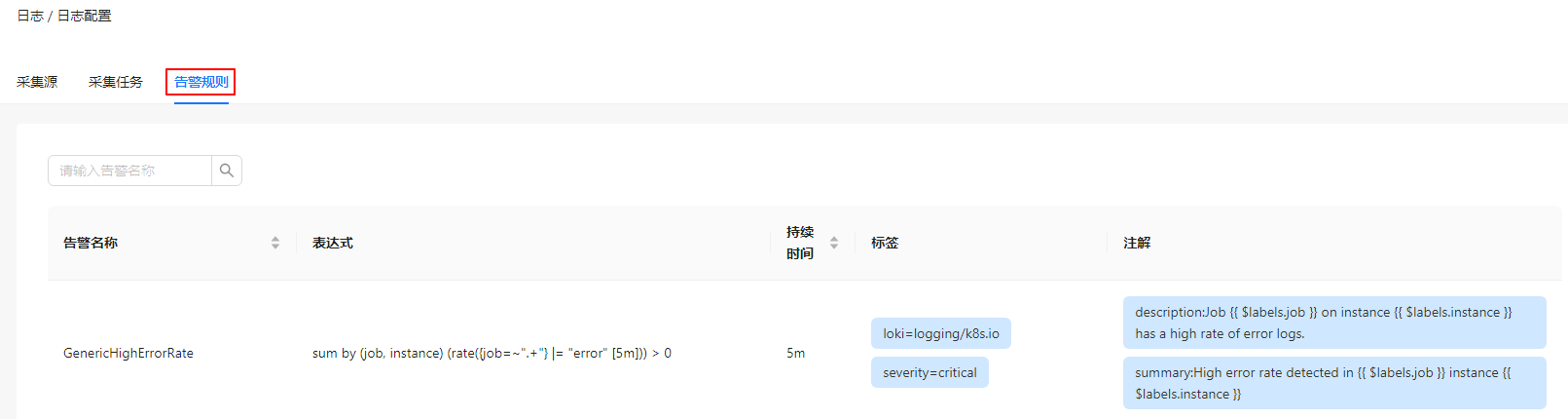
View alert rule details on the "Alert Rules" tab.
Figure 6 Alert Rules
Licensed under the MulanPSL2
 YueGongWangAnBei No.44030002007300