Eagle Eye for AI Inference
Feature Overview
Eagle Eye is an observability system for AI inference scenarios, implementing full-link metric collection from AI gateways, inference engines, Mooncake to infrastructure (Ray, K8s, hardware), near real-time transmission and intelligent diagnosis. The system integrates Prometheus's periodic metric collection with the low-latency push mechanism of distributed message queue systems, supporting both trend analysis for scaling decisions and meeting the requirements of modules with high timeliness needs (such as intelligent routing) for second-level data updates. Through an independent hardware health diagnosis module, continuous monitoring and anomaly identification of underlying metrics such as NPU/GPU, temperature, power consumption, and error codes are achieved, building a closed-loop monitoring capability of "collection—transmission—diagnosis—evaluation" to provide solid data support for AI inference system stability, performance optimization, and resource scheduling.
Application Scenarios
- System Resource Health Monitoring: Real-time monitoring of infrastructure (Ray, K8s, hardware) to ensure system resource health and stability, promptly discovering and resolving resource bottlenecks to ensure system efficiency.
- Inference Process Performance Optimization: Real-time monitoring of performance metrics (such as latency, throughput) and resource usage at each stage of the inference process (such as prefill, decode, etc.), identifying and analyzing performance bottlenecks, optimizing model execution efficiency, and improving response speed and computational efficiency of inference tasks.
- Hardware Fault Diagnosis and Repair: View abnormality analysis reports provided by the hardware diagnosis module, which include fault pattern identification and handling recommendations to help quickly locate and resolve hardware faults. The system can monitor NPU/GPU, temperature, power consumption, and other hardware states in real time, generate detailed fault analysis reports, provide specific fault causes and repair solutions, ensuring hardware stability and reliability.
- Automatic Scaling Decisions: Obtain SLA-related metrics (such as throughput rate, latency, etc.) and use this data as the basis for automatic scaling decisions, ensuring that inference services dynamically expand or shrink according to load and performance requirements to achieve elastic scaling goals.
- Intelligent Routing Decisions: Implement near real-time data updates through distributed message queue systems, enabling intelligent routing to make decisions quickly based on the latest data, thereby optimizing response speed in the AI inference process.
- Weight Distribution Acceleration Decisions: Implement near real-time data transmission through distributed message queue systems to obtain network dynamic performance metrics in real time (such as actual transmission rate of node RDMA network cards, remaining available bandwidth, etc.), and combine with static metrics attached to nodes in label form by NPU Feature Discovery (such as theoretical transmission speed of node RDMA network cards, PCIe bandwidth of network cards, etc.). Based on these metrics, the module dynamically evaluates node performance and ultimately selects the node with the best performance for task allocation, ensuring optimal resource utilization and maximizing system stability and processing efficiency.
Capability Scope
- Multi-layer Metric Coverage: Covers AI gateways (such as performance, resource consumption, security and compliance audits, governance policy execution tracking), inference engines (API Server, model input/output, inference process, inference engine status), Mooncake (Mooncake master, transfer engine, Mooncake client) and infrastructure (Ray, K8S, hardware), achieving full-link observation.
- Near Real-time Metric Transmission: For modules with high timeliness requirements, second-level metric push is implemented through distributed message queue systems to ensure metrics can be perceived promptly and influence decisions.
- Scaling Decision Support: Synchronize collected system and runtime metrics to Prometheus for periodic calculation and trend evaluation.
- Hardware Health Check and Diagnosis: Build an independent hardware health diagnosis module that periodically collects underlying metrics such as NPU/GPU temperature, power consumption, and error codes, and reports them in real time through distributed message queue systems. The diagnosis module subscribes to and analyzes collected data, combines device model, driver, and firmware information, identifies typical fault patterns based on threshold rules and abnormal metric analysis, and outputs diagnostic conclusions and handling recommendations, achieving a closed loop from data collection to health assessment.
Implementation Principle
Logical View
Figure 1 Layer 0 Logical View
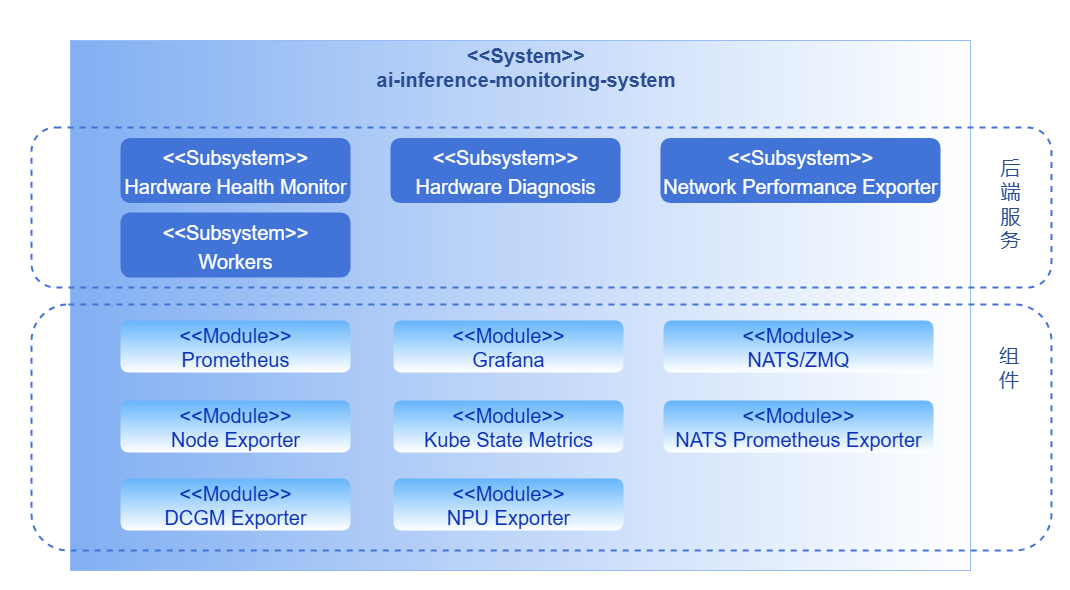
The monitoring system is divided into backend layer and component layer according to business hierarchy.
Backend Layer
- Hardware Health Monitor: The hardware health detection module operates as an independent collection component, actively executing metric collection and reporting in a periodic task manner. During operation, the module calls underlying interfaces (DCMI, NVML) or parses system logs (dmesg) according to a fixed collection cycle to obtain device running status and health information. Collection results are published in real time to the diagnosis module through distributed message queue systems, achieving decoupling of collection and diagnosis.
- Hardware Diagnosis: The diagnosis module subscribes to metric data published by the collection module through distributed message queue systems, combines device model, driver, and firmware information to analyze hardware health status in real time. The module supports threshold judgment and anomaly detection, identifies typical fault patterns and outputs diagnostic conclusions and handling recommendations, achieving a closed loop from data collection to health assessment.
Component Layer
The component layer provides underlying metric collection, transmission, and display capabilities, covering the following key modules: metric collection (Exporter), high-performance distributed message queue systems, metric storage (Prometheus), and display (Grafana).
Data Flow Diagram
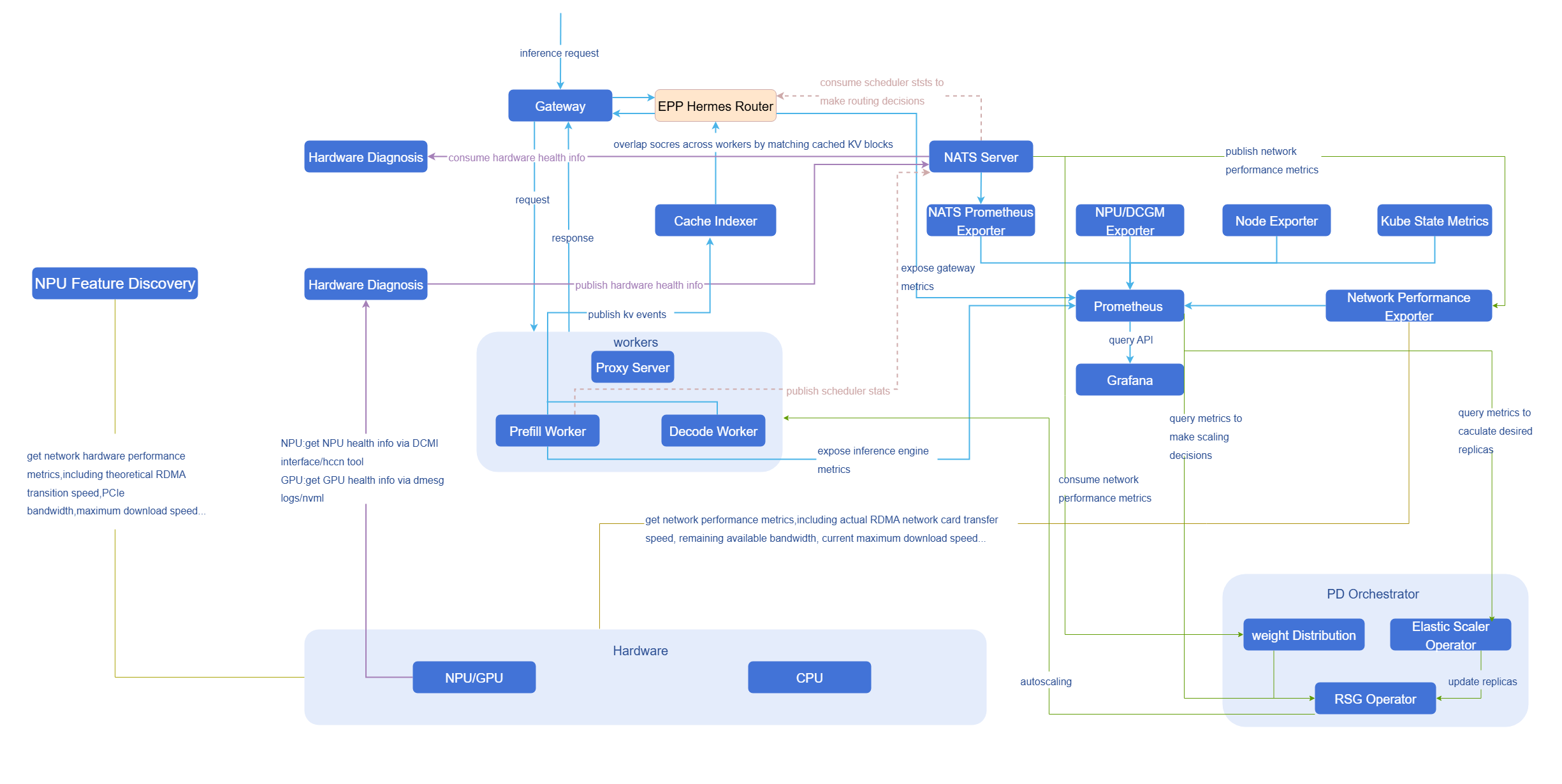
NATS
Figure 2 Data Flow Diagram-NATS
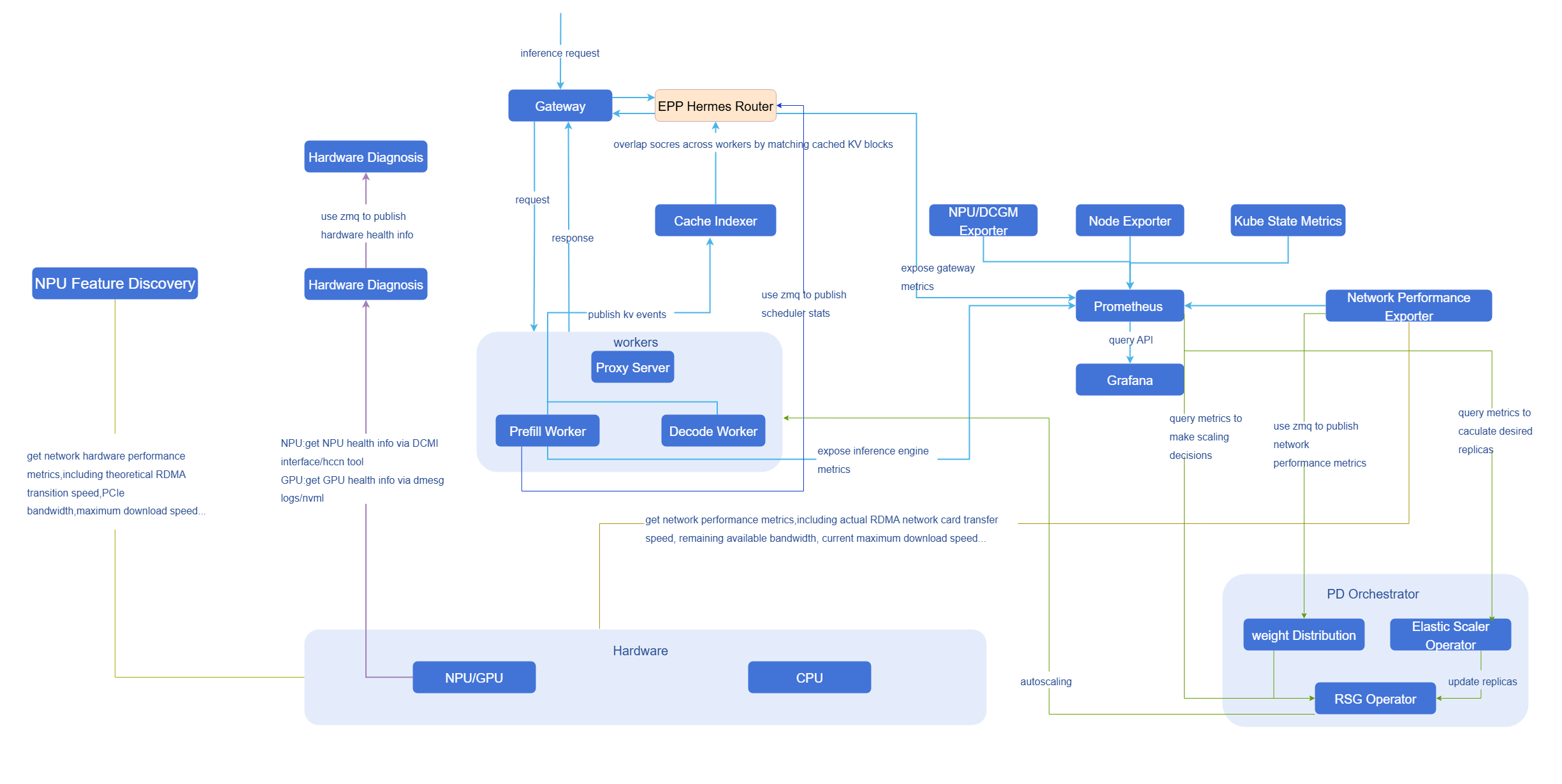
ZMQ
Figure 3 Data Flow Diagram-ZMQ
Complete Data List
Table 1 Complete Data List
| Observable Dimension | Observable Category | Observable Item | Observable Sub-item | Specific Metric | Static/Dynamic | Metric Source | Real-time Requirement | Metric Transmission | Currently Supported | Remarks |
| AI Gateway | Performance | - | - | QPS | Dynamic | EPP | Low | Prometheus | - | - |
| Request success rate | - | |||||||||
| Overall latency for non-streaming responses | - | |||||||||
| Time to first token (TTFT) for streaming responses | - | |||||||||
| Resource Consumption | - | - | Token consumption/s | Dynamic | EPP | Low | Prometheus | Large model services charge by token | ||
| Token usage statistics by model | EPP | |||||||||
| Token usage statistics by user | - | |||||||||
| Security and Compliance Audit | - | - | Content security interception logs | Dynamic | - | Low | Prometheus | - | ||
| Risk type statistics | - | - | ||||||||
| Risk user statistics | - | - | ||||||||
| Governance Policy Execution Tracking | - | - | Rate limiting statistics | - | Low | Prometheus | - | |||
| Cache hit status | EPP | - | ||||||||
| Fallback success rate | - | - | ||||||||
| Inference Engine | API Server | - | - | Path | Dynamic | - | Low | Prometheus | - | - |
| Status code | - | |||||||||
| Client | - | |||||||||
| Duration | - | |||||||||
| Model Input/Output | - | - | Prompt | Static | - | Low | Prometheus | ✅ | Exposed as OpenTelemetry Trace attributes, needs to be enabled when deploying vLLM. vllm serve your-model --otlp-traces-endpoint="http://your-collector:4317" --collect-detailed-traces=all | |
| Response mode | - | |||||||||
| Model name | vLLM | |||||||||
| Max tokens | vLLM | |||||||||
| Temperature | vLLM | |||||||||
| top-k | - | |||||||||
| top-p | vLLM | |||||||||
| N | vLLM | |||||||||
| Inference Process | - | - | E2E time | Dynamic | vLLM | Low | Prometheus | - | ||
| TTFT | - | |||||||||
| Prefill time | - | |||||||||
| Decode time | - | |||||||||
| Request waiting time in scheduler | - | |||||||||
| Token interval time | - | |||||||||
| Inference Engine Status | - | - | Running request count | Dynamic | vLLM | Low | Prometheus | - | ||
| Waiting request count | - | |||||||||
| Preempted request count | - | |||||||||
| KV cache usage | - | |||||||||
| Total prompt token count | - | |||||||||
| Total generation token count | - | |||||||||
| Successfully processed request count | - | |||||||||
| Mooncake | Mooncake master | - | - | - | Dynamic | Mooncake | Low | Prometheus | - | Mooncake master exposes metrics directly to prometheus through /metrics, while transfer engine and Mooncake client metrics are recorded in logs. |
| transfer engine | - | - | - | Dynamic | Low | Prometheus | ||||
| Mooncake client | - | - | - | Dynamic | Low | Prometheus | ||||
| Infrastructure | ray | - | - | - | Dynamic | ray | Low | Prometheus | - | - |
| kubernetes | Cluster health | - | - | Dynamic | kube-state-metrics/node-exporter | Low | Prometheus | ✅ | - | |
| Resource usage | - | - | - | |||||||
| Workload status | - | - | - | |||||||
| Scheduling and Elasticity | Scheduling | Schedule queue | kube-scheduler | Prometheus | ✅ | - | ||||
| Scheduling latency | - | |||||||||
| Scheduling success/failure rate | - | |||||||||
| Retry count | - | |||||||||
| Elasticity | Desired replica count | kube-state-metrics | Prometheus | ✅ | - | |||||
| Current replica count | - | |||||||||
| Ready replica count | - | |||||||||
| Scaling latency | - | - | - | |||||||
| Image pull time | kubelet | ✅ | - | |||||||
| Weight download time | - | - | - | |||||||
| Scaling trigger count | - | - | - | |||||||
| Hardware | Compute Resources | - | machine_npu_nums | Dynamic | npu-exporter | Low | Prometheus | ✅ | - | |
| npu_chip_info_utilization | - | |||||||||
| npu_chip_info_overall_utilization | - | |||||||||
| npu_chip_info_vector_utilization | - | |||||||||
| npu_chip_info_temperature | - | |||||||||
| npu_chip_info_power | - | |||||||||
| npu_chip_info_voltage | - | |||||||||
| npu_chip_info_aicore_current_freq | - | |||||||||
| npu_chip_info_process_info_num | - | |||||||||
| npu_chip_info_process_info | - | |||||||||
| container_npu_utilization | - | |||||||||
| container_npu_total_memory | - | |||||||||
| container_npu_used_memory | - | |||||||||
| Memory and Video Memory | hbm (910A1/910A2/910A3/910A5) | npu_chip_info_hbm_used_memory | - | |||||||
| npu_chip_info_hbm_total_memory | - | |||||||||
| npu_chip_info_hbm_utilization | - | |||||||||
| npu_chip_info_hbm_temperature | - | |||||||||
| npu_chip_info_hbm_bandwidth_utilization | - | |||||||||
| npu_chip_info_hbm_ecc_enable_flag | - | |||||||||
| npu_chip_info_hbm_ecc_single_bit_error_cnt | - | |||||||||
| npu_chip_info_hbm_ecc_double_bit_error_cnt | - | |||||||||
| npu_chip_info_hbm_ecc_total_single_bit_error_cnt | - | |||||||||
| npu_chip_info_hbm_ecc_total_double_bit_error_cnt | - | |||||||||
| npu_chip_info_hbm_ecc_single_bit_isolated_pages_cnt | - | |||||||||
| npu_chip_info_hbm_ecc_double_bit_isolated_pages_cnt | - | |||||||||
| ddr (except 910A2/910A3/910A5) | npu_chip_info_total_memory | - | ||||||||
| npu_chip_info_used_memory | - | |||||||||
| Interconnect and IO | network (except 310/310B/310P) | npu_chip_info_bandwidth_tx | - | |||||||
| npu_chip_info_bandwidth_rx | - | |||||||||
| npu_chip_link_speed | - | |||||||||
| npu_chip_link_up_num | - | |||||||||
| pcie (910A2) | npu_chip_info_pcie_rx_p_bw | - | ||||||||
| npu_chip_info_pcie_rx_np_bw | - | |||||||||
| npu_chip_info_pcie_rx_cpl_bw | - | |||||||||
| npu_chip_info_pcie_tx_p_bw | - | |||||||||
| npu_chip_info_pcie_tx_np_bw | - | |||||||||
| npu_chip_info_pcie_tx_cpl_bw | - | |||||||||
| hccs (910A2/910A3) | npu_chip_info_hccs_statistic_info_tx_cnt_index | - | ||||||||
| npu_chip_info_hccs_statistic_info_rx_cnt_index | - | |||||||||
| npu_chip_info_hccs_statistic_info_crc_err_cnt_index | - | |||||||||
| npu_chip_info_hccs_bandwidth_info_tx_index | - | |||||||||
| npu_chip_info_hccs_bandwidth_info_rx_index | - | |||||||||
| npu_chip_info_hccs_bandwidth_info_profiling_time | - | |||||||||
| npu_chip_info_hccs_bandwidth_info_total_tx | - | |||||||||
| npu_chip_info_hccs_bandwidth_info_total_rx | - | |||||||||
| roce (except 310/310B/310P) | npu_chip_mac_rx_pause_num | - | ||||||||
| npu_chip_mac_tx_pause_num | - | |||||||||
| npu_chip_mac_rx_pfc_pkt_num | - | |||||||||
| npu_chip_mac_tx_pfc_pkt_num | - | |||||||||
| npu_chip_mac_rx_bad_pkt_num | - | |||||||||
| npu_chip_mac_tx_bad_pkt_num | - | |||||||||
| npu_chip_mac_tx_bad_oct_num | - | |||||||||
| npu_chip_mac_rx_bad_oct_num | - | |||||||||
| npu_chip_info_rx_fcs_num | - | |||||||||
| npu_chip_info_rx_ecn_num | - | |||||||||
| npu_chip_roce_rx_all_pkt_num | - | |||||||||
| npu_chip_roce_tx_all_pkt_num | - | |||||||||
| npu_chip_roce_rx_err_pkt_num | - | |||||||||
| npu_chip_roce_tx_err_pkt_num | - | |||||||||
| npu_chip_roce_rx_cnp_pkt_num | - | |||||||||
| npu_chip_roce_tx_cnp_pkt_num | - | |||||||||
| npu_chip_roce_new_pkt_rty_num | - | |||||||||
| npu_chip_roce_out_of_order_num | - | |||||||||
| npu_chip_roce_qp_status_err_num | - | |||||||||
| npu_chip_roce_unexpected_ack_num | - | |||||||||
| npu_chip_roce_verification_err_num | - | |||||||||
| Network Hardware Performance | - | Theoretical transmission speed of node RDMA network card | Static | npu-feature-discovery | Low | / | ✅ | - | ||
| Theoretical maximum network download speed of node | ||||||||||
| Total bandwidth of NPU card-side RoCE network card | ||||||||||
| PCIe bandwidth of network card | ||||||||||
| - | Actual transmission speed of node RDMA network card | Dynamic | network-performace-exporter | High | Prometheus NATS/ZMQ | - | - | |||
| Remaining available bandwidth of node RDMA network card | - | - | ||||||||
| How much traffic node transmitted through RDMA network card | - | - | ||||||||
| Current actual maximum network download speed of node | - | - | ||||||||
| NPU card-side RoCE network card transmission rate | - | - | ||||||||
| NPU card-side RoCE network card remaining bandwidth | - | - | ||||||||
| Minimum bottleneck bandwidth between nodes across racks and multiple switches | - | - | ||||||||
| Hardware Health | Black box error code | - | Dynamic | eagle-eye-hardware-monitor | High | NATS/ZMQ | ✅ | - | ||
| Health management fault code | - | - | ||||||||
| hbm (910A1/910A2/910A3/910A5) | npu_chip_info_hbm_temperature | - | ||||||||
| npu_chip_info_hbm_total_memory | - | |||||||||
| npu_chip_info_hbm_used_memory | - | |||||||||
| npu_chip_info_hbm_memory_utilization | - | |||||||||
| ddr (except 910A2/910A3/910A5) | npu_chip_info_memory_utilization | - | ||||||||
| network (except 310/310B/310P) | npu_chip_info_link_status | - | ||||||||
| npu_chip_info_bandwidth_rx | - | |||||||||
| npu_chip_info_bandwidth_tx | - | |||||||||
| Hardware Status | npu_chip_info_power | NPU overload frequency reduction | ||||||||
| npu_chip_info_aicore_freq | ||||||||||
| npu_chip_info_aicore_current_freq | ||||||||||
| npu_chip_info_temperature | ||||||||||
| npu_chip_info_network_status | - | |||||||||
| npu_chip_info_health_status | - |
Relationship with Related Features
Depends on inference engines (such as vLLM).
Installation
Prerequisites
Hardware Requirements
Eagle Eye itself has no special hardware environment requirements.
Software Requirements
Kubernetes v1.33.0 and above.
Installation Steps
openFuyao Platform
- Log in to the openFuyao management dashboard.
- Select "Application Market > Application List" in the left navigation bar to jump to the "Application List" interface.
- Check "Artificial Intelligence/Machine Learning" in the left "Scenario" section and find the "eagle-eye" card. Or enter "eagle-eye" in the search box.
- Click "Deploy" to enter the "Deploy" interface.
- Enter the application name, select the installation version and namespace. You can select an existing namespace or create a new namespace. For creating namespaces, refer to Namespaces.
- Configure routing in "values.yaml" in parameter configuration.
- Click "Deploy" to complete installation.
Standalone Deployment
In addition to openFuyao platform installation and deployment, this feature also provides standalone deployment functionality, with the following two methods:
- Obtain the project installation package from the openFuyao official image repository.
Execute the following command to pull the project installation package.
bashhelm pull oci://cr.openfuyao.cn/charts/eagle-eye --version xxxWhere
xxxneeds to be replaced with the specific project installation package version, such as0.0.0-latest. The pulled installation package is in compressed package form.Execute the following command to extract the installation package.
bashtar -zxvf eagle-eyeInstall and deploy.
Execute the following command in the same directory as eagle-eye.
bashhelm install eagle-eye -n xxxxxx .
- Obtain from the openFuyao GitCode repository.
Execute the following command to pull the project from the repository.
bashgit clone https://gitcode.com/openFuyao/eagle-eye.gitInstall and deploy. Execute the following command in the same directory as eagle-eye.
bashhelm install eagle-eye -n xxxxxx .
High Real-time Metric Collection and Reporting for Intelligent Routing
NATS
To meet the high timeliness requirements of modules such as intelligent routing, the system uses NATS for second-level push of key performance metrics. This enables metrics such as waiting request count and NPU/GPU KVCache utilization to be perceived in real time, thereby dynamically adjusting decisions.
Currently only vLLM deployment is supported.
Prerequisites
- Kubernetes cluster is deployed and accessible
kubectlcommand line tool is installed and cluster access permissions are configured- Ascend driver and related dependencies are installed on nodes
- NATS is deployed and running normally
Deployment Steps
The NATS publish/subscribe model is used as the metric transmission method. CustomStatLogger is a custom statistics data logger implemented in vLLM by inheriting the StatLoggerBase abstract class. As a publisher, CustomStatLogger actively generates structured operation metric messages after each decoding batch ends and publishes them to the specified NATS topic; Router, as a subscriber, only needs to register a listener on this topic to receive and trigger subsequent processing logic at the moment the message is published.
To avoid the loss of the first batch of messages, the subscriber end (Router) needs to complete connection and subscription before the publisher end (CustomStatLogger).
Router (Subscriber).
Router, as a subscriber, is mainly responsible for receiving published operation metric messages and triggering corresponding processing logic. Refer to the following code example to implementRouterand deploy it to the Kubernetes cluster.pythonimport logging import json from nats.aio.client import Client as NATS_Client logger = logging.getLogger() class RouterSubscriber: def __init__(self, server_address: str, topic: str): """ Initialize RouterSubscriber instance :param server_address: NATS server address :param topic: Topic to subscribe to """ self.server_address = server_address self.topic = topic self.client = NATS_Client() async def connect(self): """ Establish connection with NATS server """ try: # Establish NATS long connection await self.client.connect(self.server_address) logger.info("Connected to NATS server at %s", self.server_address) except Exception as e: logger.error("Failed to connect to NATS server: %s", e) raise e async def subscribe(self, topic: str, message_handler): """ Subscribe to specified topic and pass received messages to business logic processing :param message_handler: Business logic processing function for handling received messages """ try: async def on_message(msg): """ Message callback function to handle subscribed messages :param msg: NATS message """ logger.info("Received message on topic %s", topic) await message_handler(msg) # Ensure NATS connection if not self.client.is_connected: await self.connect() # Register subscription topic and bind message callback function await self.client.subscribe(topic, cb=on_message) logger.info("Successfully subscribed to NATS topic %s", topic) except Exception as e: logger.error("Failed to subscribe to NATS topic %s: %s", topic, e) raise e async def message_handler(self, msg) -> None: """ NATS original callback, responsible for: 1. Decoding data from msg; 2. Calling parse_message for JSON deserialization; 3. Passing parsed structured data to subsequent business logic processing. """ try: data = msg.data.decode("utf-8") except Exception as exc: logger.error("Failed to decode NATS message: %s", exc) return data_dict = self.parse_message(data) if not data_dict: # Return directly if parsing fails to avoid subsequent logic exceptions return # TODO: Process specific business logic here, such as making routing decisions based on metrics ... def parse_message(self, data: str) -> Dict[str, Any]: """ Deserialize NATS message body from JSON string to dictionary. Log and return empty dictionary if parsing fails. """ try: return json.loads(data) except Exception as exc: logger.error("Failed to parse message: %s, raw: %r", exc, data) return {}Customstatlogger (Publisher).
CustomStatLoggeris the publisher, responsible for generating and publishing real-time operation metric data. After each decoding batch ends,CustomStatLoggerpublishes structured metric messages to the specified NATS topic (this topic should match the subscriber's topic, currently topiceagle_eye.routing_metrics) forRoutersubscription.2.1 Package source code.
Execute the following command in the project root directory to package the source code into a compressed file.
bashtar -czf source_code.tar.gz src/ requirements.txt2.2 Create ConfigMap.
Import the compressed package into ConfigMap as a binary file.
bash# Check if namespace exists, create it if it doesn't exist kubectl get namespace ai-inference || kubectl create namespace ai-inference # Delete if ConfigMap with the same name already exists kubectl delete configmap vllm-source-code -n ai-inference --ignore-not-found # Create new ConfigMap kubectl create configmap vllm-source-code \ --from-file=source_code.tar.gz=source_code.tar.gz \ -n ai-inference2.3 Deploy service.
Apply deployment YAML file.
bashkubectl apply -f ./docs/routing-metrics/vllm_eagle_eye.yaml2.4 Check deployment status.
bash# Check Pod running status kubectl get pods -n ai-inference -l app=vllm-eagle-eye # Check Pod detailed information kubectl describe pod -n ai-inference -l app=vllm-eagle-eye # Check Pod logs kubectl logs -n ai-inference -l app=vllm-eagle-eye -fVerification steps.
3.1 Method 1: Verify using temporary Pod.
3.1.1 Get service Pod IP address.
bashkubectl get pod -n ai-inference -l app=vllm-eagle-eye -o wideRecord the
IPaddress in the output (for example:10.244.1.5).3.1.2 Start temporary test Pod.
bashkubectl run curl-test --image=curlimages/curl -n ai-inference -it --rm --restart=Never -- sh3.1.3 Send test request in temporary Pod.
Execute in the temporary Pod's shell (replace
<POD_IP>with actual IP address):bashcurl -X POST http://<POD_IP>:8000/generate \ -H "Content-Type: application/json" \ -d '{"prompt": "Hello AI"}'3.2 Method 2: Verify using port-forward.
bash# Port forwarding kubectl port-forward -n ai-inference deployment/vllm-eagle-eye 8000:8000 # Send request in another terminal curl -X POST http://localhost:8000/generate \ -H "Content-Type: application/json" \ -d '{"prompt": "Hello AI"}'Clean up resources.
bash# Delete Deployment kubectl delete -f ./docs/routing-metrics/vllm_eagle_eye.yaml # Delete ConfigMap kubectl delete configmap vllm-source-code -n ai-inference # Delete temporary Pod kubectl delete pod -n ai-inference curl-test
Common Issues
Pod startup failure.
bash# Check Pod events kubectl describe pod -n ai-inference -l app=vllm-eagle-eye # Check init container logs kubectl logs -n ai-inference <pod-name> -c code-extractorDependency installation failure.
If the cluster cannot access the internet, dependency packages need to be packed into the compressed package in advance.
bash# Download dependencies locally pip download -r requirements.txt -d packages/ # Include dependencies when packaging tar -czf source_code.tar.gz src/ requirements.txt packages/
Licensed under the MulanPSL2
 YueGongWangAnBei No.44030002007300