Mooncake Store Hotspot Cache Optimization
Feature Introduction
The core idea of the Mooncake Store hotspot cache feature is to cache frequently accessed KVCache data slices on the Mooncake Client side. This feature can significantly reduce cross-node network transmission overhead for hotspot data, optimize the performance of get and batch get operations, and improve TTFT (Time To First Token) and Total Token Throughput metrics in AI inference scenarios.
This feature is configured through the environment variable LOCAL_HOT_CACHE_SIZE and supports dynamic memory block allocation in units of 16MB, achieving efficient local cache management for hot data.
Application Scenarios
- Multi-client + Master Node Architecture: Recommended for distributed deployment scenarios with multiple Mooncake Clients, where the Master Service randomly assigns data slices to different storage nodes, causing frequent cross-node network transmission. This feature can effectively reduce network overhead.
- High-frequency Access Scenarios: Suitable for KVCache access scenarios with hotspot data. When certain data is frequently accessed, local caching can significantly improve access efficiency.
Note:
Standalone Client Scenario: Since all data is stored locally, there is no need to enable client hot caching functionality. To avoid additional memory overhead, this feature should be disabled.
Capability Scope
- Supports users to flexibly configure Mooncake Store hotspot cache size according to their business scenarios, reducing
get/batchGetoperation latency. - Supports seamless integration with inference engines (vLLM, SGLang, etc.), compatible with Mooncake's
get/batchGetinterfaces.
Key Features
- Significant Performance Improvement: When local slice hit rate reaches 50% or higher,
get/batchGetinterface latency is expected to decrease by ≥40%, and TTFT metrics are expected to improve by more than 20%. - Intelligent LRU Eviction: Adopts LRU eviction strategy, prioritizing retention of recently accessed data to improve cache hit rates for hotspot data.
- Memory-efficient Management: Pre-allocates memory block pools in units of 16MB, minimizing runtime allocation overhead.
- Zero-intrusion Integration: No need to modify inference engine code; can be enabled through environment variables, maintaining full interface compatibility.
Implementation Principle
Figure 1 Runtime Sequence Diagram
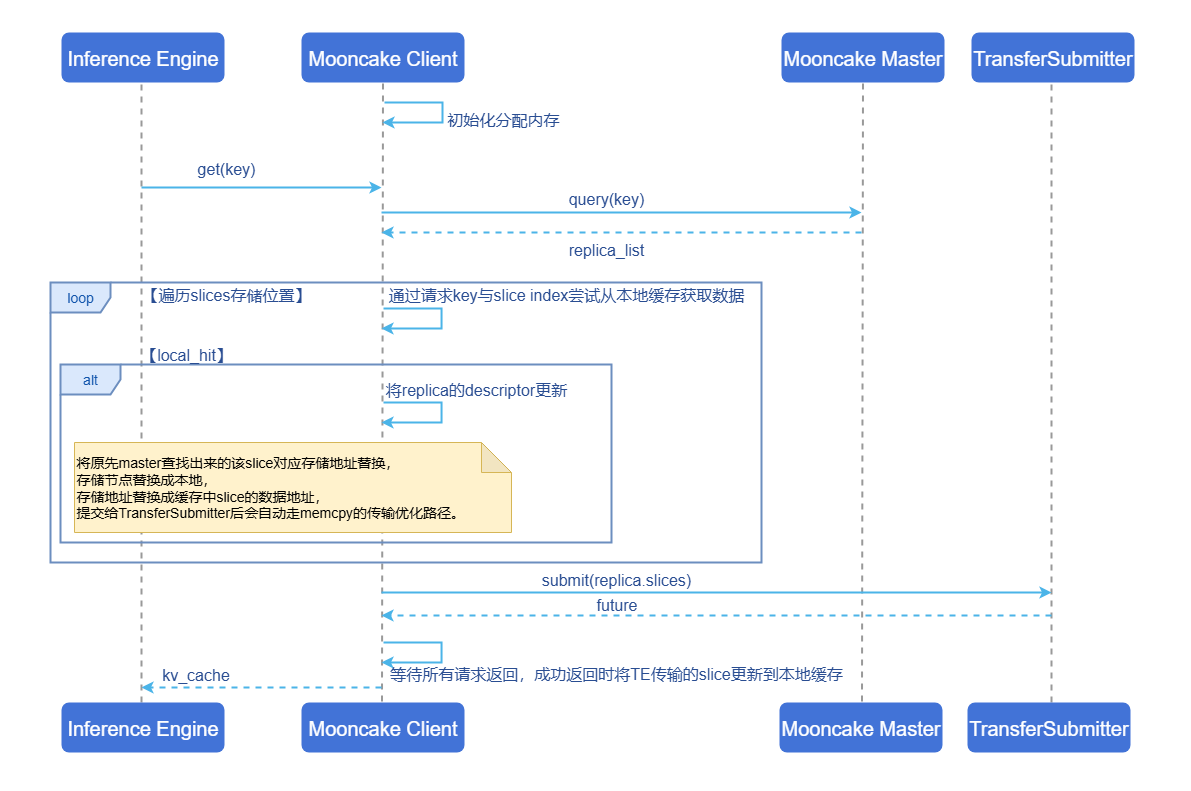
Core Processing Flow:
Initialization Phase: When creating a Client, the Mooncake Store hotspot cache is initialized based on the environment variable configuration item
LOCAL_HOT_CACHE_SIZE. The default value is 0, indicating that this feature is disabled. If the configured value is greater than 16MB, corresponding memory is allocated for storing hot data.Metadata Query: When a
get/batchGetrequest arrives, first query the Master Service for storage location information (replica descriptor) of the target KVCache, obtaining the storage node and address information for each data slice.Cache Query: Traverse all data slices, using
{request_key}_{slice_index}as the key to query this Mooncake Client's Mooncake Store hotspot cache. If cache hit, update replica descriptor:- Replace the storage node with the local node.
- Replace the storage address with the data address of this slice in the cache.
- After submitting to TransferSubmitter, LOCAL_MEMCPY transfer strategy will be automatically selected for optimization.
Transfer Submission: Submit the read request to Transfer Submitter. If the target address is a local node (including Mooncake Store hotspot cache hits), Transfer Engine will automatically select the LOCAL_MEMCPY transfer strategy to avoid network transmission overhead.
Cache Update: After waiting for all transfer requests to return, update remotely transferred slices to Mooncake Store hotspot cache through an asynchronous task handler (LocalHotCacheHandler). Cache updates adopt LRU strategy, automatically evicting the least recently accessed data blocks when cache space is insufficient.
Relationship with Related Features
- Relationship with Mooncake: This feature is a performance optimization enhancement for the Mooncake Store Client side.
- Relationship with Inference Engines: Compatible with mainstream inference engines (such as vLLM, SGLang), no code modification required to improve performance.
Installation
Start Installation
This feature can be installed via two methods:
Using Images
Images currently only support ARM architecture.
docker pull cr.openfuyao.cn/openfuyao/mooncake:0.3.7-of.1Manual Installation
This feature is integrated in Mooncake Store Client, consistent with Mooncake installation.
Configure Mooncake Store Hotspot Cache
Prerequisites
- Mooncake project files have been obtained.
- Mooncake Client process has not been started.
Background Information
- Enable Condition: When the
LOCAL_HOT_CACHE_SIZEconfiguration value is greater than 16MB, the Mooncake Store hotspot cache function will be enabled. - Disable Conditions:
- Configuration value less than 16MB
- Invalid input configuration value (such as strings, negative numbers, etc.)
- Environment variable not set (default value is 0, indicating disabled)
- Memory Allocation: Actual memory allocation follows 16MB unit alignment. For example:
- Configure 32MB → Allocate 2 blocks of 16MB
- Configure 50MB → Allocate 3 blocks of 16MB (48MB)
- Configure 100MB → Allocate 6 blocks of 16MB (96MB)
Operation Steps
Enable and configure the Mooncake Store hotspot cache function by setting the environment variable LOCAL_HOT_CACHE_SIZE:
export LOCAL_HOT_CACHE_SIZE=<cache size (bytes)>Configuration Example
# Enable 64MB (64*1024*1024=67108864) hot cache
export LOCAL_HOT_CACHE_SIZE=67108864
Configuration Recommendations
- Multi-client Architecture: Adjust the
LOCAL_HOT_CACHE_SIZEparameter according to actual deployment environment to balance performance improvement and memory overhead. - Scenarios with Sufficient Memory Resources: Cache size can be appropriately increased to improve cache hit rate.
Use Mooncake Store Hotspot Cache
Configure the environment variable LOCAL_HOT_CACHE_SIZE, consistent with Mooncake usage. Mooncake Client will automatically handle cache logic.
Prerequisites
Mooncake Store and other related components (Transfer Engine, etc.) have been compiled.
Usage Limitations
- This feature should be disabled in standalone scenarios to save memory.
- Mooncake Store hotspot cache occupies additional memory, which is not counted in the memory mounted to Mooncake Master.
LOCAL_HOT_CACHE_SIZEonly takes effect when Mooncake Client is initialized; runtime modifications have no effect.
Operation Steps
- Enter the Mooncake directory, using the image provided by openFuyao as an example:
cd /workspace/Mooncake- Start Mooncake Master.
./build/mooncake-store/src/mooncake_master --rpc-port 50051- Start Metadata Server, using Redis as an example.
apt update && apt install redis-server -y
redis-server --port 6379 --protected-mode no --bind 0.0.0.0- Start Mooncake Client.
The following code example demonstrates how to configure and start Mooncake Client. Refer to community example file.
# Use 1GB(1*1024*1024*1024) size Mooncake Store hotspot cache
import os
os.environ['LOCAL_HOT_CACHE_SIZE'] = '1073741824'

from mooncake.store import MooncakeDistributedStore
# Initialize Mooncake Store Client
store = MooncakeDistributedStore()
# Use tcp protocol to transfer data
protocol = "tcp"
# Default RDMA device name
device_name = "ibp6s0"
# Mooncake Store Client address
local_hostname = "localhost:12355"
# Started Metadata Server address
metadata_server = "redis://localhost:6379"
# Provide 16GB storage
global_segment_size = 16 * 1024 * 1024 * 1024
# Provide 512MB read/write buffer
local_buffer_size = 512 * 1024 * 1024
# Started Mooncake Master address
master_server_address = "localhost:50051"
# Start Mooncake Store Client
result = store.setup(local_hostname,
                      metadata_server,
                      global_segment_size,
                      local_buffer_size,
                      protocol,
                      device_name,
master_server_address)- Use Get interface.
The following code demonstrates basic Get interface usage. For complete test cases (including error handling, boundary conditions, etc.), please refer to community example file.
test_data = b"Hello, World!"
key = "test_teardown_key"
store.put(key, test_data)
store.get(key)- Use BatchGet interface.
The following code demonstrates basic BatchGet interface usage. For complete test cases (including error handling, boundary conditions, etc.), please refer to community example file.
test_data = [
    b"Batch Buffer Data 1! " * 100,  # ~2.1KB
    b"Batch Buffer Data 2! " * 200,  # ~4.2KB
]
keys = ["test_batch_get_buffer_key1", "test_batch_get_buffer_key2"]

for key, data in zip(keys, test_data):
    result = store.put(key, data)
    assert result == 0, f"Failed to put data for key {key}"

results = store.batch_get_buffer(keys)
Related Operations
None
Licensed under the MulanPSL2
 YueGongWangAnBei No.44030002007300