Custom Cluster Certificate User Guide
Background
openFuyao supports using custom CA certificates to sign all component certificates within the Kubernetes cluster to meet enterprise-level security compliance requirements. By importing user global CA certificate, private key and certificate chain, as well as configuring certificate signing policies and signing requests (CSR), complete control of the cluster certificate system can be achieved.
This guide is based on Kubernetes official PKI certificate configuration requirements, reference documentation: https://kubernetes.io/docs/setup/best-practices/certificates/.
A total of 15 PKI certificates are required within a Kubernetes cluster for secure communication and identity authentication between different components. For detailed certificate configuration information, please refer to Appendix: PKI Certificate Configuration Table.
Prerequisites
Before configuring custom certificates, please ensure the following conditions are met:
Certificate Private Key Specification Requirements
- Certificate type: Must be X.509 public key certificate with CA signing capability.
- Private key format: Must be PKCS#1 format.
If not met, use the following commands to check private key format and convert:
bash# Check if private key is PKCS#1 format openssl rsa -in <private key file> -text -nooutbash# Convert private key to PKCS#1 format openssl rsa -in <original private key file> -out <converted private key file>File Preparation
- Global CA certificate file prepared (
global-ca.crt) - Global CA private key file prepared (
global-ca.key) - (Optional) Certificate chain file (
trust-chain.crt)- If this file is not provided, apiserver will mount
ca.crtby default.
- If this file is not provided, apiserver will mount
- (Optional) 17 JSON configuration files (2 signing policy files + 15 CSR configuration files)
- If these configuration files are not provided, system will use code built-in default signing policies.
- Global CA certificate file prepared (
Operation Timing
- Required certificate files (
global-ca.crtandglobal-ca.key) must be imported before bootstrap node creation. - Optional certificate chain file and configuration files (if needed) should also be imported before bootstrap node creation.
- Ensure sufficient permissions to access target paths.
- Required certificate files (
Restrictions
When configuring and importing custom certificate signing policies and signing requests, please note the following restrictions:
File Names Cannot Be Modified
- CSR request file names and corresponding signing policy file names for each component are system identification basis, file names must match templates.
- If file names are changed, system will not correctly match corresponding component configuration when loading ConfigMap, leading to certificate signing failure or component startup exceptions.
CN (Common Name) and O (Organization) Fields Must Be Correctly Configured
- These two fields directly affect Kubernetes certificate-based identity authentication and RBAC authorization.
- Must be filled in strictly according to cluster specifications, otherwise components will fail API Server authentication. See Appendix: PKI Certificate Configuration Table.
- If CN/O configuration is incorrect, components or users will fail certificate identity authentication, manifesting as connection rejection (such as "Unauthorized" or "x509: certificate signed by unknown authority").
Signing Policy (profiles) Names Need To Match Components
- Each signing policy name in the
profilesfield should correspond to actual component names. - If names do not match, components will not find correct signing configuration, certificate generation will fail.
- Each signing policy name in the
Certificate Usage (keyUsage / extKeyUsage) Configuration Must Be Correct
- Incorrect usage configuration will cause TLS handshake failure between components, interrupting cluster communication.
Must Include Default Signing Policy (default profile)
- If the
defaultpolicy is missing, some requests using default signing rules (such as node joining or automatic signing) will be rejected.
- If the
CA Signing Policy File Cannot Be Incorrect
- CA is the root of entire cluster certificate system. If CA signing policy configuration is incorrect, all lower-level component certificates cannot be signed, causing control plane services (API Server, Scheduler, Controller Manager, etc.) to fail to start.
kubelet Certificate CN Field Restrictions
- The CN field of
kubelet-kubeconfig-csr.jsonmust besystem:node:<nodeName>. - The value of
<nodeName>must exactly match the node name value provided by kubelet when registering with apiserver. - In high availability scenarios, different node name values are different. bke will automatically configure corresponding node names for kubelet certificate CN field.
- The CN field of
Load Balancer Requires Prior Preparation
- If users want to configure external load balancer, they need to prepare the load balancer in advance, then write corresponding IP address into bc.yaml file, otherwise cluster node startup will block.
Procedure
1. Import User Global CA Certificate, Private Key and Certificate Chain
1.1 Prepare Certificate Files
- Must prepare the following two files:
global-ca.crt: Global CA certificateglobal-ca.key: Global CA private key (must be PKCS#1 format)
- (Optional)
trust-chain.crt: Certificate chain file- If this file is not provided, system will use
global-ca.crtas certificate chain, apiserver will mountca.crt
- If this file is not provided, system will use
1.2 Place Certificate Files
- Before bootstrap node creation, place certificate files in specified path:
/etc/openFuyao/certs/ - File names are fixed and cannot be modified:
global-ca.crt(required)global-ca.key(required)trust-chain.crt(optional)
 Note:
Note:- PEM, CRT and KEY formats are essentially same PEM encoding format, only file extensions differ, all can be used normally as long as prerequisites are met.
- If
trust-chain.crtis not provided, system will automatically useglobal-ca.crtas certificate chain.
2. Import Certificate Signing Policies and Signing Requests CSR (Optional)
This step is optional. If these configuration files are not provided, system will use code built-in default signing policies.
2.1 File Composition Description
If customizing certificate signing policies and CSR configuration, need to prepare 17 JSON files, divided into two categories:
Certificate Signing Requests (CSR)
- 15 JSON files in total
- Each file corresponds to one cluster component's certificate signing request (e.g., apiserver, controller-manager, scheduler, kubelet, etc.).
- File content defines the component's certificate subject information (such as CN, O, SAN, usage, etc.), used to initiate signing request to CA.
Certificate Signing Policies (Signing Policy)
- 2 JSON files in total:
- Cluster CA Signing Policy File (
cluster-ca-policy.json): Defines cluster root CA signing rules and default policy (defaultprofile). - Component Signing Policy File (
sign-policy.json): Defines signing policies for all 14 components except cluster CA, plus one general default policy (defaultprofile). These policies are stored in the file'sprofilesfield, each profile corresponds to one component certificate's signing parameters (validity period, usage, extension attributes, etc.).
2.2 Import Configuration Files
Before bootstrap node creation, place the 2 signing policies and 15 signing request CSR configuration JSON files together in specified path: /etc/openFuyao/certs/cert_config/.
If these configuration files are not provided, system will use code built-in default signing policies, no manual configuration needed.
2.3 Configuration File Templates
Following are certificate configuration file template examples (templates are for reference only). When involving component permission issues, users need to modify O field themselves.
Configuration File List:
| No. | File Name | Type | Description |
|---|---|---|---|
| 1 | cluster-ca-policy.json | Signing Policy | Cluster CA signing policy configuration |
| 2 | cluster-ca-csr.json | CSR Config | Cluster CA certificate signing request |
| 3 | sign-policy.json | Signing Policy | Cluster component signing policy configuration |
| 4 | apiserver-csr.json | CSR Config | API Server certificate signing request |
| 5 | apiserver-etcd-client-csr.json | CSR Config | API Server accessing etcd client certificate signing request |
| 6 | front-proxy-client-csr.json | CSR Config | Front Proxy client certificate signing request |
| 7 | apiserver-kubelet-client-csr.json | CSR Config | API Server accessing kubelet client certificate signing request |
| 8 | front-proxy-ca-csr.json | CSR Config | Front Proxy CA certificate signing request |
| 9 | etcd-ca-csr.json | CSR Config | Etcd CA certificate signing request |
| 10 | etcd-server-csr.json | CSR Config | Etcd Server certificate signing request |
| 11 | etcd-healthcheck-client-csr.json | CSR Config | Etcd health check client certificate signing request |
| 12 | etcd-peer-csr.json | CSR Config | Etcd Peer certificate signing request |
| 13 | admin-kubeconfig-csr.json | CSR Config | Admin Kubeconfig certificate signing request |
| 14 | kubelet-kubeconfig-csr.json | CSR Config | Kubelet Kubeconfig certificate signing request |
| 15 | controller-manager-csr.json | CSR Config | Controller Manager certificate signing request |
| 16 | scheduler-csr.json | CSR Config | Scheduler certificate signing request |
| 17 | kube-proxy-csr.json | CSR Config | Kube-proxy certificate signing request |
2.3.1. Cluster CA Signing Policy Configuration cluster-ca-policy.json
{
  "signing": {
    "default": {
      "usages": ["cert sign", "crl sign"],
      "expiry": "87600h",
      "ca_constraint": {
        "is_ca": true,
        "max_path_len": 0
      }
    },
    "profiles": {
      "ca": {
        "usages": ["cert sign", "crl sign"],
        "expiry": "87600h",
        "ca_constraint": {
          "is_ca": true,
          "max_path_len_zero": true
        }
      }
    }
  }
}
2.3.2. Cluster CA CSR Configuration cluster-ca-csr.json
{
     "CN": "kubernetes",
     "C": "CN",
     "ST": "Beijing",
     "L": "Beijing",
     "OU": "Kubernetes",
     "key": {
       "algo": "rsa",
       "size": 2048
     },
     "hosts": ["kubernetes", "kubernetes.default"]
}
2.3.3. Cluster Component Signing Policy Configuration sign-policy.json
{
  "signing": {
    "default": {
      "usages": ["digital signature", "key encipherment"],
      "expiry": "87600h"
    },
    "profiles": {
      "ca": {
        "usages": ["cert sign", "crl sign"],
        "expiry": "87600h",
        "ca_constraint": {
          "is_ca": true,
          "max_path_len": 0
        }
      },
      "apiserver": {
        "usages": ["digital signature", "key encipherment", "server auth"],
        "expiry": "87600h"
      },
      "apiserver-etcd-client": {
        "usages": ["digital signature", "key encipherment", "client auth"],
        "expiry": "87600h"
      },
      "apiserver-kubelet-client": {
        "usages": ["digital signature", "key encipherment", "client auth"],
        "expiry": "87600h"
      },
      "front-proxy-client": {
        "usages": ["digital signature", "key encipherment", "client auth"],
        "expiry": "87600h"
      },
      "front-proxy-ca": {
        "usages": ["cert sign", "crl sign"],
        "expiry": "87600h",
        "ca_constraint": {
          "is_ca": true,
          "max_path_len": 1
        }
      },
      "etcd/ca": {
        "usages": ["cert sign", "crl sign"],
        "expiry": "87600h",
        "ca_constraint": {
          "is_ca": true,
          "max_path_len": 1
        }
      },
      "etcd/server": {
        "usages": ["digital signature", "key encipherment", "server auth", "client auth"],
        "expiry": "87600h"
      },
      "etcd/peer": {
        "usages": ["digital signature", "key encipherment", "server auth", "client auth"],
        "expiry": "87600h"
      },
      "etcd/healthcheck-client": {
        "usages": ["digital signature", "key encipherment", "client auth"],
        "expiry": "87600h"
      },
      "controller-manager": {
        "usages": ["digital signature", "key encipherment", "client auth"],
        "expiry": "87600h"
      },
      "scheduler": {
        "usages": ["digital signature", "key encipherment", "client auth"],
        "expiry": "87600h"
      },
      "kubelet": {
        "usages": ["digital signature", "key encipherment", "server auth", "client auth"],
        "expiry": "87600h"
      },
      "admin": {
        "usages": ["digital signature", "key encipherment", "client auth"],
        "expiry": "87600h"
      },
      "kube-proxy": {
        "usages": ["digital signature", "key encipherment", "client auth"],
        "expiry": "87600h"
      }
    }
  }
}
2.3.4. API Server CSR Configuration apiserver-csr.json
{
  "CN": "kube-apiserver",
  "C": "CN",
  "ST": "Beijing",
  "L": "Beijing",
  "OU": "Kubernetes",
  "key": {
    "algo": "rsa",
    "size": 2048
  },
  "hosts": [
    "kubernetes",
    "kubernetes.default",
    "kubernetes.default.svc",
    "kubernetes.default.svc.cluster.local",
    "10.0.0.1"
  ]
}
2.3.5. API Server Etcd Client CSR Configuration apiserver-etcd-client-csr.json
{
     "CN": "kube-apiserver-etcd-client",
     "C": "CN",
     "ST": "Beijing",
     "L": "Beijing",
     "OU": "Kubernetes",
     "key": {
       "algo": "rsa",
       "size": 2048
     },
     "hosts": []
}
2.3.6. Front Proxy Client CSR Configuration front-proxy-client-csr.json
{
  "CN": "front-proxy-client",
  "C": "CN",
  "ST": "Beijing",
  "L": "Beijing",
  "OU": "Kubernetes",
  "key": {
    "algo": "rsa",
    "size": 2048
  },
  "hosts": []
}
2.3.7. API Server Kubelet Client CSR Configuration apiserver-kubelet-client-csr.json
{
  "CN": "kube-apiserver-kubelet-client",
  "O": "system:masters",
  "C": "CN",
  "ST": "Beijing",
  "L": "Beijing",
  "OU": "Kubernetes",
  "key": {
    "algo": "rsa",
    "size": 2048
  },
  "hosts": []
}
2.3.8. Front Proxy CA CSR Configuration front-proxy-ca-csr.json
{
  "CN": "front-proxy-ca",
  "C": "CN",
  "ST": "Beijing",
  "L": "Beijing",
  "OU": "Kubernetes",
  "key": {
    "algo": "rsa",
    "size": 2048
  },
  "hosts": []
}
2.3.9. Etcd CA CSR Configuration etcd-ca-csr.json
{
  "CN": "etcd-ca",
  "C": "CN",
  "ST": "Beijing",
  "L": "Beijing",
  "OU": "Kubernetes",
  "key": {
    "algo": "rsa",
    "size": 2048
  },
  "hosts": []
}
2.3.10. Etcd Server CSR Configuration etcd-server-csr.json
{
  "CN": "etcd-server",
  "C": "CN",
  "ST": "Beijing",
  "L": "Beijing",
  "OU": "Kubernetes",
  "key": {
    "algo": "rsa",
    "size": 2048
  },
  "hosts": ["localhost", "127.0.0.1"]
}
2.3.11. Etcd Healthcheck Client CSR Configuration etcd-healthcheck-client-csr.json
{
  "CN": "kube-etcd-healthcheck-client",
  "C": "CN",
  "ST": "Beijing",
  "L": "Beijing",
  "OU": "Kubernetes",
  "key": {
    "algo": "rsa",
    "size": 2048
  },
  "hosts": []
}
2.3.12. Etcd Peer CSR Configuration etcd-peer-csr.json
{
  "CN": "etcd-peer",
  "C": "CN",
  "ST": "Beijing",
  "L": "Beijing",
  "OU": "Kubernetes",
  "key": {
    "algo": "rsa",
    "size": 2048
  },
  "hosts": []
}
2.3.13. Admin Kubeconfig CSR Configuration admin-kubeconfig-csr.json
{
  "CN": "kubernetes-admin",
  "O": "system:masters",
  "C": "CN",
  "ST": "Beijing",
  "L": "Beijing",
  "OU": "Kubernetes",
  "key": {
    "algo": "rsa",
    "size": 2048
  },
  "hosts": []
}
2.3.14. Kubelet Kubeconfig CSR Configuration kubelet-kubeconfig-csr.json
The CN field of
kubelet-kubeconfig-csr.jsonmust besystem:node:<nodeName>. The value of<nodeName>must exactly match the node name value provided by kubelet when registering with apiserver. Since different node name values are different in high availability scenarios,kubelet-kubeconfig-csr.jsonfor different nodes cannot be specified through one configuration file. bke will configure corresponding node names for kubelet certificate CN field, users don't need to worry.
{
  "CN": "system:node:test-node",
  "O": "system:nodes",
  "C": "CN",
  "ST": "Beijing",
  "L": "Beijing",
  "OU": "Kubernetes",
  "key": {
    "algo": "rsa",
    "size": 2048
  },
  "hosts": []
}
2.3.15. Controller Manager CSR Configuration controller-manager-csr.json
{
  "CN": "system:kube-controller-manager",
  "C": "CN",
  "ST": "Beijing",
  "L": "Beijing",
  "OU": "Kubernetes",
  "key": {
    "algo": "rsa",
    "size": 2048
  },
  "hosts": []
}
2.3.16. Scheduler CSR Configuration scheduler-csr.json
{
  "CN": "system:kube-scheduler",
  "C": "CN",
  "ST": "Beijing",
  "L": "Beijing",
  "OU": "Kubernetes",
  "key": {
    "algo": "rsa",
    "size": 2048
  },
  "hosts": []
}
2.3.17. Kube-proxy CSR Configuration kube-proxy-csr.json
{
  "CN": "system:kube-proxy",
  "O": "system:node-proxier",
  "C": "CN",
  "ST": "Beijing",
  "L": "Beijing",
  "OU": "Kubernetes",
  "key": {
    "algo": "rsa",
    "size": 2048
  },
  "hosts": []
}
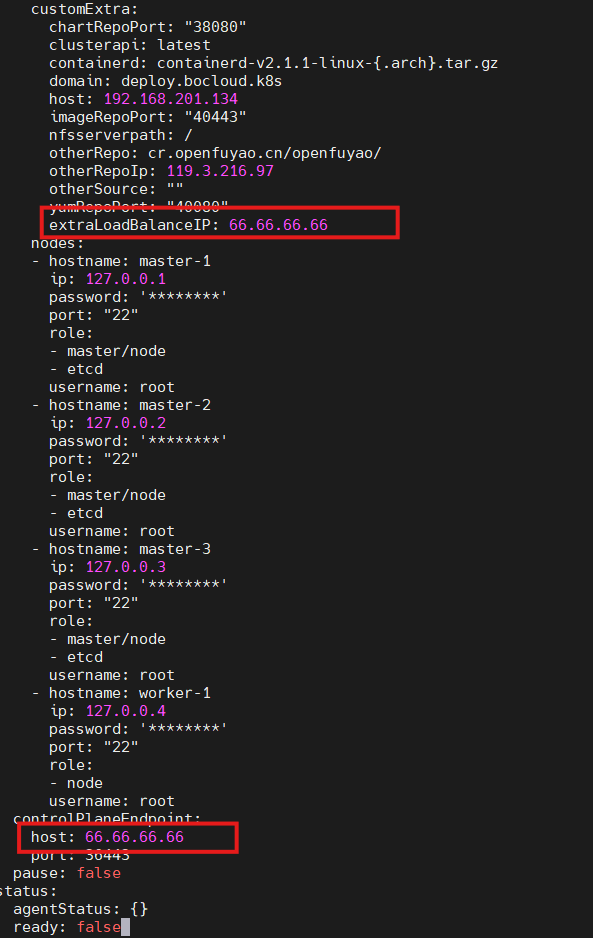
3. Load Balancer Optional Configuration (Optional)
Write External Load Balancer IP Address to Certificate:
If users need to configure bke external load balancer, they need to add corresponding values in bc.yaml. Specific operations are as follows:
3.1 Add corresponding key, value values under customExtra
- key value is fixed and cannot be modified.
- value value fills in corresponding IP address of load balancer.
3.2 Synchronously modify controlPlaneEndpoint
- Change
hostto corresponding IP address of load balancer.
Configuration example:
Related Operations
Verify Certificate Configuration
After bootstrap node creation, certificate configuration can be verified through the following methods:
Check Certificate Files
bash# Check if certificate files exist ls -la /etc/openFuyao/certs/ ls -la /etc/openFuyao/certs/cert_config/Verify Certificate Content
bash# View certificate information openssl x509 -in /etc/openFuyao/certs/global-ca.crt -text -nooutCheck Cluster Component Status
bash# Check if API Server starts normally kubectl get nodes kubectl get pods -n kube-system
FAQ
1. What to do if private key format conversion fails?
Ensure original private key file format is correct, can use following command to check:
# Check private key type
file <private key file>
# If PKCS#8 format, use following command to convert
openssl pkcs8 -topk8 -nocrypt -in <original private key file> -out <temporary file>
openssl rsa -in <temporary file> -out <converted private key file>
2. Can certificate file paths be modified?
No. System fixedly uses following paths:
- Global CA certificate:
/etc/openFuyao/certs/ - Certificate configuration files:
/etc/openFuyao/certs/cert_config/
3. How to configure O field in configuration files?
O field is used for RBAC permission control, needs to be configured according to actual needs:
system:masters: Cluster administrator permissionsystem:nodes: Node permissionsystem:kube-controller-manager: Controller Manager permissionsystem:kube-scheduler: Scheduler permissionsystem:node-proxier: Kube-proxy permission
4. How to set certificate validity period?
Set in expiry field of signing policy configuration file, format is time units (such as 87600h represents 10 years). Recommended to set reasonable validity period according to enterprise security policy.
5. How to configure kubelet certificates in high availability cluster?
In high availability scenarios, CN field of different nodes' kubelet certificates will be automatically configured to corresponding node names, users don't need to configure separately for each node. bke will automatically handle this during node joining.
Appendix
PKI Certificate Configuration Table
Table 1 shows the 15 PKI certificates required within Kubernetes cluster along with their Common Names (CN), Organizations (O), and certificate usages:
Table 1 PKI Certificate Configuration Table
| Component/Certificate Name | CN (Common Name) | O (Organization) | Usage (usages) | Description |
|---|---|---|---|---|
| Cluster CA (Root CA) | kubernetes | (None) | cert sign, crl sign | Cluster root certificate, signs all sub-certificates |
| Etcd CA | etcd-ca | (None) | cert sign, crl sign | Signs etcd related communication certificates |
| Front-Proxy CA | front-proxy-ca | (None) | cert sign, crl sign | Used for API aggregation layer related client certificates |
| apiserver | kube-apiserver | (None) | server auth | kube-apiserver server certificate |
| apiserver-kubelet-client | kube-apiserver-kubelet-client | system:masters | client auth | API Server accessing kubelet client certificate |
| apiserver-etcd-client | kube-apiserver-etcd-client | (None) | client auth | API Server accessing etcd client certificate |
| front-proxy-client | front-proxy-client | (None) | client auth | Aggregation layer front proxy client certificate |
| etcd-server | etcd-server | (None) | server auth | etcd server certificate |
| etcd-peer | etcd-peer | (None) | server auth, client auth | etcd inter-node (peer) communication |
| etcd-healthcheck-client | kube-etcd-healthcheck-client | (None) | client auth | Health check client accessing etcd |
| kubelet Client (kubeconfig) | system:node:<nodeName> | system:nodes | client auth | kubelet accessing API Server client certificate |
| admin (kubeconfig) | admin | system:masters | client auth | Cluster administrator client certificate (kubectl uses) |
| controller-manager (kubeconfig) | system:kube-controller-manager | (None) | client auth | controller-manager using kubeconfig certificate |
| scheduler (kubeconfig) | system:kube-scheduler | (None) | client auth | scheduler using kubeconfig certificate |
| kube-proxy(kubeconfig) | system:kube-proxy | system:node-proxier | client auth | kube-proxy using kubeconfig certificate |
Terminology
Table 2 shows main terminology explanations involved in this document:
Table 2 Terminology
| Chinese Name | English Full Name | Abbreviation | Description |
|---|---|---|---|
| Certificate Authority | Certificate Authority | CA | Authoritative organization responsible for issuing and managing digital certificates |
| Public Key Infrastructure | Public Key Infrastructure | PKI | System for managing digital certificates and public-private key pairs |
| Certificate Signing Request | Certificate Signing Request | CSR | File containing certificate applicant information, used to apply for certificate from CA |
| X.509 Standard | - | X.509 | Public key certificate standard formulated by International Telecommunication Union (ITU), defines format and structure of digital certificates |
| PKCS#1 Standard | Public-Key Cryptography Standards #1 | PKCS#1 | RSA encryption standard, defines RSA private key storage format |
| Common Name | Common Name | CN | Field in X.509 certificate, usually used to identify certificate holder's name |
| Organization | Organization | O | Field in X.509 certificate, used to identify organization certificate holder belongs to |
| Subject Alternative Name | Subject Alternative Name | SAN | Extension field in certificate used to specify multiple domain names or IP addresses |
| Role-Based Access Control | Role-Based Access Control | RBAC | Authorization mechanism in Kubernetes |
| Transport Layer Security | Transport Layer Security | TLS | Used to provide encrypted communication over network |
| Privacy-Enhanced Mail Format | Privacy-Enhanced Mail | PEM | Base64 encoded certificate and key storage format |
| Certificate File Extension | Certificate | CRT | Usually used to store X.509 certificates |
| Private Key File Extension | Key | KEY | Used to store private keys |
| Configuration Map | Configuration Map | ConfigMap | Configuration object in Kubernetes, used to store non-sensitive configuration data |
| Kubernetes Configuration File | Kubernetes Configuration | kubeconfig | Contains cluster access information, authentication information and context configuration |
| Configuration Item | Profile | Profile | Configuration item in signing policy configuration, defines signing parameters for specific type of certificate |
| Key Usage | Key Usage | keyUsage | Certificate extension field, specifies usage of certificate key (such as digital signature, key encryption, etc.) |
| Extended Key Usage | Extended Key Usage | extKeyUsage | Certificate extension field, specifies specific usage of certificate (such as server authentication, client authentication, etc.) |
| Certificate Revocation List | Certificate Revocation List | CRL | Contains list of certificates that have been revoked |
| Bootstrap Node | Bootstrap Node | - | First node created during cluster initialization, used to bootstrap entire cluster creation process |
| Load Balancer | Load Balancer | - | Device or service used to distribute network traffic among multiple servers |
| API Server | API Server | apiserver | Kubernetes API server, provides cluster REST API interface |
| - | etcd | etcd | Distributed key-value storage system, Kubernetes uses to store cluster state and configuration data |
| - | kubelet | kubelet | Kubernetes node agent, runs on each node, responsible for managing Pods and containers |
| Controller Manager | Controller Manager | controller-manager | Kubernetes controller manager, runs various controllers to maintain cluster state |
| Scheduler | scheduler | scheduler | Kubernetes scheduler, responsible for scheduling Pods to appropriate nodes for running |
| - | kube-proxy | kube-proxy | Kubernetes network proxy, responsible for maintaining network rules and load balancing on nodes |
- In
kubelet.conf, the value of<nodeName>must exactly match the node name value provided by kubelet when registering with apiserver.- For more detailed information, please refer to Kubernetes official documentation: https://kubernetes.io/docs/setup/best-practices/certificates/.
Licensed under the MulanPSL2
 YueGongWangAnBei No.44030002007300