Service Cluster Deployment Guide (Linux Backend)
This document describes using bke and kubectl for service cluster deployment verification.
Node Requirements
- Nodes can connect to the external network.
- Nodes can be logged in with the root user.
- The bootstrap node needs to have the tar tool installed.
Notice:
It is recommended that your node environment be a bare metal operating system with no docker or Kubernetes components installed, otherwise version conflicts may occur and cause installation failure. If you need to install experimentally in an existing environment, you can download the incubation tool env-check for environment verification.
Management Cluster
After the bootstrap node initialization is complete, default configuration yaml files will be generated in the /bke/cluster directory, which are:
- 1master-cluster.yaml: Used to create a management cluster with 1 master node.
- 1master-node.yaml: Used to create node information file with 1 master node.
- 1master1node-cluster.yaml: Used to create a management cluster with 1 master node and 1 worker node.
- 1master1node-nodes.yaml: Used to create node information file with 1 master node and 1 worker node.
- 3master-cluster.yaml: Used to create a management cluster with 3 master nodes, which can be configured with a load balancer to become a high-availability management cluster.
- 3master-nodes.yaml: Used to create node information file with 3 master nodes.
Note:
When deploying a high-availability cluster, it is recommended not to use the bootstrap node as a Master node of the high-availability cluster, or if there are not enough nodes, use the bootstrap node as a Master node, then the port field of controlPlaneEndpoint should not be set to 36443.
Below, 1master-cluster.yaml and 1master-node.yaml are used as examples.
Modify Configuration File
Edit the 1master-cluster.yaml and 1master-node.yaml files to fill in the correct node information.
For custom addon installation, refer to the Appendix section.
Configure BKENode Resource (1master-node.yaml)
apiVersion: bke.bocloud.com/v1beta1
kind: BKENode
metadata:
  name: master-1
  namespace: bke-cluster
  labels:
    # Associated cluster name
    cluster.x-k8s.io/cluster-name: bke-cluster
spec:
  hostname: m1  # Modify to node name
  ip: 127.0.0.1  # Modify to actual node ip
  password: '******'  # Modify to actual node password
  port: "22"   # Default port number is 22
  role:
  - master/node
  - etcd
  username: root   # Default is root privileged user
status: {}
Configure BKECluster Resource (1master-cluster.yaml)
apiVersion: bke.bocloud.com/v1beta1
kind: BKECluster
metadata:
  creationTimestamp: null
  name: bke-cluster
  namespace: bke-cluster
spec:
  KubeletConfigRef:  # Custom configuration for kubelet
    name: bke-kubelet
    namespace: bke-kubelet
  clusterConfig:
    addons:
    - name: kubeproxy
      param:
        clusterNetworkMode: calico
      version: v1.33.1-of.1
    - name: calico
      param:
        calicoMode: vxlan
        ipAutoDetectionMethod: skip-interface=nerdctl*
      version: v3.27.3
    - name: coredns
      version: v1.10.1
    - block: true     # Note this is a cluster-api component, management cluster has this addon, service cluster does not have this addon
      name: cluster-api
      param:
        manage: "true"
        offline: "true"
        sandbox: deploy.bocloud.k8s:40443/kubernetes/pause:3.9
      version: v1.4.3
    - name: openfuyao-system-controller   # openFuyao core component addon
      param:
        helmRepo: https://helm.openfuyao.cn/_core # For offline installation, need to replace with http:<bootstrap node IP>:38080
      version: latest
    cluster:
      apiServer:
        extraArgs:
          max-mutating-requests-inflight: "3000"
          max-requests-inflight: "1000"
          watch-cache-sizes: node#1000,pod#5000
      certificatesDir: /etc/kubernetes/pki
      containerRuntime:
        cri: containerd
        param:
          data-root: /var/lib/containerd
        runtime: runc
      containerdConfigRef:    # Custom configuration for containerd
        name: bke-containerd
        namespace: bke-containerd
      containerdVersion: v2.1.1
      controllerManager:
        extraArgs:
          kube-api-burst: "1000"
          kube-api-qps: "1000"
      etcd:
        dataDir: /var/lib/openFuyao/etcd
      chartRepo:    # chart repository, for offline installation need to change ip to actual bootstrap node ip address, set domain to empty or bootstrap node ip address
        domain: deploy.bocloud.k8s  # Need to modify for custom repository
        ip: 192.168.200.173         # Need to modify for custom repository
        port: "38080"               # Need to modify for custom repository
        prefix: ""                  # Need to modify for custom repository
      httpRepo:    # http repository, for offline installation need to change ip to actual bootstrap node ip
        domain: http.bocloud.k8s
        ip: 192.168.200.173    # Need to modify for custom repository
        port: "40080"
        prefix: ""
      imageRepo:
        domain: deploy.bocloud.k8s  # image repository, for offline installation need to change ip to actual bootstrap node ip
        ip: 192.168.200.173   # Need to modify for custom repository
        port: "40443"
        prefix: kubernetes
      kubelet:
        extraArgs:
          kube-api-burst: "2000"
          kube-api-qps: "1000"
        extraVolumes:
        - hostPath: /var/lib/kubelet
          name: kubelet-root-dir
      kubernetesVersion: v1.33.1-of.1
      networking:
        dnsDomain: cluster.local
        podSubnet: 10.250.0.0/16
        serviceSubnet: 10.96.0.0/16
      ntpServer: 192.168.200.173:123
      openFuyaoVersion: latest
      scheduler:
        extraArgs:
          kube-api-qps: "1000"
    customExtra:
      chartRepoPort: "38080"
      clusterapi: latest
      containerd: containerd-v2.1.1-linux-{.arch}.tar.gz
      domain: deploy.bocloud.k8s
      host: 192.168.200.173     # Modify to bootstrap node ip
      imageRepoPort: "40443"
      nfsserverpath: /
      otherRepo: ""
      otherRepoIp: ""
      otherSource: ""
      yumRepoPort: "40080"
  controlPlaneEndpoint: {}
  pause: false
status:
  agentStatus: {}
  ready: false
The other items are default and do not need to be changed. Users need to ensure that the submitted yaml file is reliable. The reconciler will perform validation, but cannot confirm the correctness of business logic (such as incorrect IP address, incorrect password, etc., which need to be confirmed by the user).
Create Management Cluster
Execute the following command to complete cluster creation. Replace the file after -f with the actual path to the 1master-cluster.yaml file, and replace the file after -n with the actual path to the 1master-node.yaml file.
bke cluster create -f /bke/cluster/1master-cluster.yaml -n /bke/cluster/1master-node.yamlService Cluster
Use the previously created management cluster to further create a service cluster. The process is similar to the management cluster creation process. You only need to comment out the management cluster's addon and not install it.
- block: true     # Note this is a cluster-api component, management cluster has this addon, service cluster does not have this addon
  name: cluster-api
  param:
    manage: "true"
    offline: "true"
    sandbox: deploy.bocloud.k8s:40443/kubernetes/pause:3.9
  version: v1.4.3
There are two ways to create a service cluster with the edited configuration yaml file:
- Using the bke installation tool requires downloading the bke installation tool on the management cluster node and executing the installation command.
# Method 1: Quick download
curl -sfL https://openfuyao.obs.cn-north-4.myhuaweicloud.com/openFuyao/bkeadm/releases/download/1.2.2/download.sh | bash# Method 2: Download with integrity verification
## Download download.sh script file
curl -LO https://openfuyao.obs.cn-north-4.myhuaweicloud.com/openFuyao/bkeadm/releases/download/1.2.2/download.sh
## Download the checksum file for download.sh and verify (optional). Successful verification will output -: OK. If verification fails, contact openFuyao community maintainers to locate the cause
curl -LO https://openfuyao.obs.cn-north-4.myhuaweicloud.com/openFuyao/bkeadm/releases/download/1.2.2/download.sh.sha256
sha256sum -c <(cat download.sh.sha256) < download.sh
## Run download.sh to download the bke installation tool, which will verify sha256sum during execution
chmod +x download.sh && ./download.sh- Using kubectl installation directly calls K8s's APIServer.
# First create namespace, corresponding to metadata.namespace field in configuration file
kubectl create namespace <metadata.namespace>

# Execute installation command, first Apply BKENode resource, then Apply BKECluster resource
kubectl apply -f /bke/cluster/1master-node.yaml
kubectl apply -f /bke/cluster/1master-cluster.yaml
Scaling Operation Guide
Here is backend processing for cluster scaling. Operations need to be performed when the cluster is in a healthy state. When the cluster is in an unhealthy state, scaling operations may encounter errors.
Scale-down operation: Remove nodes from the existing cluster.
View existing
BKENoderesources.bash# Replace bke-cluster with actual cluster information kubectl get bn -n bke-clusterDelete the corresponding BKENode resource.
bash# Replace bke-cluster-n1 with actual node name kubectl delete bn -n bke-cluster bke-cluster-n1Execute the command to view existing
BKENoderesources again. If the corresponding node is not found, deletion was successful.Scale-up operation: Add new nodes to the existing cluster.
Write the configuration file for new nodes (newNode.yaml).
yamlapiVersion: bke.bocloud.com/v1beta1 kind: BKENode metadata: name: bke-cluster-n1 namespace: bke-cluster labels: cluster.x-k8s.io/cluster-name: bke-cluster spec: hostname: n1 ip: <node-ip> password: '<encrypted>' port: "22" role: - node username: rootExecute the following command to implement the scale-up operation.
bashkubectl apply -f newNode.yamlExecute the command to view existing
BKENoderesources. If the corresponding node is Ready, the scale-up was successful.
FAQ
If you encounter problems during operation, please first refer to the Diagnosis Guide and FAQ to attempt resolution.
Follow-up Operations
After completing the service cluster installation, for instructions on generating and mounting certificates for core components, please refer to Certificate Generation and Mounting for openFuyao Core Components.
Appendix
The appendix section introduces some knowledge about Linux backend cluster installation.
Custom Addon Installation
openFuyao provides the ability to install and deploy K8s clusters. By adding the addon field, users can install custom extensions. bke-manifests provides yaml files for extensions used by the community, including components such as coredns and calico. In addition, through hostPath mounting, users can place yaml files of custom extensions to achieve custom addon installation. The hostPath mounting path is /etc/openFuyao/addons/manifests/kubernetes.
Follow these steps for custom addon extension installation:
Start the bootstrap cluster or management cluster as the cluster management center for the service cluster.
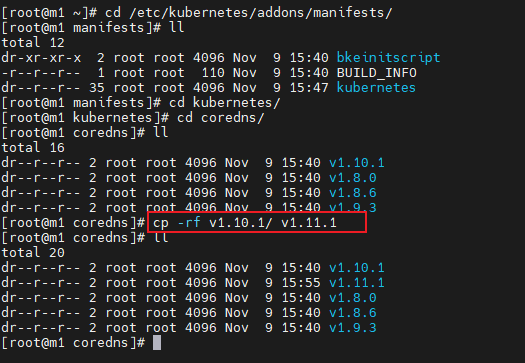
Place the custom addon extension yaml files in the /etc/openFuyao/addons/manifests/kubernetes directory according to the structure of component name/version number/yaml file. As shown below, a copy operation is given to simulate custom processing of yaml files.
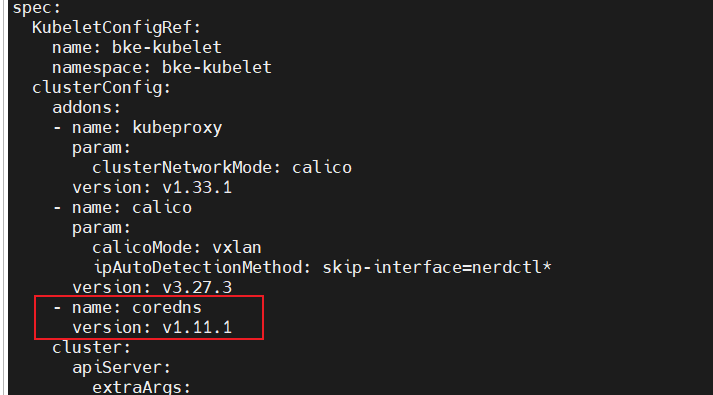
When installing the service cluster, add the addon field to install the custom extension.
Licensed under the MulanPSL2
 YueGongWangAnBei No.44030002007300