Extension Component Development Guide
Feature Introduction
openFuyao computing power container platform (hereinafter referred to as "openFuyao") provides pluggable extension capabilities, allowing users to independently develop components to extend openFuyao's backend capabilities and frontend interface, providing users with more efficient, flexible, and customized cloud-native usage experience. openFuyao also provides corresponding interfaces and templates, supporting users to independently access or develop third-party extension components. For details, please refer to Extension Component Management.
Constraints and Limitations
- When developing or accessing developed extension components, need to transform frontend code according to openFuyao extension component standards and write related configuration files. For specific rules, please refer to Development Steps.
- When using third-party extension components from non-official sources, openFuyao cannot avoid risks brought by extension component's own problems.
- When too many extension components are enabled or extension interface resources are too large, it may cause network request time to be too long, affecting overall page loading time.
Environment Preparation
Environment Requirements
Existing openFuyao cluster environment. For details, please refer to Installation Guide.
Development tools required for developing extension components:
- Frontend development: Node.js v18+
- Image building: Docker v18+
- Software packaging: Helm v3.8+
Build Environment
Visit software official website to install development tools required in Environment Requirements.
Verify Whether Environment Setup is Successful
Execute following command to check whether openFuyao component pod running status is all "Running".
bashkubectl get pod -n openfuyao-systemExecute following command to check development software versions, confirm whether software installation is successful.
bashnode -v docker version helm version
Using Extension Components
Usage Scenario Overview
Existing frontend interfaces can be mounted to openFuyao frontend as extension interfaces. When developers complete development of extension component frontend pages, in order to be discovered and loaded by openFuyao frontend, some transformation and configuration file writing are required.
System Architecture
Extension components can configure frontend and backend service quantity, name, etc. as needed, while containing ConsolePlugin resource to provide frontend interface rendering configuration and backend forwarding rules. console-service module in openFuyao platform will obtain extension frontend enabling status in cluster through extension management plugin-management-service module related interfaces and return to frontend. Meanwhile, console-service will also forward extension component frontend resource requests or backend interface calls to corresponding services according to information in ConsolePlugin resource. 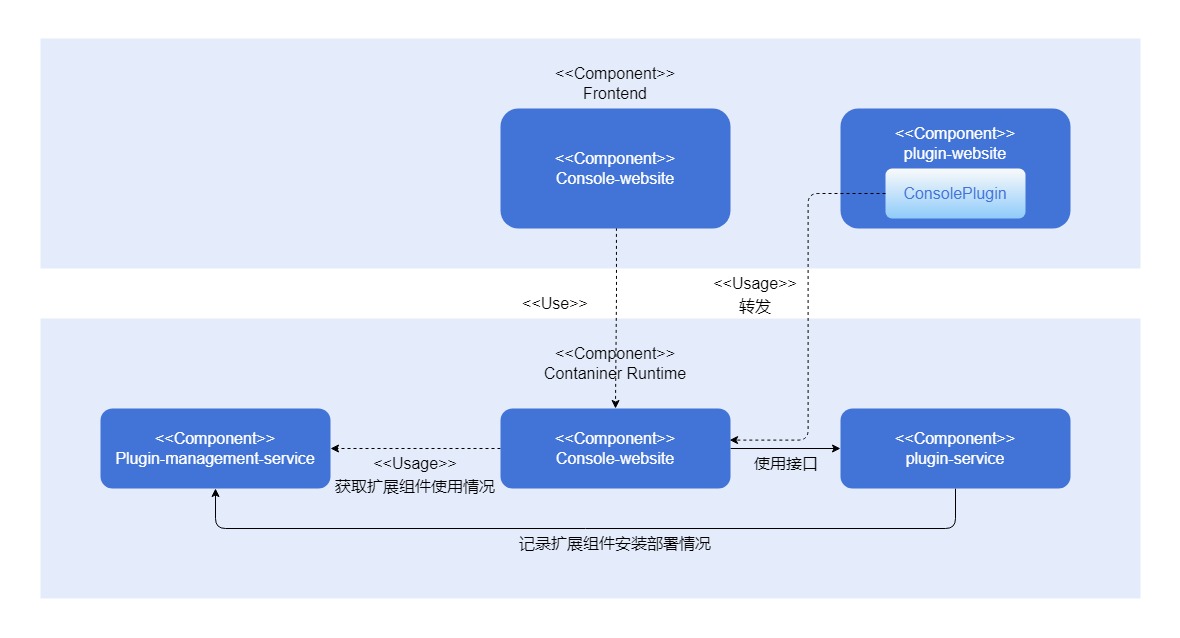
Interface Description
None.
Development Steps
Frontend development/transformation.
openFuyao pluggable structure supports developers mounting independent frontend interfaces to openFuyao frontend management interface without making large-scale modifications to source code. If need to access extension component frontend, need to first provide unique extension component name, and write following
extension.jsfile in project directory:jsconst config = { menu: { pluginName: <extension component name>, }, }; export default config;openFuyao frontend creates unique mount point for extension component based on extension component name, html tag id is
<extension component name>_root, therefore extension component's frontend entry function needs to change rendering mount point. Taking extension frontend developed using openInula as example, entry function modification method is as follows:js// Before modification index.html <div id="root"></div> // After modification index.html <div id="xxxx_root"></div> // xxxx is extension component name // Before modification index.jsx Inula.render(<App />, document.querySelector('#root')); // After modification index.jsx Inula.render(<App />, document.querySelector(`#${extensionConfig.menu.pluginName}_root`));Extension interface will be dynamically imported into openFuyao frontend management interface in JavaScript ES Module form, need to package according to following configuration.
Install CSS style plugin (using vite as example).
bashnpm install vite-plugin-css-injected-by-js postcss-prefix-selectorAdd
vite.config.jsbuild configuration items. Following text as example, will build{pluginName}.mjsfile indist/{pluginName}path, and generate extension component dedicated style sheet to avoid possible style conflicts after mounting.jsimport cssInjectedByJsPlugin from 'vite-plugin-css-injected-by-js'; import postcssPrefixSelector from 'postcss-prefix-selector'; import extension from './src/extension.js'; const { pluginName } = extension.menu; // vite.config.js export default { // Add plugins plugins: [ cssInjectedByJsPlugin(), // Other plugins ...
... ], // Add following build configuration build: { lib: { entry: path.resolve(__dirname, 'index.html'), name: pluginName, formats: ['es'], }, rollupOptions: { output: { entryFileNames: ${pluginName}/${pluginName}.mjs, }, }, }, // Style plugin configuration css: { postcss: { plugins: [ postcssPrefixSelector({ prefix: #${pluginName}_root, transform(prefix, selector, prefixedSelector) { // Skip body, html styles if (selector.startsWith('body') || selector.startsWith('html')) { return selector; } return prefixedSelector; }, }), ], }, }, define: { 'process.env': 'new Object({ NODE_ENV: "production" })', }, // Other configurations ... }; ```
Image module building.
Extension components can contain multiple extension frontend interfaces and extension backend services. Developers need to build images for each service, deploy in cluster in forms such as Deployment, and expose in Service form.
 Caution:
Current openFuyao extension component frontend and backend design needs to follow following specifications:- Extension component backend interfaces must start with
/rest/{pluginName}to allow openFuyao platform extension component related modules to identify, wherepluginNameis extension component name, consistent with that inextension.js. - Extension component frontend interface module name must be
{pluginName}.mjs, wherepluginNameis consistent with that inextension.js. (If using vite configuration in step 1 to build, ES Module file name defaults to{pluginName}.mjs). - When obtaining frontend interface module from frontend service container, please ensure that path to obtain this file is
/dist/{pluginName}.mjs. (Suggest to use Nginx to provide, and place ES Module file in Nginx containerhtml/dist/path, can refer to log component Dockerfile)
- Extension component backend interfaces must start with
Resource configuration.
ConsolePlugin custom resource is configuration file for frontend extension discovery and loading in openFuyao pluggable architecture, and for declaring extension backend interface forwarding rules. For correct operation of extension component, developers need to provide ConsolePlugin resource.
Taking log component as example, this component name is
logging, contains extension frontend interface, and provides interfaces starting with/rest/logging. Following is ConsolePlugin configuration for this extension component.```yaml apiVersion: console.openfuyao.com/v1beta1 kind: ConsolePlugin metadata: name: logging spec: pluginName: logging displayName: "日志" entrypoint: /container_platform subPages: - pageName: logSearch displayName: "日志查询" - pageName: logSet displayName: "日志配置" backend: type: Service service: name: logging-operator namespace: logging-ns port: 8080 scheme: https insecureSkipVerify: false caBundle: xxxxx # base64 encoded extension component CA certificate enabled: true ``` **Table 1** Configuration File Parameter DescriptionParameter Type Required Description pluginName string Yes Unique name of extension component. displayName string Yes Extension component name displayed on menu. entrypoint string Yes Navigation button mount position on page (currently supports /,/container_platform).order string No Extension component order on menu. subPages subPage[] No Secondary menus displayed under extension component on menu. subPages[].pageName string Yes Name of extension subpage. subPages[].displayName string Yes Name of extension subpage displayed on menu. backend.type string Yes Extension backend access method (currently only supports Service).backend.service.name string Yes Extension backend Service name. backend.service.namespace string Yes Extension backend Service namespace. backend.service.port int32 No, default 80 Extension backend Service port. backend.service.basePath string No, default / Extension backend Service path suffix, will be added to end of name.namespace.svc:port.backend.service.scheme string No, default http Extension backend Service protocol, has httpandhttpstwo options.backend.service.caBundle string No CA certificate used by openFuyao's console-service component to verify extension backend. backend.service.insecureSkipVerify boolean No, default false Whether to enable certificate authentication when openFuyao's console-service component accesses extension backend. enable boolean No, default true Whether this extension is enabled. **Parameter Supplementary Description:** - `pluginName` is a **unique** resource name composed of numbers, letters, _, - symbols, and needs to be same as JavaScript file name built above (`{name}`). - If `order` field is not provided, it will be null, at this time extension component will be rendered at the end of menu. - `entrypoint` is routing prefix for mounting page, currently supports `/` (navigation bar) and `/container_platform` (openFuyao platform left menu). - `subPages` is only generated when extension frontend is mounted on openFuyao platform left menu (`entrypoint: /container_platform`). If subPage is empty, renders content as jump button with `displayName`; if not empty, renders as dropdown button, displaying multiple jump buttons after expansion. - `enabled` only indicates whether extension frontend interface is enabled, does not affect running status of extension component's various modules. - `backend.service.scheme`, `backend.service.caBundle` and `backend.service.insecureSkipVerify` three parameters' function is to provide secure access protocol for extension component's access. By setting `caBundle` and `insecureSkipVerify`, and after extension backend service configures service certificate, can enable `console-service` component to perform one-way `tls` verification when routing extension component, ensuring access data security.Authorization access.
Extension components can access openFuyao authentication and authorization module to implement authentication and authorization capabilities consistent with openFuyao main system. Extension component's authorization access does not need to modify extension component's own service, only needs to proxy extension requests by introducing openFuyao OAuth-Proxy module. For specific principle and transformation process, please refer to Authentication and Authorization Development Guide.
Packaging and building.
After completing above steps and installing related resources, open or refresh openFuyao frontend management interface, you can see that extension component button has been successfully mounted at corresponding position. After clicking, extension component's frontend page will be displayed inside openFuyao frontend management interface.
Recommend packaging this extension component as Helm Chart according to following specifications and uploading to openFuyao local repository, thereby achieving better extension component lifecycle management experience. When packaging as Helm Chart, please add
openfuyao-extensionkeyword inChart.yamlfile. Taking log component as example, itsChart.yamlin chart package is as follows:yamlapiVersion: v2 name: logging description: A Helm chart for openFuyao logging extension. It includes logging operator, Loki stack, and proxy frontend to deliver a complete logging solution. type: application appVersion: "latest" version: 0.0.0-latest keywords: ["openfuyao-extension", "log"]
Testing and Verification
Extension frontend interface mounting.
Build and deploy extension component frontend service, provide ConsolePlugin resource, access or refresh openFuyao frontend management interface, you can see extension component entry button or collapsed menu at corresponding position. According to
entrypointfield configuration, expected effects are as follows.Top navigation bar button (
entrypoint: /)Figure 1 Top Navigation

openFuyao platform left navigation bar button (
entrypoint: /container_platform,subPageis empty)Figure 2 Left Navigation

openFuyao platform left collapsed menu (
entrypoint: /container_platform,subPageis not empty)Figure 3 Left Collapsed Menu

Click button to switch to extension component frontend interface. If page content loads normally, it indicates mounting is successful. If page is empty, you can analyze problems by viewing network request records through browser development tools, openFuyao ingress-controller and console-service and other component logs.
Extension component packaging.
After packaging as Helm Chart according to openFuyao extension component packaging specifications, upload to any Helm repository that has been added to openFuyao platform. In openFuyao platform "Application Market > Repository Configuration", synchronize this repository, then you can search for this extension component in "Application Market > Application List", and "Extension Component" mark is visible on application card and detail interface. Meanwhile, support checking "Extension Component" on left side of list for filtering.
Extension components already installed in cluster will no longer be managed through "Application Management" but through "Extension Component Management" page. This interface not only supports performing application upgrade, rollback, uninstallation and other operations on extension components, but also allows enabling/disabling settings for extension interfaces. For specific usage instructions, please refer to Extension Component Management User Guide.
Licensed under the MulanPSL2
 YueGongWangAnBei No.44030002007300