High-Density Container Deployment
Feature Introduction
When a large number of Pods are deployed on a worker node, the main issues include:
containerdruntime creates a shim process for each Pod to handle Pod management and monitoring. When the number of Pods is large, shims consume a large amount of memory.The relationship between shim and containers is 1:1. The containerd container shim process is written in Go and consumes approximately 20 MB of memory. With 1000 Pods, approximately 20 GB of memory is consumed.
The native kubelet probe mechanism (exec/http) consumes high CPU, and the probe failure rate also increases when there are many Pods.
The native probe mechanism runs via the CRI interface. When there are very many containers, a large number of concurrent calls occur, generating high system noise and slowing system response.
A large number of containers generates a large number of cgroups, causing degraded systemd management performance and reliability.
Therefore, optimizations and mitigations for the above issues are desired.
Use Cases
Configure lightweight probes correctly, with business periodically updating target files. When the probe detects a file update, the probe succeeds.
Configure lightweight probes correctly, container startup fails and target files cannot be updated periodically. When the probe detects that the file update interval exceeds the configured value, the probe fails.
Highlights
Eliminate shim processes
Implement shim functionality in containerd, using kernel eBPF technology to implement process exit monitoring, reducing the memory footprint of the container runtime.
Build lightweight kubelet probes
Replace message interaction/CRI interaction with low-cost methods such as file detection for kubelet probes, reducing CPU usage of the container runtime.
Implementation Principle
Design Principles
- By default, native community capabilities are maintained; this feature switch is disabled by default.
- Modify native code as minimally as possible.
- Record basic request access information at minimum storage cost.
New Parameters
| Parameter | Default Value | Description |
|---|---|---|
| file | Empty string | Lightweight probe file. |
| path | Empty string | Location of the target file. |
| validity | 0 | If modification time is within this value, probe succeeds; otherwise fails. |
Shimless Implementation
After containerd starts a process, it creates a pidfd to track the process exit event, and uses the sched_process_exit eBPF program to record the process exit code. Even if a container process exit event occurs during containerd restart, the kernel eBPF program does not exit. After containerd starts, it reads the exit code recorded by eBPF to identify process exit events that occurred during restart. The main process is:
At startup of
containerd, load theeBPFprogramsched_process_exitinto the kernel.containerdstarts the container viarunc, records the process ID toBPF maptracing_tasks, and creates apidfdto track process exit.After the container process exits, the
sched_process_exitprogram records the process exit code toexited_eventsinBPF map.After
containerddetects the process exit event viapidfd, it reads the process exit code fromexited_eventsinBPF map.
Figure 1 Shimless Implementation Flow Chart
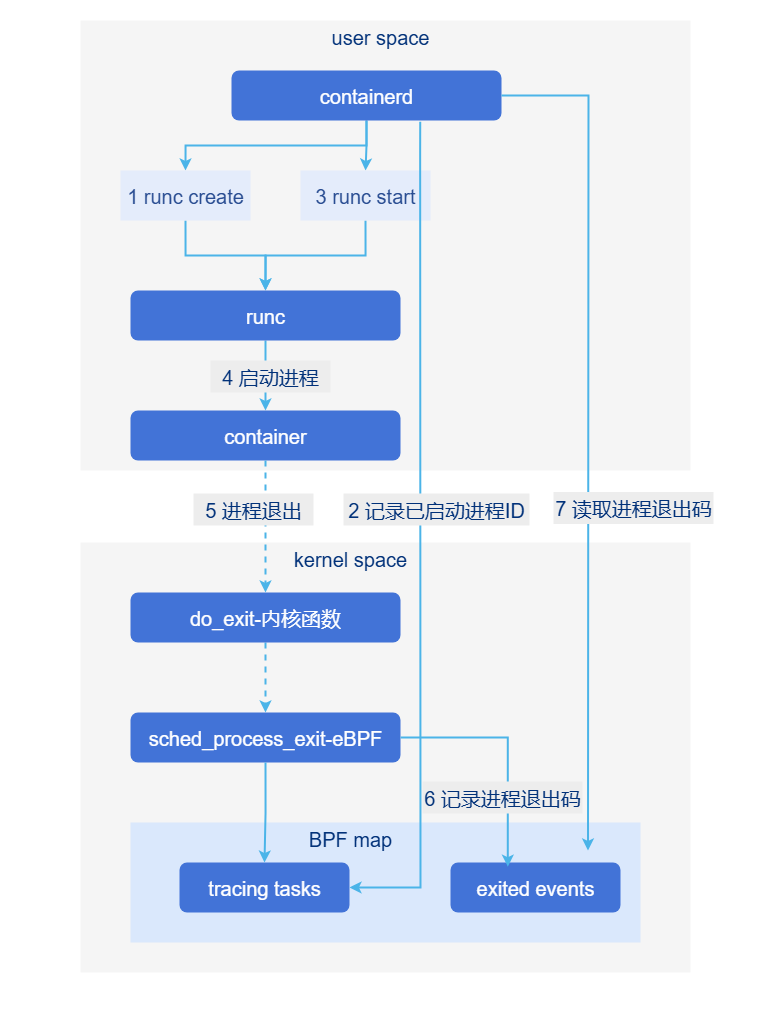
Based on the new container exit detection mechanism, shim-related capabilities can be implemented using eBPF kernel capabilities, with other capabilities separated into containerd, thereby achieving the goal of eliminating shims.
How Lightweight Probes Work
The container process periodically updates the timestamp of the file at
file.path.The
kubeletlightweight probe periodically checks the modification timestamp of the file atfile.pathaccording to the user-configured probe interval. If the file modification time is withinfile.validityof the current time, the probe succeeds; otherwise it fails. Other probe parameters have the same meaning and handling as other native probes.
Relationship with Related Features
None.
Create a Shimless Pod with a Lightweight Probe
Prerequisites
kernel version >= v5.4, kernel compilation option CONFIG_DEBUG_INFO_BTF=y. If using cgroup v2, kernel version 5.14 or above is recommended.
Run the command
grep BTF /boot/config-$(uname -r), output:CONFIG_DEBUG_INFO_BTF=ymeans supported;# CONFIG_DEBUG_INFO_BTF is not setmeans not supported.
Containers must correctly create probe files and continuously update them periodically.
Modifying shimless configuration during system operation is not allowed, as this would cause shim and shimless to coexist.
Background Information
You need to understand how to enable the InPlacePodVerticalScaling feature in kube-apiserver and kubelet components.
Usage Restrictions
None.
Procedure
Shim Process Elimination
Ensure containerd (replacement) and containerd-shim-shimless-v2 (new addition) are in the correct path, e.g.,
/usr/local/bin/.Run
vi /etc/containerd/config.tomlto configure.Add the following configuration under [plugins."io.containerd.grpc.v1.cri".containerd.runtimes]: [plugins."io.containerd.grpc.v1.cri".containerd.runtimes.unified] base_runtime_spec = "" cni_conf_dir = "" cni_max_conf_num = 0 container_annotations = [] pod_annotations = [] privileged_without_host_devices = false privileged_without_host_devices_all_devices_allowed = false runtime_engine = "" runtime_path = "/usr/local/bin/containerd-shim-shimless-v2" runtime_root = "" runtime_type = "io.containerd.runc.v2" sandbox_mode = "podsandbox" snapshotter = "" [plugins."io.containerd.grpc.v1.cri".containerd.runtimes.unified.options] BinaryName = "" CriuImagePath = "" CriuPath = "" CriuWorkPath = "" IoGid = 0 IoUid = 0 NoNewKeyring = false NoPivotRoot = false Root = "" ShimCgroup = "" SystemdCgroup = trueModify containerd.service by adding the configuration item
LimitMEMLOCK=infinityunder the Service section.Run
kubectl apply -f xxx.yamlto create a RuntimeClass. Thexxx.yamlreference example is as follows.kind: RuntimeClass apiVersion: node.k8s.io/v1 metadata: name: unified handler: unifiedStart the Pod by adding
runtimeClassName: unifiedto the Pod spec to reference the RuntimeClass, as shown in the following example.apiVersion: apps/v1 kind: Deployment metadata: name: shimless-pod spec: replicas: 10 selector: matchLabels: app: shimless-pod template: metadata: labels: app: shimless-pod spec: restartPolicy: Always runtimeClassName: unified # Reference RuntimeClass in Pod SPEC containers: - name: shimless-container image: registry.k8s.io/e2e-test-images/nginx:1.15-2 resources: limits: cpu: 300m ports: - containerPort: 80 readinessProbe: httpGet: path: / port: 80 initialDelaySeconds: 1 periodSeconds: 1 timeoutSeconds: 1Verification: After creating shimless Pods, when 10 Pods are running normally, use the command
ps -ef|grep shimto check and confirm that the number of shim processes has not increased.
Lightweight Probes
Mount an empty volume in the business Pod and create the target file in that empty volume.
The container needs to periodically update the target file to indicate that the container is alive.
Configure the lightweight probe, making sure the path matches the path under the empty volume. Example:
apiVersion: v1
kind: Pod
metadata:
  name: file-probe-success
spec:
  nodeSelector:
    my-node: master
  containers:
  - name: container1
    image: registry.k8s.io/e2e-test-images/busybox:1.29-2
    command: ["/bin/sh", "-c"]
    args:
    - |
      mkdir -p /probe-dir;
      touch /probe-dir/probe;                 # Simulate periodic business update of target file
      while true; do                          # Simulate periodic business update of target file
        touch /probe-dir/probe;               # Simulate periodic business update of target file
        sleep 20;                             # Simulate periodic business update of target file
      done
    readinessProbe:
      file:                                   # Lightweight probe
        path: /probe-volume/probe             # Path to target file under empty volume
        validity: 30                          # Tolerated update interval: if the elapsed time since the last cycle is within 30 seconds at probe time, the probe succeeds; otherwise it fails
      initialDelaySeconds: 5
      periodSeconds: 10
      timeoutSeconds: 1
      failureThreshold: 3
    livenessProbe:
      file:                                   # file probe
        path: /probe-volume/probe             # Target path
        validity: 10                          # Tolerated update time difference
      initialDelaySeconds: 5
      periodSeconds: 10
      timeoutSeconds: 1
      failureThreshold: 3
    volumeMounts:
    - name: probe-volume
      mountPath: /probe-dir
  volumes:
  - name: probe-volume                        # Empty volume
    emptyDir: {}
After running
kubectl apply -f deploy.yamlto create the Pod, the probes become ready normally.
Related Operations
None.
Licensed under the MulanPSL2
 YueGongWangAnBei No.44030002007300