npu-dra-plugin
Feature Introduction
The traditional Device Plugin resource scheduling method is based on a "countable" interface for requesting device resources. Users can only request devices in fixed quantities, making it difficult to perceive and utilize the internal characteristics of devices, and unable to perform fine-grained scheduling based on the hardware requirements of actual workloads.
To address this challenge, DRA (Dynamic Resource Allocation) technology emerged, providing Kubernetes with a more flexible and semantically rich resource scheduling mechanism. Based on Kubernetes' native DRA architecture, we have completed deep adaptation for Ascend NPU devices, allowing users not only to request NPU devices but also to make scheduling decisions based on device attributes, compute specifications, and other metadata, achieving higher performance and higher quality heterogeneous computing resource scheduling.
Use Cases
Users submit business Pods and use ResourceClaim for resource requests.
Supported Scope
- Supports resource discovery and reporting of Ascend NPU devices.
- Supports device selection via
DeviceClass/CEL. - Supports resource requests using
ResourceClaim/ResourceClaimTemplate, enabling binding of businessPodstoResourceSlices. - Supports injecting devices into containers via
CDI.
Highlights
Completed adaptation of Ascend npu devices with DRA technology.
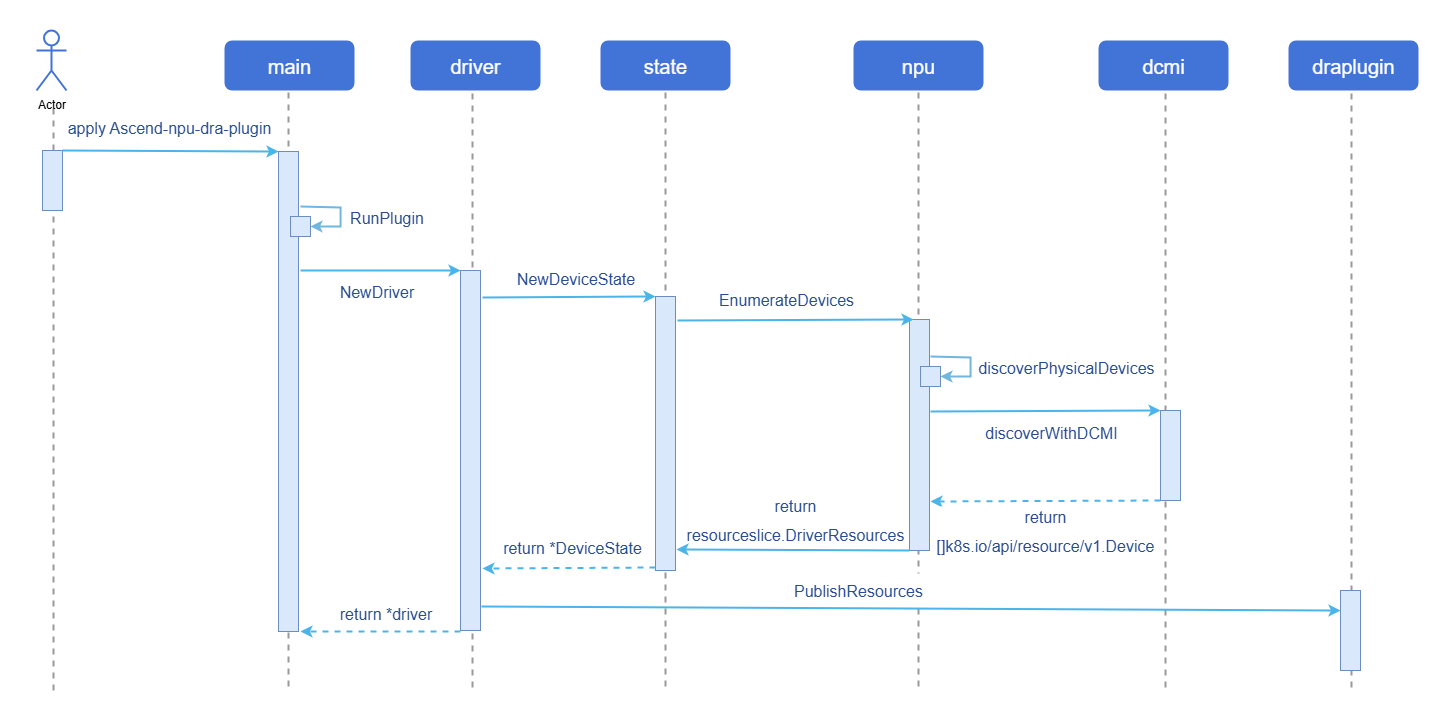
Implementation Principle
Figure 1 Device discovery and reporting implementation diagram
Relationship with Related Features
Depends on Ascend npu device interfaces.
Installation
Deploy Ascend-npu-dra-plugin via Daemonset. Refer to the Procedure for details.
Using npu-dra
Prerequisites
Kubernetes uses the openFuyao community recommended version v1.34.3.
containerd must use version v1.7.0 or above; the openFuyao community default version v2.1.1 is recommended.
Background Information
Used to adapt Ascend npu devices with DRA technology. By following the Procedure below, you can execute the npu-smi info command in containers corresponding to business Pods, completing the full workflow of device discovery, reporting, allocation, and usage.
Usage Restrictions
Partitioning of NPU devices is not currently supported.
Procedure
Deploy
Ascend-npu-dra-pluginviaDaemonset.yamlapiVersion: v1 kind: Namespace metadata: name: ascend-dra --- apiVersion: v1 kind: ServiceAccount metadata: name: ascend-npu-dra-kubeletplugin namespace: ascend-dra --- apiVersion: rbac.authorization.k8s.io/v1 kind: ClusterRole metadata: name: ascend-npu-dra-kubeletplugin rules: - apiGroups: [""] resources: ["nodes"] verbs: ["get"] - apiGroups: ["resource.k8s.io"] resources: ["resourceslices", "resourceclaims"] verbs: ["get", "list", "watch", "create", "update", "patch", "delete"] --- apiVersion: rbac.authorization.k8s.io/v1 kind: ClusterRoleBinding metadata: name: ascend-npu-dra-kubeletplugin roleRef: apiGroup: rbac.authorization.k8s.io kind: ClusterRole name: ascend-npu-dra-kubeletplugin subjects: - kind: ServiceAccount name: ascend-npu-dra-kubeletplugin namespace: ascend-dra --- apiVersion: apps/v1 kind: DaemonSet metadata: name: ascend-npu-dra-kubeletplugin namespace: ascend-dra spec: selector: matchLabels: app: ascend-npu-dra-kubeletplugin template: metadata: labels: app: ascend-npu-dra-kubeletplugin spec: serviceAccountName: ascend-npu-dra-kubeletplugin hostNetwork: true dnsPolicy: ClusterFirstWithHostNet tolerations: - operator: Exists containers: - name: kubeletplugin image: docker.io/library/dra-npu:latest # modify image according to the actual image name imagePullPolicy: IfNotPresent securityContext: privileged: true args: - --node-name=$(NODE_NAME) - --device-profile=npu - --driver-name=npu.huawei.com - --kubelet-registrar-directory-path=/var/lib/kubelet/plugins_registry - --kubelet-plugins-directory-path=/var/lib/kubelet/plugins - --cdi-root=/etc/cdi - --healthcheck-port=-1 env: - name: NODE_NAME valueFrom: fieldRef: fieldPath: spec.nodeName - name: LD_LIBRARY_PATH value: /usr/local/Ascend/driver/lib64:/usr/local/Ascend/driver/lib64/common:/usr/local/Ascend/driver/lib64/driver:/usr/local/Ascend/ascend-toolkit/latest/lib64:/usr/local/Ascend/ascend-toolkit/latest/runtime/lib64 volumeMounts: - name: kubelet-plugins-registry mountPath: /var/lib/kubelet/plugins_registry - name: kubelet-plugins mountPath: /var/lib/kubelet/plugins - name: cdi mountPath: /etc/cdi - name: dev mountPath: /dev - name: sys mountPath: /sys readOnly: true - name: ascend-driver mountPath: /usr/local/Ascend readOnly: true - name: npu-smi-command mountPath: /usr/local/bin/npu-smi readOnly: true volumes: - name: kubelet-plugins-registry hostPath: path: /var/lib/kubelet/plugins_registry type: DirectoryOrCreate - name: kubelet-plugins hostPath: path: /var/lib/kubelet/plugins type: DirectoryOrCreate - name: cdi hostPath: path: /etc/cdi type: DirectoryOrCreate - name: dev hostPath: path: /dev type: Directory - name: sys hostPath: path: /sys type: Directory - name: ascend-driver hostPath: path: /usr/local/Ascend type: Directory - name: npu-smi-command hostPath: path: /usr/local/bin/npu-smi type: FileDeploy
DeviceClass.yamlapiVersion: resource.k8s.io/v1 kind: DeviceClass metadata: name: npu.huawei.com spec: selectors: - cel: expression: |- device.driver == "npu.huawei.com" Note:
Note:The above configuration uses a
CELexpression to filter devices withdriverset tonpu.huawei.com.Deploy
ResourceClaim.yamlapiVersion: resource.k8s.io/v1 kind: ResourceClaim metadata: name: npu-resource spec: devices: requests: - name: npu deviceClassName: npu.huawei.comDeploy the business
Pod.yamlapiVersion: v1 kind: Pod metadata: name: npu-test-pod spec: containers: - name: npu-container image: ubuntu command: ["sleep", "300"] resources: claims: - name: npu resourceClaims: - name: npu resourceClaimName: npu-resourceAfter the Pod starts, run the
npu-smi infocommand in the container to verify that the NPU device was successfully injected.Alternatively, you can use
ResourceClaimTemplatefor resource requests:yamlapiVersion: resource.k8s.io/v1 kind: ResourceClaimTemplate metadata: name: npu-resource-template spec: spec: devices: requests: - name: npu deviceClassName: npu.huawei.com --- apiVersion: v1 kind: Pod metadata: name: npu-test-pod spec: containers: - name: npu-container image: ubuntu command: ["sleep", "300"] resources: claims: - name: npu volumeMounts: - name: ascend-driver mountPath: /usr/local/Ascend readOnly: true - name: npu-smi-command mountPath: /usr/local/bin/npu-smi readOnly: true volumes: - name: ascend-driver hostPath: path: /usr/local/Ascend type: Directory - name: npu-smi-command hostPath: path: /usr/local/bin/npu-smi type: File resourceClaims: - name: npu resourceClaimTemplateName: npu-resource-templateNote:Both
ResourceClaimTemplateandResourceClaimcan use CEL expressions for device selection; this example only demonstrates usage withResourceClaim.
Related Operations
Query DRA-related CR information
Query all
ResourceSlices.bashkubectl get resourceslicesQuery information of a specific
ResourceSlice.bashkubectl get resourceslices <resourceslice_name> -o yamlAll discovered device information can be viewed here. This information can be used in CEL expressions for device selection. Example:
yamlapiVersion: resource.k8s.io/v1 kind: ResourceSlice metadata: creationTimestamp: "2026-02-27T01:55:37Z" generateName: master-npu.huawei.com- generation: 1 name: master-npu.huawei.com-9gv8l ownerReferences: - apiVersion: v1 controller: true kind: Node name: master uid: 6ef76e72-da36-44e3-b9c3-93f44684a859 resourceVersion: "2225369" uid: 0c1b399e-4fa8-4279-93f8-b92a1faeff6f spec: devices: - attributes: chipName: string: 910B4 numaNode: int: 6 physicalId: int: 0 topologyGroup: string: ring-0 capacity: memCapacity: value: 32Gi name: npu-0 driver: npu.huawei.com nodeName: master pool: generation: 1 name: master resourceSliceCount: 1Query all
DeviceClasses.bashkubectl get deviceclassesQuery all
ResourceClaims.bashkubectl get resourceclaims -n <namespace>
Licensed under the MulanPSL2
 YueGongWangAnBei No.44030002007300