CPU Acceleration During Container Startup
Feature Introduction
The service startup phase consumes more CPU resources than the steady state. This feature aims to ensure minimal resource usage in the steady state while increasing startup speed to meet business requirements.
Use Cases
Enable the feature switch and correctly configure
resize.on.startingat startup. When a Pod starts, it usesResizeLimitas the CPU limit for startup; after startup the limit returns to the steady-state configured size.Enable the feature switch and correctly configure
resize.on.startingat startup. After a container starts and is abnormally killed, when the container restarts it usesResizeLimitas the CPU limit; after startup the limit returns to the steady-state configured size.Enable the feature switch and correctly configure
resize.on.startingat startup. After a Pod starts and is abnormally killed, when the Pod restarts, the container usesResizeLimitas the CPU limit; after startup the limit returns to the steady-state configured size.
Supported Scope
Supports adjusting the CPU limit value at startup to enable startup acceleration; does not provide the ability to adjust memory limits at startup.
Highlights
Programs such as Java consume more resources during the startup phase, with resources decreasing after startup completes. If resources configured at startup are too small, startup will take longer. This feature ensures both startup speed and reduced steady-state resource usage.
Implementation Principle
Design Principles
- By default, native community capabilities are maintained; this feature switch is disabled by default.
- Modify native code as minimally as possible.
- Record basic request access information at minimum storage cost.
New Parameters
| Parameter | Default Value | Description |
|---|---|---|
| resize.on.starting | Empty string | CPU limit at service startup |
Process Overview
Figure 1 CPU Acceleration During Container Startup Flow Chart
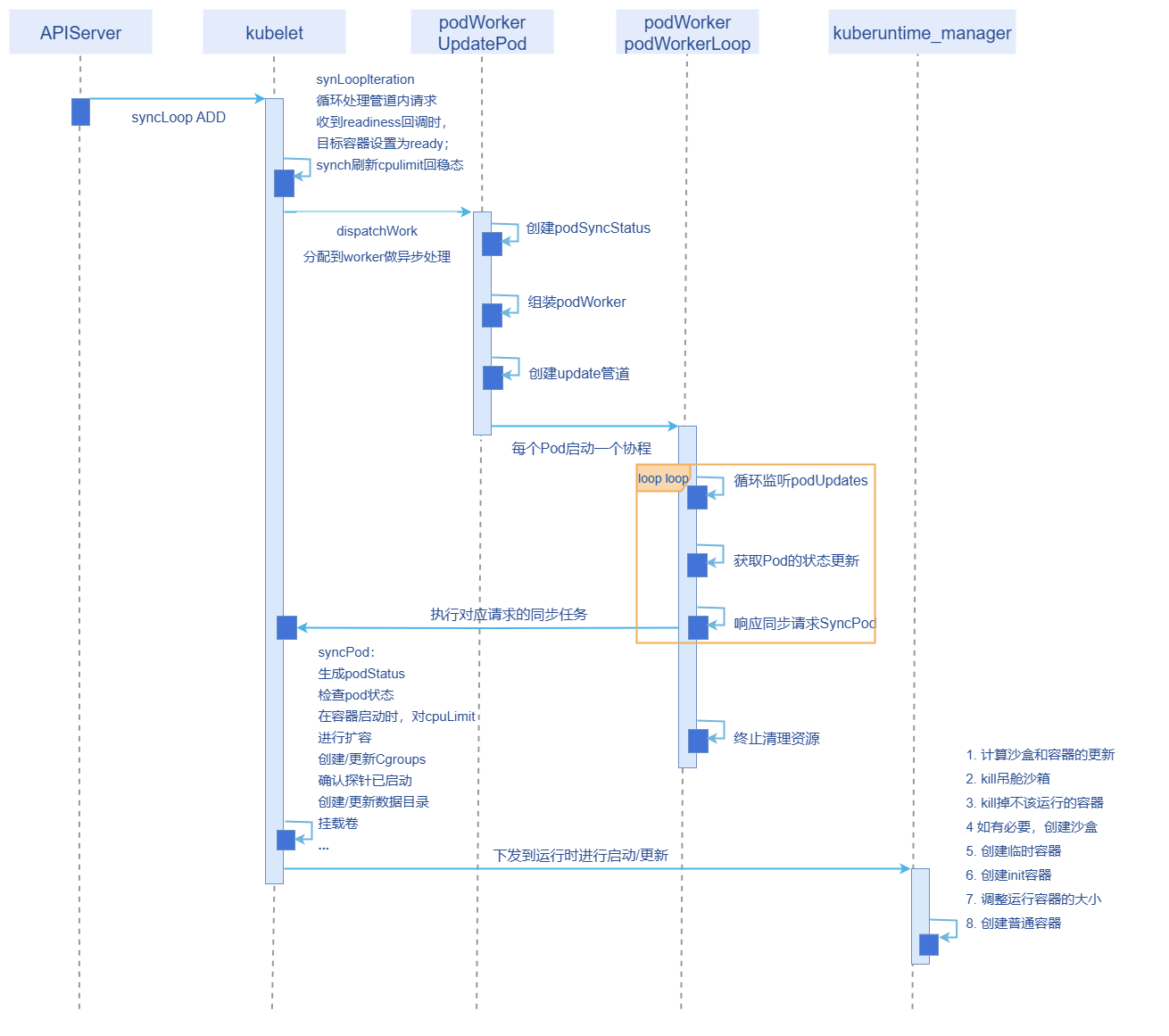
Implementation
- First, validate whether the configured value is valid: it must be greater than the steady-state limit. If invalid, do not dynamically adjust the CPU value and record logs.
- In the
SyncPodmethod for processing Pods, based on the annotation configuration, patch the resource size of non-terminated Pod containers that are not in the ready state, then submit to the runtime for startup. - After successful startup, the probe result refreshes the Pod status. If the probe is OK, the container refreshes to ready state, and the native
syncChlogic restores the steady-state CPU limit. - Each time a Pod is rebuilt or restarted, repeat the above operations.
Relationship with Related Features
InPlacePodVerticalScaling: The startup resize capability depends on the InPlacePodVerticalScaling feature gate; only CPU limit adjustment during the startup phase is supported.
Create a Pod and Verify CPU Acceleration During Startup
Prerequisites
The feature is disabled by default; whether to enable it is determined by the product.
The startup resize capability depends on the
InPlacePodVerticalScalingfeature gate; only CPU limit adjustment during the startup phase is supported.Business must ensure the readiness probe succeeds only when the container is truly ready; the probe result is the sole basis for determining whether to reset resources to steady state.
The Pod QoS level must not be Guaranteed.
Background Information
You need to understand how to enable the InPlacePodVerticalScaling feature in kube-apiserver and kubelet components.
Usage Restrictions
- At startup,
ResizeLimitcannot be less than the steady-state CPU limit; if it is, the configuration takes no effect, and a log is recorded and printed. - Enabling the feature during an upgrade will cause container restarts and service interruption; there is currently no capability to enable it during upgrades.
- Due to resource constraints, even if a scheduled Pod has its CPU limit adjusted, full acceleration may not always be achieved.
Procedure
The startup resize capability depends on the
InPlacePodVerticalScalingfeature gate. Please enable theInPlacePodVerticalScalingfeature gate for bothkubeletandkube-apiservercomponents. Reference links:Example:
Add
InPlacePodVerticalScaling=trueto the feature-gates in the kube-apiserver configuration file, then restart kube-apiserver.Add
InPlacePodVerticalScaling: trueto featureGates in the kubelet configuration file, then restart kubelet.When creating a workload (deployment, statefulset, etc.), configure the steady-state CPU request/limit in the resource field, and configure the CPU value required at startup for each container in the Pod metadata annotations.
resize.on.starting: '[{"name":"container1", "cpu":"400m"},{"name":"container2", "cpu":"600m"}]'A correct deployment configuration example:
yamlapiVersion: apps/v1 kind: Deployment metadata: name: my-pod spec: replicas: 1 selector: matchLabels: app: my-pod template: metadata: labels: app: my-pod annotations: resize.on.starting: '[{"name":"my-container", "cpu":"4"}]' # Enable resize feature; multiple containers can be configured spec: restartPolicy: Always containers: - name: my-container image: registry.k8s.io/e2e-test-images/nginx:1.15-2 resources: limits: cpu: 300m ports: - containerPort: 80 readinessProbe: httpGet: path: / port: 80 initialDelaySeconds: 1 periodSeconds: 10 timeoutSeconds: 1 failureThreshold: 3Self-verification: Use the command
crictl inspect containerID |grep cpuQuotato check the CPU consumed at container creation time and in steady state. At startup it should be theresize.on.startingconfigured size; in steady state it should be thecpuLimitconfigured size.
Licensed under the MulanPSL2
 YueGongWangAnBei No.44030002007300