AI Inference Hermes Routing
Feature Overview
Hermes-router is a Kubernetes (K8s) native AI inference intelligent routing solution that receives user inference requests and forwards them to appropriate inference service backends.
- Architecturally, Hermes-router follows the K8s Gateway API Inference Extension (GIE) framework as a pluggable, extensible EndPointPicker (EPP) component, maximizing compatibility with the K8s ecosystem.
- In terms of capabilities, Hermes-router provides multiple AI inference routing strategies including KVCache aware and PD bucket scheduling, helping users improve AI inference performance, cluster resource utilization, and service stability in various cloud-native scenarios.
Application Scenarios
Hermes-router is suitable for deploying and running AI inference services in Kubernetes cluster environments, specifically including the following scenarios.
- Cloud-native AI inference services: Deploying large language model (LLM) inference services in K8s clusters, requiring intelligent routing capabilities to optimize request distribution and resource utilization.
- Multi-instance inference backends: Intelligent routing of inference requests to multiple inference service instances (supporting aggregated or PD disaggregated architectures) to achieve load balancing and performance optimization.
- High-concurrency inference scenarios: In business scenarios with mixed long and short requests and medium to high concurrency, intelligent scheduling based on request characteristics and instance load status is needed to improve inference throughput.
- KVCache aware optimization scenarios: In scenarios with frequent repeated requests, routing optimization based on KVCache hit rate information is needed to improve inference performance and resource utilization.
- Gateway integration scenarios: Existing K8s gateway infrastructure where AI inference routing capabilities need to be added without affecting the original gateway.
Capability Scope
- Supports user deployment and usage in K8s clusters.
- Supports user configuration of multiple routing strategies for OpenAI API-style AI inference requests.
Software Dependencies
As an EPP component of the GIE framework, Hermes-router needs to be used with open-source gateways that support Gateway API Inference Extension. The table below lists optional open-source gateways and their dependency component version requirements.
Table 1 Optional Open-source Gateways and Dependency Component Versions
| Gateway | Gateway Version | Gateway API | GIE | Kubernetes |
|---|---|---|---|---|
| Istio | 1.27+ | 1.4.0+ | 1.0+ | 1.29+ |
| Nginx Gateway Fabric | 2.2+ | 1.3.0+ | 1.0+ | 1.25+ |
| Envoy AI Gateway | 0.4+ | 1.4.0+ | 1.0+ | 1.32+ |
| Kgateway | 2.1+ | 1.3.0+ | 1.0+ | 1.29+ |
Note:
The table shows the minimum verified compatible versions. It is recommended to use the latest versions of open-source gateways to ensure the best experience.
Highlight Features
Here are the highlights independent of the GIE framework.
- Feature design follows the GIE framework, naturally supports the K8s gateway ecosystem, and can be integrated with multiple open-source gateways. In clusters with existing gateways, it can be added as a pluggable capability, adding AI inference routing capabilities without affecting the original gateway.
- Provides multiple innovative routing strategies, supporting aggregated, PD, and other inference backend architectures, helping users improve performance in various business scenarios.
- KVCache aware (aggregated/PD): Provides a KVCache aware routing strategy that allows users to customize scoring functions, improving inference performance in repeated request scenarios.
- PD bucket scheduling routing (PD): Provides a bucket scheduling strategy that allows users to customize parameters, improving inference throughput in scenarios with mixed long and short requests and medium to high concurrency.
- Dynamic inference service discovery: Allows users to add/remove inference backends at runtime, enabling flexible adjustment of inference resource investment.
Implementation Principle
Figure 1 Hermes-router Architecture 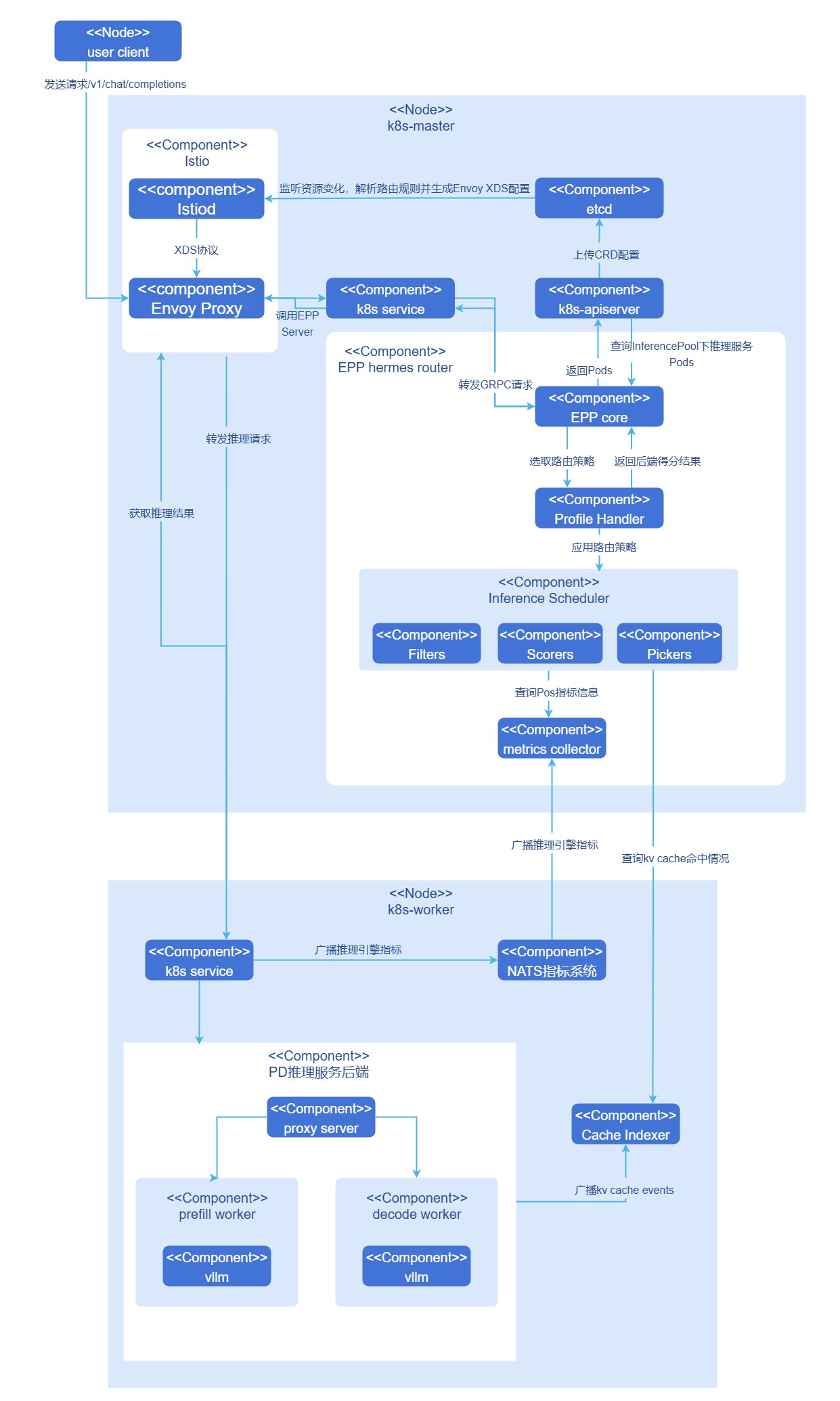
Hermes-router is integrated into open-source gateways as an EPP component. The following uses a complete inference request as an example to explain the internal principle.
- Users send an OpenAI API request
/v1/chat/completionsto the cluster gateway. - The gateway identifies the request as an inference request and forwards it to the EPP.
- The EPP processes the request according to the user-configured routing strategy and selects the most suitable inference backend for processing the inference request.
- The EPP returns the inference backend to the cluster gateway, and the cluster gateway sends the inference request to the target inference backend.
- The inference backend completes the request and returns it to the gateway, which returns the inference result to the user.
Relationship with Related Features
- cache-indexer: Required when using KVCache aware type strategies, obtains KVCache hit rate from this component through the
/match_sortinterface. - vLLM-ascend: The following specific dependencies exist for this feature.
- PD proxy service component
proxy-server: Originally a sample component provided by vllm officially in the PD disaggregated architecture, serving as a hub to organize P/D instances to complete inference tasks. The openFuyao community has enhanced this component, and it now serves as the Leader instance of the PD Group to receive gateway inference requests and has the ability to dynamically discover inference service instances based on specified labels. - NPU adaptation: When the environment is Ascend NPU, vLLM-ascend needs to be used as the inference engine to start the service.
- Inference metrics: Depends on vllm's
/metricsinterface to obtain inference service metrics, automatically obtained by the GIE architecture.
- PD proxy service component
Installation
EPP Component Standalone Deployment
This section describes how to deploy Hermes-router as an EPP component in a cluster with existing Kubernetes Gateway infrastructure.
Delivery Specification
Hermes-router is deployed to the cluster as a standalone EPP component, requiring the cluster to already have an Envoy-based Gateway, Gateway API and Inference Extension CRDs, and inference backend services. After deployment, Hermes-router provides multiple AI inference intelligent routing strategies (KVCache aware, PD bucket scheduling, etc.), dynamically discovers and manages inference backends through InferencePool CR, and supports flexible configuration through HTTPRoute.
Prerequisites
Before starting the installation, please ensure the following conditions are met.
Environment Requirements
- Kubernetes cluster: v1.33.0 and above.
- Cluster administrator permissions: For installing CRDs and cluster-level resources.
- Helm tool: For deploying Hermes router and related components.
Deployment Component Requirements
Before deploying Hermes-router, the following components need to be installed in the cluster.
- Envoy-based gateway: The cluster has deployed a gateway supporting the ExtProc protocol (such as Istio, Envoy Gateway, etc.). Hermes-router interacts with the gateway through ExtProc (gRPC).
- Gateway API CRDs: Kubernetes Gateway API core resource definitions are installed.
- Inference Extension CRDs: Gateway API Inference Extension is installed, providing inference extension resource definitions such as InferencePool.
- Inference backend services: Inference engine services such as vLLM are deployed in the cluster.
Note:
If the above components are not yet installed in the cluster, please refer to the Install Supporting Components section to complete the installation.Hardware Requirements
Hermes-router itself has no special hardware environment requirements. As a lightweight routing component, it can run on standard x86 or ARM architecture nodes.
Quick Install Hermes Router
Hermes-router supports multiple routing strategies. Users can obtain the chart package and preset routing strategy configuration files from the openFuyao GitCode repository according to business scenarios.
Pull the project from the repository.
bashgit clone https://gitcode.com/openFuyao/hermes-router.gitInstall and deploy.
Taking the release name
hermes-routeras an example, please ensure the following operations are completed before executing the installation.bashcd hermes-router/charts/hermes-router helm dependency build helm install -n <NAMESPACE> hermes-router . \ -f <routing_strategy_file_name>Parameter descriptions are as follows.
<NAMESPACE>: Target namespace for deployment (such asai-inference).<routing_strategy_file_name>: Directly use the strategy files in Table 2; the repository provides examples in theexamples/profiles/directory (see profiles directory), which can be reused or customized as needed.
Table 2 Preset Routing Strategy List
Strategy File Strategy Name Applicable Scenario Description epp-random-pd-bucket.yamlRandom PD Bucket Routing Simple load balancing Randomly selects PD Bucket to achieve basic load balancing. epp-pd-bucket.yamlPD Bucket Scheduling Routing Load-based routing Scores PD Buckets based on their load status and selects the optimal instance, supporting TP heterogeneous PD disaggregated architecture. epp-pd-kv-cache-aware.yamlPD KVCache Aware Routing KVCache optimization under PD architecture Intelligently selects the optimal inference service by combining KVCache hit rate, XPU cache usage, and other information (suitable for PD architecture). epp-kv-cache-aware.yamlAggregated Architecture KVCache Aware Routing KVCache optimization under aggregated architecture Intelligently selects the optimal inference service by combining KVCache hit rate, XPU cache usage, and waiting request count (suitable for aggregated architecture). Verify deployment.
bash# Check Pod running status kubectl get pods -n <NAMESPACE> -l inferencepool=<INFERENCEPOOL_NAME>-epp # Check InferencePool resources kubectl get inferencepool -n <NAMESPACE> # Check HTTPRoute resources kubectl get httproute -n <NAMESPACE>
The EPP Pod label format isinferencepool=<INFERENCEPOOL_NAME>-epp, where<INFERENCEPOOL_NAME>is the name of the InferencePool resource, corresponding to the.Values.inferencepool.nameconfiguration item in values.yaml. For example, if the InferencePool name isvllm-qwen-qwen3-8b, the EPP Pod label isapp=vllm-qwen-qwen3-8b-epp.
Notice:
HTTPRoute and InferencePool CR need to be configured correctly when deploying Hermes router.
- HTTPRoute needs to be associated with the Gateway resource in the cluster through parentRef.
- InferencePool needs to configure the correct label selector (matchLabels) to discover and manage inference backend instances.
- For detailed routing strategy configuration, please refer to the Configure Routing Strategy section.
InferNex Integrated Deployment
This section describes how to deploy Hermes-router through Infernex integration.
Delivery Specification
InferNex is a complete AI inference service integrated deployment package that deploys gateway, Hermes-router, HTTPRoute/InferencePool and other K8s resources, and inference backend services with one click. It provides an end-to-end AI inference solution, integrating gateway, intelligent routing, and inference services, ready to use out of the box.
When there is no gateway or inference backend in the environment and out-of-the-box deployment is needed, InferNex can be used directly for integrated deployment. Refer to Installation and Configuration Guide.
Prerequisites
- Kubernetes v1.33.0 and above.
- Kubernetes Gateway API CRDs: Provides core resource definitions for Gateway API.
- Gateway API Inference Extension CRDs: Provides inference extension resource definitions such as InferencePool.
- At least one inference chip per inference node.
- At least 16GB memory and 4 CPU cores per inference node.
- Online installation requires access to the image repository: oci://cr.openfuyao.cn.
- Users have permissions to create RBAC resources.
Quick Install InferNex
InferNex has two independent deployment methods.
Obtain the project installation package from the openFuyao official image repository.
Pull the project installation package.
bashhelm pull oci://cr.openfuyao.cn/charts/infernex --version xxxWhere
xxxneeds to be replaced with the specific project installation package version, such as0.21.1. The pulled installation package is in compressed package form.Extract the installation package.
bashtar -xzvf infernex-xxx.tgzWhere
xxxneeds to be replaced with the specific project installation package version, such as0.21.1.Install and deploy.
Taking the release name
infernexas an example, please ensure the following operations are completed before executing the installation.- The namespace
istio-systemhas been created in the cluster (Istio Gateway resources must be deployed in this namespace). - The namespace specified by the
global.namespaceconfiguration item invalues.yamlhas been created in the cluster. The namespace for other components (such as inference-backend, hermes-router, cache-indexer, etc.) can be set through theglobal.namespaceconfiguration item invalues.yaml, with a default value ofai-inference.
Execute the following command in the same directory as
infernex.bashhelm install -n istio-system infernex ./infernex- The namespace
Obtain from the openFuyao GitCode repository.
Pull the project from the repository.
bashgit clone https://gitcode.com/openFuyao/InferNex.gitInstall and deploy.
Taking the release name
infernexas an example, when installing with helm, the namespaceistio-systemneeds to be specified because the open-source gateway istio is integrated. The namespace settings for other components can be configured inglobal.namespaceinvalues.yaml. Execute the following command in the same directory asInferNex.bashcd InferNex/charts/infernex helm dependency build helm install -n istio-system infernex .
Install Supporting Components
If supporting components such as gateway and inference backend are not yet deployed in your cluster, please complete the installation according to this section.
Open-source Gateway Installation
Hermes-router needs to be used with open-source gateways that support Kubernetes Gateway API and Gateway API Inference Extension. This document uses Istio as an example to introduce the installation and deployment process.
Install Istio and enable Gateway API Inference Extension support.
bashistioctl install -y \ --set tag=<ISTIO_TAG> \ --set hub=gcr.io/istio-testing \ --set values.pilot.env.ENABLE_GATEWAY_API_INFERENCE_EXTENSION=true⚠️Notice:
ISTIO_TAGneeds to use an Istio version that supports Inference Extension. Executecurl -s https://storage.googleapis.com/istio-build/dev/1.28-devto get the latest version.Verify installation.
Verify Istio installation.
shellkubectl get pods -n istio-systemDeploy Inference Gateway.
After completing infrastructure installation, you can deploy Inference Gateway.
shellhelm upgrade --install inference-gateway examples/1_pd_bucket/charts/gateway \ -n <NAMESPACE> --create-namespace \ --set gateway.className=istio
Open-source gateway notes are as follows.
- Istio version: An Istio development version that supports Inference Extension is required; stable versions may not support it.
- Permission requirements: Installing CRDs requires cluster administrator permissions.
- Other open-source gateways: In addition to Istio, users can choose open-source gateways that support Gateway API and Gateway API Inference Extension according to their needs. When configuring, just set
gateway.classNameto the corresponding GatewayClass name.
Inference Engine Backend Installation
Hermes-router currently supports the vLLM inference engine, providing both aggregated and PD disaggregated architectures. Users can choose deployment as needed.
Install according to aggregated architecture, execute the following command.
shellhelm upgrade --install vllm examples/2_kv_aware/charts/vllm \ -n ${NAMESPACE} --create-namespace \ --set modelServer.name=$(MODEL) \ --set modelServer.rootCachePath=/home/llm_cacheInstall according to PD disaggregated architecture (Prefill-Decode Disaggregated), execute the following command.
shellhelm upgrade --install vllm-pd examples/1_pd_bucket/charts/vllm-pd \ -n ${NAMESPACE} --create-namespace \ --set modelServer.name=$(MODEL) \ --set modelServer.rootCachePath=/home/llm_cache
In vLLM disaggregated architecture deployment, the proxy server needs to be able to parse the request headers added by EPP routing to achieve precise routing to P-end and D-end backend services. Specific implementation can refer to: proxy_server_example.
Install cache-indexer (Optional)
When Hermes-router uses the KVCache aware routing strategy, the cache-indexer component must be installed to obtain global KV Cache information. The installation steps are as follows.
Obtain the openFuyao/cache-indexer component helm chart deployment package.
shellhelm fetch oci://cr.openfuyao.cn/charts/cache-indexer --version 0.20.0Configure cache-indexer to correctly provide global KVCache hit rate calculation service. Open the
charts/cache-indexer/values.yamlfile in the helm chart obtained in the previous step for configuration. The required parameters are described below.yamlapp: serviceDiscovery: # This configuration is used to dynamically discover inference service instances and subscribe to kv cache messages labelSelector: "openfuyao.com/model=qwen-qwen3-8b" # Dynamically discover inference instance Pods carrying this label portName: "zmq-pub" # Subscribe to kv cache messages in the vllm port with this name; refreshInterval: 10 # Subscription interval (s) service: name: cache-indexer-service # Name of the service resource at runtime, hermes-router requests cache-indexer through this name port: 8080 # External port # ... Other configurationsDeploy cache-indexer.
shellhelm upgrade --install cache-indexer ./charts/cache-indexer \ -n ${NAMESPACE} --create-namespaceCheck deployment results.
Confirm that the Pod is running normally and that the logs show that inference service backend instances have been successfully discovered.
Using AI Inference Services
After deployment, you can send inference requests to the Inference Gateway in the following two ways.
LoadBalancer Access
If the cluster supports LoadBalancer, Istio Gateway will automatically create a LoadBalancer type Service.
shell# Get External IP EXTERNAL_IP=$(kubectl get svc -n istio-system istio-ingressgateway -o jsonpath='{.status.loadBalancer.ingress[0].ip}')Send inference request.
shellcurl -X POST http://${EXTERNAL_IP}/v1/chat/completions \ -H "Content-Type: application/json" \ -d '{ "model": "Qwen/Qwen3-8B", "messages": [ {"role": "user", "content": "Hello"} ], "max_tokens": 100, "temperature": 0.7, "stream": false }'
NodePort Access
Execute the following command to get the node IP address and port.
shellkubectl get svc -n istio-system istio-ingressgatewayCheck the PORT(S) column, for example 80:30080/TCP, where 30080 is the NodePort.
If there is no ExternalIP, use InternalIP.
shellNODE_IP=$(kubectl get nodes -o jsonpath='{.items[0].status.addresses[?(@.type=="InternalIP")].address}') NODE_PORT=$(kubectl get svc -n istio-system istio-ingressgateway -o jsonpath='{.spec.ports[?(@.port==80)].nodePort}')Send request.
shellcurl -X POST http://${NODE_IP}:${NODE_PORT}/v1/chat/completions \ -H "Content-Type: application/json" \ -d '{ "model": "Qwen/Qwen3-8B", "messages": [ {"role": "user", "content": "Hello"} ], "max_tokens": 100, "temperature": 0.7, "stream": false }'
Configure Routing Strategy
Metric Mapping
When using vLLM-Ascend in NPU environments, metric name mapping is required. By default, the kv-cache-usage-percentage-metric used by the GIE framework is the metric name for vLLM in GPU environments. To adapt to vLLM-Ascend, this metric needs to be mapped to vllm:kv_cache_usage_perc used by vLLM-Ascend through flags, configured as follows:
  inferenceExtension:
    flags:
      kv-cache-usage-percentage-metric: "vllm:kv_cache_usage_perc"
This configuration maps the metric kv-cache-usage-percentage-metric collected by the GIE framework to vllm:kv_cache_usage_perc, so that subsequent routing strategies can calculate based on the correct metric name.
aggregate kv cache aware
inferenceExtension:
  pluginsConfigFile: "epp-aggregate-kv-cache-aware.yaml"
  pluginsCustomConfig:
    epp-aggregate-kv-cache-aware.yaml: |
      apiVersion: inference.networking.x-k8s.io/v1alpha1
      kind: EndpointPickerConfig
      plugins:
      - type: scorer-aggregate-kv-cache-aware    # Scoring plugin
        parameters:                              # Scoring parameters
          kvCacheHitNotRateWeight: 1.0
          xpuCacheUsageWeight: 1.0
          waitingRequestWeight: 1.0
          kvCacheManagerIP: cache-indexer-service
          kvCacheManagerPort: 8080
          kvCacheManagerPath: /match_sort
          kvCacheManagerTimeout: 5000000000
      - type: picker-min-random                  # Picker plugin
      schedulingProfiles:
      - name: default
        plugins:
        - pluginRef: scorer-aggregate-kv-cache-aware
        - pluginRef: picker-min-random
Plugin descriptions are as follows.
scorer-aggregate-kv-cache-aware: Scores inference service instances based on KVCache hit rate, XPU cache usage, and waiting request count.
picker-min-random: Randomly selects one from the instances with the lowest score to achieve load balancing.
Table 3 KVCache Aware Agg Parameter Descriptions
| Parameter | Type | Description | Default Value |
|---|---|---|---|
kvCacheHitNotRateWeight | float | KVCache miss rate weight. | 1.0 |
xpuCacheUsageWeight | float | XPU cache usage weight. | 1.0 |
waitingRequestWeight | float | Waiting request count weight. | 1.0 |
kvCacheManagerIP | string | KVCache Indexer service IP address/name. | cache-indexer-service |
kvCacheManagerPort | int | KVCache Indexer service port. | 8080 |
kvCacheManagerPath | string | KVCache Indexer API path. | /match_sort |
kvCacheManagerTimeout | int | KVCache Indexer request timeout (nanoseconds). | 5000000000 |
Weight parameter descriptions are as follows.
- Increase weight: This metric has a greater impact on scoring.
- Decrease weight: The impact of this metric is reduced.
- Example: If you care more about KVCache hit rate, you can increase
kvCacheHitNotRateWeight.
pd kv cache aware
inferenceExtension:
  pluginsConfigFile: "epp-pd-kv-cache-aware.yaml"
  pluginsCustomConfig:
    epp-pd-kv-cache-aware.yaml: |
      apiVersion: inference.networking.x-k8s.io/v1alpha1
      kind: EndpointPickerConfig
      plugins:
      - type: filter-by-pd-label              # PD label filter plugin
      - type: scorer-pd-kv-cache-aware         # PD KV Cache aware scoring plugin
      - type: picker-pd-kv-cache-aware         # PD KV Cache aware picker
      - type: pd-header-handler                # PD request header handler plugin
      schedulingProfiles:
      - name: default
        plugins:
        - pluginRef: filter-by-pd-label
        - pluginRef: scorer-pd-kv-cache-aware
        - pluginRef: picker-pd-kv-cache-aware
        - pluginRef: pd-header-handler
The plugins used by the pd kv cache aware strategy are as follows.
filter-by-pd-label: Filters inference service instances based on PD role (Prefill/Decode) and group ID.
scorer-pd-kv-cache-aware: Combines KVCache hit rate, XPU cache usage, and waiting request count to score Prefill and Decode Pods separately.
picker-pd-kv-cache-aware: Based on scoring results, intelligently selects the optimal Prefill or Decode Pod.
pd-header-handler: Adds request header information required for PD disaggregated architecture to specify routing backend.
The parameter descriptions for the filter-by-pd-label and scorer-pd-kv-cache-aware plugins are shown in Table 4 and Table 5.
Table 4 filter-by-pd-label Parameter Descriptions
| Parameter | Type | Description | Default Value |
|---|---|---|---|
pdLabelName | string | PD role label name. | openfuyao.com/pdRole |
pdGroupLabelName | string | PD group label name. | openfuyao.com/pdGroupID |
prefillValue | string | Prefill role label value. | prefill |
decodeValue | string | Decode role label value. | decode |
leaderValue | string | Leader role label value. | leader |
Table 5 scorer-pd-kv-cache-aware Parameter Descriptions
| Parameter | Type | Description | Default Value |
|---|---|---|---|
kvCacheHitNotRateWeight | float | KVCache miss rate weight. | 1.0 |
xpuCacheUsageWeight | float | XPU cache usage weight. | 1.0 |
prefillWaitingRequestWeight | float | Prefill waiting request count weight. | 1.0 |
decodeWaitingRequestWeight | float | Decode waiting request count weight. | 1.0 |
prefillPodScoreWeight | float | Prefill Pod score weight. | 1.0 |
decodePodScoreWeight | float | Decode Pod score weight. | 1.0 |
kvCacheManagerIP | string | KVCache Indexer service IP address/name. | cache-indexer-service |
kvCacheManagerPort | int | KVCache Indexer service port. | 8080 |
kvCacheManagerPath | string | KVCache Indexer API path. | /match_sort |
kvCacheManagerTimeout | int | KVCache Indexer request timeout (nanoseconds). | 5000000000 |
PD label configuration descriptions are as follows.
pdLabelNameandpdGroupLabelName: Must be consistent with Pod labels in vLLM PD deployment.prefillValue,decodeValue: Must match theopenfuyao.com/pdRolelabel value of Pods.- Ensure that the
groupIDof vLLM PD deployment matches the group label in the routing strategy.
Weight parameter adjustment descriptions are as follows.
- Prefill-related weights: Adjust routing decisions for the Prefill phase.
prefillWaitingRequestWeight: Impact of Prefill waiting request count.prefillPodScoreWeight: Impact of Prefill Pod score.
- Decode-related weights: Adjust routing decisions for the Decode phase.
decodeWaitingRequestWeight: Impact of Decode waiting request count.decodePodScoreWeight: Impact of Decode Pod score.
- General weights: Affect both Prefill and Decode.
kvCacheHitNotRateWeight: Impact of KV Cache miss rate.xpuCacheUsageWeight: Impact of XPU cache usage.
KVCache Indexer configuration is consistent with the above.
pd bucket
inferenceExtension:
  pluginsConfigFile: "epp-pd-bucket.yaml"
  pluginsCustomConfig:
    epp-pd-bucket.yaml: |
      apiVersion: inference.networking.x-k8s.io/v1alpha1
      kind: EndpointPickerConfig
      plugins:
      - type: filter-by-pd-label              # PD label filter plugin
      - type: scorer-pd-bucket                 # PD Bucket scoring plugin
      - type: pd-header-handler                # PD request header handler plugin
      schedulingProfiles:
      - name: default
        plugins:
        - pluginRef: filter-by-pd-label
        - pluginRef: scorer-pd-bucket
          weight: 1
        - pluginRef: pd-header-handler
The plugins used by the pd bucket strategy are as follows.
filter-by-pd-label: Filters inference service instances based on PD role (Prefill/Decode) and group ID.
scorer-pd-bucket: Scores based on request length and Pod load status, routing requests to the lightest-loaded Bucket.
pd-header-handler: Handles request header information required for PD disaggregated architecture.
The parameter descriptions for the filter-by-pd-label and scorer-pd-bucket plugins are shown in Table 4 and Table 6.
Table 6 scorer-pd-bucket Parameter Descriptions
| Parameter | Type | Description | Default Value |
|---|---|---|---|
alpha | float | Load scoring coefficient. | 1.0 |
beta | float | Request length scoring coefficient. | 2.0 |
decayFactor | float | Load decay factor (0-1). | 0.99 |
bucketSeperateLength | int | Bucket separation length threshold. | 200 |
PD label configuration descriptions are as follows.
pdLabelNameandpdGroupLabelName: Must be consistent with Pod labels in vLLM PD deployment.prefillValue,decodeValue: Must match theopenfuyao.com/pdRolelabel value of Pods.- Ensure that the
groupIDof vLLM PD deployment matches the group label in the routing strategy.
Scoring algorithm parameter descriptions are as follows.
- alpha: Controls the weight of Pod current load in scoring, the larger the value, the greater the load impact.
- beta: Controls the weight of request length in scoring, the larger the value, the greater the request length impact.
- decayFactor: Load decay factor used to smooth load changes, the closer to 1, the slower the decay.
- bucketSeperateLength: Request length threshold used to distinguish long requests and short requests, routing requests to different Buckets.
Scoring weight description is as follows.
weight: 1: Weight of the scoring plugin in the scheduling configuration, can be adjusted as needed.
Working Principle
- Request classification: Compares request length with
bucketSeperateLengthto classify requests into long and short requests. - Load scoring: Calculates load score by combining Pod's current load and load decay factor.
- Comprehensive scoring: Based on
alphaandbetaweights, combines load score and request length score. - Routing selection: Selects the Pod with the lowest score (lightest load) for routing.
Other Routing Strategies
Next, we will introduce other commonly used routing strategies and their configuration methods.
aggregate random
inferenceExtension:
  pluginsConfigFile: "epp-aggregate-random.yaml"
  pluginsCustomConfig:
    epp-aggregate-kv-cache-aware.yaml: |
      apiVersion: inference.networking.x-k8s.io/v1alpha1
      kind: EndpointPickerConfig
      plugins:
      - type: picker-min-random                  # Use only random picker
      schedulingProfiles:
      - name: default
        plugins:
        - pluginRef: picker-min-random
The plugin used by the aggregate random strategy is picker-min-random.
random pd
inferenceExtension:
  pluginsConfigFile: "epp-random-pd.yaml"
  pluginsCustomConfig:
    epp-random-pd-bucket.yaml: |
      apiVersion: inference.networking.x-k8s.io/v1alpha1
      kind: EndpointPickerConfig
      plugins:
      - type: filter-by-pd-label              # PD label filter plugin
      - type: picker-random-pd-bucket         # Random PD Bucket picker
      - type: pd-header-handler                # PD request header handler plugin
      schedulingProfiles:
      - name: default
        plugins:
        - pluginRef: filter-by-pd-label
        - pluginRef: picker-random-pd-bucket
        - pluginRef: pd-header-handler
The plugins used by the random pd strategy are as follows.
filter-by-pd-label: Filters inference service instances based on PD role (Prefill/Decode) and group ID.
picker-random-pd: Randomly selects one from qualified Pods to achieve basic load balancing.
pd-header-handler: Handles request header information required for PD disaggregated architecture.
Configure Disaster Recovery Capabilities
Prerequisites
An open-source gateway supporting GIE has been deployed in the K8s environment.
Background Information
Supported disaster recovery capabilities include automatic traffic switching, fault recovery, and request retry, aiming to ensure lossless or low-loss switching of request traffic when inference backends fail or restart, and automatic retry of inference requests when they fail due to various exceptions according to predetermined rules. The disaster recovery capability architecture is shown in the figure below.
Figure 2 Disaster Recovery Capability Architecture 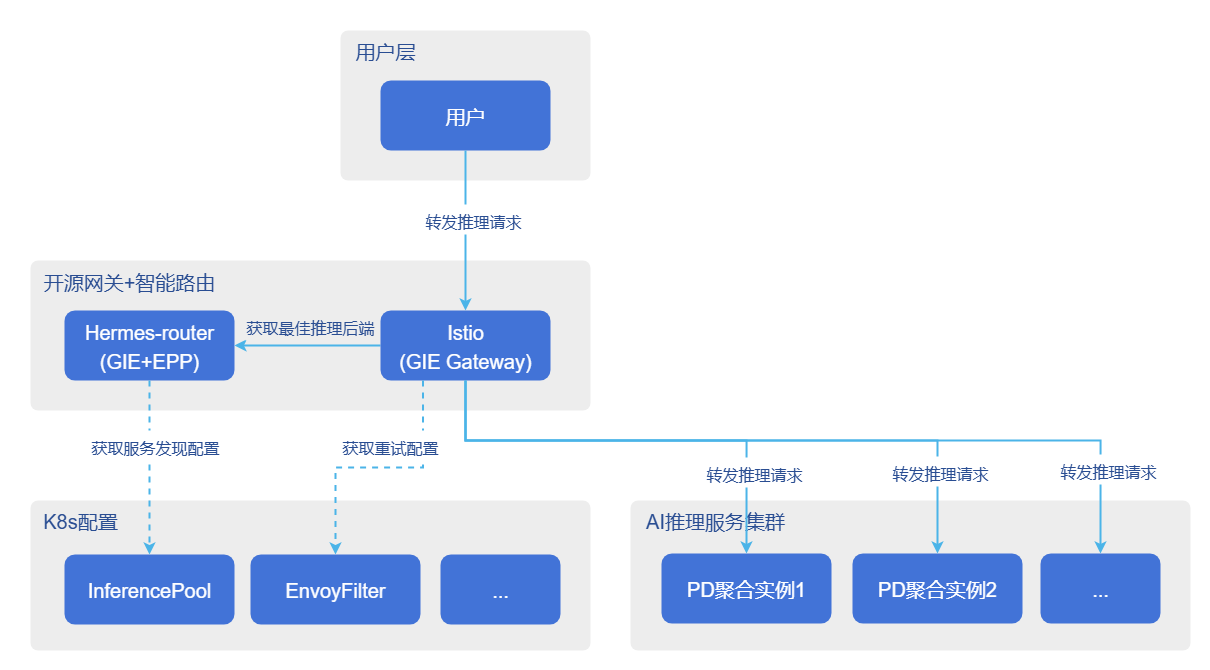
Automatic Traffic Switching
The automatic traffic switching process is as follows.
- Fault determination: The monitoring system detects business exceptions in backend services (such as long-term service unresponsiveness).
- Trigger exit: Triggers the graceful exit process of the fault handling service.
- Active offline: Deletes the Pod of the faulty backend service (or triggers automatic Pod termination).
- Traffic switching:
- New traffic: After Pod deletion, the K8s Endpoint Controller removes the IP address from the Service/InferencePool list, and new traffic is automatically routed to other nodes.
- In-flight traffic: For requests being sent to the faulty Pod, requests will fail due to Pod termination or network unreachability. At this time, the gateway proxy captures 5xx errors or connection failures, triggering automatic retry, and forwards the request to other healthy backend services.
Fault Recovery
The fault recovery process is as follows.
- Restart service: Pull up new inference backend Pods by K8s cluster or manually by users.
- Service discovery warm-up: EPP discovers and waits for Pods to be ready, and verifies service availability by sending inference requests.
- Online to receive traffic: After verification passes, EPP adds new Pods to the available service backend list.
Request Retry
The request retry mechanism is used to handle timeout or abnormal inference requests, ensuring system reliability and fault tolerance. In the GIE architecture, the retry mechanism needs to be configured on the gateway data plane. When inference requests are forwarded through the gateway, the retry logic is directly executed by the gateway's Envoy proxy. The specific request retry logic is shown in the figure below.
Figure 3 Disaster Recovery Capability Request Retry Process 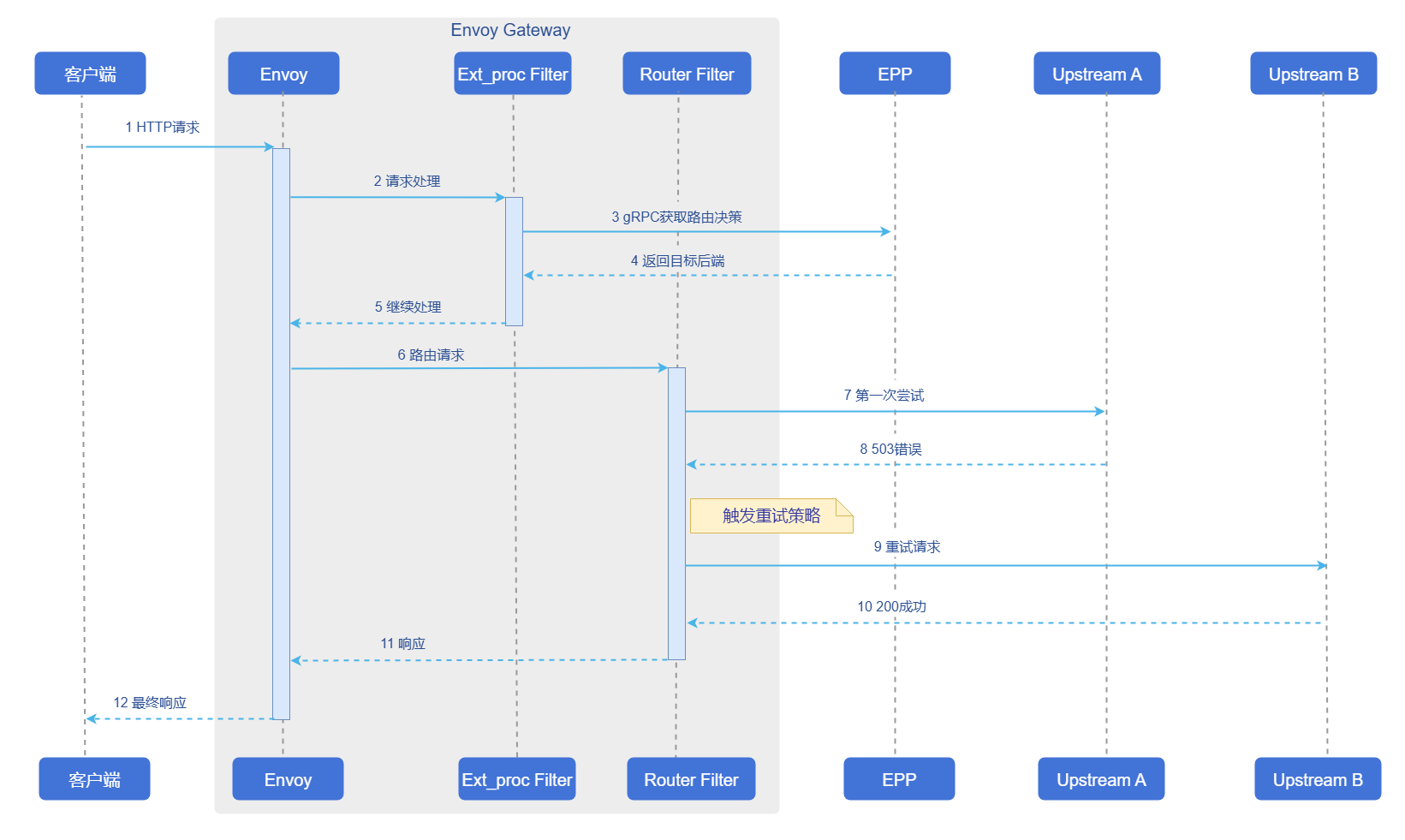
Usage Restrictions
- The current disaster recovery capabilities have been validated on the open-source gateway Istio, and the configurations in this subsection are applicable to Istio.
- Due to Envoy data plane runtime logic limitations, when the gateway triggers retry requests, the gateway will not call EPP again but will select from the inference backend Pods in the inferencepool resource pool.
- Since the current retry mechanism requires inference backends to be at the Pod resource granularity, it does not support the inferencepool resource pool containing Prefill, Decode, and other Pods that do not provide complete inference capabilities. Other disaster recovery capabilities are normally supported. The routing strategies currently not supported by the retry mechanism include: pd kv cache aware, pd bucket, and random pd.
Operation Steps
Automatic traffic switching and fault recovery capabilities are directly supported as basic capabilities of Hermes-router. Users only need to pay attention to request retry related configurations.
Enable Disaster Recovery in Standalone Deployment
When deploying Hermes-router standalone, other components required for inference services (open-source gateway, inference backend, etc.) are deployed separately by users. Users need to add the following configuration in charts/hermes-router/values.yaml to enable disaster recovery.
provider:
    istio:
      destinationRule:
        trafficPolicy:
          tls:
            mode: SIMPLE
            insecureSkipVerify: true
      retryConfig:
        enabled: false
        retryOn: "connect-failure,refused-stream,unavailable,cancelled,retriable-status-codes,5xx,reset"
        numRetries: 3
Parameter descriptions in the above configuration are shown in the table below.
Table 7 Disaster Recovery Capability Request Retry Parameters
| Parameter | Description |
|---|---|
enabled | Whether to enable request retry capability, optional: true/false. |
retryOn | List of error types that trigger retry, typical optional values include: connect-failure, refused-stream, unavailable, cancelled, retriable-status-codes, 5xx, reset, etc., can be combined as needed. |
numRetries | Maximum retry count allowed for a single request. |
mode | TLS mode when Istio communicates with backends, optional: DISABLE (TLS not enabled), SIMPLE (one-way TLS), MUTUAL/ISTIO_MUTUAL (mutual TLS, depends on certificates or identity provided by Istio). |
insecureSkipVerify | Whether to skip verification of backend service certificates, optional: true/false; true is only recommended for testing/validation environments, production environments are recommended to set to false. |
When deploying Hermes-router standalone, it is recommended to configure health probes for inference backend Pods to enhance disaster recovery effectiveness.
Enable Disaster Recovery in InferNex Deployment
When deploying through InferNex, disaster recovery configuration is preset in the helm chart. Users only need to set provider.istio.retryConfig.enabled to true in charts/infernex/values.yaml to enable request retry capability. Retry strategy parameters (such as retryOn, numRetries) can be adjusted according to business needs, configured in the same way as standalone deployment.
Inference backends in InferNex have health probes configured by default and do not require additional configuration.
Licensed under the MulanPSL2
 YueGongWangAnBei No.44030002007300