OS Consistency Check Tool Developer Guide
Feature Introduction
In container scenarios, various workloads have reduced dependencies on the OS runtime environment. However, the container platform itself has increased OS runtime environment dependencies due to managing more content. oschecktool provides a single-node check tool that checks whether a specific runtime environment meets the container platform's environmental requirements in an openFuyao scenario, to reduce deployment failures or feature failures caused by environmental dependencies.
Constraints and Limitations
- Only Linux system checks are supported; Windows versions are not supported.
- This tool only performs preliminary analysis of environmental dependencies; analysis results cannot replace actual compatibility testing.
- The check tool requires each component to provide specific check items before it can perform the corresponding checks.
- The check tool must be run with root privileges because it needs to read some system files during the check process.
Environment Preparation
Environment Requirements
As a standalone tool, it can run in a general Linux environment.
Setting Up the Environment
Download the latest version directly from the following links and extract with tar:
Verify Environment Setup
When using the oschecktool, simply run ./oschecktool in the oschecktool directory. As follows:
Figure 1 oschecktool default run result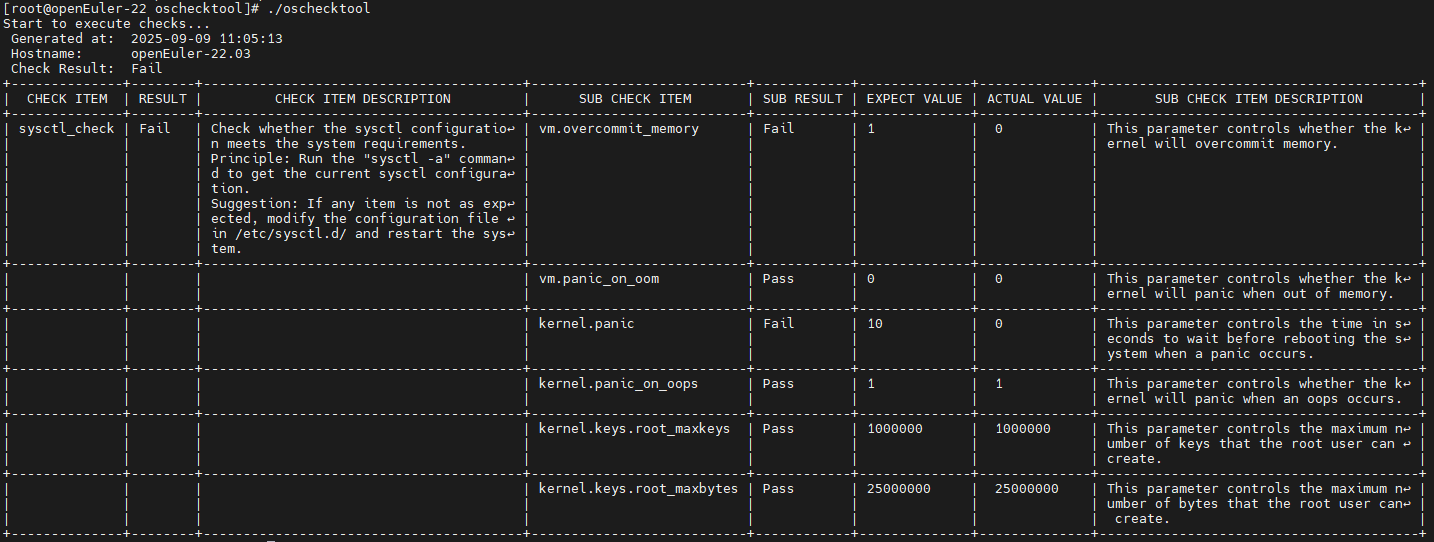
When the preset check items can run, the environment setup is successful.
Use Case: Extending Check Tool Check Items
Use Case Overview
oschecktool itself only provides some basic check items. Users can extend check items according to their own scenarios to meet their check requirements.
Check Item Organization Structure
The check tool itself is a standalone tool that runs on the node to be checked, directly outputs check results, and has no context dependencies. It mainly relies on check items for specific check logic.
Check items are located in the tool's conf directory, where:
- The check-items directory contains configuration files for all check items.
- The check-sets directory contains configuration files for all check sets.
The check item organization structure is as follows:
Figure 2 Check item organization structure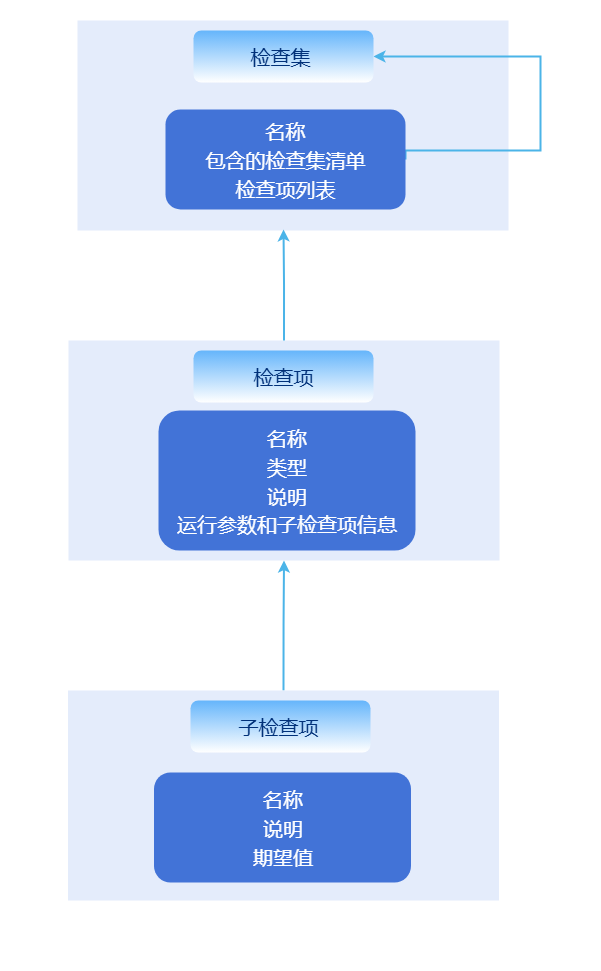
Check sets support nesting to meet the nested association requirements of various components within openFuyao.
Development Process
Create a check item configuration file
Check item configuration file directory: ./conf/check-items/
Format description:
yamlname: sysctl-check kind: kv-checker doc: | Check whether sysctl meets Kubernetes runtime requirements via the sysctl -a command spec: ...Where:
name: Check item name, the unique identifier of the check item. The check set references check items via thenamefield; thenamefield is also included in the results.kind: Check item type, differentiates different check item types based on thekindfield.doc: Check item description, provides detailed explanation of the check item. Thedocfield is also included in reports; you can provide detailed explanations of the principle in this field.spec: Specific parameters for each check item; differentkindcheck items have differentspecstructures.
Currently supported
kindfield values for check items:kv-checker: Parses data from a specific source as simple key-value pairs and checks whether a specific key meets expectations; can also be abbreviated askv.command-checker: Uses a command as a sub-check item and directly checks the command's output result; can also be abbreviated ascommand.ping-checker: Uses the ICMP protocol to check whether a target host is reachable; can also be abbreviated asping.kernel-module-checker: Checks kernel module loading status and loading parameters; can also be abbreviated askernel-module.
command-checker type check items
This check item executes a command and checks the output (stdout and stderr merged). The
specfield format example is as follows:yamlspec: - name: echo command exist # [Required] Name command: which echo && echo "Exist" || echo "Not Exist" type: string expect: "Exist" doc: Check whether the {name} command exists; the configuration process depends on the echo commandspecfield descriptions:spec[].name: [Required] Check item name.spec[].command: [Required] The command and parameters to execute; the content of this field will be run as the argument tosh -c.spec[].doc: [Optional] Output to report as a description.spec[].type&spec[].expect: [Optional], same askv-checker. If these two fields are not configured, the return value of the command configured byspec[].commandis used as the judgment (0 for success, non-0 for failure). If configured, the content configured inspec[].expectis used to check the command output.
Where
spec[].typespecifies the type ofspec[].expect, andspec[].expectis the expected result.spec[].typesupports the following types:string: String type, directly compares whether strings are equal.regex: Regular expression type, uses regex to check whether the string matches.int: Integer type, checks whether the above output matches theexpectvalue numerically.version-range: Version type, checks whether the above output is within theexpectversion range. Version numbers use dot-separated numeric format, e.g., 1.1.1;expectis an interval, e.g.,(1.2.3, 1.5)means version greater than 1.2.3 and less than 1.5;[1.2.3, ]means version greater than or equal to 1.2.3.int-range: Integer range type, checks whether the above output is within theexpectinteger range;expectis an interval, e.g.,(1, 10]means integer greater than 1 and less than or equal to 10.
kv-checker type check items
This check item parses command output or specific file content as key-value pairs and checks whether specific keys meet expectations. The
specfield format example is as follows:yamlspec: source: # Specify the data source; supports command and file; each line of data is split into key and value by the splitter file: - /etc/sysctl.conf command: - sysctl -a kvParser: # Optional; specifies how to parse key and value from source. If not specified, defaults to splitting by whitespace. If splitting fails, the line is skipped. reSplitter: = # Use this field value as a regular expression to split key, value subItems: # Sub-check items - name: kernel.threads-max key: kernel.threads-max # If key is specified, it is used for matching; otherwise name is used directly. key itself supports regex wildcards type: int-range # Integer value range expect: "[409600,)" doc: Minimum thread count <409600 may cause the system to malfunctionWhere:
spec.source.file: [Optional] Specifies the file paths to read; content from multiple files will be merged.spec.source.command: [Optional] Specifies command outputs as the subsequent data source; outputs from multiple commands will be merged. Ifspec.source.fileis specified, this parameter is ignored.spec.kvParser: [Optional] Specifies how to parse key and value from source. If not specified, defaults to splitting by whitespace. If splitting fails, the line is skipped.spec.kvParser.reGroup: [Optional] Uses this field value as a regular expression to match each line. The regex must have two or more unnamed groups; if there are more than two matching groups, the last group value is used as the value, and other group values are joined with-as the key.spec.kvParser.reSplitter: [Optional] Specifies the delimiter for key and value; the delimiter is used as a regular expression. If there are multiple matches, the first match is used for splitting. Ifspec.kvParser.reGroupis specified, this parameter is ignored.spec.kvParser.reIgnore: [Optional] Matched lines are ignored and not parsed.spec.subItems[]: Specific content to be checked, wherekeymatches the previously parsed keys, andexpectmatches the previously parsed values. Ifkeyis empty,nameis used as the key. Other fields have the same meaning as same-named fields incommand-checker.
ping-checker type check items
This check item uses the ICMP protocol to check whether a target host is reachable. The default is 5 checks, each with a 5-second timeout. Success with 3 or more checks is considered a successful check; otherwise it fails. Supports IPv4 and IPv6. The
specfield format example is as follows:yamlspec: targets: - 192.168.1.1@hostnameWhere:
spec.targets[]: List of target hosts to check, in the formatip@nodeName. If no node name is specified, the IP is used as the node name by default. The node name is mainly for display in reports.
kernel-module-checker type check items
This check item parses
/proc/modulesand the/sys/moduledirectory to check whether specified kernel modules are loaded and whether their loading parameters meet expectations. Thespecfield format example is as follows:yamlspec: - name: ip_vs doc: Check whether the ip_vs module is loaded properly detail: - name: parameters/conn_tab_bits expect: "[0, )" type: int-range - name: not_exist_module doc: Test a non-existent module, should fail the check - name: nf_conntrack doc: Test an existing module but with loading parameters that do not meet requirements detail: - name: parameters/expect_hashsize expect: "(, 0)" type: int-rangeWhere:
spec[].name: [Required] Kernel module name.spec[].doc: [Optional] Output to report as a description.spec[].detail[]: [Optional] Module parameter check items. Each parameter check item is a key-value pair, where key is the parameter path (relative path based on/sys/module/<module_name>),expectis the expected value, andtypeis the value type.expectandtypehave the same meaning as same-named fields in other check items.
Extended Parameters
Since some parameters can only be determined at runtime, oschecktool supports specifying some extended parameters in check items, which are bound and assigned via the
-pparameter when running. Example:yamlname: ping_check kind: ping doc: Simulate checking whether target IPs are reachable; specific targets are entered via the -p parameter params: - name: ping-addr desc: Check whether the target IP is reachable multi: true spec: targets: '{{ping-addr}}'Where:
params[].name: [Required] Parameter name; valid character range:A-Za-z0-9_-.params[].desc: [Optional] Description.params[].multi: [Optional] Whether it is a multi-value parameter; defaults to false. Multiple values will be set as a string array; a single value will be a string.
{{param.name}}can be used inspecto reference parameter values, but only supports completely setting a yaml field to the parameter value.Define check sets
Check sets are used to organize multiple check items together for easy selection. The check set archive directory is
<tool directory>/conf/check-sets. The check set format example is as follows:yamlname: default desc: default check set include: - other_check_set items: - sysctl_checkWhere:
name: [Required] Check set name.desc: [Optional] Description.include: [Optional] Include other check sets; the included check sets will be merged into the current check set, referencing thenamefield of other check sets.items: [Optional] Check item list, referencing thenamefield of check items.
Validate check items
Run oschecktool and use the
-soption to specify your new check set:<tool directory>/oschecktool -s <check set name>. You can also omit-sto run all check items by default.
If a check item result is Error, you can analyze the issue based on the logs under<tool directory>/log.
Licensed under the MulanPSL2
 YueGongWangAnBei No.44030002007300