Log Extension Component Development Guide
Feature Introduction
Log system as pluggable extension component, independently deployed and running in openFuyao platform, provides powerful log filtering, searching, querying and alerting capabilities for platform and users.
Constraints and Limitations
None.
Environment Preparation
For detailed installation steps, please refer to Installation Guide.
Usage Scenarios
Usage Scenario Overview
Developers need to install log extension component in openFuyao cluster management interface themselves. When installing extension component, several settings need to be configured to enable log system to better adapt to their own business scenarios. Configurable options include:
- Configure time limit from creation to now for collected logs and log storage update time policy.
- Configure log collection source configuration.
- Configure custom alert triggering rules for log alerts.
System Architecture
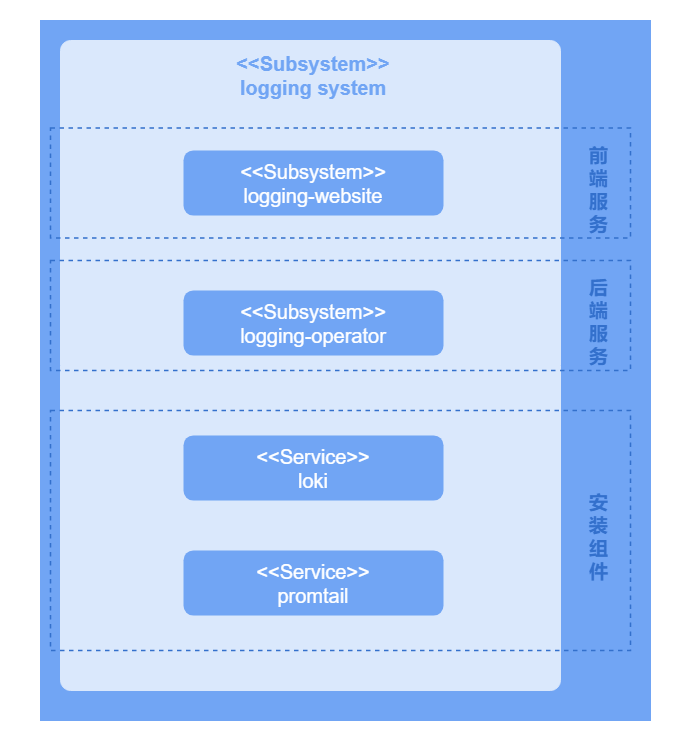
Log system business layer is divided into UI layer, backend layer, and component layer.
UI layer: Users can perform log operations on console-website.
Backend layer: logging-operator is deployed in microservice form providing some core capabilities, including log filtering, searching, querying, configuration and alerting functions.
Component layer: Component layer provides key log collection, storage and processing capabilities for log system, and supports integration with backend layer, enabling users to efficiently perform log operations.
Figure 1 Log Extension Component System Architecture
Interface Description
Main interface descriptions are shown in following table.
Table 1 Main Interface Description
| Interface | Description |
|---|---|
| PATCH /rest/logging/v1/update-config | Add new collection job and modify existing collection job. |
| GET /rest/logging/v1/configmap | List collection source paths of all workflows of current log collection component. |
Development Steps
Prerequisites
Log extension component has been successfully installed. For detailed installation steps, please refer to Logs.
Testing and Verification
When configured collection task name and collection source path match collection paths listed in workflows of current log collection system, it indicates that this configuration has successfully taken effect. Interface for viewing collection source paths of all workflows of current log collection component is shown in following table.
Table 2 Testing Interface Description
| Interface | Description |
|---|---|
| GET /rest/logging/v1/configmap | List collection source paths of all workflows of current log collection component. |
Licensed under the MulanPSL2
 YueGongWangAnBei No.44030002007300