AI Inference Integrated Deployment
Feature Introduction
AI Inference Integrated Deployment (InferNex) is an end-to-end integrated deployment solution specifically designed for optimizing AI inference services in cloud-native environments. Built on the Kubernetes Gateway API Inference Extension (GIE) and mainstream LLM technology stack, this solution seamlessly integrates core acceleration modules including open-source gateways, intelligent routing, high-performance inference backends, global KVCache management, scaling decision frameworks, and inference observability systems through Helm Charts. It provides a complete acceleration chain from request ingress, dynamic routing, inference execution to resource management and monitoring, aimed at improving inference throughput and reducing TTFT/TPOT latency to achieve a one-stop efficient AI service deployment experience.
Application Scenarios
- Aggregated Inference Scenario: Supports aggregated inference architecture, suitable for small to medium-scale inference scenarios.
- PD-Disaggregated Inference Scenario: Supports Prefill-Decode disaggregated inference architecture, suitable for large-scale, high-throughput inference scenarios.
- AI Inference Software Suite Scenario: Supports the original AI inference software suite mode, suitable for software deployment in appliance scenarios. For specific feature usage methods, please refer to the guide.
Capability Scope
- Supports users to selectively install open-source gateway, intelligent routing, global KVCache management, and inference observability components based on scenario requirements.
- Intelligent routing supports integration with multiple open-source gateways, which need to be adapted to GIE.
- Intelligent routing provides advanced routing strategies such as KVCache-aware and bucket scheduling, supporting optimized inference request scheduling in multiple scenarios.
- Intelligent routing provides disaster recovery capabilities, including automatic traffic switching, fault awareness, and request retry.
- Supports deploying inference engines in both aggregated and PD-disaggregated modes, and can configure the number of inference engine nodes.
- Supports configuring Mooncake as the distributed KVCache management backend.
- Supports appending additional startup parameters based on the built-in vLLM startup commands and common configuration items (model length, batch size, memory utilization, block size, etc.).
- Supports configuring different versions of vLLM inference engines.
- Supports fine-grained resource configuration at the inference engine node level, including CPU limits, memory limits, environment variables, volume mounts, etc.
- Adapted to Huawei Ascend 910B4 chip inference acceleration.
- Supports users to configure inference chips.
- Implements full-chain metric collection from AI gateway, inference engine, Mooncake to infrastructure.
- AI Gateway: Performance, resource consumption, security and compliance auditing, etc.
- Inference Engine: API Server, model input/output, inference process, etc.
- Mooncake: Mooncake master, Mooncake client, and transfer engine.
- Infrastructure: Ray, K8s, and hardware.
- Provides an independent hardware health diagnosis module that periodically collects underlying metrics such as NPU/GPU temperature, power consumption, and error codes, and reports them in real-time through a distributed message queue system. The diagnosis module subscribes to and analyzes collected data, combined with device model, driver, and firmware information, identifies typical fault patterns based on threshold rules and anomalous metric analysis, and outputs diagnostic conclusions and handling suggestions, implementing a closed loop from data collection to health assessment.
- Provides SLA-related metrics (such as throughput, latency, etc.) to support automatic scaling decisions for inference services, implementing elastic scaling based on load and performance.
- Provides tidal algorithm, supporting starting/deleting business resources at specified time periods.
- Provides a scaling decision framework, supporting metric-driven and event-driven control of resource replica scaling, and supporting flexible extension of user-defined scaling decision algorithms and custom resource management logic.
- Provides dynamic PD group scaling capability, utilizing abstract resource management objects to manage PD instances, implementing proportional dynamic PD scaling.
- Supports one-click deployment of inference clusters in K8s environment via Helm.
Highlight Features
- Component Selection and Decoupling: Open-source gateway, intelligent routing, global KVCache management, and inference observability components all adopt a selective installation design. Users can enable or disable them as needed based on actual scenarios, and support replacement with self-developed or third-party components with equivalent capabilities.
- Open-Source Gateway Capability Integration: Supports integration with GIE-adapted open-source gateways (Istio, Envoy AI Gateway, etc.), with key gateway capabilities such as service discovery, fault awareness, request retry, traffic control, and security authentication.
- KVCache Aware Routing Strategy: Compared to traditional load balancing, implements smarter request routing by sensing the global KVCache status of inference nodes, reducing redundant KVCache computation.
- PD-Bucket Routing Strategy: Bucket scheduling strategy under PD-disaggregated architecture, improving inference throughput in long/short request and medium/high concurrency scenarios.
- Prefill-Decode Disaggregated Architecture: Supports industry-leading PD-disaggregated architecture, significantly improving LLM inference throughput.
- vLLM Mooncake Integration: vLLM v1 architecture integrates Mooncake distributed KVCache management system, providing distributed KVCache pooled storage and high-speed KVCache transmission across instances, improving cache reuse efficiency.
- Second-Level Metric Push: Integrates NATS distributed message queue system to achieve efficient second-level metric push. After acquiring hardware health data, the collection module immediately pushes data to the diagnosis module through NATS. This mechanism ensures the diagnosis module can quickly receive the latest status information for timely anomaly detection and fault analysis.
- PD-Orchestrator Features: Integrates tidal algorithm, scaling decision framework, and dynamic PD scaling three major capabilities, covering PD instance independent scaling, PD instance group proportional scaling, metric-driven scaling, tidal business scheduled scaling and other scenarios, ensuring service availability during traffic surges.
- One-Click Deployment: Implements one-click integrated deployment of three major components in K8s environment through Helm Chart.
Implementation Principle
Figure 1 AI Inference Integrated Component Diagram
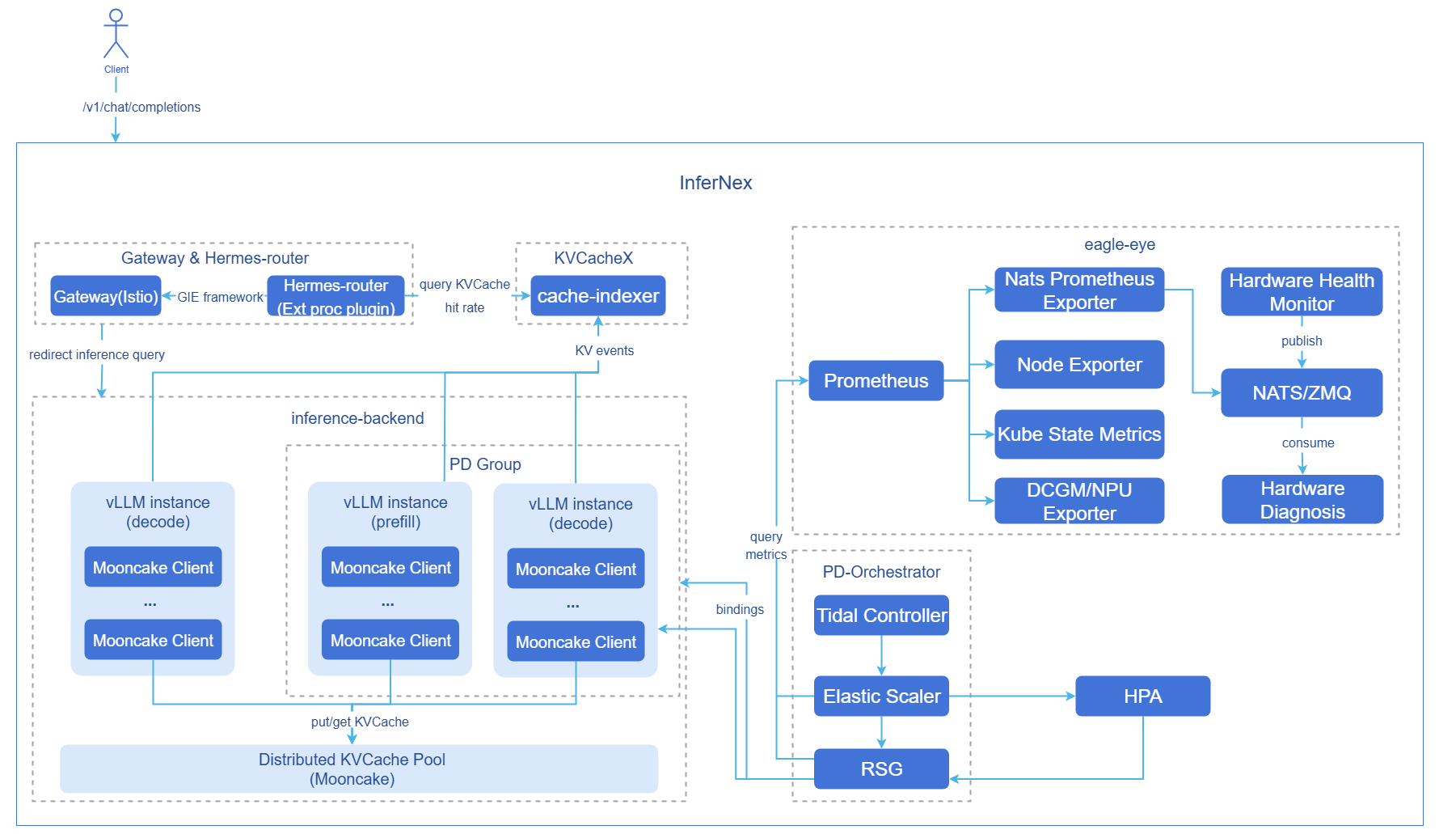
- Hermes-router: Intelligent routing module. Responsible for receiving user requests and forwarding them to the optimal inference backend service based on routing strategies. For implementation principles, see AI Inference Hermes Router.
- cache-indexer: Global KVCache manager, providing data support for routing decisions.
- inference-backend: Inference backend module, providing high-performance large model inference services based on vLLM, consisting of 1 Proxy Server instance, n vLLM Prefill inference engine instances, and n vLLM Decode inference engine instances.
- vLLM: vLLM inference engine instance.
- Mooncake: Distributed KVCache pooled storage and providing high-speed KVCache P2P transmission between PD instances.
- eagle-eye: Provides near-real-time observable metric publish-subscribe mechanism, ensuring millisecond-level latency for critical metrics; covers business runtime state, system runtime state, and hardware health metrics for inference scenarios, and provides hardware fault awareness and diagnosis modules. For implementation principles, see AI Inference Eagle Eye.
- PD-Orchestrator: Composed of Tidal Controller, Elastic Scaler, and RSG three components, providing tidal scheduled scaling, metric-driven scaling, and multi-resource proportional scaling capabilities. For implementation principles, see AI Inference Elastic Scaling, AI Inference Tidal Algorithm, Resource Scaling Group.
Component Initialization Process:
Open-source gateway (default Istio):
- After users deploy the Istiod control plane, Istiod starts and begins listening to Kubernetes Gateway API-related CRDs (GatewayClass, Gateway, HTTPRoute, etc.).
- Istio automatically creates a GatewayClass resource, declaring itself as the gateway controller.
- After users configure a Gateway CR, Istiod generates the corresponding Envoy configuration and automatically creates an Envoy Proxy Deployment and Service in the target namespace, serving as the actual gateway entry point.
- The data plane completes configuration loading, and the gateway starts forwarding external traffic normally.
Intelligent routing:
- Intelligent routing reads the configuration.
- Starts the inference backend service discovery module (periodically updates backend list).
- Starts the inference backend metric collection module (periodically updates backend load metrics).
Inference backend:
- Starts vLLM inference engine instances based on configuration.
- vLLM inference engine instances bind to hardware devices and load models.
- Each vLLM inference engine instance starts a Mooncake client and registers memory/SSD storage pools.
- Prefill inference engine instances and Decode inference engine instances establish connections with each other's exposed KV connector ports.
- In PD-disaggregated deployment mode, the Proxy Server component starts and begins automatic discovery of inference engine instances (periodically updates the inference engine instance list).
Global KVCache manager:
- Starts cache-indexer instances based on configuration.
- Starts the inference engine instance automatic discovery module (periodically updates the inference instance list).
PD-Orchestrator:
- Starts tidal-scheduler controller, elastic-scaler controller, and ResourceScalingGroup controller based on configuration.
- Deploys default ElasticScaler CR instance and ResourceScalingGroup CR instance based on configuration, binding to vLLM inference backend.
- Creates HPA resources, performing PD group scaling on vLLM inference backend based on metrics such as CPU utilization.
Request Flow:
- Request Ingress: User requests first arrive at the GIE open-source gateway Istio.
- KVCache Query: Gateway plugin Hermes-router queries cache-indexer for prefix hit information of this request in the cluster.
- Routing Decision: Hermes-router selects the optimal inference backend service based on KVCache hit status, GPU utilization, and other metrics.
- Request Forwarding: Open-source gateway forwards the request to the selected inference backend service.
- KVCache Retrieval: Prefill node inference engine attempts to retrieve cached prefix KVCache from Mooncake KVCache pool.
- Prefill Computation: Prefill node inference engine performs token prefill computation for the missed KVCache portions and writes newly generated KVCache to the Mooncake KVCache pool.
- KVCache Transmission: Prefill node inference engine transmits the request's KVCache to Decode node inference engine at high speed through Mooncake.
- Inference Generation: Prefill inference engine generates the first token result, and Decode inference engine continuously generates subsequent tokens based on the received KVCache.
- Inference Instance Dynamic Scaling: When the pressure on inference backend services increases/decreases, HPA monitors corresponding metrics and calculates the number of replicas needed for scaling up/down, implementing inference backend service scaling.
- Result Return: Inference results generated by the inference engine are returned to the open-source gateway, then returned to the client.
- Global KVCache Management Asynchronous Update: Prefill inference engine generates KV Events during the prefill process, cache-indexer subscribes to these KV Events and updates global KVCache metadata in real-time.
Relationship with Related Features
- The intelligent routing Hermes-router component depends on inference engines (such as vLLM) to provide inference services and metric interfaces.
- The KVCache global manager cache-indexer component depends on inference engines (such as vLLM) to provide KVCache storage and removal events.
- The tidal algorithm Tidal-scheduler needs to depend on the elastic scaling framework elastic-scaler to modify the replica count of resource objects that need scheduled scaling.
Related Examples
Example reference: values.yaml
Installation
Prerequisites
Hardware Requirements
- At least one inference chip per inference node.
- At least 32GB of memory and 4 CPU cores per inference node.
Software Requirements
- Kubernetes v1.33.0 or above.
- npu-operator component must be installed.
- InferNex will deploy the open-source gateway with one click, using Istio by default, so the environment must not have conflicts.
- Components included in InferNex have not been installed or deployed in the target namespace: hermes-router, Inference Backend, cache-indexer.
- Components included in InferNex have not been installed or deployed in the eagle-eye and nats namespaces: eagle-eye.
Network Requirements
- Online installation requires access to the image repository: oci://cr.openfuyao.cn.
Permission Requirements
- User has permission to create RBAC resources.
Getting Started with Installation
Standalone Deployment
This feature can be deployed independently in the following two ways:
Obtaining Installation Package from openFuyao Official Image Repository
Pull the installation package.
bashhelm pull oci://cr.openfuyao.cn/charts/infernex --version xxxWhere
xxxneeds to be replaced with the specific installation package version, such as0.21.1. The pulled installation package is in compressed format.Decompress the installation package.
bashtar -xzvf infernex-xxx.tgzWhere
xxxneeds to be replaced with the specific installation package version, such as0.21.1.Install and deploy.
Taking namespace
ai-inferenceand release nameinfernexas an example, execute the following command in the same directory asinfernex:bashhelm install -n ai-inference infernex ./infernex
Obtaining Complete Project from openFuyao GitCode Repository
Pull the project from the repository.
bashgit clone https://gitcode.com/openFuyao/InferNex.gitInstall and deploy.
Taking namespace
ai-inferenceand release nameinfernexas an example, execute the following command in the same directory asInferNex:bashcd InferNex/charts/infernex helm dependency build helm install -n ai-inference infernex .
Offline Installation
Obtain the offline installation package from the openFuyao artifact repository.
bashwget https://openfuyao.obs.cn-north-4.myhuaweicloud.com/openFuyao/ext-components/InferNex/openFuyao-infernex-offline-v26.03.tar.gz Note:
Note:
If users want to manually create an InferNex offline package, please refer to Offline Package Creation Guide.Decompress the offline installation package.
bashtar -xzvf openFuyao-infernex-offline-v26.03.tar.gzDecompress the helm chart installation package, load images into the local repository, and decompress InferNex built-in model cache files.
bashcd openFuyao-infernex-offline-v26.03 && bash install.shInstall and deploy.
If users want to use custom model files, please refer to Custom Model Directory Configuration.
Taking namespace
ai-inferenceand release nameinfernexas an example, execute the following command in the same directory as the chart package fileinfernex:bashhelm install -n ai-inference infernex ./infernex
Configuring AI Inference Integrated Deployment
Prerequisites
- Have obtained the InferNex project files.
Operation Steps
Prepare the
values.yamlconfiguration file.Refer to the Getting Started with Installation section to find the
values.yamlconfiguration file.Configure global settings.
global.image.pullPolicy: Controls the pull policy for all images deployed by InferNex, defaults to
IfNotPresentfor online deployment andNeverfor offline deployment.global.imagePullSecrets: Secret configuration for private image repositories, used to pull images from private registries. Example:
[{"name": "registry-secret"}].global.env: Defines default environment variables for all
inference-backendservice instances, which will be injected into all inference engine containers and cache-indexer containers. Commonly configured are HuggingFace offline download switch and HuggingFace access K8s Secret.global.autoDownloadModel: Whether to automatically download Huggingface models through InferNex. If you want to use local non-Huggingface models or are in an offline environment, set this to
false.global.modelName: Inference model name (required). If
global.modelPathis not configured, vLLM will load weights using the Huggingface model name. Ifglobal.modelPathis configured, vLLM will use this configuration as the model alias for matching themodelfield in inference requests. The default inference model is"Qwen/Qwen3-8B".global.modelPath: Local path to inference model weights (optional). If configured, vLLM uses the local path method to start, otherwise uses the model name configured in
global.modelNameto load the Huggingface model. The current version of this configuration cannot be used together with thecache-indexercomponent. Since model weights are mounted to the container's/root/.cachedirectory through theglobal.cachePathmethod, this configuration should be/root/.cache/{model directory after cachePath}.global.cachePath: Path on the host machine storing
HuggingFacemodel cache, structured as{cache directory}/huggingface/hub/{model directory}. This path will be mounted to the/root/.cachedirectory of all inference engine containers and cache-indexer containers throughhostPath. For detailed description and examples of custom model directory configuration, please refer to Custom Model Directory Configuration. The default configured host machine model cache path is/home/llm_cache.Local non-Huggingface model configuration example: If the local model path on the host machine is
/mnt/public/models/my_models/Qwen3-8B-W8A8/, then configure InferNex as:yamlglobal: env: - name: HF_HUB_OFFLINE value: "0" autoDownloadModel: false modelName: "Qwen3-8B-W8A8" modelPath: "/root/.cache/Qwen3-8B-W8A8/" cachePath: "/mnt/public/models/my_models/"
Configure intelligent routing parameters.
Configure gateway parameters
- inferenceGateway.enabled: Open-source gateway switch.
trueto enable,falseto disable. - inferenceGateway.name: Name of the Gateway resource. Must be consistent with
hermes-router.httpRoute.parentRef.name. - inferenceGateway.className: Gateway class name. Default value
"istio", indicating use of Istio control plane management. - inferenceGateway.listeners: Defines listener configuration.
name: http: Listener name.port: 80: Listening port.protocol: HTTP: Protocol type.
Configure routing image pull
- hermes-router.enabled: Intelligent routing switch.
trueto enable,falseto disable. Note that since intelligent routing itself is an extension plugin, it cannot be used standalone without a gateway. - hermes-router.image.repository: Intelligent routing image address.
- hermes-router.image.tag: Intelligent routing image version.
Configure routing strategy
hermes-router.inferenceExtension.replicas: Number of intelligent routing replicas. Defaults to
1.hermes-router.inferenceExtension.pluginsConfigFile: Specifies the routing strategy configuration file name to use, which must match the key name in
hermes-router.inferenceExtension.pluginsCustomConfig.hermes-router.inferenceExtension.pluginsCustomConfig: Defines custom routing strategy configuration content. Currently supports the following routing strategies:
- KVCache Aware (Aggregated): Refer to
epp-aggregate-kv-cache-aware.yaml. - KVCache Aware (PD-Disaggregated): Refer to
epp-pd-kv-cache-aware.yaml. - PD-Disaggregated Bucket Scheduling: Refer to
epp-pd-bucket.yaml. - PD-Disaggregated Random Scheduling: Refer to
epp-random-pd.yaml.
Configuration must include plugin configuration and scheduling configuration in the routing strategy. For specific configuration examples, refer to: hermes-router routing strategy reference configuration, which provides complete reference configurations for all the above routing strategies.
- KVCache Aware (Aggregated): Refer to
Configure InferencePool
- hermes-router.inferencePool.modelServers.matchLabels: Inference service label selector, used to select Pods to join InferencePool. Pods must satisfy all labels simultaneously and only match within the same namespace; cross-namespace is not supported.
- hermes-router.inferencePool.targetPorts: Actual port numbers listened to by each inference service in the InferencePool, used to handle inference traffic. The default inference port is
8000. - hermes-router.inferencePool.modelServerType: Inference engine type. Defaults to
vllm.
Configure HTTPRoute
- hermes-router.httpRoute.inferenceGatewayName: Name of the Gateway resource. Must be consistent with
inferenceGateway.name.
Configure request retry
- hermes-router.provider.retryConfig: Defines request retry configuration.
enabled: Request retry switch.trueto enable,falseto disable. Defaultfalse.retryOn: List of error types that trigger retry, typical optional values include:connect-failure,refused-stream,unavailable,cancelled,retriable-status-codes,5xx,reset, etc., can be combined as needed. All selected by default.numRetries: Maximum number of retries allowed for a single request. Default is3.
- hermes-router.provider.istio.destinationRule.tls: Defines communication rules between Istio gateway and inference backend.
mode: TLS mode when Istio communicates with backends, options:DISABLE(TLS not enabled),SIMPLE(one-way TLS),MUTUAL/ISTIO_MUTUAL(mutual TLS, dependent on certificates or Istio-provided identity). DefaultSIMPLE.insecureSkipVerify: Whether to skip verification of backend service certificates, options:true(skip),false(do not skip). Defaulttrue.
- inferenceGateway.enabled: Open-source gateway switch.
Configure inference backend parameters.
Configure inference backend image parameters
- inference-backend.images.inferenceEngine: Configure inference engine image (repository, tag). InferNex defaults to using
vllm-ascend:v0.13.0inference engine. - inference-backend.images.proxyServer: Configure Proxy Server image (repository, tag).
Configure inference backend environment variables
- inference-backend.env: Inference backend environment variable master configuration, these environment variables will be injected into all inference service inference engine containers (Prefill, Decode) and Proxy Server containers. Users can configure according to actual needs by referring to the vllm-ascend environment variable configuration documentation.
Configure inference backend file mount parameters
- inference-backend.volumeMounts: volumeMounts configuration that all vLLM deployments will mount. Default configuration includes Ascend device-related volumeMounts. Users can add more detailed mount items as needed. For detailed configuration instructions, please refer to Default Mount Configuration for Inference Backend.
- inference-backend.volumes: volumes configuration that all vLLM deployments will mount. Default configuration includes Ascend device-related volumes. For detailed configuration instructions, please refer to Default Mount Configuration for Inference Backend.
Configure inference services
inference-backend.services: Inference service configuration, supports users to configure multiple independent vLLM inference services. Each service can independently configure parameters such as model, deployment mode (aggregated mode or PD-disaggregated mode), resources, etc., implementing mixed deployment of multiple deployment forms of inference services.
Basic configuration
- name: Inference service name.
- enabled: Whether to deploy this service. InferNex requires that at least one inference service in the inference backend is enabled.
- mode: Inference backend service mode, two options:
aggregatedandpd, representing aggregated architecture and PD-disaggregated architecture respectively. - service.port: Service port, defaults to
8000. - pdGroupID: PD mode group ID, needs to be set under PD-disaggregated architecture, indicating that all Proxy Server services and Prefill and Decode inference backend services under this inference service are within this group, used for intelligent routing strategy discovery and service filtering.
Configure inference engine Connector
kvTransferConfig.connectorConfig: Configure KVCache Connector, used to define KVCache reuse methods for Prefill and Decode phases. Provides configuration objects in YAML format, configuration will be automatically converted to JSON format by key-value pairs, and Prefill/Decode node-specific fields such as
kv_role,kv_rank,engine_id,tp_size,dp_size, etc., will be automatically filled; manual configuration is not required (manual user configuration can override automatic filling). For PD-disaggregated mode deployment, it is recommended to useMultiConnectorwithkv_connector(combiningMooncakeConnectorV1andAscendStoreConnector), and for aggregated mode deployment, it is recommended to useAscendStoreConnector.Due to differences in vllm/vllm-ascend versions, connector names and detailed configuration items may differ. For detailed configuration instructions, please refer to the target vllm/vllm-ascend version documentation. InferNex defaults to using
vllm-ascend:v0.13.0inference engine, users can refer to vllm-ascend v0.13.0 version documentation.kvTransferConfig.mooncake.configPath: When using Mooncake as the KVCache management system for the inference engine, the configuration file for starting the Mooncake client inside the inference engine. Default path is
"/app/mooncake.json".kvTransferConfig.mooncake.use_store: When using Mooncake as the KVCache management system for the inference engine, used to control whether to use Mooncake Store mode. If the connector type above applies a Mooncake Store type Connector, this configuration needs to be enabled.
kvTransferConfig.mooncake.config: Mooncake client configuration file content (yaml format). The inference engine pod's initContainer will automatically convert and generate a
mooncake.jsonconfiguration file for direct use by the Mooncake client inside the inference engine. For detailed configuration item descriptions, please refer to the Mooncake documentation.
Configure inference engine startup items in PD-disaggregated mode
- pd.prefill.replicas: Number of Prefill engine replicas.
- pd.prefill.tensorParallelSize: Prefill engine tensor parallelism degree.
- pd.prefill.pipelineParallelSize: Prefill engine pipeline parallelism degree, currently only supports configuration of 1.
- pd.prefill.dataParallelSize: Prefill engine data parallelism degree.
- pd.prefill.cardCount: Used to specify the number of inference cards allocated to the Prefill engine; defaults to
tp*dp*ppwhen not configured. In multi-machine single-model deployment scenarios, this parameter must be manually set, otherwise the default calculation based ontp*dp*ppwill produce deviations. - pd.prefill.enablePrefixCaching: Whether Prefill engine enables prefix caching.
- pd.prefill.maxModelLen: Prefill engine maximum model length.
- pd.prefill.maxNumBatchedTokens: Prefill engine maximum number of batched tokens.
- pd.prefill.gpuMemoryUtilization: Prefill engine GPU memory utilization.
- pd.prefill.blockSize: Prefill engine block size.
- pd.prefill.env: Prefill engine container environment variable list, used to configure environment variables specifically needed by this inference service's Prefill inference engine Pod.
- pd.prefill.volumeMounts: Prefill engine container volumeMounts list, used to configure volume mounts specifically needed by this inference service's Prefill inference engine Pod.
- pd.prefill.volumes: Prefill engine container volumes list, used to configure volumes specifically needed by this inference service's Prefill inference engine Pod.
- pd.prefill.extraArgs: Prefill engine additional startup parameter list. In some scenarios where users need performance tuning for startup command-specific configurations, this configuration item is responsible for appending additional configuration items to the inference engine startup command.
- pd.decode.replicas: Number of Decode engine replicas.
- pd.decode.tensorParallelSize: Decode engine tensor parallelism degree.
- pd.decode.pipelineParallelSize: Decode engine pipeline parallelism degree, currently only supports configuration of 1.
- pd.decode.dataParallelSize: Decode engine data parallelism degree.
- pd.decode.cardCount: Used to specify the number of inference cards allocated to the Decode engine; defaults to
tp*dp*ppwhen not configured. In multi-machine single-model deployment scenarios, this parameter must be manually set, otherwise the default calculation based ontp*dp*ppwill produce deviations. - pd.decode.enablePrefixCaching: Whether Decode engine enables prefix caching.
- pd.decode.maxModelLen: Decode engine maximum model length.
- pd.decode.maxNumBatchedTokens: Decode engine maximum number of batched tokens.
- pd.decode.gpuMemoryUtilization: Decode engine GPU memory utilization.
- pd.decode.env: Decode engine container environment variable list, used to configure environment variables specifically needed by this inference service's Decode inference engine Pod.
- pd.decode.volumeMounts: Decode engine container volumeMounts list, used to configure volume mounts specifically needed by this inference service's Decode inference engine Pod.
- pd.decode.volumes: Decode engine container volumes list, used to configure volumes specifically needed by this inference service's Decode inference engine Pod.
- pd.decode.extraArgs: Decode engine additional startup parameter list.
- pd.proxyServer.discoveryInterval: Proxy Server inference backend service discovery interval (unit: seconds).
Configure inference engine in aggregated mode
- aggregated.replicas: Number of aggregated mode inference engine replicas.
- aggregated.enablePrefixCaching: Whether aggregated mode inference engine enables prefix caching.
- aggregated.tensorParallelSize: Aggregated mode inference engine tensor parallelism degree.
- aggregated.pipelineParallelSize: Aggregated mode inference engine pipeline parallelism degree.
- aggregated.dataParallelSize: Aggregated mode inference engine data parallelism degree.
- aggregated.cardCount: Used to specify the number of inference cards allocated to the aggregated mode inference engine; defaults to
tp*dp*ppwhen not configured. In multi-machine single-model deployment scenarios, this parameter must be manually set, otherwise the default calculation based ontp*dp*ppwill produce deviations. - aggregated.gpuMemoryUtilization: Aggregated mode inference engine GPU memory utilization.
- aggregated.blockSize: Aggregated mode inference engine block size.
- aggregated.maxModelLen: Aggregated mode inference engine maximum model length.
- aggregated.maxNumBatchedTokens: Aggregated mode inference engine maximum number of batched tokens.
- aggregated.env: Aggregated mode inference engine container environment variable list, used to configure environment variables specifically needed by this inference service's inference engine Pod.
- aggregated.volumeMounts: Aggregated mode inference engine container volumeMounts list, used to configure volume mounts specifically needed by this inference service's inference engine Pod.
- aggregated.volumes: Aggregated mode inference engine container volumes list, used to configure volumes specifically needed by this inference service's inference engine Pod.
- aggregated.extraArgs: Aggregated mode inference engine additional startup parameter list.
Configure inference engine resources
- resources.requests: Inference engine requested resources (such as CPU, memory, etc.).
- resources.limits: Inference engine resource limits (such as CPU, memory, etc.).
- inference-backend.images.inferenceEngine: Configure inference engine image (repository, tag). InferNex defaults to using
Configure KVCache global manager parameters.
Configure whether to enable KVCache global manager
- cache-indexer.enabled: cache-indexer is an optional component in InferNex, defaults to
true.
Configure KVCache global manager's inference backend service discovery
cache-indexer.app.serviceDiscovery.labelSelector: K8s Service resource labels for automatic service discovery of inference backends. This label is configured in
inference-backend.service.openfuyao.Example: If the inference backend K8s Service resource label configuration is:
yamllabels: openfuyao.com/engine: vllm inference-backend: "true"Then this property should be configured as
labelSelector: "inference-backend=true,openfuyao.com/engine=vllm".cache-indexer.app.serviceDiscovery.refreshInterval: Automatic service discovery time interval for inference backends (unit: seconds).
Configure KVCache global manager's K8s service
- cache-indexer.service.name: cache-indexer's K8s Service name, defaults to
cache-indexer-service. - cache-indexer.service.port: cache-indexer's K8s Service port, defaults to
8080.
Configure KVCache global manager image pull
- cache-indexer.image.repository: cache-indexer image address.
- cache-indexer.image.tag: cache-indexer image tag.
- cache-indexer.enabled: cache-indexer is an optional component in InferNex, defaults to
Configure AI inference observability parameters.
Configure whether to enable AI inference observability
- eagle-eye.enabled: Controls whether to enable AI inference observability.
Configure hardware health monitoring image pull
- hardware-monitor.images.core.repository: hardware-monitor image address.
- hardware-monitor.images.core.tag: hardware-monitor image tag.
- hardware-monitor.images.core.pullPolicy: hardware-monitor image pull policy.
Configure hardware diagnosis image pull
- hardware-diagnosis.images.core.repository: hardware-diagnosis image address.
- hardware-diagnosis.images.core.tag: hardware-diagnosis image tag.
- hardware-diagnosis.images.core.pullPolicy: hardware-diagnosis image pull policy.
Configure whether to enable prometheus monitoring K8s cluster suite
- kube-prometheus-stack.enabled: Controls whether to enable Prometheus monitoring K8s cluster functionality.
Configure PD-Orchestrator parameters.
Configure whether to enable elastic scaling framework
- elastic-scaler.enabled: Controls whether to enable elastic-scaler component
Configure elastic scaling framework image pull
- elastic-scaler.images.repository: elastic-scaler image address.
- elastic-scaler.images.tag: elastic-scaler image tag.
Configure PD-Orchestrator component installation namespace
- elastic-scaler.namespace.name: Namespace where PD-Orchestrator component controllers are located.
Configure elastic scaling framework default CR instance
elastic-scaler.elasticScaler.enabled: Controls whether to deploy default ElasticScaler CR instance.
elastic-scaler.targetRef.kind: The type of actual resource object controlled by the default ElasticScaler CR, can be kubernetes native resources such as
Deployment,StatefulSet, etc. In InferNex's configuration, this configuration defaults toresourcescalinggroup.elastic-scaler.targetRef.name: The name of the actual resource object controlled by the default ElasticScaler CR. In InferNex's configuration, this field needs to correspond to the name of the RSG resource object. Example: If the RSG resource object configuration is:
yamlresourcescalinggroup: instanceConfig: name: rsgThen this property needs to be configured as
elastic-scaler.targetRef.name: rsg.elastic-scaler.targetRef.apiVersion: The API version of the actual resource object controlled by the default ElasticScaler CR. In InferNex's configuration, this field needs to correspond to the API version of the RSG resource object, such as
autoscaling.openfuyao.com/v1alpha1.elastic-scaler.minReplicas: Minimum number of replicas for the actual resource object controlled by the default ElasticScaler CR.
elastic-scaler.maxReplicas: Maximum number of replicas for the actual resource object controlled by the default ElasticScaler CR.
elastic-scaler.trigger.scalingAlgorithm: Algorithm to trigger actual resource object scaling, defaults to HPA.
elastic-scaler.trigger.resource.metricsName: Metric name to trigger actual resource object scaling, defaults to CPU, indicating the scaling module will calculate resource replica count based on CPU metrics.
elastic-scaler.trigger.resource.targetType: Metric type to trigger actual resource object scaling, defaults to utilization, combined with the
elastic-scaler.trigger.resource.metricsNamefield, indicating CPU utilization is the trigger type for resource object replica scaling.elastic-scaler.trigger.resource.targetValue: Metric threshold to trigger actual resource object scaling.
Configure whether to enable PD scaling resource management object component
- resourcescalinggroup.enabled: Controls whether to enable ResourceScalingGroup component
Configure PD scaling resource management object component image pull
- resourcescalinggroup.images.repository: ResourceScalingGroup image address.
- resourcescalinggroup.images.tag: ResourceScalingGroup image tag.
Configure PD scaling resource management object component installation namespace
- resourcescalinggroup.namespace.name: Namespace where ResourceScalingGroup Controller is deployed, defaults to
scaling-system. - resourcescalinggroup.namespace.create: Whether to automatically create the namespace specified by
resourcescalinggroup.namespace.name. If the namespace does not exist in the cluster, it needs to be set totrue; otherwise it needs to be manually created in advance. The current default value isfalse, namespace is not created by default.
Configure PD scaling resource management object component runtime parameters
- resourcescalinggroup.prometheus.url: Prometheus query address, used by
scaleDown.metricscaling strategy, will actually be injected into environment variableRSG_PROMETHEUS_URL. This feature needs to be used with prometheus-related configurations, for details please refer to Resource Scaling Group.
Configure PD scaling resource management object default CR instance
ResourceScalingGroup CR instance configuration
Basic configuration
resourcescalinggroup.instanceConfig.enabled: Controls whether to deploy default ResourceScalingGroup CR instance.
resourcescalinggroup.instanceConfig.name: Name of the default ResourceScalingGroup CR instance.
resourcescalinggroup.instanceConfig.scalingStrategy.type: Scaling strategy type adopted by the default ResourceScalingGroup CR instance, either
GroupReplicationorInplaceScaling. Currently defaults toGroupReplication, if you need to change toInplaceScalingmode, please refer to Resource Scaling Group.resourcescalinggroup.instanceConfig.scalingStrategy.groupConfig.groupName: Group name prefix for the default ResourceScalingGroup CR instance; defaults to using RSG name when empty.
resourcescalinggroup.instanceConfig.scalingStrategy.groupConfig.replicas: Desired number of groups for the default ResourceScalingGroup CR instance, this property is limited by the
elastic-scaler.minReplicasandelastic-scaler.maxReplicasfields. Example: If configured as:yamlelastic-scaler: minReplicas: 1 maxReplicas: 10Then the minimum number of resource groups created through HPA scaling is 1, and the maximum is 10.
resourcescalinggroup.instanceConfig.scalingStrategy.groupConfig.scaleDown.metric.expr: Prometheus metric expression or metric name referenced by the default ResourceScalingGroup CR instance for scaling down.
resourcescalinggroup.instanceConfig.scalingStrategy.groupConfig.scaleDown.metric.type: Scaling down metric type for the default ResourceScalingGroup CR instance, such as
Counter,Gauge,Histogram.resourcescalinggroup.instanceConfig.scalingStrategy.groupConfig.scaleDown.metric.window: Statistical window used when the scaling down metric type is
CounterorHistogram.resourcescalinggroup.instanceConfig.scalingStrategy.groupConfig.scaleDown.metric.aggregator: Aggregation method for metric data during scaling down, such as
avg,sum,max.resourcescalinggroup.instanceConfig.scalingStrategy.groupConfig.scaleDown.order: Group scaling down order, usually supports
ascendingordescending.
Scaling resource object configuration
Below is the configuration of all related fields in
resourcescalinggroup.instanceConfig.targetResourcesin InferNex's configuration:yamlresourcescalinggroup: instanceConfig: name: rsg # Name of ResourceScalingGroup CR instance, needs to be the same as elastic-scaler.targetRef.name targetResources: - name: prefill # This name can be customized by users resourceRef: apiVersion: apps/v1 kind: Deployment # Type of prefill node created by inference backend name: vllm-pd-2p1d-01-prefill # In InferNex's default configuration, inference-backend.services.name is configured as vllm-pd-2p1d-01, so the Deployment resource name of the created prefill node is vllm-pd-2p1d-01-prefill. - name: decode # This name can be customized by users resourceRef: apiVersion: apps/v1 kind: Deployment # Type of decode node created by inference backend name: vllm-pd-2p1d-01-decode # In InferNex's default configuration, inference-backend.services.name is configured as vllm-pd-2p1d-01, so it needs to match the Deployment resource name vllm-pd-2p1d-01-decode of the created decode node.resourcescalinggroup.instanceConfig.targetResources.name: Logical name of the target resource in the default ResourceScalingGroup CR instance, referenced by scaling strategy configuration, must be unique within the group.
resourcescalinggroup.instanceConfig.targetResources.resourceRef.apiVersion: API version of the target workload in the default ResourceScalingGroup CR instance. In InferNex's configuration, since the default configuration object of the inference backend is
Deployment, the default value isapps/v1.resourcescalinggroup.instanceConfig.targetResources.resourceRef.kind: Target workload type in the default ResourceScalingGroup CR instance, such as
Deployment,StatefulSet,LeaderWorkerSet. In InferNex's configuration, the default value isDeployment, this type needs to be the same as the inference backend resource type created byinference-backend.resourcescalinggroup.instanceConfig.targetResources.resourceRef.name: Target workload name in the default ResourceScalingGroup CR instance. In InferNex's configuration, this needs to correspond to
inference-backend.services.name.resourcescalinggroup.instanceConfig.targetResources.resourceRef.namespace: Namespace where the target workload is located in the default ResourceScalingGroup CR instance, defaults to using the RSG's namespace when empty.
Configure whether to enable tidal algorithm component
- tidal.enabled: Controls whether to enable TidalScheduler component, used to adjust target workload replica count or ResourceScalingGroup group count according to time rules.
Configure tidal algorithm component image configuration
- tidal.images.repository: tidal image address.
- tidal.images.tag: tidal image tag.
Note:
TidalScheduler only calculates the desired replica count based on time rules, actual scaling still depends on ElasticScaler execution. If mainly using Tidal for tidal scaling, it is recommended to keepelastic-scaler.enabled=true, and disable the default ElasticScaler and ResourceScalingGroup example CRs as needed to avoid conflicts with business-customized ElasticScaler or ResourceScalingGroup resources.Apply configuration
Users refer to the Installation section to deploy and apply the configuration.
Using AI Inference
Prerequisites
Hardware Requirements
- At least one inference chip per inference node.
- At least 32GB of memory and 4 CPU cores per inference node.
- In PD-disaggregated scenarios where Mooncake transmits KVCache, if using HCCS protocol, the host machine's
/etc/hccn.conffile needs to correctly configure the inference device IP address and mask of the host machine. For an example script for configuring device information in thehccn.conffile, please refer to Ascend HCCS Device IP Address Configuration Example.
Software Requirements
- Kubernetes v1.33.0 or above.
- npu-operator component must be installed.
- Metrics server v0.8.0 or above must be installed in the cluster.
- Necessary components included in InferNex must be installed: inference-backend, PD-Orchestrator.
Network Requirements
- In PD-disaggregated scenarios where Mooncake transmits KVCache, if using HCCS protocol for cross-machine high-speed communication transmission, HCCS device or RDMA device support is required.
Background Information
None.
Usage Limitations
- Currently only supports vLLM/vLLM-Ascend inference engines.
- Currently only validated on Ascend910B4 inference chips.
- Currently only supports AI inference scenarios, does not support AI training scenarios.
- Currently only supports existing Huggingface models.
Operation Steps
Taking release name infernex and deployment namespace ai-inference as an example:
Obtain service access address.
1.1 Check the access address of the hermes-router service:
bashkubectl get svc -n ai-inference1.2 Record the IP address and port of the gateway. The hermes-router service name is
inference-gateway-istio.Send inference request (using curl to send request as an example).
2.1 Send non-streaming inference request:
bashcurl -X POST http://[routing service IP address]:[routing service port]/v1/chat/completions \ -H "Content-Type: application/json" \ -d '{ "model": "Qwen/Qwen3-8B", "messages": [{"role": "user", "content": "Please introduce the openFuyao open source community"}], "stream": false }'2.2 Send streaming inference request:
bashcurl -X POST http://[routing service IP address]:[routing service port]/v1/chat/completions \ -H "Content-Type: application/json" \ -d '{ "model": "Qwen/Qwen3-8B", "messages": [{"role": "user", "content": "Please introduce the openFuyao open source community"}], "stream": true }'Receive inference results.
3.1 Non-streaming response returns complete results at once.
3.2 Streaming response returns JSON objects starting with
data:chunk by chunk.
Related Operations
Taking release name infernex and namespace ai-inference as an example:
View deployment status:
helm status infernex -n ai-inferenceUninstall system:
helm uninstall infernex -n ai-inferenceExport configuration:
helm get values infernex -n ai-inference > current-values.yamlFAQ
Hermes-router and Proxy Server have error messages in the initial phase.
Phenomenon Description: By viewing Pod logs, it was found that there are many error request messages in Hermes-router and Proxy Server initially.
Handling Steps: This is normal. After initialization, Hermes-router periodically sends inference engine metric query requests to Proxy Server. Because the inference engine instance takes a long time to load the large model during initialization, metric query requests cannot be properly responded to at this time. This issue will not occur after the inference engine instance finishes starting.
Hermes-router and cache-indexer cannot discover inference services.
Phenomenon Description: By viewing Pod logs, errors were found when Hermes-router and cache-indexer automatically discover inference service instances.
Handling Steps: This may be due to incorrect service label selector configuration. The
hermes-router.app.discovery.labelSelector.appandcache-indexer.app.serviceDiscovery.labelSelectorproperties represent the service discovery configuration for inference backend K8s Service resources by hermes-router and cache-indexer, and need to be consistent with theinference-backend.service.labelproperty.Gateway cannot work normally after deployment.
Phenomenon Description: After installation, Istio Envoy proxy reports errors or cannot forward requests to backend services, but the backend inference service is running normally.
Handling Steps: Check if the
parentRef.namein theHTTPRouteresource is consistent with the name of theGatewayresource (needs to match theinferenceGateway.nameconfiguration item).Decode service does not normally use Mooncake for transmission in PD-disaggregated mode.
Phenomenon Description: After deploying PD-disaggregated architecture, Decode inference service is abnormal or performs poorly.
Handling Steps: Check the prefix cache configuration of the Decode inference service. In PD-disaggregated architecture using Mooncake for transmission, Decode inference service should not enable prefix cache. Please confirm that the
pd.decode.enablePrefixCachingconfiguration item is set tofalse, or start the Decode service with the--no-enable-prefix-cachingparameter.Decode service keeps computing output tokens in PD-disaggregated mode, or inference request results are empty strings.
Phenomenon Description: Configured to use HCCS for KVCache transmission, after deploying PD-disaggregated architecture, Decode nodes keep computing and returning tokens, output does not stop.
Handling Steps: Check if the host machine's
hccn.conffile is mounted, and confirm whether the inference device IP address and mask of the host machine are correctly configured in thehccn.conffile. For an example script for configuring device information in thehccn.conffile, please refer to Ascend HCCS Device IP Address Configuration Example.Using non-HuggingFace models (such as quantized models) causes inference engine Pods to fail deployment.
Phenomenon Description: When users use non-HuggingFace models (such as quantized model
Qwen3-8B-W4A8), the inference engine backend Pod is inCrashLoopBackOffstate.Handling Steps: The current cache-indexer component is not compatible with non-Huggingface models. Change the default configuration of InferNex
cache-indexer.enabled: truetocache-indexer.enabled: false, or change the routing strategy of intelligent routing to a non-kv-awarestrategy. The inference backend component can normally deploy non-HuggingFace models.Resource replicas scaled up using ResourceScalingGroup will not be deleted by helm uninstall.
Phenomenon Description: When using ResourceScalingGroup, if new resources such as Deployments are scaled up, these scaled resources will not be deleted when the user executes the
helm uninstallcommand to uninstall components.Handling Steps: Before executing the
helm uninstallcommand, execute the following commands to delete the ResourceScalingGroup CR and the scaled Deployment resources.bashkubectl delete resourcescalinggroup [rsg-name] -n [namespace] kubectl delete deployment -n [namespace] -l 'rsg.io/name=[rsg-name],rsg.io/group-id!=0'Where
rsg-nameis the name of the CR instance, andnamespaceis the namespace where the instance is located.
Appendix
Custom Model Directory Configuration
After downloading models from HuggingFace, you can place model files in custom folders. You just need to ensure the mounted folder format is huggingface/hub/{model directory}, and InferNex can properly recognize and use the model. For example, for the model Qwen/Qwen3-8B, the custom folder structure should be: {cache directory}/huggingface/hub/models--Qwen--Qwen3-8B (note that / in the model name will be converted to --). When configuring global.cachePath, you only need to specify to {cache directory}, the system will automatically recognize models under the huggingface/hub directory.
The following script example downloads the Qwen/Qwen3-8B model to the mount directory /home/llm_cache/.
python3 -c "
  import os
  from transformers import AutoModelForCausalLM, AutoTokenizer

  model_name = \"Qwen/Qwen3-8B\"

  tokenizer = AutoTokenizer.from_pretrained(
      model_name,
      cache_dir='/home/llm_cache/huggingface/hub',
      force_download=True,
      resume_download=True  # Resume download
  )

  model = AutoModelForCausalLM.from_pretrained(
      model_name,
      cache_dir='/home/llm_cache/huggingface/hub',
      force_download=True,
      resume_download=True
  )
"
Default Mount Configuration for Inference Backend
InferNex has default configuration for inference backend volumeMounts and volumes, including Ascend device-related mounts. Below is the default configuration example:
Default volumeMounts:
volumeMounts:
  ascend: # Ascend device-related volumeMounts
    enable: true # Whether to enable Ascend-related volumeMounts
    mounts:
      - name: shm
        mountPath: /dev/shm
      - name: dcmi
        mountPath: /usr/local/dcmi
      - name: npusmi
        mountPath: /usr/local/bin/npu-smi
      - name: lib64
        mountPath: /usr/local/Ascend/driver/lib64
      - name: version
        mountPath: /usr/local/Ascend/driver/version.info
      - name: installinfo
        mountPath: /etc/ascend_install.info
      - name: hccntool
        mountPath: /usr/bin/hccn_tool
      - name: hccnconf
        mountPath: /etc/hccn.conf
Default volumes:
volumes:
  ascend: # Ascend device-related volumes
    enable: true # Whether to enable Ascend-related volumes
    mounts:
      - name: shm
        emptyDir:
          medium: Memory
          sizeLimit: "24Gi"
      - name: dcmi
        hostPath:
          path: /usr/local/dcmi
      - name: npusmi
        hostPath:
          path: /usr/local/bin/npu-smi
          type: File
      - name: lib64
        hostPath:
          path: /usr/local/Ascend/driver/lib64
      - name: version
        hostPath:
          path: /usr/local/Ascend/driver/version.info
          type: File
      - name: installinfo
        hostPath:
          path: /etc/ascend_install.info
          type: File
      - name: hccntool
        hostPath:
          path: /usr/bin/hccn_tool
          type: File
      - name: hccnconf
        hostPath:
          path: /etc/hccn.conf
          type: File
Ascend HCCS Device IP Address Configuration Example
The following script example shows how to configure device IP addresses and mask information in hccn.conf for multiple Ascend devices, which can be adjusted according to the actual number of devices and network planning:
#!/bin/bash
for i in {0..7}
do
  hccn_tool -i $i -ip -s address 192.168.102.$i netmask 255.255.255.0
done
Offline Package Creation Guide
Obtain online chart package.
1.1 Obtain installation package from openFuyao official image repository:
bashhelm pull oci://cr.openfuyao.cn/charts/infernex --version xxxWhere
xxxneeds to be replaced with the specific installation package version, such as0.22.1. The pulled installation package is in compressed format.1.2 Decompress the installation package:
bashtar -xzvf infernex-xxx.tgzWhere
xxxneeds to be replaced with the specific installation package version, such as0.22.1.Modify the
values.yamlconfiguration file.Find the
values.yamlfile in the decompressed chart package fileinfernexand make the following configuration modifications:- Change the value of
global.image.pullPolicytoNever, so the system uses local images instead of pulling from remote repositories. - Set the
HF_HUB_OFFLINEenvironment variable value inglobal.envto1, enabling HuggingFace offline mode to prevent the inference engine from requesting to download models from Huggingface during startup.
- Change the value of
Add image files.
Compress required images to tar.gz format files using the
nerdctl savecommand:bashnerdctl save -o xxx.tar.gz xxxInferNex 0.22.1 version offline package default image list:
- cr.openfuyao.cn/openfuyao/eagle-eye-hardware-diagnosis:0.22.0
- cr.openfuyao.cn/openfuyao/eagle-eye-hardware-monitor:0.22.0
- cr.openfuyao.cn/openfuyao/npu-exporter:v7.2.RC1-of.1
- cr.openfuyao.cn/openfuyao/hermes-router:0.21.0
- cr.openfuyao.cn/openfuyao/cache-indexer:0.21.1
- cr.openfuyao.cn/openfuyao/huggingface-download:0.22.1
- hub.oepkgs.net/openfuyao/redis:8.6.1
- hub.oepkgs.net/openfuyao/mikefarah/yq:4.50.1
- cr.openfuyao.cn/openfuyao/elastic-scaler:0.20.0
- cr.openfuyao.cn/openfuyao/resource-scaling-group:0.20.0
- cr.openfuyao.cn/openfuyao/tidal:0.20.0
- hub.oepkgs.net/openfuyao/alpine/kubectl:1.34.2
- hub.oepkgs.net/openfuyao/prometheus/node-exporter:v1.8.2
- hub.oepkgs.net/openfuyao/kube-state-metrics/kube-state-metrics:v2.14.0
- hub.oepkgs.net/openfuyao/prometheus/alertmanager:v0.28.0
- hub.oepkgs.net/openfuyao/prometheus-operator/admission-webhook:v0.80.0
- hub.oepkgs.net/openfuyao/ingress-nginx/kube-webhook-certgen:v1.5.1
- hub.oepkgs.net/openfuyao/prometheus-operator/prometheus-operator:v0.80.0
- hub.oepkgs.net/openfuyao/prometheus-operator/prometheus-config-reloader:v0.80.0
- hub.oepkgs.net/openfuyao/thanos/thanos:v0.37.2
- hub.oepkgs.net/openfuyao/prometheus/prometheus:v3.1.0
- hub.oepkgs.net/openfuyao/nats:2.12.1-alpine
- hub.oepkgs.net/openfuyao/natsio/nats-server-config-reloader:0.20.1
- hub.oepkgs.net/openfuyao/natsio/prometheus-nats-exporter:0.17.3
- hub.oepkgs.net/openfuyao/busybox:1.36.1
- hub.oepkgs.net/openfuyao/istio/pilot:1.28.0
- hub.oepkgs.net/openfuyao/istio/proxyv2:1.28.0
- hub.oepkgs.net/openfuyao/ascend/vllm-ascend:v0.13.0
Add local model files.
Download model files according to the instructions in Custom Model Directory Configuration, and configure the
global.cachePathparameter to point to the model directory.Create offline package.
Package the following contents to create an offline installation package:
- Chart package file: Contains the modified
values.yamlconfiguration file. - Image files: Image tar.gz files compressed using the
nerdctl savecommand. - Model cache files: Compressed model directory files.
- Chart package file: Contains the modified
AI Inference Software Suite Deployment Mode
In openFuyao v26.03 version, AI inference software suite-related functionality has been merged into Infernex and continues to evolve. The AI inference software suite was originally positioned as a lightweight inference software deployment solution for appliance scenarios, implementing one-click installation and deployment based on the openFuyao platform application marketplace, supporting Kunpeng, Ascend affinity, and mainstream CPU computing scenarios. After the merge, users can deploy inference engines in aggregated mode through InferNex's configuration items, achieving lightweight inference deployment capabilities equivalent to the original AI inference software suite.
Below is an overview of the core specifications of the original AI inference software suite and migration guide to InferNex.
Original AI Inference Software Suite Specification Overview
- Application Scenarios: Web scenarios and API interface scenarios, supporting large model inference capabilities through openAI API calls.
- Deployment Method: One-click deployment of the
aiaio-installerapplication through the openFuyao platform application marketplace. - Core Components: NPU Operator (or GPU Operator), KubeRay Operator.
- Inference Engine: Based on vLLM, supports vLLM v1 version.
- Hardware Support: Ascend 910B/910B4, NVIDIA V100.
- Model Support: Existing HuggingFace models, such as DeepSeek-R1-Distill series (1.5B~70B).
- API Interface: Follows openAI API specifications, providing
/v1/chat/completionsinterface.
Migration Guide
Migrating from AI inference software suite to InferNex mainly involves changes in deployment method and configuration method, while inference API interfaces remain compatible.
- Deployment Method Change
The original AI inference software suite deployed the aiaio-installer application with one click through the openFuyao platform application marketplace, after migration use InferNex Helm Chart for deployment. For specific deployment steps, please refer to the Installation section.
- Configuration Parameter Mapping
The mapping relationship between the original AI inference software suite's values.yaml configuration parameters and InferNex configuration parameters is as follows:
Table 1 AI Inference Software Suite and Infernex Configuration Parameter Mapping
| Original AI Inference Software Suite Parameter | InferNex Configuration Parameter | Description |
|---|---|---|
| accelerator.NPU / accelerator.GPU | inference-backend.inferenceDevice | Specifies inference chip type, NPU corresponds to huawei.com/Ascend910, GPU is not currently supported. |
| accelerator.type | - | Current Infernex temporarily only supports NPU. |
| accelerator.num | - | Infernex supports automatic calculation of required accelerator count. |
| service.model | global.modelName | Inference model name. |
| service.tensor_parallel_size | aggregated.tensorParallelSize | Tensor parallelism degree. |
| service.pipeline_parallel_size | aggregated.pipelineParallelSize | Pipeline parallelism degree. |
| service.max_model_len | aggregated.maxModelLen | Model maximum sequence length. |
| service.vllm_use_v1 | - | InferNex defaults to using vLLM v1 engine. |
| storage.size | - | Current Infernex supports directly mounting host directories, no need to fill in. |
- Model Recommended Configuration Mapping
Below are examples of the original AI inference software suite model recommended configurations corresponding to InferNex configurations:
Table 2 AI Inference Software Suite Recommended Configuration and Infernex Configuration Correspondence Table
| Model Scale | global.modelName | aggregated.tensorParallelSize | aggregated.pipelineParallelSize | Recommended Storage Size |
|---|---|---|---|---|
| 1.5B | deepseek-ai/DeepSeek-R1-Distill-Qwen-1.5B | 1 | 1 | 10Gi |
| 7B | deepseek-ai/DeepSeek-R1-Distill-Qwen-7B | 1 | 1 | 20Gi |
| 8B | deepseek-ai/DeepSeek-R1-Distill-Llama-8B | 1 | 1 | 25Gi |
| 14B | deepseek-ai/DeepSeek-R1-Distill-Qwen-14B | 2 | 1 | 40Gi |
| 32B | deepseek-ai/DeepSeek-R1-Distill-Qwen-32B | 4 | 1 | 80Gi |
| 70B | deepseek-ai/DeepSeek-R1-Distill-Llama-70B | 8 | 1 | 160Gi |
- API Interface Compatibility
After migration, the inference API interface remains compatible, still following openAI API specifications. Users can access the /v1/chat/completions interface through the inference service address deployed by InferNex, with request and response formats consistent with the original AI inference software suite. For specific usage methods, please refer to the Using AI Inference section.
Theaiaio-installerapplication used by the original AI inference software suite is no longer maintained after v26.03 version. If you need to use lightweight inference deployment capabilities for appliance scenarios, please use InferNex aggregated mode deployment.
Configuration Example
This section provides a configuration file for deploying DeepSeek-R1-Distill-Qwen-7B using Infernex, which can also be obtained in the examples/ai_software_suite directory of the openFuyao/InferNex repository.
inferenceGateway:
  enabled: false

global:
  image:
    pullPolicy: IfNotPresent
  imagePullSecrets: [] # Private image registry Secret, for example: [{"name": "registry-secret"}]

  env:
    - name: HF_HUB_OFFLINE # HuggingFace Hub offline switch (1=offline; 0=online)
      value: "0"

  modelName: "deepseek-ai/DeepSeek-R1-Distill-Qwen-7B" # Inference model name
  cachePath: "/home/llm_cache" # Inference side cache directory (such as HuggingFace / vLLM download and compilation cache)

hermes-router:
  enabled: false

inference-backend:
  images:
    inferenceEngine:
      repository: "hub.oepkgs.net/openfuyao/ascend/vllm-ascend"
      tag: "v0.13.0"
    proxyServer:
      repository: "cr.openfuyao.cn/openfuyao/proxy-server"
      tag: "latest"

  inferenceDevice: "huawei.com/Ascend910"

  services:
  - name: vllm-aggregated-tp2-01
    enabled: true
    mode: aggregated # Inference backend uses aggregated mode
    service:
      port: 8000

    aggregated:
      replicas: 1
      enablePrefixCaching: true
      tensorParallelSize: 2
      pipelineParallelSize: 1
      dataParallelSize: 1
      gpuMemoryUtilization: 0.8
      blockSize: 128
      maxModelLen: 10000
      maxNumBatchedTokens: 40960
      extraArgs: [] # Additional vLLM startup parameters for aggregated node, for example: ["--dtype float16", "--max-num-seqs 256"]

    resources: # aggregated node resource configuration
      requests:
        cpu: "4"
        memory: "32Gi"
      limits:
        cpu: "8"
        memory: "64Gi"

# cache indexer
cache-indexer:
  enabled: false

eagle-eye:
  enabled: false

pd-orchestrator:
  elastic-scaler:
    enabled: false
  resourcescalinggroup:
    enabled: false
  tidal:
enabled: falseLicensed under the MulanPSL2
 YueGongWangAnBei No.44030002007300