Memory Sharing
Feature Introduction
UBS-Core's memory pooling component supports importing and exporting memory blocks within UBS Server clusters through memory pooling capabilities, achieving cross-node and multi-process memory sharing on bare-metal, while ensuring resource security and QoS through directory isolation and proxy layer.
Application Scenarios
Cross-node Big Data Processing: Suitable for scenarios requiring cross-node sharing of large memory datasets (such as in-memory databases, big data analysis), avoiding data copying and improving processing efficiency through memory sharing capabilities.
Capability Scope
- Architecture Support: Supports operating system openEuler 24.03 LTS and above, Kubernetes v1.31.1 and above, architecture aarch64.
- Memory Management:
- Supports cross-node, multi-process memory sharing, single node shared memory upper limit 512GB, single shared memory block range 128M-512G.
- Lifecycle Management: Automatically senses container extinction and cleans up borrowed remote memory or imported shared memory.
- Specification Limitations:
- Memory sharing only applies to bare-metal container scenarios, not VM container scenarios.
Highlight Features
Plugin Deployment: Quick deployment through Helm Chart, seamlessly integrating with existing K8s ecosystem.
Implementation Principle
Figure 1 Container Memory Sharing
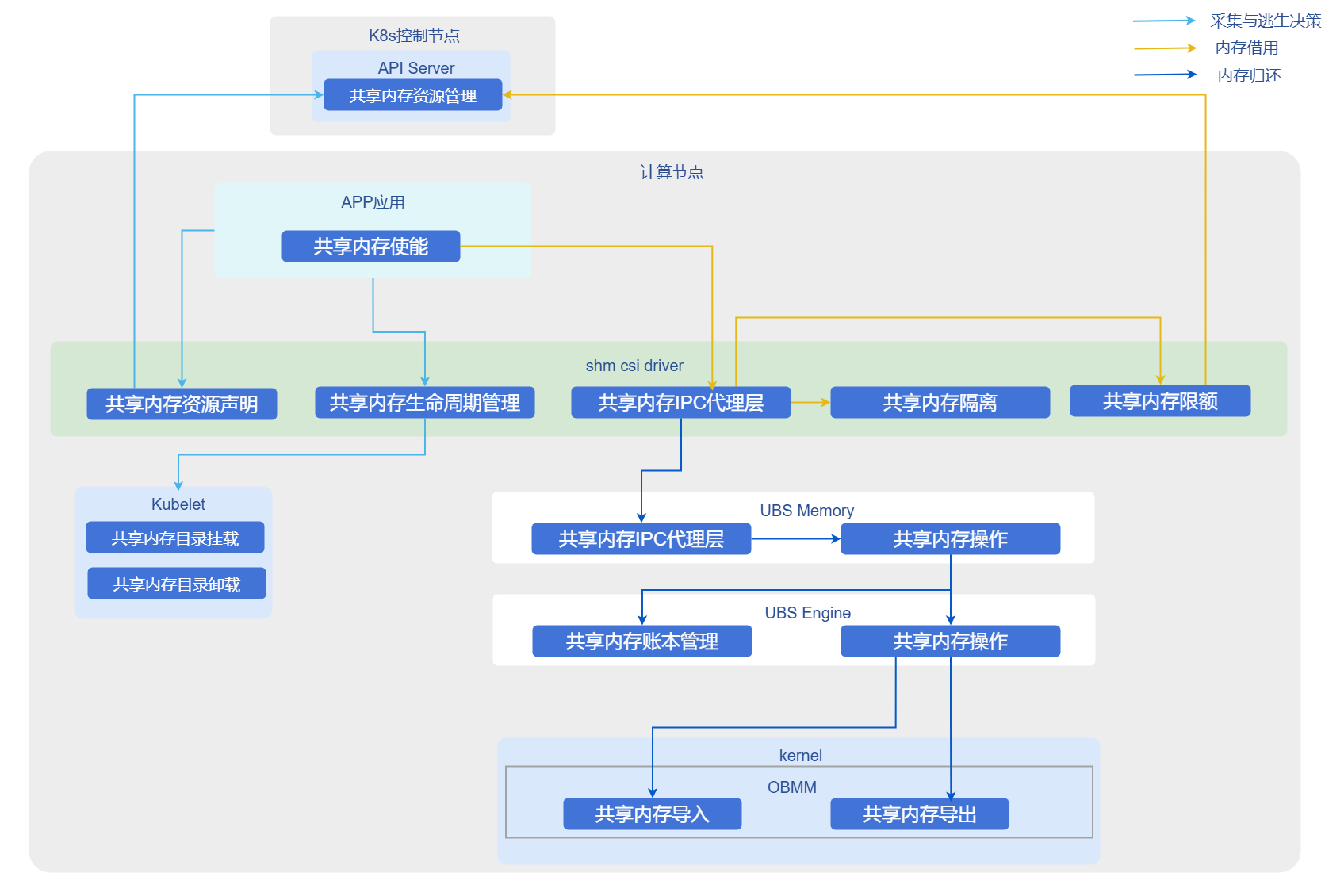
- Resource Declaration: Users declare shared memory size and name through Custom Resource (ShareMemory).
- CSI Mounting: shm-csi-driver listens to resource creation, mounts shared memory blocks to designated Pod directories through CSI protocol.
- Proxy and Isolation: Added proxy layer intercepts shared memory operations, implements QoS restrictions; ensures data security between different tenants/applications through directory isolation.
- Lifecycle Linkage: Listens to Pod events, automatically unmounts shared memory and cleans up backend resources when Pods are deleted.
Relationship with Related Features
- Depends on UBS Engine: This solution strongly depends on underlying ubs-engine and its memory pooling components, which need to be pre-installed.
- Kubernetes Version Dependency: Implemented based on K8s v1.31.1+ CSI plugin mechanism and CRD extension capabilities.
- Hardware Constraints: Depends on UB chip interconnect technology to achieve high-bandwidth remote memory access.
Using Container Memory Sharing
Prerequisites
- Operating System: openEuler 24.03 LTS SP3 or higher
- CPU Architecture: aarch64
- Memory: Greater than or equal to 64GB
- Disk: SSD, IOPS 500MB/s
- Chip Interconnect: UB
- User Permissions: Installation and management require root permissions
- Software Requirements:
- Kubernetes v1.31.1 and above.
- Refer to ubs-engine to install ubs-engine and its dependency components.
- Refer to Helm Installation Documentation to install Helm.
Background Information
In high-performance computing or high-density deployment scenarios, local memory may become a bottleneck. By deploying UBS K8S Enable related components, you can leverage UB memory pooling technology to achieve cross-node memory sharing, breaking through single-machine memory limitations while maintaining cloud-native characteristics of containerized applications.
Usage Limitations
Scenario Limitations: Only applies to bare-metal container scenarios, not VM container scenarios.
Operation Steps
Build Instructions.
1.1 Pull source code.
shellgit clone https://gitcode.com/openFuyao/ubs-k8s-enable.git1.2 Install dependencies.
Before building, ensure the host has the following tools installed:
shelldocker helmDockerfile uses BuildKit features, ensure BuildKit is enabled before executing
docker build.1.3 Execute build images.
shell# Version number example, can be adjusted according to actual release version export VERSION=1.0.0 export DOCKER_BUILDKIT=1 # Build matrixshm image docker build -f build/matrixshm.dockerfile -t cr.openfuyao.cn/openfuyao/matrixshm:${VERSION} .1.4 Export image packages.
shellmkdir -p output docker save cr.openfuyao.cn/openfuyao/matrixshm:${VERSION} | gzip -c > output/ubs-k8s.matrixshm.image.${VERSION}.aarch64.tgz1.5 Package Helm Chart.
shellhelm package charts/matrixshm --destination output mv output/matrixshm-*.tgz output/ubs-k8s.matrixshm.chart.${VERSION}.aarch64.tgzBuild artifacts are as follows:
    └── output
    ├── ubs-k8s.matrixshm.image.${VERSION}.aarch64.tgz
    └── ubs-k8s.matrixshm.chart.${VERSION}.aarch64.tgz
Deployment Steps.
Execute the following command to set version variables:
bashexport VERSION=1.0.0 export OCI_VERSION=0.0.0-latest2.1 Obtain deployment files.
Choose one of the following methods to obtain required images and Helm Charts according to actual scenario.- Method 1: Use offline release packages. Prepare the following files:
ubs-k8s.matrixshm.image.${VERSION}.aarch64.tgzubs-k8s.matrixshm.chart.${VERSION}.aarch64.tgz
- Method 2: Obtain from image repository and OCI repository.
Pull images:
bashdocker pull cr.openfuyao.cn/openfuyao/matrixshm:latestPull Helm Charts:
bashhelm pull oci://cr.openfuyao.cn/charts/matrixshm --version ${OCI_VERSION}2.2 Import offline images.
bashgunzip -c ubs-k8s.matrixshm.image.${VERSION}.aarch64.tgz | ctr -n k8s.io images import - Note:
Note:
If using "Method 2" to pull images directly from image repository, skip this step.2.3 Deploy services.
Choose one of the following methods to deploy services according to actual scenario.- Deploy using offline Chart.
bashhelm install matrixshm ubs-k8s.matrixshm.chart.${VERSION}.aarch64.tgz -n kube-system \ --set images.shmcsidriver.tag=${VERSION}- Deploy using OCI Chart.
bashhelm install matrixshm oci://cr.openfuyao.cn/charts/matrixshm --version ${OCI_VERSION} -n kube-system \ --set images.shmcsidriver.tag=latest2.4 Execute the following command to verify results.
bashkubectl get pods -AExpected results are as follows:
- Each node should have corresponding
matrixagent,matrixshmrelated Pods with statusRunning - Control node should have
matrixcontrollerrelated Pods with statusRunning
Enable container memory sharing demo.
3.1 Prerequisites.
Complete installation of shm-csi-driver.3.2 Develop simple test binary.
Using container memory sharing requires users to call externally provided SDK through their own developed applications.
SDK header file reference: ubs_mem.h3.3 Verification steps.
Write the following configuration to
cr.yaml, modify corresponding configuration as needed.apiVersion: resource.ubsvirt.huawei.com/v1 kind: ShareMemory metadata: name: testshm # Shared memory name, user-defined namespace: kube-system spec: storage: 5120Mi # Total shared memoryWrite the following configuration to
pod.yaml, modify corresponding configuration as needed (here user's own developed application needs to be integrated in image or mounted inside Pod).apiVersion: v1 kind: Pod metadata: ...... spec: securityContext: supplementalGroups: - 1024 # ubsmd group id - 4177 # shm csi driver group id ...... volumes: - name: ubs-mem # ubsm so file path, shared memory dependency hostPath: path: /usr/local/ubs_mem/ type: Directory - name: boundscheck-volume # libboundscheck, libobmm, libnuma, libhcom so files can be directly integrated in image, eliminating mount configuration hostPath: path: /usr/lib64/libboundscheck.so type: File - name: libobmm-1-0-1 hostPath: path: /usr/lib64/libobmm.so.1.0.1 type: File - name: libobmm-1 hostPath: path: /usr/lib64/libobmm.so.1 type: File - name: libnuma-1-0-0 hostPath: path: /usr/lib64/libnuma.so.1.0.0 type: File - name: libnuma-1 hostPath: path: /usr/lib64/libnuma.so.1 type: File - name: libhcom-so-0-0-1 hostPath: path: /usr/lib64/libhcom.so.0.0.1 type: File - name: libhcom-so-0 hostPath: path: /usr/lib64/libhcom.so.0 type: File - name: mxm-agent-ipc-server # ubsm socket file hostPath: path: /run/memory/ type: Directory - name: shared-memory # Shared memory file mount dependency configuration csi: driver: shm-csi-driver volumeAttributes: type: shareMem identity: testshm # Shared memory name, corresponds to name in cr ...... containers: - name: xxxxxxx ...... env: - name: LD_LIBRARY_PATH value: "/usr/lib64/:/host/usr/local/ubs_mem/lib/:......" volumeMounts: - name: ubs-mem mountPath: /host/usr/local/ubs_mem/ - name: boundscheck-volume mountPath: /usr/lib64/libboundscheck.so - name: libobmm-1-0-1 mountPath: /usr/lib64/libobmm.so.1.0.1 - name: libobmm-1 mountPath: /usr/lib64/libobmm.so.1 - name: libnuma-1-0-0 mountPath: /usr/lib64/libnuma.so.1.0.0 - name: libnuma-1 mountPath: /usr/lib64/libnuma.so.1 - name: libhcom-so-0-0-1 mountPath: /usr/lib64/libhcom.so.0.0.1 - name: libhcom-so-0 mountPath: /usr/lib64/libhcom.so.0 - name: mxm-agent-ipc-server mountPath: /run/matrix/memory/ - name: shared-memory mountPath: /dev mountPropagation: "HostToContainer" ......3.4 Deploy yaml on master node.
shellkubectl apply -f cr.yaml kubectl apply -f pod.yaml3.5 Use memory sharing.
Users execute their own developed applications inside containers to enable shared memory within containers.
Licensed under the MulanPSL2
 YueGongWangAnBei No.44030002007300