Multi-Core Scheduling Development Guide
Feature Introduction
This feature supports explicit labeling of business characteristic labels for workloads (I/O intensive, memory sensitive, compute intensive), scheduler dynamically selects target node with minimum resource competition based on labels using multi-dimensional weighted scoring algorithm, scoring dimensions include same business resource request ratio and node remaining resource quantity. For details, please refer to Multi-Core Scheduling.
Constraints and Limitations
This feature is enabled as extension scheduling component of volcano, needs to be enabled together with volcano.
Interface Description
Table 1 Interface Description
| Interface Name | Description |
|---|---|
| GET /rest/scheduling/v1/balance | Query balanced scheduling strategy. |
| PUT /rest/scheduling/v1/balance | Modify balanced scheduling strategy. |
Environment Preparation
Environment Requirements
- Kubernetes v1.21 and above has been deployed.
- Containerd v1.7 and above has been deployed.
Verify Environment Setup
Using Volcano as example: When Pod status under volcano-system namespace is "Running", it indicates environment setup is successful.
volcano-system volcano-admission-xx-xx           1/1  Running  0  xmxxs
volcano-system volcano-admission-init-xx         1/1  Running  0  xmxxs
volcano-system volcano-controllers-xx-xx         1/1  Running  0  xmxxs
volcano-system volcano-schedulers-xx-xx          1/1  Running  0  xmxxs
volcano-system volcano-config-website-xx-xx      1/1  Running  0  xmxxs
volcano-system volcano-config-xx-xx              1/1  Running  0  xmxxs
Usage Scenario 1: Balanced Scheduling Based on Business Type Configured in Annotations
Usage Scenario Overview
According to business type labels set by workload, schedule it evenly to various nodes.
System Architecture
Figure 1 Scenario 1 System Architecture Diagram
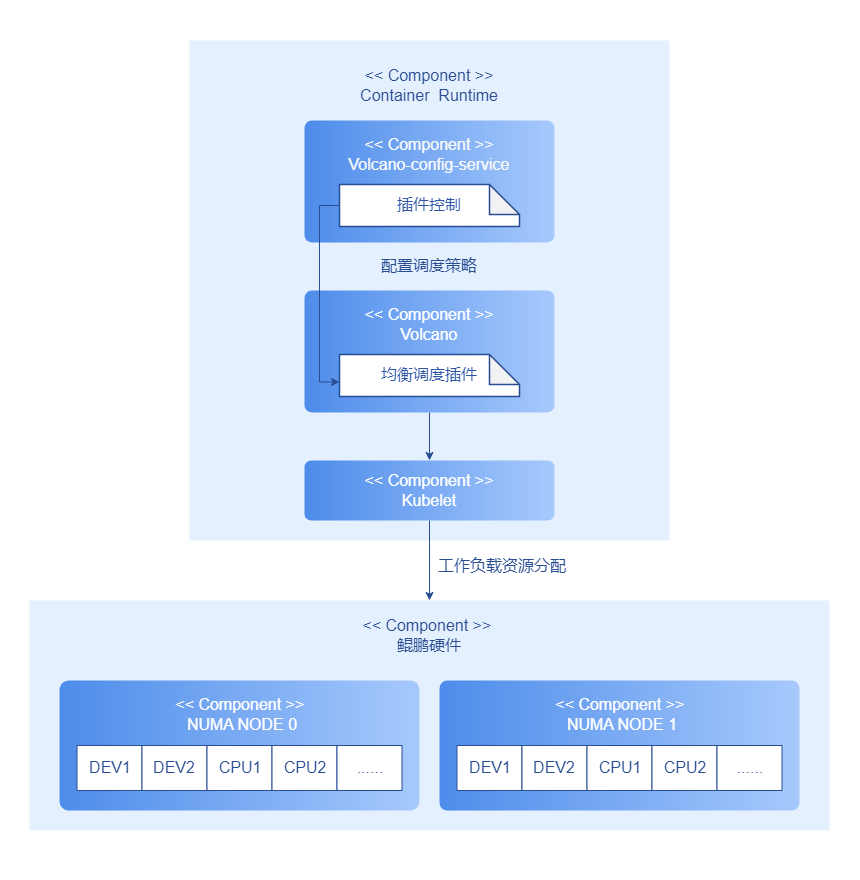
Supports controlling enabling or disabling of this scheduling strategy through backend interface provided by volcano-config-service. When scheduling Pod, schedule based on workload business type and scoring of each node.
Development Steps
Using following code as example:
// calculateTypeScore computes score for a specific business type based on resource usage
func calculateTypeScore(businessType string string, cpuUsage, memUsage, diskIOUsage float64) float64 {
    switch businessType {
    case iOIntensiveType:
        return (1-diskIOUsage)*mainWeight + (1-cpuUsage)*minorWeight + (1-memUsage)*minorWeight
    case memorySensitiveType:
        return (1-memUsage)*mainWeight + (1-cpuUsage)*minorWeight + (1-diskIOUsage)*minorWeight
    case computeIntensiveType:
        return (1-cpuUsage)*mainWeight + (1-memUsage)*minorWeight + (1-diskIOUsage)*minorWeight
    default:
        // If unknown type, use balanced scoring
        return (1-cpuUsage)*averageWeight + (1-memUsage)*averageWeight + (1-diskIOUsage)*averageWeight
    }
}
By parsing different business types, calculate different scores, and use this as basis for scheduling.
Testing and Verification
Create Pod, add business type in annotation, using following compute-intensive as example.
apiVersion: v1
kind: Pod
metadata:
  annotations:
    # Core business type label
    business.workload/type: "compute-intensive"
After deploying it to node, it should be preferentially scheduled to node with low CPU utilization.
Usage Scenario 2: Webhook Intercepts Error Requests and Provides Prompts
Usage Scenario Overview
You can specify business type through workload YAML annotation, this configuration requires user explicit declaration. System supports following three business types.
- I/O intensive (io-intensive)
- Memory sensitive (memory-sensitive)
- Compute intensive (compute-intensive)
Configuration example is as follows.
apiVersion: v1
kind: Pod
metadata:
  annotations:
    # Core business type label
    business.workload/type: "io-intensive"  # Optional values: io-intensive/memory-sensitive/compute-intensive
Meanwhile, this strategy supports configuring multiple business types for one application, example as follows.
apiVersion: v1
kind: Pod
metadata:
  annotations:
    business.workload/type: "io-intensive,memory-sensitive"   # Multiple business types separated by comma
If you label workload with core business type label but configuration is incorrect, webhook will intercept request and provide suggestion modification prompt.
System Architecture
Figure 2 Scenario 2 System Architecture Diagram
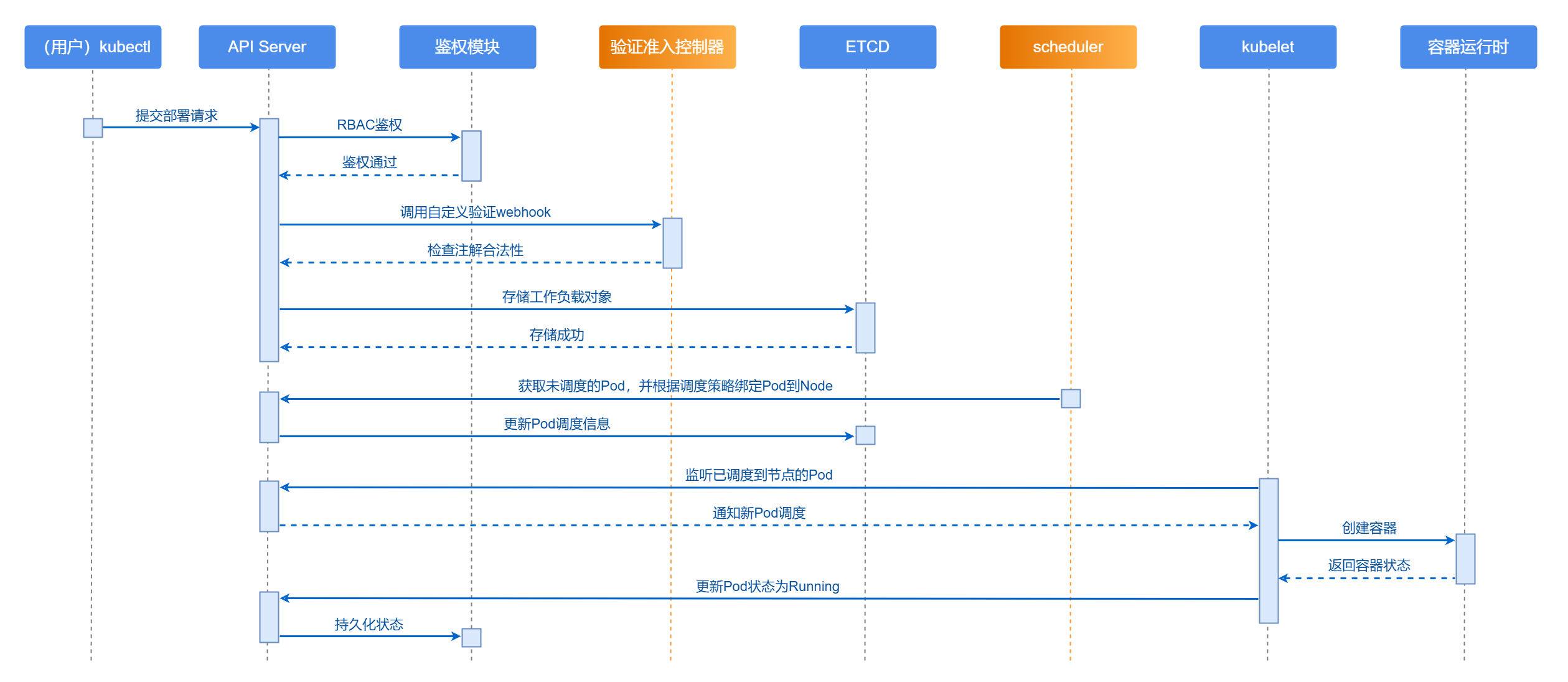
After creating workload deployment request, pass RBAC authorization and Webhook to verify whether annotation conforms to specification. After verification passes, schedule it to node with least same type business according to balanced scheduling strategy, and update Pod status to Running.
Development Steps
Through parsing, determine whether business type is available. If not available, provide prompt. Core code is as follows.
// validateBusinessType validates business type annotation - enhances error prompts
func validateBusinessType(annotations map[string]string) (bool, string) {
    if annotations == nil {
        return true, ""
    }

    businessType, exists := annotations[BusinessTypeAnnotation]
    if !exists {
        return true, ""
    }

    if strings.TrimSpace(businessType) == "" {
        return false, fmt.Sprintf("Business type annotation '%s' cannot be empty. Please set to one of following valid values: %s",
            BusinessTypeAnnotation, strings.Join(getAllowedTypesList(), ","))
    }

    // Parse multiple business types
    types := strings.Split(businessType, TypeSeparator)
    var invalidTypes []string

    for _, t := range types {
        t = strings.TrimSpace(t)
        if t == "" {
            continue
        }
        if !allowedBusinessTypes[t] {
            invalidTypes = append(invalidTypes, t)
        }
    }

    // If there are invalid types, return detailed error information
    if len(invalidTypes) > 0 {
        allowedList := strings.Join(getAllowedTypesList(), ",")
        if len(invalidTypes) == 1 {
            // Check if it is common spelling error, provide correction suggestion
            suggestion := getSuggestion(invalidTypes[0])
            if suggestion != "" {
                return false, fmt.Sprintf("Invalid business type: '%s'. Did you mean to set '%s'?\nValid business types include: %s",
                    invalidTypes[0], suggestion, allowedList)
            }
            return false, fmt.Sprintf("Invalid business type: '%s'.\nValid business types include: %s",
                invalidTypes[0], allowedList)
        } else {
            return false, fmt.Sprintf("Found %d invalid business types: %s.\nValid business types include: %s",
                len(invalidTypes), strings.Join(invalidTypes, ","), allowedList)
        }
    }

    return true, ""
}
Testing and Verification
Create Pod, add business type in annotation, determine whether Webhook takes effect.
Create Pod, YAML partial example 1.
bashapiVersion: v1 kind: Pod metadata: annotations: # Core business type label business.workload/type: "io-intensive"At this time Webhook does not intercept.
Create Pod, YAML partial example 2.
bashapiVersion: v1 kind: Pod metadata: annotations: # Core business type label business.workload/type: "io-iiiintensive"At this time Webhook intercepts request and provides how to modify prompt.
Common Issues
After creating Pod, adding annotation but not scheduling as expected.
Phenomenon Description
Workload configured annotation as
business.workload/type: "compute-intensive", but not correctly scheduled to node with low CPU utilization.Possible Causes
- Scheduler not specified as volcano.
- Balanced scheduling strategy not enabled.
Solution
- Specify scheduler as volcano in workload deployment YAML.
- Take effect scheduling strategy by modifying volcano scheduler configuration file and restarting scheduler pod.
Licensed under the MulanPSL2
 YueGongWangAnBei No.44030002007300