Colocation
Feature Overview
As cloud services and hardware resources become increasingly diversified, higher management requirements are imposed on cloud native systems, such as resource utilization optimization and service quality assurance. Various colocation solutions have emerged to ensure that a colocation system involving diversified services and computing power runs in the optimal state. The colocation and resource overselling solution of openFuyao provides the following functions:
- Multi-tier QoS management for services
- Service feature–aware scheduling
- Colocation node management
- Colocation policy configuration
- Management and reporting of oversold resources of nodes
- NRI-based, non-intrusive colocation Pod creation and cgroup management
- Multi-layer optimization technologies, such as single-node colocation engine (Rubik) and kernel isolation
Application Scenarios
When deploying a workload, you need to determine the QoS level of the workload based on its characteristics. The scheduler adds necessary colocation information to the workload and schedules the workload to a colocation or non-colocation node to meet your colocation requirements. You can also manage colocation scheduling and colocation nodes through unified colocation configurations.
Supported Capabilities
- Priority-based scheduling and load balancing are supported for services with different QoS levels.
- On a single node, online services can preempt CPU and memory resources of offline services to preferentially guarantee their QoS.
- Offline services can be evicted and rescheduled based on the CPU and memory watermarks on a single node.
- Advanced colocation features such as CPU elastic throttling, asynchronous memory reclamation, memory bandwidth limitation, and PSI interference detection are supported.
- Monitoring and viewing of colocation resources are supported.
Highlights
- openFuyao adopts industry-leading colocation and resource overselling solutions. It supports hybrid deployment of online and offline services. During peak periods of online services, resource scheduling is prioritized to guarantee online services. During off-peak periods of online services, offline services are allowed to utilize oversold resources, improving cluster resource utilization.
- Services are classified into online services (High Latency Sensitive (HLS) services with high CPU pinning priority and Latency Sensitive (LS) services with low CPU pinning priority) and offline services (Best effort (BE) services that use oversold resources). Multiple QoS levels are defined for different services. At the scheduling layer, the scheduler ensures that high-priority tasks can preempt resources from low-priority ones. In addition, offline service eviction is supported to prevent offline services from being preempted by online services with high resource utilization for a long time. On a single node, CPU pinning is supported for online HLS services, while NUMA-aware scheduling is supported for online LS services.
Constraints
This feature, along with NUMA-aware scheduling and the NPU Operator, uses Volcano 1.9.0. If NUMA-aware scheduling has been deployed in advance, or NPU Operator has been deployed with vcscheduler.enabled and vccontroller.enabled enabled, you do not need to manually install Volcano. You can use it after configuring volcano-scheduler-configmap. For details, see Prerequisites in the installation section.
Implementation Principles
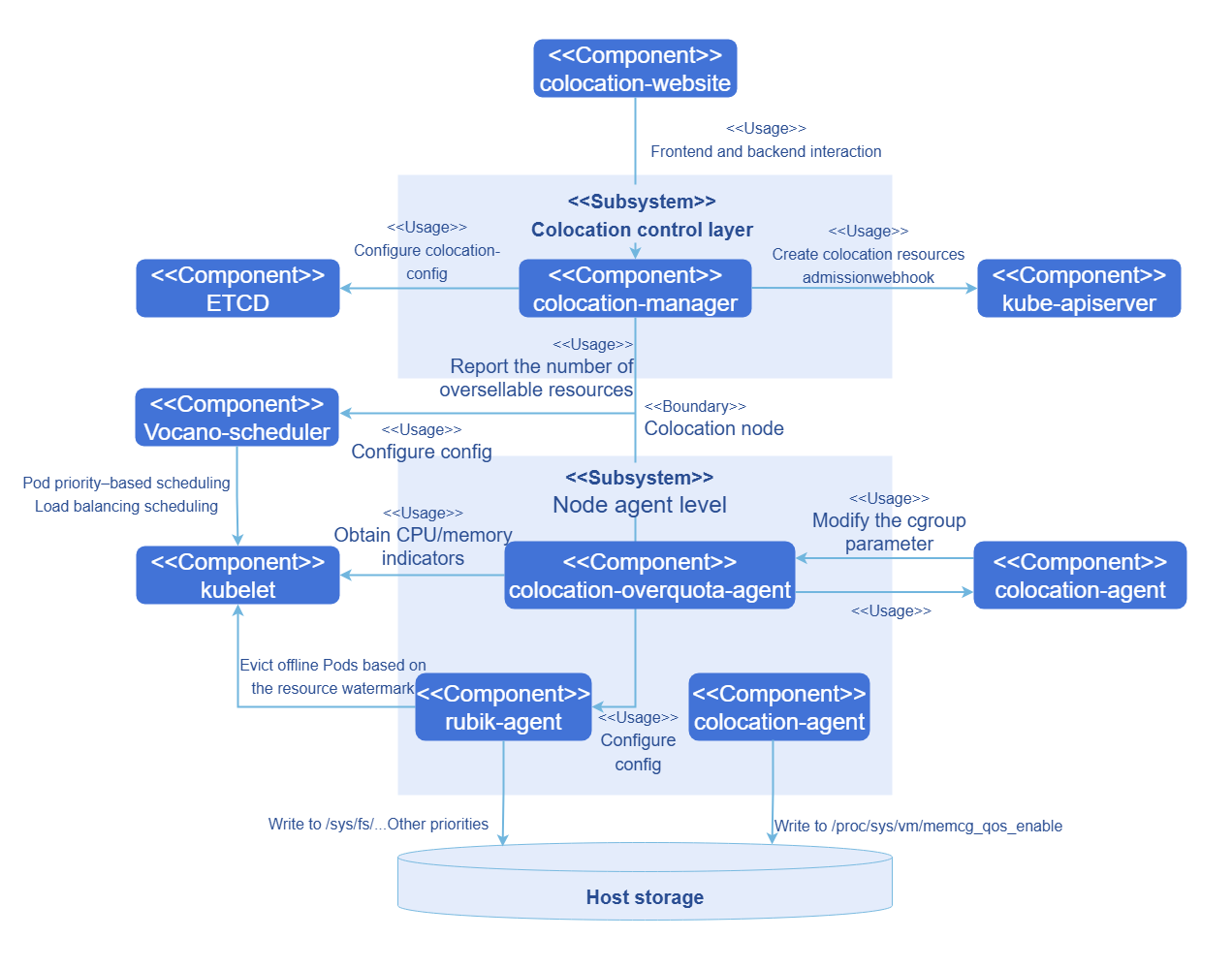
The colocation component is divided into two parts from the perspectives of functions and deployment modes: control layer and node agent.
-
The control layer is responsible for the unified colocation management.
- Global configuration plane: Global colocation configurations are provided, including startup of colocation nodes, the eviction watermark configuration of the colocation engine, and load balancing scheduling threshold settings of the scheduler.
- Admission control: An admission controller is provided for colocation workloads, which checks rules for workloads annotated with QoS levels and adds mandatory resource items for colocation scheduling (such as the scheduler, priority, and affinity label).
- Unified management of oversold resources: The control layer receives the indicators collected by the resource overselling agents, periodically pushes the resource usage of each node and Pods on each node to the CRDs of the Checkpoint API, and periodically updates the total oversellable resources of nodes.
- REST API service: REST APIs are offered to integrate with visual interfaces.
- Colocation monitoring: A visual interface is provided for centralized colocation monitoring.
-
Node agents are deployed in Kubernetes clusters as DaemonSets to support resource overselling in colocation scenarios and injection of refined resource management policies.
- Resource overselling agent: Collects resource indicators, uses histograms to collect and predict resource usage details of workloads, and builds resource profiles for applications. It also reports resource overselling, predicts the usage of Pod resources based on application resource profiles, reclaims allocated but unused resources, and reports the information to the unified management plane.
- Colocation agent: Includes the Rubik colocation engine and provides additional functionality to integrate with the kernel for enabling or disabling Rubik features
- Resource overselling NRI plug-in: Uses the NRI mechanism of containerd to inject refined resource management policies in different lifecycle phases of containers.
Figure 1 Architecture of the colocation and resource overselling solution
Considering the overall scheduling framework and future multi-tier QoS levels for colocation, openFuyao introduces a three-tier QoS guarantee model. This model further classifies online services into HLS and LS services, while marking offline services as BE services, as detailed below.
Table 1 Three QoS levels for workloads
| QoS | Characteristics | Scenario | Description | K8s QoS |
|---|---|---|---|---|
| HLS | Requirements for latency and stability are strict. Resources are not oversold and are reserved to guarantee service performance. | High-quality online services | It corresponds to the Guaranteed class of the Kubernetes community. When the CPU pinning function is enabled in kubelet on a node, CPU cores are bound. The admission controller checks that the requested CPU cores equal the CPU limit and the requested memory equals the memory limit. In addition, the number of requested CPU cores must be an integer, and Pods labeled HLS are treated as exclusive Guaranteed Pods. | Guaranteed |
| LS | Resources are shared, providing better elasticity for burst traffic. | Online services | It is a typical QoS level for microservice workloads, enabling better resource elasticity and more flexible resource adjustment. | Guaranteed/Burstable |
| BE | Resources are shared, leading to unguaranteed performance quality and the risk of forceful termination under extreme conditions. | Offline services | It is a typical QoS level for batch jobs. Computing throughput is stable within a certain period. Only oversold resources are used. | BestEffort |
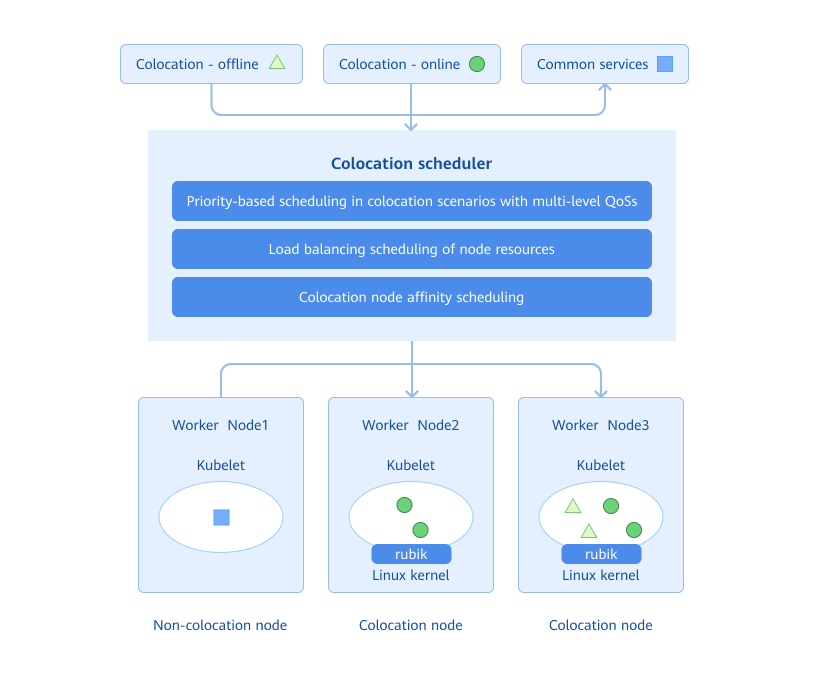
Nodes in a cluster are classified into colocation nodes and non-colocation nodes. Generally, online and offline services are deployed on colocation nodes, and common services are deployed on non-colocation nodes. The colocation scheduler properly schedules the service to a suitable node based on the attribute of the service to be deployed and the colocation attribute of nodes in the cluster. Workloads with different QoS levels are mapped to different PriorityClasses. During scheduling, the colocation scheduler performs priority-based scheduling or preemption at the scheduling queue layer according to PriorityClasses. This ensures that high-priority tasks are preferentially guaranteed at the scheduling layer. In addition, when selecting a node, the colocation scheduler also scores nodes based on their actual CPU and memory utilization and schedules workloads to a node with low comprehensive CPU and memory usage to minimize node overheating.
Figure 2 Colocation scheduling
The colocation component consists of the colocation scheduler, unified colocation manager, single-node colocation engine, oversold resource reporting/management component, and NRI plug-in. The colocation scheduler is implemented based on the Volcano scheduler, and the single-node colocation engine integrates Rubik. The colocation component comprises the following main parts:
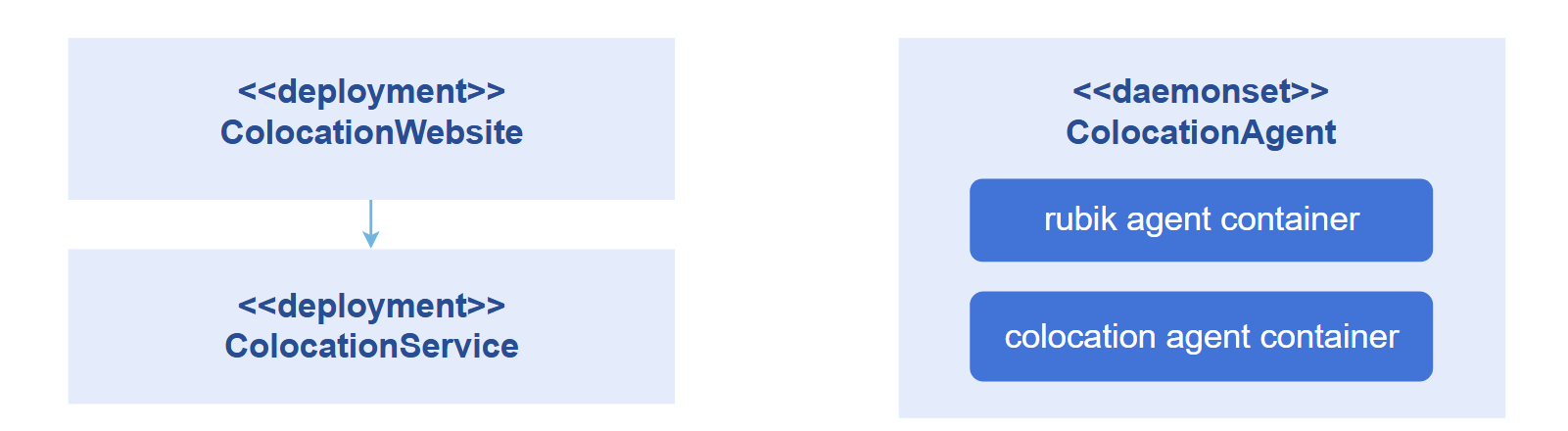
- colocation-website: deployed in a cluster as a Deployment. It is used by the colocation frontend interface. This enables functions including colocation statistics visualization, colocation node management, and colocation scheduling configuration management.
- colocation-service: deployed in a cluster as a Deployment. It provides service APIs for external systems, such as APIs for monitoring colocation, adding and removing colocation nodes, and configuring colocation scheduling policies.
- colocation-agent: deployed in a cluster as a DaemonSet. It is used to enable the memory QoS management function on colocation nodes.
Figure 3 Modular design of main parts of the colocation component and their deployment in a cluster
The colocation engine and oversold-resource management system are provided by the colocation-management repository.
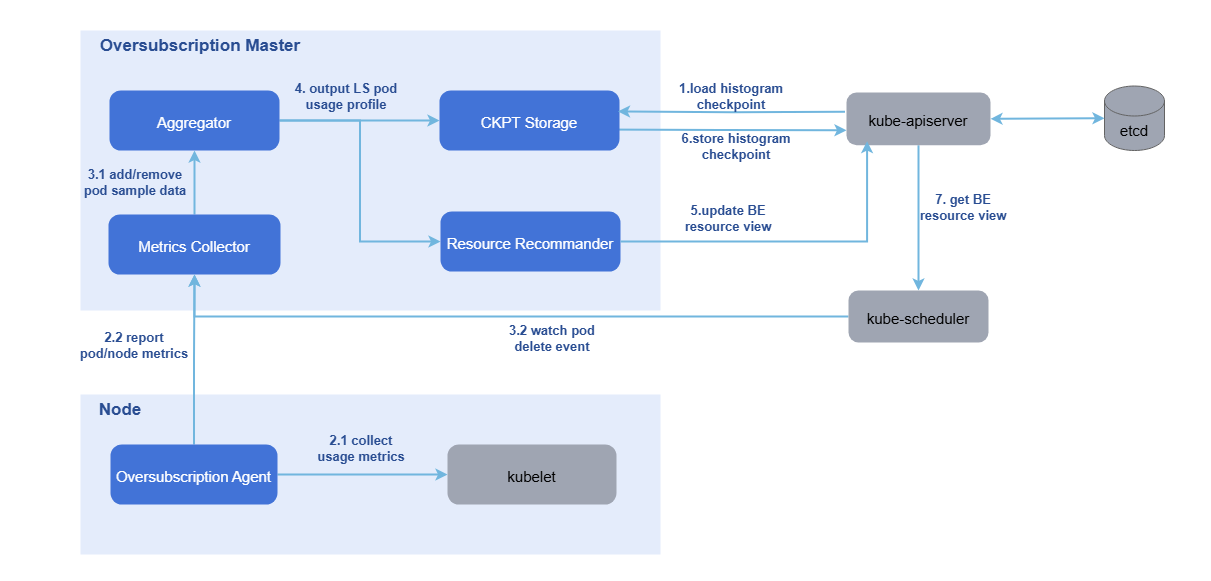
- colocation-overquota-agent: deployed on an oversold node in the cluster as a DaemonSet. The single-node agent obtains the resource sampling data of nodes and Pods from kubelet and reports the data to the master component. It also integrates the Rubik colocation engine to provide advanced colocation features such as CPU elastic throttling, asynchronous memory reclamation, memory bandwidth limitation, and PSI interference detection.
- colocation-manager: deployed in a cluster as a Deployment. The oversold master uses the sampled data to build resource usage profiles for online Pods on each node. Based on these profiles, system configuration parameters, and an overselling formula, it updates the amount of BE resources that can be allocated to the node object. It also provides the admission controller function for colocation workloads.
Figure 4 Reporting and management of overselling node resources
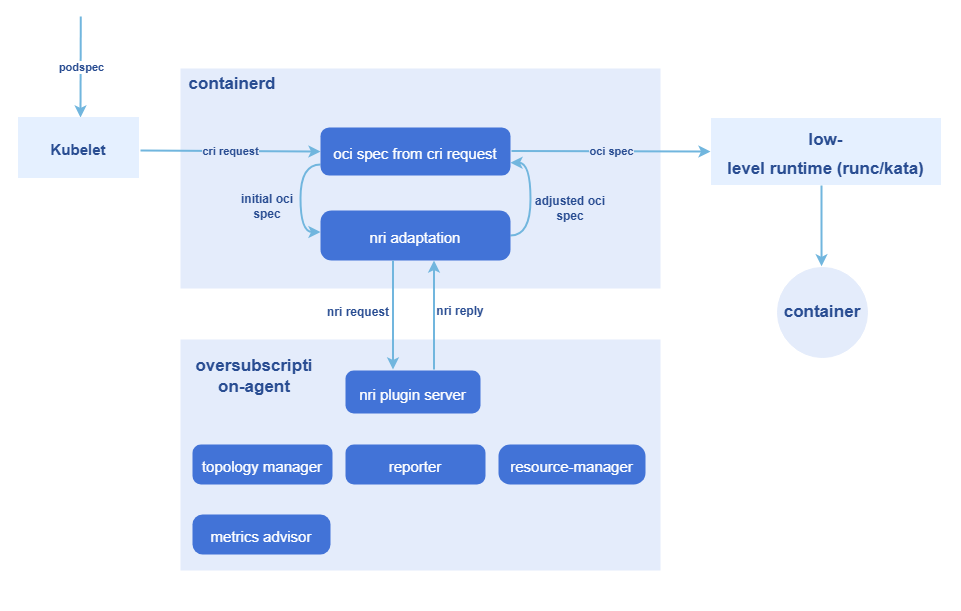
For the creation of oversold Pods and the management of cgroups, the NRI mechanism is leveraged to execute custom logic at various container lifecycle stages:
- The NRI mechanism is used to add custom logic in Pod and container lifecycle hooks.
- The NRI reply is used to modify the container OCI specifications.
- NRI UpdateContainer is used to modify the actual resources.
The entire process involves two workloads:
- colocation-manager: deployed in a cluster as a Deployment. It serves as the admission controller for colocation workloads and validates whether a workload's configuration meets the resource requirements for its designated QoS level during admission. It rejects non-compliant colocation workloads. It also adds mandatory resource items for colocation scheduling (such as the scheduler, priority, and affinity label).
- colocation-overquota-agent: deployed on an oversold node as a DaemonSet. The preceding NRI mechanism is used to modify the actual resources.
Figure 5 NRI-based, non-intrusive oversold Pod creation and cgroup management
Relationship with Related Features
This feature depends on the resource management module. The resource management module provides APIs for delivering workloads, and Prometheus provides the monitoring capability.
Related Instances
Code links:
openFuyao/colocation-website (gitcode.com)
openFuyao/colocation-service (gitcode.com)
openFuyao/colocation-agent (gitcode.com)
openFuyao/colocation-management (gitcode.com)
Installation
Prerequisites
-
Kubernetes v1.21 or later, containerd v1.7.0 or later, and kube-prometheus v1.19 or later have been deployed.
-
The colocation scheduler used by openFuyao is
volcano-scheduler, which must be pre-installed in Kubernetes by using Helm. Full testing has been completed on v1.9.0. Functions introduced in versions later than v1.9.0 are expected to work properly. Users can choose to deploy the versions, but functional correctness is not yet guaranteed.2.1 Use Helm to install volcano-scheduler.
helm repo add volcano-sh https://volcano-sh.github.io/helm-charts
helm repo update
helm install volcano volcano-sh/volcano --version 1.9.0 -n volcano-system --create-namespace NOTE
NOTE
If the NUMA-aware scheduling component has been installed on openFuyao, the volcano component will be installed by default. In this case, you do not need to use Helm to perform preinstallation.2.2 Modify the default configurations of volcano-scheduler.
kubectl edit cm -n volcano-system volcano-scheduler-configmapModify the following annotations:
apiVersion: v1
data:
  volcano-scheduler.conf: |
    actions: "allocate, backfill, preempt" # Ensure that the actions are in the correct category and order.
    tiers:
    - plugins:
      - name: priority             # Ensure that priority-based scheduling is enabled in tiers[0].plugins[0].
      - name: gang
        enablePreemptable: false
        enableJobStarving: false # Ensure that enableJobStarving is disabled.
     ...
kind: ConfigMap
metadata:
    meta.helm.sh/release-name: volcano
    meta.helm.sh/release-namespace: volcano-system
  labels:
    app.kubernetes.io/managed-by: Helm
  name: volcano-scheduler-configmap
  namespace: volcano-system
NOTE
When the NPU operator is deployed together with the volcano-scheduler, the NPU operator may automatically modify the volcano-scheduler.conf file, that is, overwriting key items (for example, removing preempt from actions or modifying tiers.plugins.gang.enablePreemptable). After the NPU operator is installed or upgraded, check and restore the configuration as required in this section. Ensure that actions contains preempt and enablePreemptable is set to false. -
The colocation engine of openFuyao requires the OS kernel to be version 4.19 or later. For details about whether each colocation function can be enabled, see the Colocation support module in Colocation Policy Configuration on the WebUI.
NOTE
The complete functions of colocation have been verified in openEuler 22.03 LTS-SP3. For other later versions, you can choose to deploy them, but functional correctness is not yet guaranteed. -
Enable kubelet CPU pinning and NUMA affinity policies.
NOTE
This function is designed to enable CPU pinning for Pods with QoS-level set to HLS. Only when the static policy of kubelet is enabled, HLS-level Pods gain exclusivity and NUMA affinity, thereby boosting the performance of HLS workloads.To use this module, you must modify the kubelet configuration file. The configuration procedure is as follows:
4.1 Open the kubelet configuration file.
vi /etc/kubernetes/kubelet-config.yamlNOTE
If the configuration file is not found at the preceding location, you can locate it at/var/lib/kubelet/config.yaml.4.2 Add or modify a configuration item. (When switching to the static policy, you need to also configure reserved CPUs.)
cpuManagerPolicy: static
systemReserved:
  cpu: "0.5"
# Note: If the number of CPU cores on the node is small, enabling kubeReserved may cause insufficient available CPUs on the node and kubelet may break down. Exercise caution when enabling kubeReserved.
kubeReserved:
  cpu: "0.5"
topologyManagerPolicy: xxx # best-effort / restricted / single-numa-node
4.3 Modify applications.
rm -rf /var/lib/kubelet/cpu_manager_state
systemctl daemon-reload
systemctl restart kubelet
4.4 Check the kubelet operating status.
systemctl status kubeletIf the kubelet operating status is running, the operation is successful.
-
Enable the NRI extension in containerd on the colocation node.
5.1 On the colocation node, run
vi /etc/containerd/config.tomlto open the configuration file and search for the section [plugins."io.containerd.nri.v1.nri"].5.2 If the section exists, change disable=true to disable=false. If the section does not exist, add the following under [plugins]:
 [plugins."io.containerd.nri.v1.nri"]

    disable = false

    disable_connections = false

    plugin_config_path="/etc/nri/conf.d"

    plugin_path="/opt/nri/plugins"

    plugin_registration_timeout="5s"

    plugin_request_timeout = "2s"

    socket_path="/var/run/nri/nri.sock"
5.3 After the configuration is complete, run the following command to restart containerd:
sudo systemctl restart containerd
Starting the Installation
-
In the navigation pane of openFuyao, choose Application Market > Applications. The Applications page is displayed.
-
Select Extension in the Type filter on the left to view all extensions. Alternatively, enter colocation-package in the search box.
-
Click the colocation-package card. The details page of the colocation extension is displayed.
-
Click Deploy. The Deploy page is displayed.
-
Enter the application name and select the desired installation version and namespace.
-
Enter the values to be deployed in Values.yaml.
-
Click Deploy.
-
In the navigation pane, choose Extension Management to manage the component.
NOTE
After the deployment, you need to configure colocation for nodes in the cluster. This operation may cause workloads on the nodes to be evicted and rescheduled. Please properly plan colocation nodes in the cluster in a production environment and exercise caution when performing this operation.
Independent Deployment
In addition to installation and deployment through the application market, this component also supports independent deployment. The procedure is as follows:
For standalone deployment, you still need to deploy Kubernetes 1.26 or later, Prometheus, containerd, and Volcano v1.9.0 first.
-
Pull the image.
helm pull oci://helm.openfuyao.cn/charts/colocation-package --version xxxReplace xxx with the version of the Helm image to be pulled, for example, 0.13.0.
-
Decompress the installation package.
tar -zxvf colocation-package-xxx.tgz -
Disable openFuyao and OAuth.
vi colocation-package/values.yamlChange the values of
colocation-website.enableOAuthandcolocation-website.openFuyaoto false. -
Set the service type to NodePort.
vi colocation-package/values.yamlChange the value of
colocation-website.service.typetoNodePort. -
Integrate with Prometheus.
vi colocation-package/values.yamlDuring standalone deployment, ensure that the monitoring component is already installed in the cluster. Change the value of the
colocation-service.serverHost.prometheusfield to the indicator search address and port exposed by Prometheus in the current cluster, for example, http://prometheus-k8s.monitoring.svc.cluster.local:9090. -
Install the component.
helm install colocation-package ./ -
Access the standalone frontend.
You can enter http://Client login IP address of the management plane:30880 in the address box of a browser to access the independent frontend.
Viewing the Overview
In the navigation pane of the openFuyao platform, choose Computing Power Optimization Center > Colocation > Overview. The Overview page is displayed, which shows the workflow of colocation.
Prerequisites
The colocation-package extension component has been deployed in the application market.
Context
View the colocation workflow, including environment preparation, colocation policy configuration, workload deployment, and colocation monitoring.
Constraints
None
Procedure
Choose Colocation > Overview. The Overview page is displayed.
- In the Environment Preparation step, you can modify the kubelet and containerd configurations to enable the colocation function of nodes. Click
 to view the configuration methods.
 - In the Colocation Policy Configuration step, you can click Configure Colocation Policy next to the description to go to the colocation policy configuration page.
- In the Workload Deployment step, you can use the workload deployment function to schedule workloads. You can click Deploy Workloads to go to the workload deployment page.
- In the Colocation Monitoring step, the health monitoring information about cluster-level colocation and node-level colocation is displayed. You can click Go to Colocation Monitoring to go to the colocation monitoring page.
Configuring Colocation Policies
In the navigation pane of the openFuyao platform, choose Computing Power Optimization Center > Colocation > Colocation Policy Configuration. The Colocation Policy Configuration page is displayed. This page displays the list of nodes related to colocation in the cluster, and provides a window for configuring colocation parameters. In addition, you can enable or disable the colocation label of nodes in the node list to achieve balanced allocation and stable running of cluster resources.
Enabling or Disabling the Colocation Label of a Node
Context
You need to change the colocation label status of a specified node.
Constraints
Changing the colocation label of a node may cause Pods on the node to be evicted. Please properly plan the colocation capability of nodes in the cluster.
Procedure
In the colocation node list, turn on or off the switch in the Enable colocation node column corresponding to a node to enable or disable its colocation capability.
If the message "Colocation is enabled for node xxx" or "Colocation is disabled for node xxx" is displayed, the setting is successful.
Configuring Colocation Policy Parameters
Context
On this page, you can configure parameters for workload-aware scheduling, watermark-based offline workload eviction, and advanced colocation features. You can set the actual CPU and memory load thresholds to control the scheduling policy of new workloads and prevent node overload. After watermark-based offline workload eviction is configured, when the node resource usage exceeds the watermark, offline job eviction is automatically triggered to free up resources.
Advanced colocation features include:
- CPU elastic throttling: When the node load is low, the CPU limit of LS-level Pods can be dynamically exceeded. When the load increases, the CPU limit is automatically converged.
- Asynchronous memory reclamation: Memory is reclaimed based on different QoS levels. Memory of BE-level Pods is reclaimed first.
- Memory bandwidth limitation: Hardware technologies are used to limit the memory bandwidth and CPU cache occupied by BE-level Pods.
- PSI interference detection: Offline Pods that interfere with online services are automatically detected and evicted based on system pressure indicators.
Constraints
- The load-aware scheduling balances resource utilization and stability. The threshold ranges from 0 to 100%, with a default value of 60%.
- Adjusting the threshold does not affect workloads that are already running.
- The watermark-based offline workload eviction only applies to offline jobs. Critical online services are not affected. The threshold ranges from 0 to 99%. The eviction process may cause temporary service fluctuations.
- Restrictions on advanced colocation features:
- CPU elastic throttling and asynchronous memory reclamation require cgroup v2. You are advised to use openEuler v22.03 LTS SP3 or later.
- The memory bandwidth limitation requires hardware support (Intel RDT or Arm MPAM) and takes effect only in the PM environment.
- Some features require specific kernel interfaces. The system automatically checks whether nodes support these features.
Procedure
-
On the Colocation Policy Configuration page, click Configure Colocation Policy Parameters in the upper-right area of the colocation node list.
-
In the dialog box that is displayed, enable Load-aware Scheduling and Offline-Load Watermark Eviction or other advanced colocation features.
NOTE- After Load-aware Scheduling and Offline-Load Watermark Eviction are enabled, the CPU and memory thresholds of the node are 60% by default. You can change the thresholds as prompted.
- Default configurations of advanced colocation features:
- CPU elastic throttling: The default load high watermark is 60%, and the default alert watermark is 80%.
- Memory bandwidth limitation: The default L3 cache allocation (low/medium/high priority) is 20%, 30%, or 50%, and the default memory bandwidth allocation is 20%, 30%, or 50%. By default, all offline Pods use the dynamic cgroup. To customize the cgroup level, add the
volcano.sh/cache-limit: "low/mid/high"annotation to the Pods. - PSI interference detection: The monitored resources are CPUs and memory by default. The default average pressure threshold of 10 seconds is 5.0%.
- Asynchronous memory reclamation: No additional parameter configuration is required. The function takes effect automatically after being enabled.
-
After modifying the parameters and thresholds, click OK to save the modification.
NOTE- The availability of the advanced colocation features is automatically determined based on the node hardware and kernel support.
- If a feature is not supported, the switch is dimmed and the reason why the feature is not supported is displayed.
- The configuration takes effect automatically within 30 seconds after the modification, and you do not need to restart related components.
- Memory bandwidth limitation: By default, the dynamic cgroup is configured to manage all offline Pods. The low, medium, and high watermarks take effect only when the user manually specifies a Pod cgroup.
Using Colocation Monitoring
In the navigation pane of the openFuyao platform, choose Computing Power Optimization Center > Colocation > Colocation Monitoring. By default, the Cluster-Level Colocation Monitoring page is displayed. This page displays the data monitoring panel related to colocation in the cluster.
Cluster-Level Colocation Monitoring
This page provides data monitoring related to colocation in the cluster, including colocation node information, colocation workload information, and resource usage in the cluster.
-
You can hover the mouse over the curve chart of a monitoring indicator to view the detailed data.
-
In the Legend area of each chart, you can click a legend item to determine whether to display the data in the chart. This facilitates comparison between different datasets.
Node-Level Colocation Monitoring
Click the Node-Level Colocation Monitoring tab to switch to the node-level monitoring page. On this page, you can view node colocation data, such as the total physical resources used by each node and the resources used by HLS, LS, and BE Pods.
-
You can hover the mouse over the curve chart of a monitoring indicator to view the detailed data.
-
In the Legend area of each chart, you can click a legend item to determine whether to display the data in the chart. This facilitates comparison between different datasets.
-
In the filter box in the upper-right corner of the page, you can select or deselect some nodes.
Enabling NUMA Affinity Enhancement
Prerequisites
The node must have a multi-NUMA architecture and NUMA affinity must be enabled in the ConfigMap.
Context
On a server with multiple NUMA nodes, cross-NUMA-node memory access causes high latency, affecting the performance of LS services. The NUMA affinity enhancement function enables LS-level Pods to be preferentially scheduled to the same NUMA node, reducing memory access latency and improving service stability.
Constraints
-
Only LS-level Pods (with low-priority online services) are supported. This function does not apply to Pods of other QoS levels (such as HLS and BE).
-
This function only intercepts resource allocation before Pod startup. It does not alter scheduling decisions made prior to enabling this function.
Procedure
-
Ensure that the colocation and resource overselling feature has been enabled.
Ensure that colocation has been enabled for the node. For details, see the procedure in Enabling or Disabling the Colocation Label of a Node.
-
Enable NUMA affinity.
Edit the ConfigMap to enable the NUMA affinity function.
kubectl edit configmap colocation-config -n openfuyao-colocationChange the value of
enableinnuma-affinity-optionsfromfalsetotrue. -
Wait for 30 seconds for the component to detect the configuration change. The configuration change automatically takes effect.
-
Deploy the application.
Add LS-level annotations to Pods that require NUMA affinity.
annotations:
openfuyao.com/qos-level: "LS" -
Verify the result.
After the function is enabled, the system automatically performs the following operations during Pod deployment:
- Checks the QoS levels of Pods.
- Selects the optimal NUMA node for LS-level Pods.
- Allows the Pods to only use the CPU resources of the selected NUMA node.
You can view component logs to check whether the function is normal.
kubectl logs -n openfuyao-colocation -l app.kubernetes.io/name=colocation-overquota-agent
If "Successfully applied NUMA affinity for LS Pod" is displayed in the log, the function is normal.
- If resources on a single NUMA node are insufficient, the system automatically selects another suitable node.
- HLS- and BE-level Pods are not affected by the NUMA affinity function and are handled according to the existing scheduling policy.