OS Consistency Check Tool
Feature Overview
In the container scenario, various loads depend much less on the OS runtime environment, but the container platform depends more on the OS runtime environment due to its expanded responsibilities. To address this, oschecktool provides a standalone check tool that checks whether a given runtime environment meets the environment requirements of the container platform in the openFuyao scenario. This helps reduce deployment failures or function failures caused by environment dependencies.
Application Scenarios
- Before deploying openFuyao in a release version that is not officially supported, you can use the OS consistency check tool to check whether the current environment meets the requirement for running openFuyao and modify the environment configuration based on the generated check report. In this way, various simple errors can be prevented during deployment or running.
- If there is an unknown exception during the deployment or use of openFuyao, you can use this tool to check and identify the exception, improving the troubleshooting efficiency.
Supported Capabilities
A tool framework and default check capability are provided to check whether the OS runtime environment meets the requirements for running specific applications. The following capabilities are supported:
- Environment check capability
- Kernel module loading and loading parameter check.
- Command check capability. You can run a command to check whether the environment meets the requirements based on the command output.
- Simple configuration file check capability. (The configuration file can be parsed into key-value configuration information by line.)
- ICMP network connectivity detection.
- Check report generation
- Check reports in CSV, YAML, and plain formats are provided.
- A check report can contain the specific reasons why the check fails, facilitating environment adjustment.
- The check tool can be extended as an independent process plug-in.
- The check tool can be extended in the form of the source code or as an independent process to meet complex check requirements.
- The check tool can be quickly extended in the form of simple scripts.
- The check content can be specified as a configuration file. The check content can be specified as an independent configuration file to meet the requirements of each openFuyao component for specifying their own runtime environments.
The check tool runs as a standalone tool. The check process consumes only basic operation resources and does not affect the runtime environment.
Highlights
The check logic of all components is summarized to prevent repeated development and maintenance of each component. In addition, you can check the environment easily in a unified manner.
Basic Concepts
- Check items: specific items checked by the check tool. A check item includes sub-check items. If all sub-check items are successful, the check item is successful. Otherwise, the check item fails. Check items are the basic organization units of checks. Check items are also the basic units for tool extension.
- Check set: a set of check items. A check set can contain multiple check items. A check set can also contain other check sets. In this case, the check set contains check items of all referenced check sets.
Relationship with Related Features
The check tool implements only the check framework and basic capabilities. The specific check items are provided by components based on their runtime environment requirements.
Installation
Download the latest version from the following links and decompress it using tar: x86_64 Version Download Arm64 Version Download
Using the OS Consistency Check Tool
Prerequisites
The tool runs on a single node and does not require networking. The tool runtime environment requires the basic /bin/sh command.
Constraints
- Only the Linux operating system (OS) can be checked. The Windows OS cannot be checked.
- This tool only performs preliminary analysis on environment dependencies. The analysis result cannot replace the actual compatibility test.
- The check tool requires specific check items provided by each component to check the usage constraints of the components.
- The check tool must be run by the root user because some system files need to be read during the check.
Procedure
-
Select the check set to be checked based on the scenario. You can run the
-hcommand to obtain the check set, as shown in the following:[root@openEuler-22 oschecktool]# ./oschecktool -h
This tool is used to check whether the OS configuration is consistent with a specific check set.
Usage: ./oschecktool [-s check-set] [-o yaml|csv|plain] [-r report-path] [-p key1=value1[,value2,...]] [-h]
-h: Print help information
-o: Specify the report output path. The report file will be generated under this path: CheckReport-{NodeName}-{Time}.format.
-p: Specify the parameters, format: key1=value1[,value2,...],This parameter can be bound multiple times.
No optional parameters.
-s: Specify the check set to use, if not specified, all check items in the conf/CheckItem directory will be used.
Optional check sets:
default: default check set
-t: Specify the output format: yaml, csv, plain, if not specified, plain will be used.You can view the check sets to be selected in
Optional check sets. -
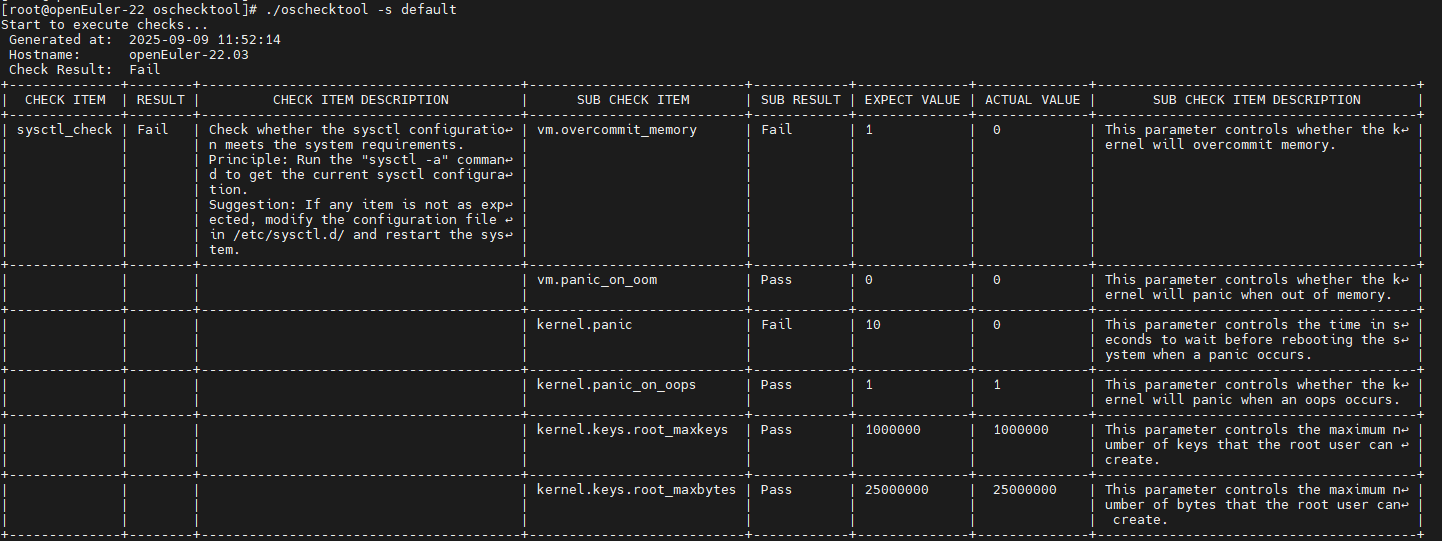
Run the check tool as follows. Figure 1 Check tool operation result
-
Adjust the environment based on the check result.
Related Operations
None