AI Inference Software Suite
Feature Overview
The openFuyao AI inference software suite allows users to use foundation model inference capabilities on appliances. It is optimized for Kunpeng and Ascend while maintaining compatibility with mainstream CPU-based computing scenarios.
Application Scenarios
Currently, enterprises primarily use AI inference in web and API scenarios.
- Web scenario: Users interact with foundation models by typing texts directly into the input box on the web page provided by services like Doubao and DeepSeek.
- API scenario: Users call APIs to communicate with foundation models and interact with foundation models through programming. This scenario is common in application plug-ins that embed foundation models into existing software, such as Cline and Roo Code.
Supported Capabilities
The AI inference software suite provides one-click installation, deployment, and model inference capabilities. The main functions are as follows:
- One-click installation and deployment: Supports one-click deployment of openFuyao and foundation model inference components, lowering the deployment threshold.
- Foundation model APIs: Provides APIs compatible with mainstream products, and allows you to call the foundation model capabilities through APIs.
- Monitoring: Supports integration of a monitoring dashboard component, allowing users to observe indicators of the inference service.
Highlights
The AI inference software suite integrates with and is compatible with open-source models to implement high scalability and quick deployment and installation. It optimizes affinity for heterogeneous computing power to improve resource utilization.
- Quick installation and out-of-the-box (lightweight and low noise) capabilities: The AI inference software suite (including the driver and firmware) can be quickly installed based on the openFuyao platform.
- High scalability and quick customized deployment: The scalable architecture is implemented based on the openFuyao container platform. The appliance solution can be customized based on the openFuyao extension market and external open-source components.
- Affinity optimization for heterogeneous computing power: Supports and performs affinity optimization for Kunpeng+Ascend computing scenarios, while remaining compatible with mainstream GPU-based computing scenarios.
Implementation Principles
Figure 1 Implementation principles of the AI inference software suite
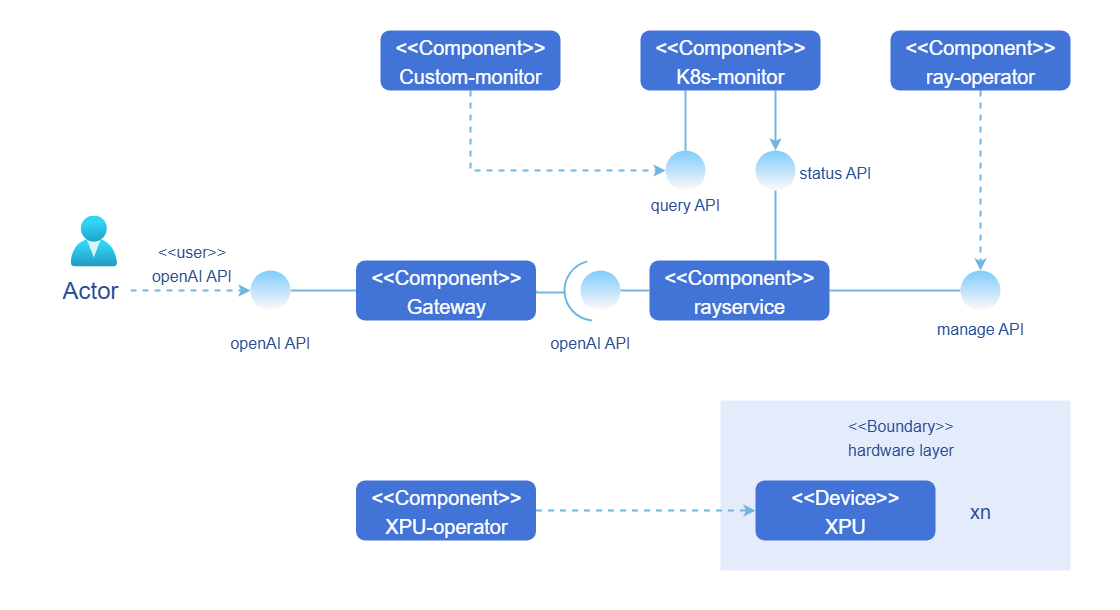
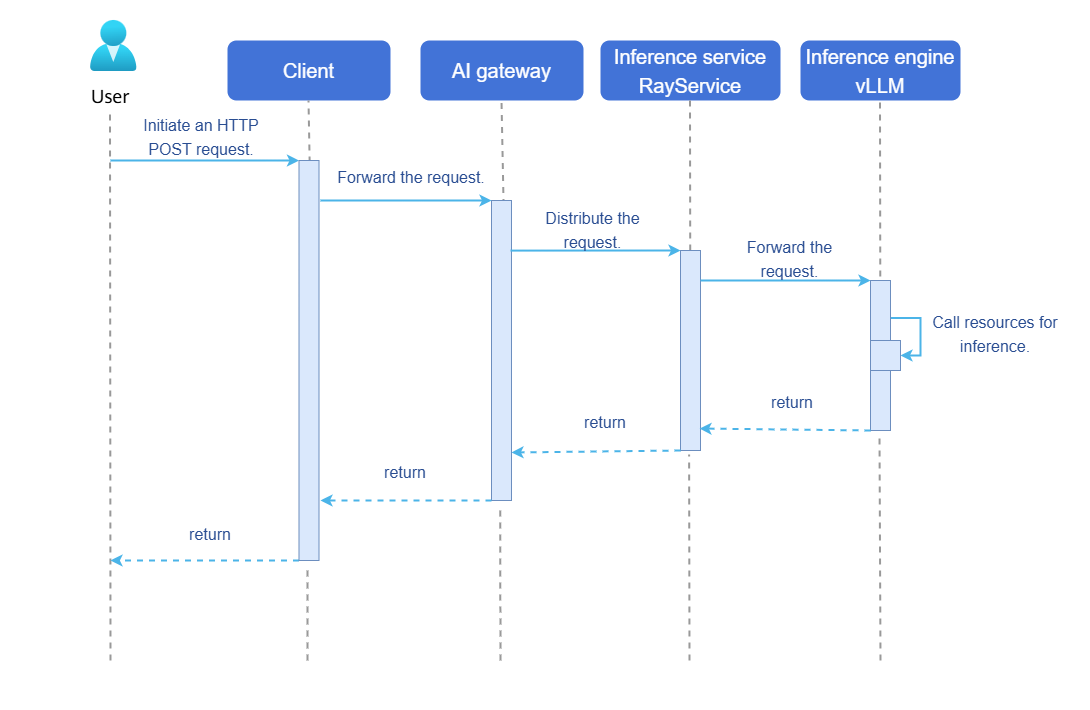
Inference job: In a complete inference job, a user initiates an inference job request using an OpenAI API, and the inference job is sent to a RayCluster in a Kubernetes cluster. After receiving the request, RayCluster delivers the job to the head Pod and worker Pod in the cluster. Once the head Pod and worker Pod complete the inference job, they return the result along the original path. Figure 2 shows the inference job sequence diagram.
Figure 2 Inference job sequence diagram of the AI inference software suite
- Cluster monitoring: Users or administrators can view the status of Ray clusters by using the visualized monitoring dashboard custom-monitor. custom-monitor obtains indicators from the monitoring component k8s-monitor in the cluster.
- One-click installation and deployment: The AI inference software suite supports one-click deployment of the openFuyao management platform.
Relationship with Related Features
The AI inference software suite has two kinds of relationships with other features: unilateral dependency and joint usage.
-
Unilateral dependency
Unilateral dependency is a prerequisite feature required for running the AI inference software suite, as shown in Table 1.
Table 1 Unilateral dependency
| Component | License | Version | Description |
|---|---|---|---|
| NPU Operator | MulanPSL-2.0 | 0.0.0-latest | openFuyao ecosystem component, which is a Kubernetes cluster management tool for Ascend NPUs. |
| GPU Operator | Apache-2.0 License | v25.3.2 | Ecosystem component provided by NVIDIA, which is a Kubernetes cluster management tool for NVIDIA GPUs. |
| KubeRay Operator | Apache-2.0 License | v1.4.0 | Simplified deployment and management of Ray applications in the Kubernetes cluster. |
| Prometheus | Apache-2.0 license | - | Kubernetes native monitoring component, which directly monitors cluster services and exposes indicators in standard format for querying. |
NOTE
The GPU operator is an optional third-party dependency and needs to be installed only when NVIDIA GPU inference is used. The GPU operator is provided based on the NVIDIA official component. openFuyao does not modify the content of the GPU operator. For details about additional terms and restrictions when using related components, see the NVIDIA official documents.
-
Joint usage
Joint usage is a feature decoupled from the AI inference software suite. In the current version, users can select features for visualized monitoring as required.
Table 2 Joint usage
| Component | License | Version | Description |
|---|---|---|---|
| monitoring-dashboard | MulanPSL-2.0 | 0.0.0-latest | openFuyao ecosystem component. Users can add indicators and customize the monitoring dashboard as required. |
| monitoring-service | MulanPSL-2.0 | 0.0.0-latest | openFuyao ecosystem component, which is used to monitor, collect, and analyze the status of resources and applications in a cluster in real time. |
Installation
One-click installation and deployment of the AI inference software suite refers to one-click deployment of appliances in the openFuyao application market.
openFuyao Platform
- In the navigation pane of openFuyao, choose Application Market > Applications. The Applications page is displayed.
- Select AI/Machine learning in the Scenario area on the left and search for the aiaio-installer card. Alternatively, enter aiaio-installer in the search box.
- Click the aiaio-installer card to go to the Details page of the extension.
- Click Deploy. The Deploy page is displayed.
- Enter the application name and select the desired installation version and namespace. You can select an existing namespace or create a namespace. For details about how to create a namespace, see Namespace.
- On the Values.yaml tab page in the Parameter Configuration area, enter the values to be deployed. There are many parameters that can be configured for this component. For details, see Parameter Configuration Description.
- Click Deploy to complete the application installation.
You can create a directory based on the name of an application. Create the /mnt/<Application name>-storage directory on the server where the application is to be deployed. For example, if the application name is aiaio, you need to create the /mnt/aiaio-storage directory.
Parameter Configuration Description
Table 3 Parameters in values.yaml
| Configuration Category | Parameter | Data Type | Description | Optional Value/Remarks |
|---|---|---|---|---|
| accelerator | GPU | boolean | Whether to use GPUs for inference | true or false. Either GPU or NPU can be set to true. |
| accelerator | NPU | boolean | Whether to use NPUs for inference | true or false. Either GPU or NPU can be set to true. |
| accelerator | type | string | Hardware accelerator type | NPU: Ascend 910B and Ascend 910B4; GPU: V100 |
| accelerator | num | integer | Hardware accelerator quantity | Set this parameter to tensor_parallel_size × pipeline_parallel_size based on the model size and recommended configurations. |
| service | image | string | Inference service image path | Recommended NPU: harbor.openfuyao.com/openfuyao/ai-all-in-one:latest GPUs need to be built using build/Dockerfile.gpu. |
| service | model | string | Inference model name | Model path, for example, deepseek-ai/DeepSeek-R1-Distill-Qwen-14B. |
| service | tensor_parallel_size | integer | Tensor parallelism size | Set this parameter based on the model size and recommended configurations. |
| service | pipeline_parallel_size | integer | Pipeline parallelism size | Set this parameter based on the model size and recommended configurations. |
| service | max_model_len | integer | Maximum sequence length of a model | Set this parameter based on the model size and hardware accelerator configuration. The recommended value is 16384. You can adjust the value as required. |
| service | vllm_use_v1 | integer | Whether to use vLLM v1 | The recommended value is 1. |
| storage | accessMode | string | Storage access mode | ReadWriteMany is recommended. |
| storage | size | string | Storage size | Set this parameter based on the model size and recommended configurations. The recommended value is 1.2 times the model size or larger. |
| storage | storageClassName | string | Storage class name | Set this parameter based on the actual storage class of the cluster. This parameter is invalid when default_pv is set to true. |
| storage | default_pv | boolean | Whether to use the default persistent volume | If no storage class is preconfigured in the cluster, you are advised to set this parameter to true. |
Recommended Model Configuration
Table 4 Recommended model configurations
| Model Size | service.model | accelerator.GPU | accelerator.NPU | accelerator.type | accelerator.num | service.tensor_parallel_size | service.pipeline_parallel_size | storage.size |
|---|---|---|---|---|---|---|---|---|
| 1.5B | deepseek-ai/DeepSeek-R1-Distill-Qwen-1.5B | false | true | Ascend910B4 | 1 | 1 | 1 | 10Gi |
| 7B | deepseek-ai/DeepSeek-R1-Distill-Qwen-7B | false | true | Ascend910B4 | 1 | 1 | 1 | 20Gi |
| 8B | deepseek-ai/DeepSeek-R1-Distill-Qwen-8B | false | true | Ascend910B4 | 1/2 | 1/2 | 1 | 25Gi |
| 14B | deepseek-ai/DeepSeek-R1-Distill-Qwen-14B | false | true | Ascend910B4 | 2 | 2 | 1 | 40Gi |
| 32B | deepseek-ai/DeepSeek-R1-Distill-Qwen-32B | false | true | Ascend910B4 | 4 | 4 | 1 | 80Gi |
| 70B | deepseek-ai/DeepSeek-R1-Distill-Qwen-70B | false | true | Ascend910B4 | 8/16 | 8/16 | 1 | 160Gi |
- Only the recommended NPU configurations are provided. The recommended GPU configurations are not provided because GPU support is in the early stage.
- In the preceding table, 1/2 indicates that the minimum configuration is 1 and the recommended configuration is 2. The same applies to other configurations.
- For details about the complete configuration, see Configuration Example.
Deployment Views
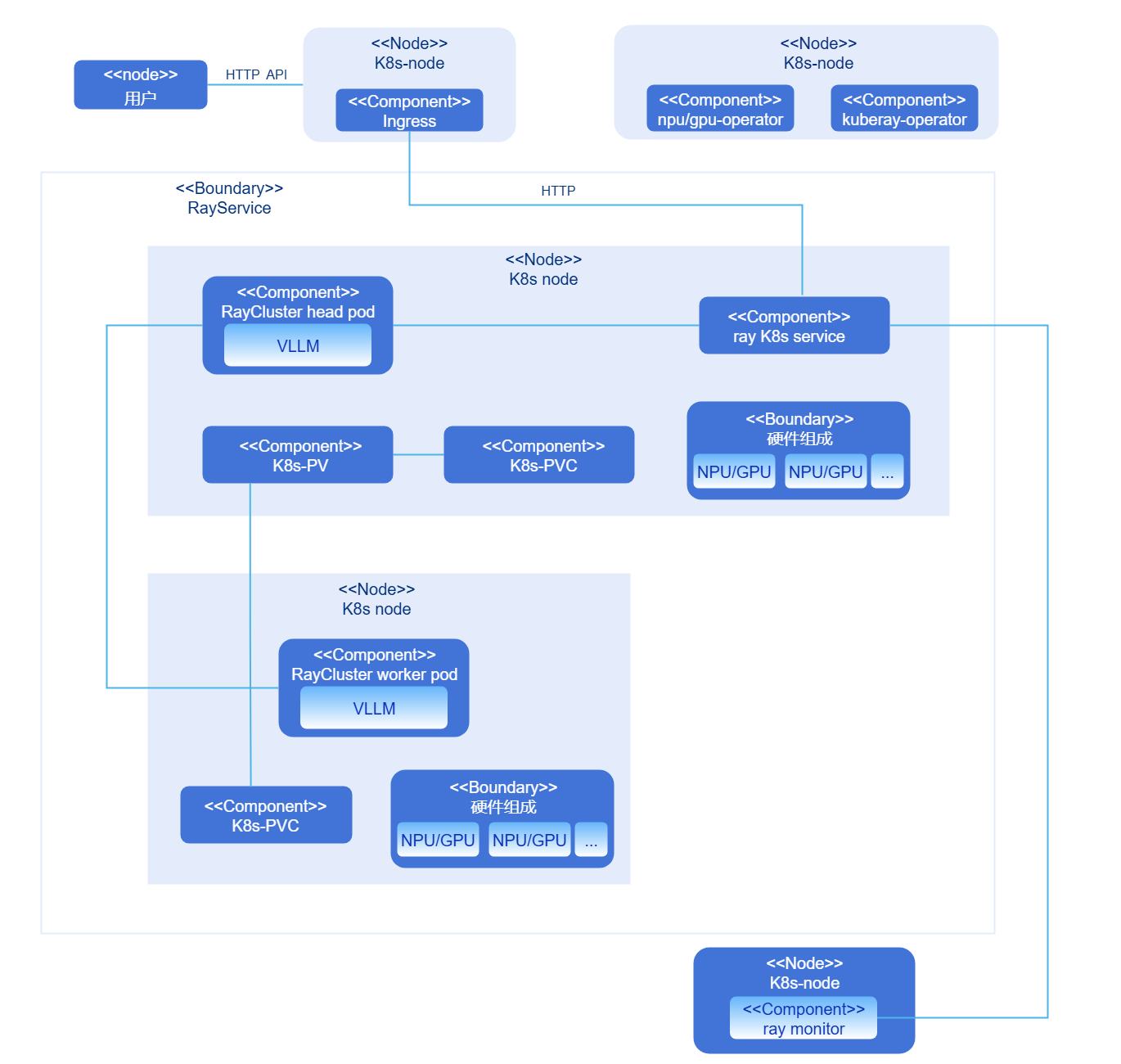
Currently, the AI inference software suite consists of three components: the Ascend NPU management component NPU operator (or the GPU management component GPU operator), the openFuyao Ray management component KubeRay operator, and the cluster component RayCluster. Depending on the size of the deployed model, RayCluster contains one head Pod and may contain zero or more worker Pods. These components do not need to be deployed by users. The deployment program automatically starts the components. For the deployment views, see Figure 3 (containing only the head Pod) and Figure 4 (containing the head Pod and one worker Pod).
Figure 3 Deployment view 1 of the AI inference software suite

Figure 4 Deployment view 2 of the AI inference software suite
Submitting an Inference Job Using OpenAI APIs
Prerequisites
The AI inference software suite service has been deployed on the node.
Context
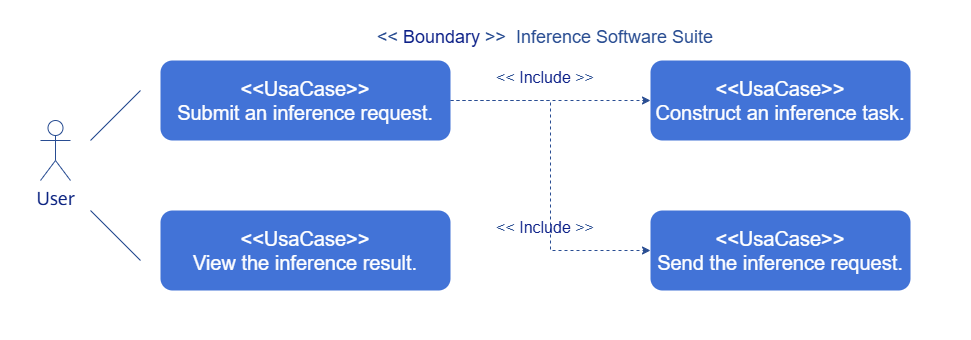
You can use OpenAI APIs to submit inference jobs and view inference results.
- Submitting an inference job: Construct an OpenAI HTTP request and send the request to the inference service address.
- Viewing the inference result: After completing the job, the inference service sends the result to the user address and displays the result on the user WebUI.
Figure 5 Inference job
Constraints
Currently, only plain-text inference jobs are supported.
Procedure
-
Construct an inference job: Construct an inference job on the client. The JSON structure of the inference job is as follows:
{
  "method": "POST",
  "url": "http://localhost:8000/v1/chat/completions",
  "headers": {
    "Content-Type": "application/json",
    "Authorization": "Bearer fake-key"
  },
  "body": {
    "model": "deepseek-ai/DeepSeek-R1-Distill-Qwen-32B",
    "messages": [
      {
        "role": "user",
        "content": "Hello!"
      }
    ]
  }
} -
Obtain the cluster IP address of the Kubernetes service (ending with serve-svc) of RayService in Kubernetes and construct an inference request Uniform Resource Identifier (URI). URI: http://<cluster_ip>:8000/v1/chat/completions
-
Use a command-line tool, such as curl, or a programming language, such as Python, to initiate an HTTP POST request.
-
The inference service in the AI inference software suite handles the inference job and returns the result to the client along the original path.
Appendixes
Configuration Examples
NPU Configuration Example (14B Model)
accelerator:
  GPU: false
  NPU: true
  type: "Ascend910B4"
  num: 2

service:
  image: cr.openfuyao.cn/openfuyao/ai-all-in-one:latest
  model: "deepseek-ai/DeepSeek-R1-Distill-Qwen-14B"
  tensor_parallel_size: 2
  pipeline_parallel_size: 1
  max_model_len: 16384
  vllm_use_v1: 1

storage:
  accessMode: ReadWriteMany
  size: 40Gi
  storageClassName: example-sc
  default_pv: true
GPU Configuration Example (14B Model)
accelerator:
  GPU: true
  NPU: false
  type: "V100"
  num: 2

service:
  image: "your-custom-gpu-image:latest"  # Use **build/Dockerfile.gpu**.
  model: "deepseek-ai/DeepSeek-R1-Distill-Qwen-14B"
  tensor_parallel_size: 2
  pipeline_parallel_size: 1
  max_model_len: 16384
  vllm_use_v1: 0 # V100 does not support the vllm v1 engine.

storage:
  accessMode: ReadWriteMany
  size: 40Gi
  storageClassName: example-sc
  default_pv: true