NPU Operator
Feature Overview
Kubernetes provides access to special hardware resources (such as Ascend NPUs) through Device Plugins. However, configuring and managing nodes with these hardware resources requires setting up multiple software components (such as drivers, container runtimes, or other libraries), which are complex, difficult, and error-prone to install. The NPU Operator uses the Operator Framework in Kubernetes to automatically manage all software components required for configuring Ascend devices. These components include the Ascend driver and firmware, which enable the full running process of cluster building, and the MindCluster device plugin, which supports cluster job scheduling, O&M monitoring, and fault recovery. By installing the corresponding components, you can implement NPU resource management, optimized workload scheduling, and containerized support for training and inference tasks, enabling AI jobs to be deployed and run on NPU devices as containers.
Table 1 Currently Supported Components
| Component Name | Deployment Mode | Function |
|---|---|---|
| Ascend driver and firmware | Containerized deployment managed by NPU Operator | Acts as the bridge between hardware devices and the operating system, enabling the OS to recognize and communicate with hardware devices. |
| Ascend Device Plugin | Containerized deployment managed by NPU Operator | Device discovery: Based on the Kubernetes device plugin mechanism, adds device discovery, device allocation, and device health status reporting functions for Ascend AI processors, enabling Kubernetes to manage Ascend AI processor resources. |
| Ascend Operator | Containerized deployment managed by NPU Operator | Environment configuration: A Volcano-supporting component that manages acjob-type tasks, injects environment variables required by AI frameworks (MindSpore/PyTorch/TensorFlow) for training tasks into containers, and then Volcano takes over scheduling. |
| Ascend Docker Runtime | Containerized deployment managed by NPU Operator | Ascend container runtime: A container engine plugin that provides NPU containerization support for all AI jobs, enabling users to run AI jobs smoothly on Ascend devices as Docker containers. |
| NPU Exporter | Containerized deployment managed by NPU Operator | Real-time monitoring of Ascend AI processor resource data: Supports real-time collection of various resource data of Ascend AI processors, including processor utilization, temperature, voltage, and memory usage. Additionally, it can monitor virtual NPUs (vNPUs) of Atlas inference series products, including key indicators such as AI Core utilization, total vNPU memory, and used memory. |
| Resilience Controller | Containerized deployment managed by NPU Operator | Dynamic scaling: When a fault occurs during task training and there are insufficient healthy resources for replacement, this component can use dynamic scale-down to remove faulty resources and continue training. When resources become sufficient, training tasks can be restored through dynamic scale-up. |
| ClusterD | Containerized deployment managed by NPU Operator | Collects cluster task information, resource information, and fault information, determines fault handling levels and policies in a unified manner, and controls the process recalculation of training containers. |
| Volcano | Containerized deployment managed by NPU Operator | Obtains cluster resource information from underlying components, selects the optimal scheduling policy and resource allocation by sensing the network connection mode between Ascend chips, and can reschedule tasks when task resources fail. |
| NodeD | Containerized deployment managed by NPU Operator | Detects node resource monitoring status and node fault information, reports fault information, and prevents new tasks from being scheduled to faulty nodes. |
| MindIO | Containerized deployment managed by NPU Operator | Generates and saves end-of-life checkpoints after model training interruption, rectifies UCE faults in on-chip memory online during model training, provides the capability of restarting or replacing nodes for fault rectification and model training resumption, and optimizes checkpoint saving and loading. |
For details about the components, see MindCluster Introduction.
Component Version Compatibility
Table 2 Currently Supported Components and Default Versions
| Component Name | Version |
|---|---|
| Ascend driver and firmware | 25.5.0 |
| Ascend Device Plugin | 7.3.0 |
| Ascend Operator | 7.3.0 |
| Ascend Docker Runtime | 7.3.0 |
| NPU Exporter | 7.3.0 |
| Resilience Controller | 7.1.RC1 |
| ClusterD | 7.3.0 |
| Volcano | 7.3.0 (based on original Volcano 1.9.0) |
| NodeD | 7.3.0 |
| MindIO | 7.3.0 |
Application Scenarios
In scenarios where a cluster is built based on Ascend devices and supports cluster job scheduling, O&M monitoring, and fault recovery, the NPU Operator can automatically identify Ascend nodes in the cluster and perform the corresponding installation and deployment. For training scenarios, it supports NPU resource detection, full-card scheduling, static vNPU scheduling, resumable training, and elastic training. For inference scenarios, it supports resource detection, full-card scheduling, static vNPU scheduling, dynamic vNPU scheduling, inference card fault recovery, and rescheduling.
Supported Capabilities
- Automatically discovers Ascend NPU device nodes and labels them.
- Automatically deploys the Ascend NPU driver and firmware.
- MindCluster automated deployment, installation, and lifecycle management for cluster scheduling components.
Highlights
The NPU Operator can automatically identify Ascend nodes and device models in a cluster, and install the corresponding versions of components required for AI runtime, greatly simplifying the configuration threshold for Ascend ecosystem components. It provides full lifecycle management and automated configuration deployment for installed components. The NPU Operator can detect component installation status and provide detailed logs for debugging.
Implementation Principles
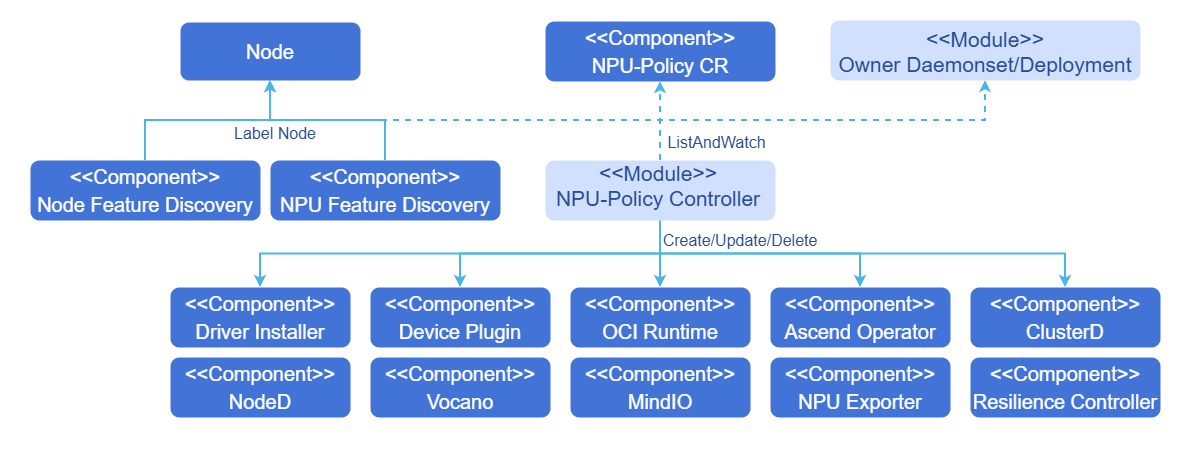
- The Operator monitors changes in CR instances instantiated from CRDs to modify the state of managed components.
- The Operator uses the npu-feature-discovery component to label nodes with labels that meet Ascend component scheduling requirements, based on labels marked by NFD on nodes.
Figure 1 Schematic Diagram
Relationship with Related Features
Ensure that application-management-service and marketplace-service are running properly so that this feature can be installed from the application market normally.
Security Context of the Operator
Some pods managed by the NPU Operator (such as driver containers) require elevated privileges as follows.
privileged: truehostPID: truehostIPC: truehostNetwork: true
The reasons for elevated privileges are as follows:
- To access the host file system and hardware devices, and install driver firmware and SDK services on the host.
- To modify device permissions for non-root user usage.
Installation
Deployment on the openFuyao Platform
Online Installation
Prerequisites
Ensure that kubectl and Helm CLI are installed on the current machine, or that a configurable application store or repository is available in the cluster.
Ensure that the bash tool is available in the environment. Otherwise, the driver firmware installation script may fail to parse.
All worker nodes or node groups running NPU workloads in a Kubernetes cluster must run operating system versions that meet openEuler 22.03 LTS or Ubuntu 22.04 (ARM architecture).
Worker nodes or node groups that run only CPU workloads can run any operating system, because the NPU Operator does not perform any configuration or management on nodes that do not run NPU workloads.
The components installed by the NPU Operator require the runtime environment to support NPU chip models 910B and 310P. For details on OS and hardware compatibility, see MindCluster Documentation.
Node-Feature-Discovery (NFD) and NPU-Feature-Discovery are dependencies for the Operator on each node.
 Note:
Note:
By default, NFD master and worker nodes are automatically deployed by the Operator. If NFD is already running in the cluster, you must disable NFD deployment during Operator installation. Similarly, if NPU-Feature-Discovery has been deployed in the cluster in advance, you also need to disable NPU-Feature-Discovery deployment during Operator installation.values.yaml
yamlnfd: enabled: false npu-feature-discovery: enabled: falseCheck NFD labels on nodes to determine whether NFD is running in the cluster.
shkubectl get nodes -o json | jq '.items[].metadata.labels | keys | any(startswith("feature.node.kubernetes.io"))'If the command output is
true, NFD is running in the cluster. In this case, setnodefeaturerulesto install NPU custom node discovery rules.yamlnfd: nodefeaturerules: trueBy default, nfd is set to true, npu-feature-discovery is set to true, and nodefeaturerules is set to false.
The openFuyao platform has been installed in the cluster. For the installation method, see Quick Installation.
Installation Steps
The NPU Operator extension component can be downloaded and installed from the openFuyao application market.
Refer to the openFuyao Platform Usage Documentation, log in to the openFuyao platform, and select "Application Market > Application List" from the left navigation pane.
Search for "npu-operator" in the application list to find the NPU Operator extension component.
Click the NPU Operator card to enter the application details page.
On the details page, click "Deploy" in the upper right corner. In the "Installation Information" module on the deployment page, enter "Application Name", "Version Information", and "Namespace".
Click "Confirm" to successfully deploy the component.
Note:
Currently, the online installation function supports driver firmware installation for 910B and 310P series models. It does not yet support online driver firmware installation for the 910C model. If you need to install driver firmware for the 910C model, see the Offline Installation section. When installing the npu-operator component through the application market, you can modify the corresponding values.yaml parameters. For details, see Table 4.
Offline Installation
Prerequisites
Ensure that kubectl and Helm CLI are installed on the current machine, or that a configurable application store or repository is available in the cluster.
Ensure that the bash tool is available in the environment. Otherwise, the driver firmware installation script may fail to parse.
All worker nodes or node groups running NPU workloads in a Kubernetes cluster must run operating system versions that meet openEuler 22.03 LTS or Ubuntu 22.04 (ARM architecture).
Worker nodes or node groups that run only CPU workloads can run any operating system, because the NPU Operator does not perform any configuration or management on nodes that do not run NPU workloads.
The components installed by the NPU Operator require the runtime environment to support NPU chip models 910B and 310P. For details on OS and hardware compatibility, see MindCluster Documentation.
The openFuyao platform has been installed in the cluster. For the installation method, see Quick Installation.
Download offline images: Download all images required for the components to be installed locally and import them into the cluster container runtime. For details, see Table 3.
Prepare the driver firmware ZIP package and the MindIO component ZIP package:
- Download the driver firmware ZIP package: Go to the npu-driver-installer repository, find the config.json file for the corresponding driver firmware version, and click the corresponding link based on the node's NPU model and OS architecture to download the corresponding driver firmware ZIP package. For 910C model NPUs that support offline driver firmware installation, download from Ascend Community - Firmware and Driver Download. Driver firmware ZIP packages for other models can also be downloaded from the above link.
- Download the MindIO component ZIP package: Go to the npu-node-provision repository, find the config.json file for the corresponding component version, and click the corresponding link based on the node's NPU model and OS architecture to download the corresponding SDK ZIP package.
Place the driver firmware ZIP file on the node path for offline installation:
/tmp/driver_pkg/. This path can be customized. For details on how to modify it, see thedriver.envfield in Table 4.Place the MindIO component ZIP package on the node path for offline installation:
/opt/openFuyao/mindio/Check whether the target installation node contains the following tools:
- If the package management tool is yum, the required packages are: "jq wget unzip which initscripts coreutils findutils gawk e2fsprogs util-linux net-tools pciutils gcc make automake autoconf libtool git patch kernel-devel-
(uname -r) dkms"
You can use the following command to check.bashpkgs=(jq wget unzip which initscripts coreutils findutils gawk e2fsprogs util-linux net-tools pciutils gcc make automake autoconf libtool git patch kernel-devel-$(uname -r) kernel-headers-$(uname -r) dkms); rpm -q "${pkgs[@]}" >/dev/null || rpm -q "${pkgs[@]}" | grep "is not installed" - If the package management tool is apt-get, the required packages are: "jq wget unzip debianutils coreutils findutils gawk e2fsprogs util-linux net-tools pciutils gcc make automake autoconf libtool git patch dkms linux-headers-$(uname -r)"
You can use the following command to check.bashpkgs=(jq wget unzip debianutils coreutils findutils gawk e2fsprogs util-linux net-tools pciutils gcc make automake autoconf libtool git patch dkms linux-headers-$(uname -r)); dpkg-query -W -f='${Package}\t${Status}\n' "${pkgs[@]}" 2>&1 | grep -Ev "install ok installed" - If the package management tool is dnf, the required packages are: "jq wget unzip which initscripts coreutils findutils gawk e2fsprogs util-linux net-tools pciutils gcc make automake autoconf libtool git patch kernel-devel-
(uname -r) dkms"
You can use the following command to check.bashpkgs=(jq wget unzip which initscripts coreutils findutils gawk e2fsprogs util-linux net-tools pciutils gcc make automake autoconf libtool git patch kernel-devel-$(uname -r) kernel-headers-$(uname -r) dkms); rpm -q "${pkgs[@]}" >/dev/null || rpm -q "${pkgs[@]}" | grep "is not installed"
- If the package management tool is yum, the required packages are: "jq wget unzip which initscripts coreutils findutils gawk e2fsprogs util-linux net-tools pciutils gcc make automake autoconf libtool git patch kernel-devel-
Table 3 Image List for Components
| Component | Image |
|---|---|
| Ascend driver and firmware | cr.openfuyao.cn/openfuyao/npu-driver-installer:latest |
| ascend-docker-runtime | cr.openfuyao.cn/openfuyao/ascend-docker-runtime:v7.3.0 cr.openfuyao.cn/openfuyao/npu-container-toolkit:latest |
| clusterd | hub.oepkgs.net/openfuyao/ascendhub/clusterd:v7.3.0 |
| device-plugin | hub.oepkgs.net/openfuyao/ascendhub/ascend-k8sdeviceplugin:v7.3.0 hub.oepkgs.net/openfuyao/busybox:1.36.1 |
| mindio | cr.openfuyao.cn/openfuyao/npu-node-provision:latest |
| noded | hub.oepkgs.net/openfuyao/ascendhub/noded:v7.3.0 |
| npu-exporter | hub.oepkgs.net/openfuyao/ascendhub/npu-exporter:v7.3.0 |
| resilience-controller | hub.oepkgs.net/openfuyao/ascendhub/resilience-controller:v7.1.RC1 |
| ascend-operator | hub.oepkgs.net/openfuyao/ascendhub/ascend-operator:v7.3.0 hub.oepkgs.net/openfuyao/busybox:1.36.1 |
| volcano | hub.oepkgs.net/openfuyao/ascendhub/vc-controller-manager:v1.9.0-v7.3.0 hub.oepkgs.net/openfuyao/ascendhub/vc-scheduler:v1.9.0-v7.3.0 hub.oepkgs.net/openfuyao/busybox:1.36.1 |
| npu-operator | cr.openfuyao.cn/openfuyao/npu-operator:latest |
| node-feature-discovery | hub.oepkgs.net/openfuyao/nfd/node-feature-discovery:v0.16.4 |
| npu-feature-discovery | cr.openfuyao.cn/openfuyao/npu-feature-discovery:latest |
Installation Steps
See Online Installation Steps.
Standalone Deployment
Online Installation
Prerequisites
Ensure that kubectl and Helm CLI are installed on the current machine, or that a configurable application store or repository is available in the cluster.
Ensure that the bash tool is available in the environment. Otherwise, the driver firmware installation script may fail to parse.
All worker nodes or node groups running NPU workloads in a Kubernetes cluster must run operating system versions that meet openEuler 22.03 LTS or Ubuntu 22.04 (ARM architecture).
Worker nodes or node groups that run only CPU workloads can run any operating system, because the NPU Operator does not perform any configuration or management on nodes that do not run NPU workloads.
The components installed by the NPU Operator require the runtime environment to support NPU chip models 910B and 310P. For details on OS and hardware compatibility, see MindCluster Documentation.
Binary Installation
Add the openFuyao Helm repository.
shellhelm repo add openfuyao https://helm.openfuyao.cn && helm repo updatePull the project package.
bashhelm pull oci://cr.openfuyao.cn/charts/npu-operator xxxReplace
xxxwith the specific project package version, such as0.0.0-latest. The pulled package is in compressed format.Install the NPU Operator.
Install the Operator using default configurations:
shellhelm install --wait --generate-name \ -n default --create-namespace \ npu-operator-xxx.tgzFor details on modifying installation parameters, see Common Customization Options.
Note: - After the NPU Operator is installed, it will label nodes with NPU resource-related labels based on different node environments. These labels are associated with cluster scheduling components. The accelerate-type label requires an exact match between the node's hardware server and the NPU card. For details on the compatibility mapping, see Creating Node Labels in the MindCluster documentation.
- For the A800I A2 inference server, automatic addition of the server-usage=infer label is not supported. You need to manually add the label by running the following command:
bashkubectl label nodes <node-name> server-usage=infer
Source Code Installation
Pull the project from the npu-operator repository.
bashgit clone -b xxx https://gitcode.com/openFuyao/npu-operator.gitReplace
xxxwith the code branch.Install and deploy.
Using namespace
defaultand release namenpu-operatoras an example, run the following command in the directory at the same level asnpu-operator:bashcd npu-operator/charts/npu-operator helm install -n default npu-operator .For details on modifying installation parameters, see Common Customization Options.
Common Customization Options
The following options can be modified when using the Helm Chart. These options are used through --set or --set-json (used when modifying component environment variables, volumes, and other list structures) during Helm installation. Due to the large number of configuration items, it is recommended to directly modify the corresponding fields in the values.yaml file of the chart package.
Table 4 lists the most commonly used fields. For other fields, see the repository.
Table 4 Common Options
| Option | Description | Default |
|---|---|---|
nfd.enabled | Deploy the Node Feature Discovery (NFD) service. If NFD is already running in the cluster, set this variable to false.
| true |
nfd.nodefeaturerules | When set to true, install the NFD CR for discovering NPU device rules. | true |
node-feature-discovery.image.repository | NFD service image address. | registry.k8s.io/nfd/node-feature-discovery |
node-feature-discovery.image.pullPolicy | NFD service image pull policy. | Always |
node-feature-discovery.image.tag | NFD service image version. | v0.16.4 |
npu-feature-discovery.images.core.repository | NPU-Feature-Discovery image address. | cr.openfuyao.cn/openfuyao/npu-feature-discovery |
npu-feature-discovery.images.core.pullPolicy | NPU-Feature-Discovery image pull policy. | Always |
npu-feature-discovery.images.core.tag | NPU-Feature-Discovery image version. | latest |
npu-feature-discovery.enabled | Switch for deploying NPU-Feature-Discovery. If NPU-Feature-Discovery is already running in the cluster, set this variable to false. | true |
images.operator.repository | NPU Operator image address. | cr.openfuyao.cn/openfuyao/npu-operator |
images.operator.tag | NPU Operator image version. | latest |
images.operator.pullPolicy | NPU Operator image pull policy. | Always |
daemonSets.labels | Custom labels to be added to all pods managed by the NPU Operator. | {} |
daemonSets.tolerations | Custom tolerations to be added to all pods managed by the NPU Operator. | [] |
driver.enabled | By default, the Operator deploys the NPU driver and firmware as a container on the system. | true |
images.driver.repository | Driver firmware image storage address. | cr.openfuyao.cn/openfuyao/npu-driver-installer |
images.driver.tag | Image version of the driver firmware installation service. | latest |
driver.env | Environment variables related to the driver firmware installation service 1. name: HOST_DRIVER_SOURCE_PATH value: "/tmp/driver_pkg" 2. name: DRIVER_VERSION value: "25.3.RC1" | 1. This environment variable specifies the path for placing the driver firmware ZIP package 2. This environment variable specifies the online download and installation version of the driver firmware ZIP package. |
devicePlugin.enabled | By default, the Operator deploys the NPU device plugin on the system. When using the Operator on a system where the device plugin is pre-installed, set this value to false.
| true |
images.devicePlugin.repository | Device plugin image address. | hub.oepkgs.net/openfuyao/ascendhub/ascend-k8sdeviceplugin |
images.devicePlugin.tag | Device plugin service image version. | v7.3.0 |
trainer.enabled | By default, the Operator installs the Ascend Operator. If not needed, set this value to false. | true |
images.trainer.repository | Ascend Operator image address. | hub.oepkgs.net/openfuyao/ascendhub/ascend-operator |
images.trainer.tag | Ascend Operator image version. | v7.3.0 |
ociRuntime.enabled | By default, the Operator installs the Ascend Docker Runtime. If not needed, set this value to false. | true |
images.ociRuntime.repository | Ascend Docker Runtime image address. | cr.openfuyao.cn/openfuyao/npu-container-toolkit |
images.ociRuntime.tag | Ascend Docker Runtime image version. | latest |
nodeD.enabled | By default, the Operator installs nodeD. If not needed, set this value to false. | true |
images.nodeD.repository | nodeD image address. | hub.oepkgs.net/openfuyao/ascendhub/noded |
images.nodeD.tag | nodeD image version. | v7.3.0 |
clusterd.enabled | By default, the Operator installs the clusterD component. If not needed, set this value to false. | true |
images.clusterd.repository | clusterD image address. | hub.oepkgs.net/openfuyao/ascendhub/clusterd |
images.clusterd.tag | clusterD image version. | v7.3.0 |
rscontroller.enabled | By default, the Operator installs the resilience controller component. If not needed, set this value to false. | true |
images.rscontroller.repository | resilience controller image address. | hub.oepkgs.net/openfuyao/ascendhub/resilience-controller |
images.rscontroller.tag | resilience controller image version. | v7.1.RC1 |
exporter.enabled | By default, the Operator installs the NPU Exporter component. If not needed, set this value to false. | true |
images.exporter.repository | NPU Exporter image address. | cr.openfuyao.cn/openfuyao/npu-exporter |
images.exporter.tag | NPU Exporter image version. | v7.3.0 |
mindiotft.enabled | By default, the Operator installs MindIO Training Fault Tolerance. If not needed, set this value to false. | true |
images.mindiotft.repository | MindIO Training Fault Tolerance image address. | cr.openfuyao.cn/openfuyao/npu-node-provision |
images.mindiotft.tag | MindIO Training Fault Tolerance image version. | latest |
mindioacp.enabled | By default, the Operator installs MindIO Async Checkpoint Persistence. If not needed, set this value to false. | true |
images.mindioacp.repository | MindIO Async Checkpoint Persistence service image address. | cr.openfuyao.cn/openfuyao/npu-node-provision |
images.mindioacp.tag | MindIO Async Checkpoint Persistence service image version. | latest |
mindioacp.version | MindIO Async Checkpoint Persistence version. | 7.3.0 |
vccontroller.enabled | By default, the Operator installs volcano-controller. If not needed, set this value to false. | true |
images.vccontroller.repository | volcano-controller service image address. | hub.oepkgs.net/openfuyao/ascendhub/vc-controller-manager |
images.vccontroller.tag | volcano-controller service image version. | v1.9.0-v7.3.0 |
vcscheduler.enabled | By default, the Operator installs volcano-scheduler. If not needed, set this value to false. | true |
images.vcscheduler.repository | volcano-scheduler service image address. | hub.oepkgs.net/openfuyao/ascendhub/vc-scheduler |
images.vcscheduler.tag | volcano-scheduler service image version. | v1.9.0-v7.3.0 |
Offline Installation
Prerequisites
See openFuyao Platform Offline Installation Prerequisites to prepare the driver firmware ZIP package, offline images, and related tools. When using binary or source code installation, the openFuyao platform does not need to be installed.
Installation Steps
For installation steps, see Binary Installation and Source Code Installation. For common customization options, see Table 4.
Upgrade
The NPU Operator supports dynamic updates to existing resources. This feature ensures that NPU Policy settings in the cluster are always kept up to date.
Because Helm does not support automatic upgrades of existing CRDs, the NPU Operator Chart can be upgraded either manually or by enabling Helm Hooks.
NPU Policy CR Update
The NPU Operator supports dynamic updates to the npuclusterpolicy CustomResource using kubectl.
kubectl get npuclusterpolicy -A
# If the default npuclusterpolicy has not been modified, the default name of npuclusterpolicy is cluster.
kubectl edit npuclusterpolicy cluster
After editing, Kubernetes automatically applies the update to the cluster. Each component managed by the NPU Operator is also updated to its expected state.
Installation Status Verification
Viewing Component Status Through CustomResource
View component status through the CustomResource npuclusterpolicies.npu.openfuyao.com. Specifically, check the state field of each component in the status field to confirm the current status of the component. The following is an example of the driver installer running properly.
status:
  componentStatuses:
    - name: /var/lib/npu-operator/components/driver
      prevState:
        reason: Reconciling
        type: deploying
      state:
        reason: Reconciled
type: running- View the CustomResource
$ kubectl get npuclusterpolicies.npu.openfuyao.com cluster -o yaml
apiVersion: npu.openfuyao.com/v1
kind: NPUClusterPolicy
metadata:
  annotations:
    meta.helm.sh/release-name: npu
    meta.helm.sh/release-namespace: default
  creationTimestamp: "2025-03-11T13:22:39Z"
  generation: 2
  labels:
    app.kubernetes.io/managed-by: Helm
    app.kubernetes.io/name: npu-operator
  name: cluster
  resourceVersion: "2240086"
  uid: 0d1498c5-143a-4e05-a5dc-376d2e6c96ea
spec:
  clusterd:
    imageSpec:
      imagePullPolicy: Always
      imagePullSecrets: []
      registry: cr.openfuyao.cn
      repository: openfuyao/ascend-image/clusterd
      tag: v6.0.0
    logRotate:
      compress: false
      logFile: /var/log/mindx-dl/clusterd/clusterd.log
      logLevel: info
      maxAge: 7
      rotate: 30
    managed: true
  daemonsets:
    imageSpec:
      imagePullPolicy: IfNotPresent
      imagePullSecrets: []
    labels:
      app.kubernetes.io/managed-by: npu-operator
      helm.sh/chart: npu-operator-0.0.0-latest
    tolerations:
    - effect: NoSchedule
      key: node-role.kubernetes.io/master
      operator: Equal
      value: ""
    - effect: NoSchedule
      key: node-role.kubernetes.io/control-plane
      operator: Equal
      value: ""
  devicePlugin:
    imageSpec:
      imagePullPolicy: Always
      imagePullSecrets: []
      registry: cr.openfuyao.cn
      repository: openfuyao/ascend-image/ascend-k8sdeviceplugin
      tag: v6.0.0
    initImageSpec:
      imagePullPolicy: Always
      imagePullSecrets: []
      registry: ""
      repository: hub.oepkgs.net/busybox:latest
      tag: ""
    logRotate:
      compress: false
      logFile: /var/log/mindx-dl/devicePlugin/devicePlugin.log
      logLevel: info
      maxAge: 7
      rotate: 30
    managed: true
  driver:
    imageSpec:
      imagePullPolicy: Always
      imagePullSecrets: []
      registry: cr.openfuyao.cn
      repository: openfuyao/npu-driver-installer
      tag: latest
    initImageSpec:
      imagePullPolicy: Always
      imagePullSecrets: []
      registry: ""
      repository: cr.openfuyao.cn/openfuyao/npu-driver-installer:latest
      tag: ""
    logRotate:
      compress: false
      logFile: /var/log/mindx-dl/driver/driver.log
      logLevel: info
      maxAge: 7
      rotate: 30
    managed: true
    version: 24.1.RC3
  exporter:
    imageSpec:
      imagePullPolicy: Always
      imagePullSecrets: []
      registry: cr.openfuyao.cn
      repository: openfuyao/ascend-image/npu-exporter
      tag: v6.0.0
    logRotate:
      compress: false
      logFile: /var/log/mindx-dl/npu-exporter/npu-exporter.log
      logLevel: info
      maxAge: 7
      rotate: 30
    managed: true
  mindioacp:
    imageSpec:
      imagePullPolicy: Always
      imagePullSecrets: []
      registry: cr.openfuyao.cn
      repository: openfuyao/npu-node-provision
      tag: latest
    managed: false
    version: 6.0.0
  mindiotft:
    imageSpec:
      imagePullPolicy: Always
      imagePullSecrets: []
      registry: cr.openfuyao.cn
      repository: openfuyao/npu-node-provision
      tag: latest
    managed: false
  nodeD:
    heartbeatInterval: 5
    imageSpec:
      imagePullPolicy: Always
      imagePullSecrets: []
      registry: cr.openfuyao.cn
      repository: openfuyao/ascend-image/noded
      tag: v6.0.0
    logRotate:
      compress: false
      logFile: /var/log/mindx-dl/noded/noded.log
      logLevel: info
      maxAge: 7
      rotate: 30
    managed: true
    pollInterval: 60
  ociRuntime:
    imageSpec:
      imagePullPolicy: Always
      imagePullSecrets: []
      registry: cr.openfuyao.cn
      repository: openfuyao/npu-container-toolkit
      tag: latest
    initConfigImageSpec:
      imagePullPolicy: Always
      imagePullSecrets: []
      registry: ""
      repository: cr.openfuyao.cn/openfuyao/npu-container-toolkit:latest
      tag: ""
    initRuntimeImageSpec:
      imagePullPolicy: Always
      imagePullSecrets: []
      registry: ""
      repository: cr.openfuyao.cn/openfuyao/ascend-image/ascend-docker-runtime:latest
      tag: ""
    interval: 300
    managed: true
  operator:
    imageSpec:
      imagePullPolicy: IfNotPresent
      imagePullSecrets: []
    runtimeClass: ascend
  rscontroller:
    imageSpec:
      imagePullPolicy: Always
      imagePullSecrets: []
      registry: cr.openfuyao.cn
      repository: openfuyao/ascend-image/resilience-controller
      tag: v6.0.0
    logRotate:
      compress: false
      logFile: /var/log/mindx-dl/resilience-controller/run.log
      logLevel: info
      maxAge: 7
      rotate: 30
    managed: true
  trainer:
    imageSpec:
      imagePullPolicy: Always
      imagePullSecrets: []
      registry: cr.openfuyao.cn
      repository: openfuyao/ascend-image/ascend-operator
      tag: v6.0.0
    initImageSpec:
      imagePullPolicy: Always
      imagePullSecrets: []
      registry: ""
      repository: hub.oepkgs.net/library/busybox:latest
      tag: ""
    logRotate:
      compress: false
      logFile: /var/log/mindx-dl/ascend-operator/ascend-operator.log
      logLevel: info
      maxAge: 7
      rotate: 30
    managed: true
  vccontroller:
    controllerResources:
      limits:
        cpu: 1000m
        memory: 1Gi
      requests:
        cpu: 1000m
        memory: 1Gi
    imageSpec:
      imagePullPolicy: Always
      imagePullSecrets: []
      registry: cr.openfuyao.cn
      repository: openfuyao/ascend-image/vc-controller-manager
      tag: v1.9.0-v6.0.0
    managed: true
  vcscheduler:
    imageSpec:
      imagePullPolicy: Always
      imagePullSecrets: []
      registry: cr.openfuyao.cn
      repository: openfuyao/ascend-image/vc-scheduler
      tag: v1.9.0-v6.0.0
    managed: true
    schedulerResources:
      limits:
        cpu: 200m
        memory: 1Gi
      requests:
        cpu: 200m
        memory: 1Gi
status:
  componentStatuses:
  - name: /var/lib/npu-operator/components/driver
    prevState:
      reason: Reconciling
      type: deploying
    state:
      reason: Reconciled
      type: running
  - name: /var/lib/npu-operator/components/oci-runtime
    prevState:
      reason: Reconciling
      type: deploying
    state:
      reason: Reconciled
      type: running
  - name: /var/lib/npu-operator/components/device-plugin
    prevState:
      reason: Reconciling
      type: deploying
    state:
      reason: Reconciled
      type: running
  - name: /var/lib/npu-operator/components/trainer
    prevState:
      reason: Reconciling
      type: deploying
    state:
      reason: Reconciled
      type: running
  - name: /var/lib/npu-operator/components/noded
    prevState:
      reason: Reconciling
      type: deploying
    state:
      reason: Reconciled
      type: running
  - name: /var/lib/npu-operator/components/volcano/volcano-controller
    prevState:
      reason: Reconciling
      type: deploying
    state:
      reason: Reconciled
      type: running
  - name: /var/lib/npu-operator/components/volcano/volcano-scheduler
    prevState:
      reason: Reconciling
      type: deploying
    state:
      reason: Reconciled
      type: running
  - name: /var/lib/npu-operator/components/clusterd
    prevState:
      reason: Reconciling
      type: deploying
    state:
      reason: Reconciled
      type: running
  - name: /var/lib/npu-operator/components/resilience-controller
    prevState:
      reason: Reconciling
      type: deploying
    state:
      reason: Reconciled
      type: running
  - name: /var/lib/npu-operator/components/npu-exporter
    prevState:
      reason: Reconciling
      type: deploying
    state:
      reason: Reconciled
      type: running
  - name: /var/lib/npu-operator/components/mindio/mindiotft
    prevState:
      reason: Reconciling
      type: deploying
    state:
      reason: ComponentUnmanaged
      type: unmanaged
  - name: /var/lib/npu-operator/components/mindio/mindioacp
    prevState:
      reason: Reconciling
      type: deploying
    state:
      reason: ComponentUnmanaged
      type: unmanaged
  conditions:
  - lastTransitionTime: "2025-03-11T13:25:41Z"
    message: ""
    reason: Ready
    status: "False"
    type: Error
  - lastTransitionTime: "2025-03-11T13:25:41Z"
    message: all components have been successfully reconciled
    reason: Reconciled
    status: "True"
    type: Ready
  namespace: default
  phase: Ready
Manually Checking the Installation Status and Running Result of Each Component
Checking the Driver Installation Status
Run the
npu-smi infocommand to check the driver firmware installation. If output similar to the following is displayed, the driver has been installed.shell+------------------------------------------------------------------------------------------------+ | npu-smi 24.1.rc2 Version: 24.1.rc2 | +---------------------------+---------------+----------------------------------------------------+ | NPU Name | Health | Power(W) Temp(C) Hugepages-Usage(page)| | Chip | Bus-Id | AICore(%) Memory-Usage(MB) HBM-Usage(MB) | +===========================+===============+====================================================+ | 0 910B3 | OK | 99.1 55 0 / 0 | | 0 | 0000:C1:00.0 | 0 0 / 0 3162 / 65536 | +===========================+===============+====================================================+ | 1 910B3 | OK | 91.7 53 0 / 0 | | 0 | 0000:C2:00.0 | 0 0 / 0 3162 / 65536 | +===========================+===============+====================================================+ | 2 910B3 | OK | 98.2 51 0 / 0 | | 0 | 0000:81:00.0 | 0 0 / 0 3162 / 65536 | +===========================+===============+====================================================+ | 3 910B3 | OK | 93.2 49 0 / 0 | | 0 | 0000:82:00.0 | 0 0 / 0 3162 / 65536 | +===========================+===============+====================================================+ | 4 910B3 | OK | 98.8 55 0 / 0 | | 0 | 0000:01:00.0 | 0 0 / 0 3163 / 65536 | +===========================+===============+====================================================+ | 5 910B3 | OK | 96.2 56 0 / 0 | | 0 | 0000:02:00.0 | 0 0 / 0 3163 / 65536 | +===========================+===============+====================================================+ | 6 910B3 | OK | 96.9 53 0 / 0 | | 0 | 0000:41:00.0 | 0 0 / 0 3162 / 65536 | +===========================+===============+====================================================+ | 7 910B3 | OK | 97.6 55 0 / 0 | | 0 | 0000:42:00.0 | 0 0 / 0 3163 / 65536 | +===========================+===============+====================================================+ +---------------------------+---------------+----------------------------------------------------+ | NPU Chip | Process id | Process name | Process memory(MB) | +===========================+===============+====================================================+ | No running processes found in NPU 0 | +===========================+===============+====================================================+ | No running processes found in NPU 1 | +===========================+===============+====================================================+ | No running processes found in NPU 2 | +===========================+===============+====================================================+ | No running processes found in NPU 3 | +===========================+===============+====================================================+ | No running processes found in NPU 4 | +===========================+===============+====================================================+ | No running processes found in NPU 5 | +===========================+===============+====================================================+ | No running processes found in NPU 6 | +===========================+===============+====================================================+ | No running processes found in NPU 7 | +===========================+===============+====================================================+Checking the Installation Status of the MindCluster Components
Run
kubectl get pod -Ato check all pods. If all pods are in the running state, the components have started successfully. For detailed verification of each component's functional status, see MindCluster Official Documentation.bashNAMESPACE NAME READY STATUS RESTARTS AGE default ascend-runtime-containerd-7lg85 1/1 Running 0 6m31s default npu-driver-c4744 1/1 Running 0 6m31s default npu-operator-77f56c9f6c-fhx8m 1/1 Running 0 6m32s default npu-feature-discovery-zqgt9 1/1 Running 0 7m12s default mindio-acp-43f64g63d2v 1/1 Running 0 7m21s default mindio-tft-2cc35gs3c2u 1/1 Running 0 6m32s kube-system ascend-device-plugin-fm4h9 1/1 Running 0 6m35s mindx-dl ascend-operator-manager-6ff7468bd9-47d7s 1/1 Running 0 6m50s mindx-dl clusterd-5ffb8f6787-n5m82 1/1 Running 0 6m48s mindx-dl noded-kmv8d 1/1 Running 0 7m11s mindx-dl resilience-controller-6727f36c28-wjn3s 1/1 Running 0 7m20s npu-exporter npu-exporter-b6txl 1/1 Running 0 7m22s volcano-system volcano-controllers-373749bg23c-mc9cq 1/1 Running 0 7m31s volcano-system volcano-scheduler-d585db88f-nkxch 1/1 Running 0 7m40s
ascend-docker-runtime is installed as a plugin and registered with containerd. If you need to use this feature, you can specify the runtime as ascend docker runtime when starting a container, or specify runtimeClassName as ascend when creating a Kubernetes resource. Examples:
ctr run --runtime io.containerd.runc.v2 --runc-binary /var/lib/npu-container-toolkit/runtime/ascend-docker-runtime -t \
--env ASCEND_VISIBLE_DEVICES=0 ubuntu:22.04 <container_id>
Uninstallation
Perform the following steps to uninstall the Operator.
Run the following command to remove the Operator through the Helm CLI or application management page:
shellhelm delete <npu-operator release name>
By default, Helm does not delete existing CRDs when deleting a chart.
kubectl get crd npuclusterpolicies.npu.openfuyao.com- Run the following command to manually delete the CRDs:
kubectl delete crd npuclusterpolicies.npu.openfuyao.com
After the Operator is uninstalled, the driver may still exist on the host machine.
Component Installation and Uninstallation Notes
Installation and Uninstallation Fields for Each Component
During the first installation of the NPU Operator, if the enabled field of the corresponding component in values.yaml is set to
true, the component resources will be replaced with resources managed by the NPU Operator, regardless of whether they already exist in the cluster.If a component (such as volcano-controller) already exists in the cluster and the
enabledfield of the component in values.yaml is set tofalseduring the first installation of the NPU Operator, the existing component resources in the cluster will not be removed.After the NPU Operator is installed, you can modify the corresponding fields of the CR instance to manage the image address, resource configuration, and lifecycle of the corresponding component.
MindIO Installation Dependencies
If you need to install MindIO components, you must pre-install the Python environment on the node (with the pip3 tool available). Supported Python versions are 3.7 through 3.11. Without the required environment, the installation will fail. When using MindIO, you can mount the installed SDK to the training container.
The installation path for the MindIO TFT (Training Fault Tolerance) component is /opt/sdk/tft. Prebuilt WHL packages for different Python versions are provided in /opt/tft-whl-package to meet customization requirements. For details, see section "Fault Recovery Acceleration" in MindCluster Documentation.
The installation paths for the MindIO ACP (Async Checkpoint Persistence) component are /opt/mindio and /opt/sdk/acp. Prebuilt WHL packages for different Python versions are provided in /opt/acp-whl-package. You can install the component using the corresponding package as needed. For details, see section "Checkpoint Saving and Loading Optimization" in MindCluster Documentation.
When a MindIO component is uninstalled, the SDK folder and other folders related to the MindIO component will be removed. This may cause the task container that uses the service to operate abnormally. Proceed with caution.
Special Fields in Helm Chart values.yaml
- The
driver.envfield adds container environment variables for npu-driver-installer. The environment variable corresponding to "HOST_DRIVER_SOURCE_PATH" specifies the path where the offline driver firmware ZIP package should be placed. The current default path is "/tmp/driver_pkg". The environment variable corresponding to "DRIVER_VERSION" specifies the driver firmware version number, with a default value of "25.3.RC1". - The
trainer.commandSpecfield, using the ascend-operator component as an example, provides configuration for the component container startup command through thecommandSpecfield, which can be customized, such as setting log levels, log paths, and component startup parameters. For details, see the parameter descriptions for each component in MindCluster Documentation. Components such as ascend-device-plugin, npu-exporter, volcano, clusterd, and noded all contain this field, and different startup parameters can be configured. - The
trainer.resourcesfield, using the ascend-operator component as an example, provides resource request configuration for the component container through theresourcesfield. Unless there are special requirements, use the default configuration, and dynamically adjust based on specific business and cluster resource conditions. Components such as ascend-device-plugin, npu-exporter, volcano, clusterd, and noded all contain this field.
Licensed under the MulanPSL2
 YueGongWangAnBei No.44030002007300