AI Inference Weight Dispatch Acceleration
Feature Introduction
Weight-Dispatcher is a model weight preheating and distribution component designed for AI inference scenarios. It distributes model weights from source nodes or external model repositories to target inference nodes' local cache directories before inference instances start, reducing the wait time and bandwidth pressure caused by repeatedly downloading large model weights during instance startup phases.
- Architecturally, Weight-Dispatcher consists of the control-plane Controller and node-side node-agent, described through the Kubernetes custom resource
ModelWarmupJobfor a single weight preheating task. - In capability, Weight-Dispatcher supports storage node sources, multi-source striped fetching, multi-node distribution, CRC32C chunk verification, RDMA transport, and TCP fallback mechanism.
- In usage, users only need to create a
ModelWarmupJob; the controller parses sources, target nodes, and distribution plans, and dispatches them to the target node's node-agent for execution.
Application Scenarios
Weight-Dispatcher is suitable for deploying large model inference services in Kubernetes clusters where model weights need to be prepared in advance, including:
- Large model cold start acceleration scenario: Preheating weights to target nodes before inference service startup, reducing the time Pods wait for weights to download from remote repositories after startup.
- Multi-node model distribution scenario: The same model needs to be distributed to multiple inference nodes, avoiding each node repeatedly downloading complete weights from remote repositories.
- Multi-source parallel fetching scenario: When multiple nodes or external sources already have the same model weights, multi-source striped fetching improves single-node preparation speed, fully utilizing aggregated bandwidth.
Capability Scope
Supports deployment and usage in Kubernetes clusters.
Supports initiating model weight preheating tasks via
ModelWarmupJobCRD.Supports selecting target nodes by
nodeNamesornodeSelector.Supports
sourceType=nodenode sources; the controller automatically resolves source node IP addresses.Supports file, directory, and model weight types.
Supports data chunk size configuration, task timeout configuration, CRC32C chunk verification, and cache hit reuse.
Supports RDMA transport; supports TCP fallback transport when RDMA is unavailable or not enabled.
Supports viewing overall task phase, target node list, node-level task status, throughput, cache path, and transport path via the CRD
status. Notice:
- The current version requires
spec.sourcesto not be empty; fully sourceless auto-discovery mode is not supported. - When setting
sourceType=node,endpointcannot be explicitly configured simultaneously; the controller auto-fills based on the source node address. - The current version does not support
sourceType=externalmode. - Multiple storage node sources must have consistent weight file layouts; tasks will fail when file count, relative path, size, or chunkable attributes are inconsistent.
- The current version requires
Highlight Features
- Kubernetes-native interface: Describes preheating objects, data sources, target nodes, and execution policies via
ModelWarmupJob, facilitating integration with scheduling, scaling, and operations systems. - Chunked parallel transfer: Splits large files by
chunkSizeMB, enabling parallel fetching, verification, and retry, reducing the impact scope of a single large file transfer failure. - Collective data transfer: When the number of target nodes exceeds the number of sources, target nodes can first fetch partial weight shards, then supplement missing shards via Ring transfer from other target nodes.
- RDMA-aware data plane: Supports RDMA export/connect/update/close sessions, improving large model weight transport efficiency on high-speed networks.
- Stable degradation path: When RDMA is unavailable or not enabled by the user, node-agent can use the TCP fallback path to continue task completion.
- Cache state machine: Target nodes use
.stagingtemporary directory and ready directory publication mechanism, preventing incomplete weights from being mistakenly used by inference processes.
Implementation Principle
Figure 1 Component Architecture Diagram
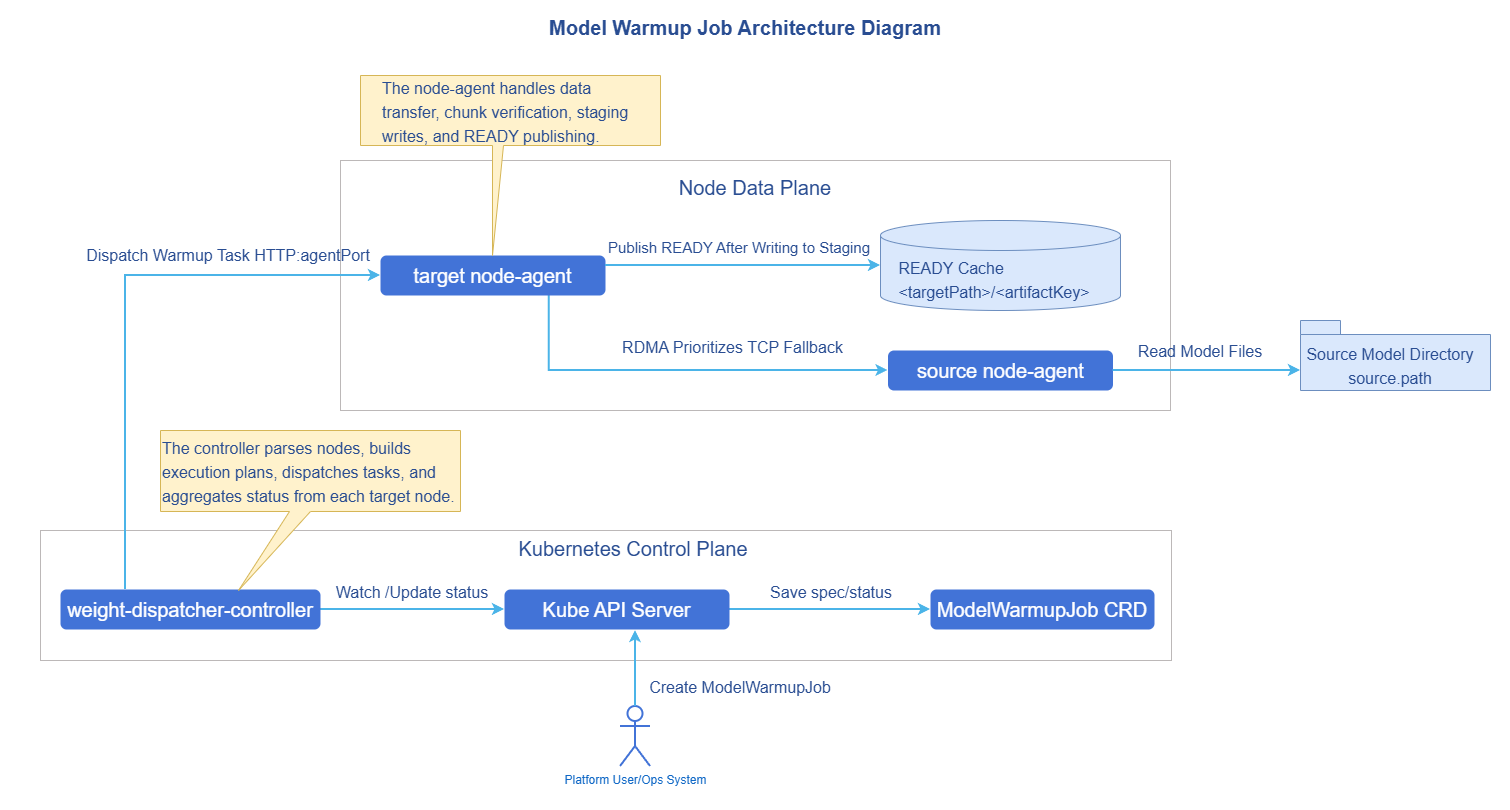
Figure 2 Component Deployment View
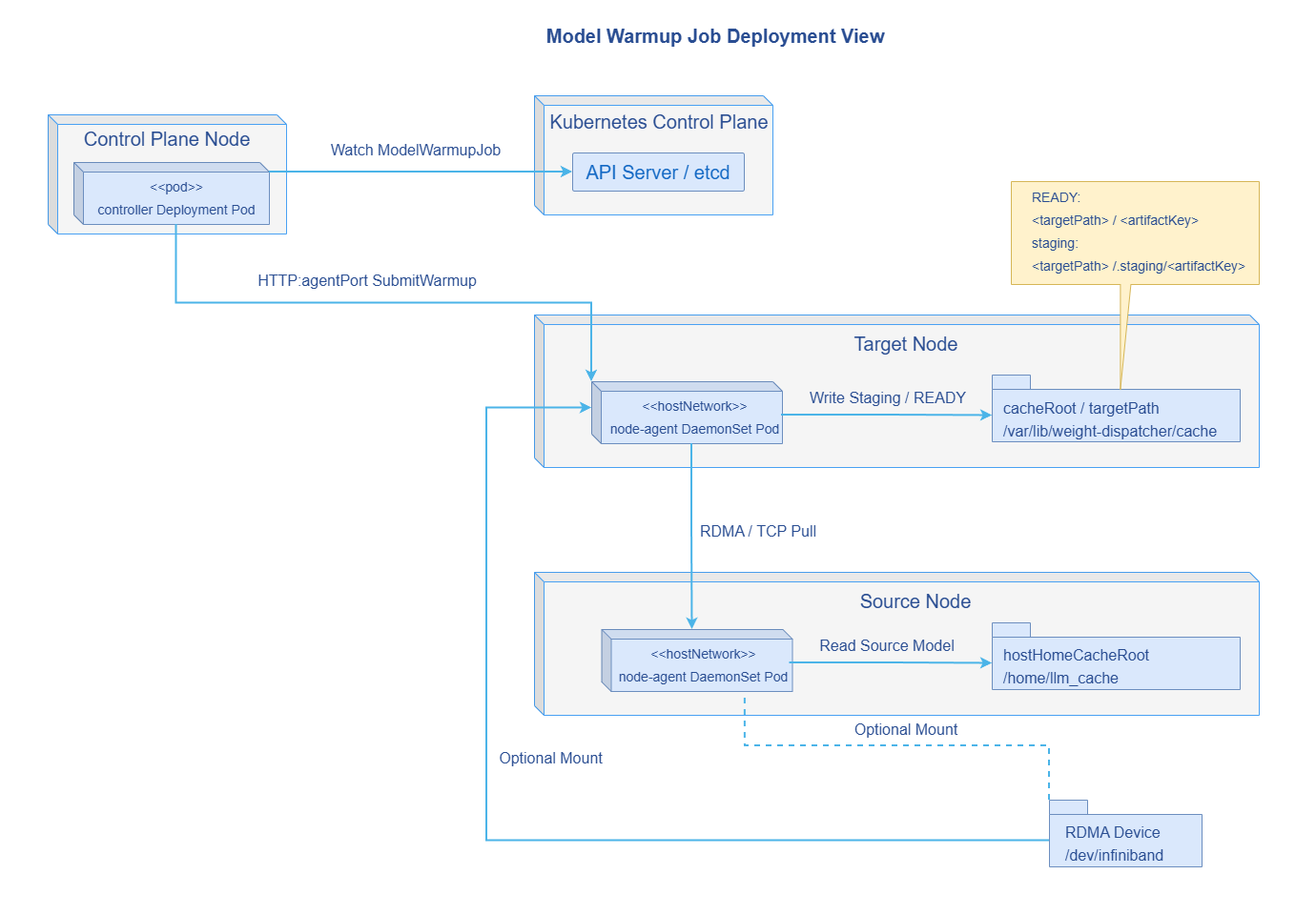
Weight-Dispatcher consists of the following components:
- ModelWarmupJob CRD: The model weight preheating task submitted by the user, describing the model weights to be preheated, data storage source nodes, target nodes, and execution policies.
- Controller: Watches
ModelWarmupJob, completes parameter validation, target node resolution, verification file generation, distribution plan generation, and task status aggregation. - node-agent: Runs on nodes as a DaemonSet, used for building verification files, reading source data shards, executing weight fetching, and publishing weight files.
- Data plane adapter: Can select RDMA or TCP transport path based on the actual environment or environment variables
RDMA_ENABLEDandTCP_FALLBACK_ENABLED. - Cache state machine: Maintains cache loading, publication, failure cleanup, and cache hit reuse logic on target nodes.
A weight preheating task execution flow is as follows:
- User creates
ModelWarmupJob. - Controller validates
spec.artifact,spec.sources, andspec.target. - Controller resolves target nodes; if
nodeNamesis configured, resolves by node name; ifnodeSelectoris configured, selects by node labels. - Controller selects one source to build a logical manifest; if it is a node source, calls the source node's node-agent
/v1/manifests:build; if it is a Hugging Face external source, builds the manifest via the model API. - Controller validates whether other node sources' manifest layout is consistent with the baseline source.
- Controller generates a distribution plan based on source and target counts, and generates a
WarmupExecutionPlanfor each target node. - Controller calls the target node's node-agent
/v1/warmupsto submit the task. - node-agent writes weights to the sibling
.stagingdirectory of the target ready path, and publishes to the ready path after transfer completion. - Controller periodically queries node-agent task status and writes back to
ModelWarmupJob.status. - After all target nodes succeed,
ModelWarmupJob.status.phasebecomesSucceeded; if any target fails and there are no pending/running nodes, the overall task becomesFailed.
Installation
This section describes the method for independently deploying Weight-Dispatcher in an existing Kubernetes cluster.
Independent Deployment
This section describes how to independently deploy Weight-Dispatcher in a Kubernetes cluster that already has model cache directory nodes.
Prerequisites
Before starting installation, ensure the following conditions are met:
Environment requirements:
- Kubernetes cluster: Version v1.28.0 or above is recommended.
- Cluster administrator privileges: For installing CRD, ClusterRole, ClusterRoleBinding, Deployment, and DaemonSet.
- Helm tool: For deploying Weight-Dispatcher via Chart.
- Cluster nodes can access the node-agent listening port via node IP addresses; default port is
18080.
Hardware requirements:
- Controller itself has no special hardware requirements and can run on standard x86 or ARM architecture nodes.
- node-agent needs to access source node weight directories and target node weight cache directories; default mounts are
/home/llm_cacheand/var/lib/weight-dispatcher/cachepaths. - If RDMA is enabled, target nodes must have RDMA devices and allow node-agent to mount
/dev/infinibandand/sys/class/net.
Model source requirements:
- When using node sources, model files or directories must already exist on source nodes.
- When using multiple node sources, model file layouts under each source path must be consistent.
Permission requirements:
- In the current version, when using RDMA for transport, node-agent needs to enable hostnetwork and privileged container flags. For security-sensitive scenarios, privileged containers can be disabled and TCP transport can be used.
Installing Weight-Dispatcher
If the source repository has been obtained, install via the Helm Chart in the repository by executing the following command.
cd weight-dispatcher/charts/weight-dispatcher
helm install weight-dispatcher . -n weight-dispatcher-system --create-namespace
If the artifact repository has published a Chart artifact package, install via the OCI repository by executing the following command.
helm install weight-dispatcher oci://cr.openfuyao.cn/charts/weight-dispatcher --version 26.6.0 \
  -n weight-dispatcher-system --create-namespace
The default Chart installs the following resources.
ModelWarmupJobCRD.- Controller Deployment.
- node-agent DaemonSet.
- ServiceAccount and RBAC required by Controller and node-agent.
After installation, execute the following command to view component status.
kubectl get pods -n weight-dispatcher-system
kubectl get crd modelwarmupjobs.warmup.openfuyao.com
Configuring node-agent
node-agent is configured via Helm values for listening address, cache directory, and transport mode. Common configurations are shown in Table 1.
Table 1 node-agent Configuration Parameter Description
| Parameter | Type | Description | Default Value |
|---|---|---|---|
nodeAgent.listenAddr | string | node-agent HTTP service listening address. | :18080 |
nodeAgent.cacheRoot | string | Target node cache directory, mounted as hostPath. | /var/lib/weight-dispatcher/cache |
nodeAgent.hostHomeCacheRoot | string | Read-only mounted host model cache directory. | /home/llm_cache |
nodeAgent.rdmaEnabled | bool | Whether to enable RDMA-aware data plane. | false |
nodeAgent.tcpFallbackEnabled | bool | Whether to enable TCP transport fallback mechanism. | true |
nodeAgent.collectiveMode | string | Data transfer mode between target nodes; current default is ring transfer mode. | ring |
nodeAgent.postWriteCRC32CEnabled | bool | Whether to enable CRC32C verification after weight disk write. | false |
nodeAgent.hostNetwork | bool | Whether to use host network. | true |
nodeAgent.privileged | bool | Whether to run as privileged container. Required when RDMA is enabled in current version. | true |
RDMA-enabled installation example:
helm install weight-dispatcher oci://cr.openfuyao.cn/charts/weight-dispatcher --version 26.6.0 \
  -n weight-dispatcher-system --create-namespace \
  --set nodeAgent.rdmaEnabled=true \
  --set nodeAgent.tcpFallbackEnabled=true
TCP-only transport installation example:
helm install weight-dispatcher ./charts/weight-dispatcher \
  -n weight-dispatcher-system --create-namespace \
  --set nodeAgent.rdmaEnabled=false \
  --set nodeAgent.tcpFallbackEnabled=true
Note:
Controller in the current version communicates with node-agent by callinghttp://<nodeIP address>:18080; ensure that node network, NetworkPolicy, and security groups allow this access.
Configuring Weight Distribution Strategy
This section describes how to configure ModelWarmupJob for different business scenarios.
Basic Configuration
ModelWarmupJob is a single model weight preheating task. A basic configuration example is as follows.
apiVersion: warmup.openfuyao.com/v1alpha1
kind: ModelWarmupJob
metadata:
  name: warmup-qwen-v1
  namespace: default
spec:
  artifact:
    type: MODEL_WEIGHT
    key: qwen:v1 # This key generates the plan ID and model storage subpath
  sources:
    - sourceType: node
      nodeName: worker-source
      path: /data/models/qwen # This path is the source node model storage path, corresponding to the nodeAgent.hostHomeCacheRoot parameter in Helm values; this path needs to be mounted into the node-agent container
  target:
    nodeNames:
      - worker-a
    targetPath: /var/lib/weight-dispatcher/cache/ready # This path is the parent path for model storage; using this yaml as an example, the final model files will be stored at /var/lib/weight-dispatcher/cache/ready/qwen_v1. Corresponding to the nodeAgent.cacheRoot parameter in Helm values; this path needs to be mounted into the node-agent container
  policy:
    timeoutSeconds: 3600
    publishAsSource: true
    enableChunkCRC32C: true
    chunkSizeMB: 64
Table 2 ModelWarmupJob Core Parameter Description
| Parameter | Type | Description | Default Value |
|---|---|---|---|
spec.artifact.type | string | Preheating object type; supports MODEL_WEIGHT, FILE, or DIRECTORY. Current version MODEL_WEIGHT only supports Hugging Face directory structure. | - |
spec.artifact.key | string | Unique identifier for the preheating object; participates in generating the plan ID and target cache subpath. | - |
spec.sources | array | Weight source list; cannot be empty in current version. | - |
spec.target.nodeNames | array | Target node name list. At least one of nodeNames or nodeSelector must be configured. | - |
spec.target.nodeSelector | map | Target node label selector. Effective when nodeNames is not configured. | - |
spec.target.targetPath | string | Target node weight root directory. Final path is <targetPath>/<artifact.key normalized name>. | - |
spec.policy.chunkSizeMB | int | Data chunk size in MB. Manifest build default is 64MB. | - |
spec.policy.enableChunkCRC32C | bool | Whether to generate and verify chunk CRC32C information. | false |
spec.policy.publishAsSource | bool | Whether to retain staging as a source that can continue to provide data after completion. | false |
spec.policy.timeoutSeconds | int | Single node task timeout. When not configured, node-agent defaults to 45 minutes. | - |
Single Source Node Distribution
Single source node distribution is suitable for scenarios where one source node already has complete model weights and needs to distribute them to one or more target nodes.
apiVersion: warmup.openfuyao.com/v1alpha1
kind: ModelWarmupJob
metadata:
  name: warmup-qwen-single-source
  namespace: default
spec:
  artifact:
    type: MODEL_WEIGHT
    key: qwen:v1
  sources:
    - sourceType: node
      nodeName: worker-source
      path: /var/lib/weight-dispatcher/source/qwen-v1
  target:
    nodeNames:
      - worker-a
      - worker-b
      - worker-c
    targetPath: /var/lib/weight-dispatcher/cache/ready
  policy:
    timeoutSeconds: 3600
    enableChunkCRC32C: true
    chunkSizeMB: 64
- Do not configure
endpointwhensourceType=node; the controller automatically uses the source node IP address.- The source path can be a single file or a directory. If the directory contains Hugging Face's
model.safetensors.index.json, node-agent will perform index verification.
Multi-Source Striped Distribution
Multi-source striped distribution is suitable for scenarios where multiple source nodes already have the same model weights, and the goal is to fully utilize multi-node multi-SSD aggregated bandwidth to accelerate single target node preheating.
apiVersion: warmup.openfuyao.com/v1alpha1
kind: ModelWarmupJob
metadata:
  name: warmup-qwen-striped
  namespace: default
spec:
  artifact:
    type: MODEL_WEIGHT
    key: qwen3:v1
  sources:
    - sourceType: node
      nodeName: worker-source-a
      path: /var/lib/weight-dispatcher/source/qwen-v1
    - sourceType: node
      nodeName: worker-source-b
      path: /var/lib/weight-dispatcher/source/qwen-v1
  target:
    nodeNames:
      - worker-a
    targetPath: /dev/shm/weight-dispatcher/cache/ready
  policy:
    timeoutSeconds: 3600
    enableChunkCRC32C: true
    chunkSizeMB: 64
Table 3 Multi-Source Configuration Requirements
| Requirement | Description |
|---|---|
| Consistent source path layout | File count, relative path, size, and chunkable attributes of multiple node sources must be consistent. Different versions with the same model weight name will also cause task failure. |
| No duplicate sources | The combination of sourceType, nodeName, endpoint, and path cannot be duplicated. |
| Target path writable | Target node's node-agent must have write permissions for targetPath. |
| Network connectivity | Target nodes must be able to access all source node node-agents. |
Selecting Targets Using Node Labels
If there are many target nodes, nodeSelector can be used for batch selection.
apiVersion: warmup.openfuyao.com/v1alpha1
kind: ModelWarmupJob
metadata:
  name: warmup-qwen-by-selector
  namespace: default
spec:
  artifact:
    type: MODEL_WEIGHT
    key: qwen:v1
  sources:
    - sourceType: node
      nodeName: worker-source
      path: /var/lib/weight-dispatcher/source/qwen-v1
  target:
    nodeSelector:
      ai.openfuyao.com/inference: "true"
    targetPath: /var/lib/weight-dispatcher/cache/ready
  policy:
    timeoutSeconds: 3600
    chunkSizeMB: 64
If bothnodeNamesandnodeSelectorare configured, the current node resolution logic prioritizesnodeNames.
Enabling RDMA and TCP Fallback
RDMA and TCP transport can be controlled by node-agent startup parameters and do not need to be configured separately in ModelWarmupJob.
Enabling RDMA:
helm upgrade --install weight-dispatcher ./charts/weight-dispatcher \
  -n weight-dispatcher-system --create-namespace \
  --set nodeAgent.rdmaEnabled=true \
  --set nodeAgent.tcpFallbackEnabled=true
Using TCP:
helm upgrade --install weight-dispatcher ./charts/weight-dispatcher \
  -n weight-dispatcher-system --create-namespace \
  --set nodeAgent.rdmaEnabled=false \
  --set nodeAgent.tcpFallbackEnabled=true
After task execution, the actual transport path can be viewed via status.nodeStates[].transportPath.
RDMA: Task mainly completed via RDMA path.TCP_FALLBACK: Task completed via TCP path.MIXED: Both RDMA and TCP were used during the task.
Using Weight Dispatch Acceleration
This section demonstrates how to create, view, and manage Weight-Dispatcher preheating tasks.
Creating a Preheating Task
Following the reference examples above, save the ModelWarmupJob as modelwarmupjob.yaml and create it by executing the following command.
kubectl apply -f modelwarmupjob.yamlViewing Preheating Tasks
# View preheating tasks in the specified namespace
kubectl get modelwarmupjobs -n <NAMESPACE>

# View using short name
kubectl get mwj -n <NAMESPACE>

# View specific task details
kubectl describe modelwarmupjob <JOB_NAME> -n <NAMESPACE>
Viewing Node-Level Status
Execute the following command to view the status fields.
kubectl get modelwarmupjob <JOB_NAME> -n <NAMESPACE> -o yamlKey fields in status are shown in Table 4.
Table 4 status Field Description
| Field | Description |
|---|---|
status.phase | Overall task phase: Pending, Running, Succeeded, or Failed. |
status.resolvedNodes | Target node list resolved for this task. |
status.summary.total | Total number of target nodes. |
status.summary.pending | Number of nodes waiting for submission or waiting for continued processing. |
status.summary.running | Number of nodes currently executing. |
status.summary.succeeded | Number of nodes that have succeeded. |
status.summary.failed | Number of nodes that have failed. |
status.nodeStates[].nodeName | Target node name. |
status.nodeStates[].taskID | Task ID on the node-agent side. |
status.nodeStates[].cachePath | Cache path published after task success. |
status.nodeStates[].bytesTransferred | Bytes transferred. |
status.nodeStates[].throughputMBps | Throughput measured on the node side in MB/s. |
status.nodeStates[].transportPath | Actual transport path, such as RDMA, TCP_FALLBACK, or MIXED. |
status.lastPlanId | Distribution plan ID generated for the current task. |
status.lastErrorCode | Latest error code, such as ValidationFailed, NoTargetNodes, or PlanBuildFailed. |
status.lastErrorMessage | Latest error details. |
JSONPath can be used to quickly view node status.
kubectl get mwj <JOB_NAME> -n <NAMESPACE> \
  -o jsonpath='{range .status.nodeStates[*]}{.nodeName}{"\t"}{.phase}{"\t"}{.cachePath}{"\t"}{.transportPath}{"\n"}{end}'
Viewing Controller and node-agent Logs
# View Controller logs
kubectl logs -n weight-dispatcher-system \
  -l app.kubernetes.io/component=controller -f

# View node-agent logs
kubectl logs -n weight-dispatcher-system \
  -l app.kubernetes.io/component=node-agent -f
Viewing Target Node Cache
After task success, the target path consists of target.targetPath and the normalized name of artifact.key. For example:
target.targetPath:/var/lib/weight-dispatcher/cache/readyartifact.key:qwen:v1- Final path:
/var/lib/weight-dispatcher/cache/ready/qwen_v1
You can check whether this path exists on the target node, or obtain the actual published path via status.nodeStates[].cachePath.
Re-executing a Preheating Task
After a ModelWarmupJob succeeds or fails, if status.observedGeneration matches the current generation, the controller will not re-execute the same generation task. To re-execute, use the following methods:
# Delete and recreate
kubectl delete modelwarmupjob <JOB_NAME> -n <NAMESPACE>
kubectl apply -f modelwarmupjob.yaml
You can also modify fields in spec that affect the plan, such as artifact.key, target.targetPath, sources, or policy, to trigger a new generation task.
Deleting a Preheating Task
Deleting a ModelWarmupJob only deletes the task object in Kubernetes and does not automatically clean up model cache already published on target nodes.
kubectl delete modelwarmupjob <JOB_NAME> -n <NAMESPACE>To clean up cache, delete the path indicated by status.nodeStates[].cachePath on the target node.
FAQ
Why does
ModelWarmupJobimmediately becomeFailed?Symptom description: The CR
ModelWarmupJobstatus showsFailed.
Possible causes:spec.artifact.keyis empty, no target nodes configured,spec.sourcesis empty, duplicate sources, node incorrectly configured withendpoint, target node selector matches no nodes, source path does not exist, or multi-source file types are inconsistent.
Processing steps: View node-agent logs andstatus.lastErrorMessageto identify the specific cause.Can
sourceType=nodemanually specify an endpoint?No. The current version requires
sourceType=nodeto only configurenodeNameandpath; the controller auto-fills the endpoint based on the node. Manually configuring endpoint triggers validation failure.What external source types are supported?
The current version does not support external sources, such as Hugging Face format download links.
Why does a multi-source task fail with logs indicating manifest mismatch?
Multi-source tasks require multiple sources to have the same model file layout. Confirm that all node source paths have consistent file count, relative path, file size, and chunkable attributes.
How to confirm whether a task uses RDMA?
Check
status.nodeStates[].transportPath. If it showsRDMA, the task mainly uses the RDMA path; if it showsTCP_FALLBACK, it uses TCP fallback; if it showsMIXED, both RDMA and TCP were used during the task.Why does RDMA still fall back to TCP when RDMA is enabled?
Common causes include the node having no RDMA device, the container not mounting
/dev/infiniband, RDMA initialization failure, network device unavailable, or RDMA session open failure. Check node-agent logs forrdmaAvailable,rdmaInitCode,rdmaLastError, andrdmaVersion.Where is the cache after task success?
The final path is
<spec.target.targetPath>/<artifact.key normalized name>. The normalization rule replaces/,\,:and spaces with_. The actual path is also written tostatus.nodeStates[].cachePath.Does deleting a task delete the model cache?
No.
ModelWarmupJobis a control-plane task record; deleting the CR does not automatically clean up the model cache directory on nodes.How to reduce data verification overhead?
You can set
spec.policy.enableChunkCRC32Ctofalseand disablenodeAgent.postWriteCRC32CEnabled. This reduces CRC32C-related computation and post-disk-write CRC32C re-verification, but lowers chunk transfer verification capability. It is recommended to only disablenodeAgent.postWriteCRC32CEnabledin performance-sensitive scenarios.
Licensed under the MulanPSL2
 YueGongWangAnBei No.44030002007300