InferNex Pre-Deployment Verification Tool
Feature Introduction
The InferNex pre-deployment verification tool (infernex-checker) is a standalone CLI (Command-Line Interface) tool used for systematic verification of the target environment before executing helm install to deploy InferNex. By detecting key aspects of hardware, K8s cluster, and business configuration matching the environment, this tool shifts environment issue identification from runtime to pre-deployment, effectively reducing deployment failure risk and improving system stability.
Application Scenarios
- Full check before first deployment: Run a full verification before first InferNex deployment; the tool sequentially verifies hardware, K8s cluster, and business configuration and environment matching. After the check completes, the report shows all aspects normal; confirm environment readiness and then execute
helm installto complete deployment. - Quick identification of deployment failure: When running full verification before first deployment, if a fatal error appears at the hardware layer (such as all nodes having NPU drivers not correctly deployed), the tool immediately stops and outputs detailed error descriptions and remediation suggestions. After completing remediation per suggestions, re-run full verification; remaining aspects pass smoothly, and the environment is confirmed ready for deployment.
- Layered check on demand: Supports running verification for only a specific layer (hardware, K8s, or business configuration and environment) as needed, without re-verifying or verifying unneeded parts, improving verification efficiency.
Capability Scope
- Systematic environment verification: Performs systematic verification of the InferNex deployment environment before
helm install, covering key aspects of hardware, K8s cluster, and business configuration and environment matching. - Flexible execution mode: Supports full verification (hardware → K8s → business configuration and environment) or execution by layer (users can choose to run only hardware checks, K8s checks, or business configuration and environment matching verification).
- Structured verification report: Outputs terminal report and JSON format result file, providing detailed error descriptions and remediation suggestions for each failed item, enabling users to quickly locate issues.
Implementation Principle
Logic View
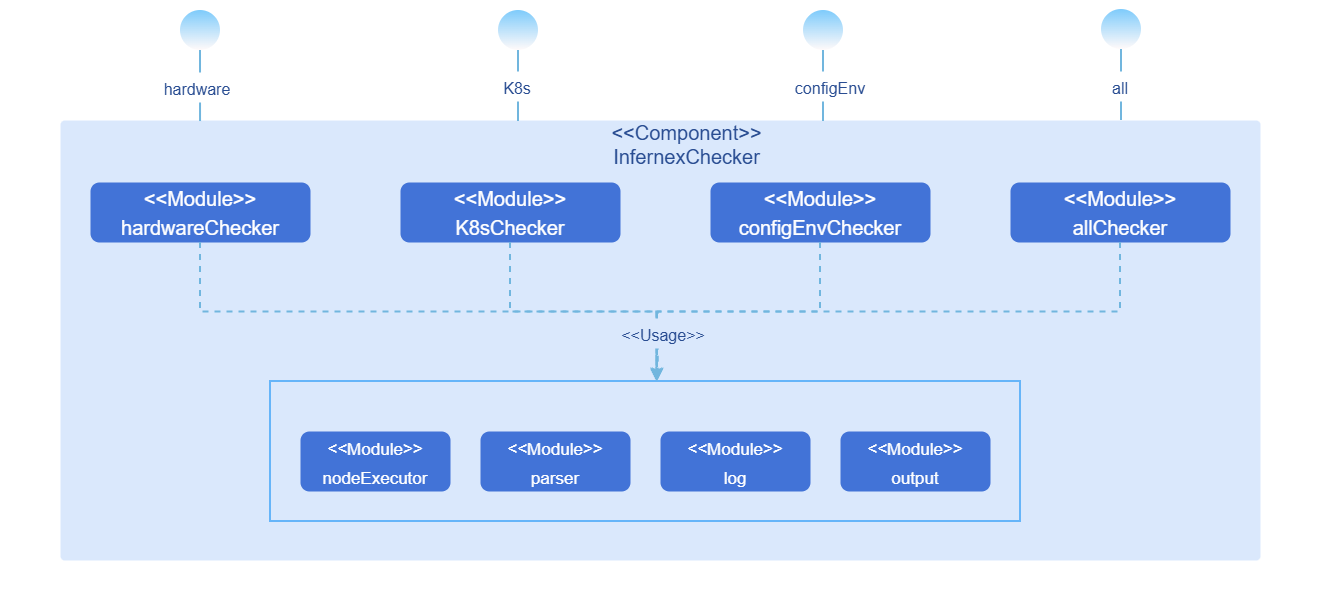
infernex-checker is internally divided into the following modules:
Table 1 infernex-checker Module Description
| Module Name | Function |
|---|---|
| HardwareChecker | Implements hardware layer checks, exposing infernex-checker hardware --nodes command. |
| K8sChecker | Implements K8s cluster status checks, exposing infernex-checker k8s --nodes command. |
| ConfigEnvChecker | Implements business configuration and environment matching verification, exposing infernex-checker config-env --nodes --values command. |
| AllChecker | Calls the above three Checkers sequentially in hardware → K8s → business configuration and environment order, exposing infernex-checker all --nodes --values command. |
| Parser | Parses CLI parameters and input files: reads node information file via --nodes parameter, reads InferNex deployment configuration file via --values parameter. |
| NodeExecutor | Unified node access entry, encapsulating SSH command execution and Kubernetes API calls. |
| Log | Records tool runtime logs (SSH connections, command execution, exception stacks, etc.). |
| Output | Organizes and presents verification results, generating terminal report and JSON result file. |
Verification Flow
Hardware Layer Verification Flow
Phase 1 - Single Node Verification (multi-node concurrent execution).
- H-01: NPU driver firmware installation status
- H-02: Ascend Device Plugin installation status
- H-03: NPU model check
- H-04: NPU available count statistics
- H-05: Key host files and directories check
- H-06: hccn.conf configuration correctness (910 series only)
- H-07: Single-node HCCS communication test (910 series only)
Phase 2 - Cross-Node Verification (requires at least 2 910-series nodes passing single-node verification).
- H-08: Cross-machine card-side RoCE RDMA communication test
K8s Layer Verification Flow
- K-01: Cluster CoreDNS check (failure terminates subsequent K8s layer verification)
- K-02: Node ready status (all nodes not Ready terminates subsequent K8s layer verification)
- K-03: Node taint check
- K-04: Node available resource statistics
Business Configuration and Environment Layer Verification Flow
- B-01: Model cache path availability (directory existence and writeability)
- B-02: Driver and CANN version compatibility
Verification Interruption Logic
Table 2 Verification Interruption Logic Description
| Trigger Condition | Interruption Scope | Description |
|---|---|---|
| Any failure in H-01~H-07 | Skip all subsequent hardware verification items for that node | Serial execution within node; single node failure does not affect concurrent execution of other nodes. |
| H-03 result is non-910 series | Skip H-06~H-08 for that node | HCCS/RoCE related verification only applies to 910 series. |
| Fewer than 2 910-series nodes passing single-node verification | Skip H-08 cross-node communication verification | Cross-node verification requires at least 2 nodes. |
| No nodes passing hardware layer verification in full mode | Terminate K8s layer and business configuration and environment layer | No nodes to continue; subsequent layers are terminated entirely. |
| K-01 failure | Terminate subsequent K8s layer verification | DNS unavailable makes node and resource check results unreliable. |
| K-02 all nodes not Ready | Terminate subsequent K8s layer verification | No available nodes; subsequent verification is meaningless. |
| B-01 failure | Skip all subsequent business verification items for that node | Serial execution within node; single node failure does not affect other nodes. |
Installation
Prerequisites
Hardware Requirements
infernex-checker itself has no special hardware environment requirements.
Software Requirements
- Kubernetes v1.33.0 or above.
Network Requirements
- The host running infernex-checker can access all target nodes via SSH.
- The host running infernex-checker can access the Kubernetes API Server.
Permission Requirements
- SSH login credentials for target nodes (username, password, or key).
- K8s cluster access permissions (via kubeconfig configuration file).
Getting Started with Installation
Binary Installation
Enter the directory for storing infernex-checker.
bashcd <target directory>Download the corresponding binary file based on host architecture.
- Linux AMD64:bash
wget https://static.openfuyao.cn/openFuyao/infernex/releases/download/release-26.6.0/bin/linux/amd64/infernex-checker - Linux ARM64:bash
wget https://static.openfuyao.cn/openFuyao/infernex/releases/download/release-26.6.0/bin/linux/arm64/infernex-checker
- Linux AMD64:
Add execution permission.
bashchmod +x infernex-checkerVerify installation.
bash./infernex-checker --help
Using InferNex Pre-Deployment Verification Tool
Prerequisites
- infernex-checker has been installed.
- Node information file (nodes.yaml) has been prepared.
- InferNex deployment configuration file (values.yaml) has been prepared (required for business configuration and environment layer verification).
- K8s access credentials (kubeconfig) have been configured.
Preparing the Node Information File
Create a nodes.yaml file with SSH connection information for target nodes:
nodes:
  - name: node-01
    ip: 192.168.1.10
    port: 22
    user: root
    # Use password authentication
    password: "your-password"
  - name: node-02
    ip: 192.168.1.11
    port: 22
    user: root
    # Use key authentication
    keyFile: "/home/user/.ssh/id_rsa"
Parameter Description:
name: Node name, must match the node name in the K8s cluster.ip: Node IP address.port: SSH port, default 22.user: SSH login username.password: SSH login password (choose one of password and keyFile).keyFile: SSH private key file path (choose one of password and keyFile).
Running Full Verification
Full verification executes sequentially in hardware layer → K8s layer → business configuration and environment layer order.
infernex-checker all --nodes nodes.yaml --values values.yaml --outputParameter Description:
--nodes: Node information file path (required).--values: InferNex deployment configuration file path (required).--kubeconfig: Kubernetes configuration file path (optional, default uses~/.kube/config).--output: JSON result file output path (optional; if not specified, no JSON result file is generated).--log: Log file output path (optional, default is./infernex-checker.log).
Output Example:
=== InferNex Checker ===

[Hardware Layer - Single Node: n2]
  ✅ H-01  NPU driver and firmware installed
  ✅ H-02  Ascend Device Plugin Running and NPU resource registered
  ✅ H-03  NPU model: 910B4
  ℹ️ H-04  NPU available: 4/8
  ✅ H-05  Key host files and directories are complete
  ✅ H-06  hccn.conf configuration is correct
  ✅ H-07  Step 1: NIC TLS switch states are consistent (no_cert)
  ✅ H-07  Step 2: Single-node NIC-to-NIC connectivity is normal

[Hardware Layer - Cross-Node]
  ⏭️ H-08  Only 1 910-series node(s) passed single-node checks, skipping cross-node check (at least 2 required)

[K8s Layer]
  ✅ K-01  CoreDNS Running, service domain names are resolvable
  ✅ K-02  n2 Ready
  ✅ K-03  n2 has no taints
  ℹ️ K-04  n2  Allocatable resources: CPU 256, Memory 1055115824Ki
    -> Please confirm this meets Infernex deployment requirements; if sufficient, consider releasing occupied resources or adjusting workloads

[Config-Env Layer: n2]
  ✅ B-01  /home/llm_cache directory exists and is writable
  ✅ B-02  Driver 25.5.0 is compatible with image v0.13.0

───────────────────────────────
Result: 12 passed, 0 failed, 2 info

ℹ️ Info items:
  H-04 [n2]  NPU available: 4/8
  K-04 [n2]  n2  Allocatable resources: CPU 256, Memory 1055115824Ki

✅ Environment check passed, ready to deploy InferNex
Running Layered Verification
Hardware Layer Verification Only
infernex-checker hardware --nodes nodes.yamlK8s Layer Verification Only
infernex-checker k8s --nodes nodes.yamlBusiness Configuration and Environment Layer Verification Only
infernex-checker config-env --nodes nodes.yaml --values values.yamlViewing JSON Result File
After specifying the JSON result file path via the --output parameter, the file is generated upon verification completion, containing detailed verification results:
{
   "summary": {
      "total": 14,
      "passed": 12,
      "failed": 0,
      "info": 2
   },
   "hardware": {
      "nodes": [
         {
            "name": "n2",
            "status": "passed",
            "is910Series": true,
            "checks": [
               {
                  "id": "H-01",
                  "status": "passed",
                  "message": "NPU driver and firmware installed"
               },
               {
                  "id": "H-02",
                  "status": "passed",
                  "message": "Ascend Device Plugin Running and NPU resource registered"
               },
               {
                  "id": "H-03",
                  "status": "passed",
                  "message": "NPU model: 910B4"
               },
               {
                  "id": "H-04",
                  "status": "info",
                  "message": "NPU available: 4/8",
                  "detail": {
                     "available": 4,
                     "total": 8,
                     "unhealthy": null
                  }
               },
               {
                  "id": "H-05",
                  "status": "passed",
                  "message": "Key host files and directories are complete"
               },
               {
                  "id": "H-06",
                  "status": "passed",
                  "message": "hccn.conf configuration is correct"
               },
               {
                  "id": "H-07",
                  "status": "passed",
                  "message": "Step 1: NIC TLS switch states are consistent (no_cert)"
               },
               {
                  "id": "H-07",
                  "status": "passed",
                  "message": "Step 2: Single-node NIC-to-NIC connectivity is normal"
               }
            ]
         }
      ],
      "cross_nodes": [
         {
            "id": "H-08",
            "status": "skipped",
            "message": "Only 1 910-series node(s) passed single-node checks, skipping cross-node check (at least 2 required)"
         }
      ]
   },
   "k8s": {
      "status": "passed",
      "checks": [
         {
            "id": "K-01",
            "status": "passed",
            "message": "CoreDNS Running, service domain names are resolvable"
         },
         {
            "id": "K-02",
            "status": "passed",
            "message": "n2 Ready"
         },
         {
            "id": "K-03",
            "status": "passed",
            "message": "n2 has no taints"
         },
         {
            "id": "K-04",
            "status": "info",
            "message": "n2  Allocatable resources: CPU 256, Memory 1055115824Ki",
            "suggestion": "Please confirm this meets InferNex deployment requirements; if insufficient, consider releasing occupied resources or adjusting workloads",
            "detail": {
               "cpu_allocatable": "256",
               "memory_allocatable": "1055115824Ki",
               "node": "n2"
            }
         }
      ]
   },
   "config_env": {
      "status": "passed",
      "checks": [
         {
            "id": "B-01",
            "node": "n2",
            "status": "passed",
            "message": "/home/llm_cache directory exists and is writable"
         },
         {
            "id": "B-02",
            "node": "n2",
            "status": "passed",
            "message": "Driver 25.5.0 is compatible with image v0.13.0",
            "detail": {
               "driver_version": "25.5.0"
            }
         }
      ]
   }
}Licensed under the MulanPSL2
 YueGongWangAnBei No.44030002007300