AI Inference InferNex Bridge
Feature Introduction
InferNex Bridge is the core hub between InferNex and KServe, connecting the two deployment entry points via Validating/Mutating Webhook and InferNexService CRD, supporting dual-mode deployment strategy: it can seamlessly integrate into the existing KServe ecosystem, or run independently without KServe.
Mode 1 (
LLMInferenceServicedeployment entry): Setinfernex.io/runtime: "true"onLLMInferenceServiceto access the InferNex link; inference engine and Hermes Router are orchestrated by KServe, while Bridge handles Mooncake KVCache, cache-indexer, PD-Orchestrator, Eagle-Eye and other enhancement components as well asLLMInferenceServiceConfigruntime compatibility.Mode 2 (
InferNexServicedeployment entry): Without KServe, useInferNexService/InferNexServiceConfigfor Bridge to uniformly deploy inference engine, Hermes Router, and enhancement components.
Teams with existing KServe environments can continue using LLMInferenceService workflow to gain complete InferNex acceleration capabilities; scenarios without KServe or needing independent control plane can also gain full-stack inference acceleration capabilities (intelligent routing, Mooncake KVCache, elastic scaling, hardware observability, etc.) consistent with AI Inference Integrated Deployment.
Note:
Unlike the one-click full-stack installation entry of the AI Inference Integrated Deployment InferNex main Chart, this document describes the InferNex Bridge independent installation method, with KServe +LLMInferenceServicedeployment as the main line. Architecture and responsibility boundaries are described in OFEP-0040 and InferNex-Bridge Technical Specification.
Application Scenarios
- Cluster already has KServe installed, supported version numbers v0.17.0 to v0.19.0, want to deploy complete InferNex capabilities via
LLMInferenceService+infernex.io/runtime: "true". - Need InferNex Bridge to automatically handle compatibility between KServe built-in Config and InferNex runtime.
- Want to deploy InferNex inference capabilities via InferNex Bridge without using the one-click full-stack installation of the InferNex Main Chart (KServe +
LLMInferenceServicedeployment entry orInferNexServicedeployment entry both supported).
Capability Scope
InferNex Bridge itself provides the control plane: independent Helm Chart installation; deploys CRDs, RBAC, Webhook, and default
InferNexServiceConfigtemplates.Dual deployment entry: supports both KServe +
LLMInferenceServiceandInferNexServicepaths.Instances deployed via InferNex Bridge have inference acceleration capabilities (intelligent routing, Mooncake KVCache, scaling decisions, hardware observability, etc.) fully consistent with AI Inference Integrated Deployment — Capability Scope. The difference lies only in deployment entry and orchestration logic, not in addition or removal of capability sets.
Highlight Features
- KServe compatibility: continue using
LLMInferenceServiceworkflow, entering InferNex link via label. - Dual deployment entry: KServe +
LLMInferenceServicedeployment entry andInferNexServicedeployment entry coexist.
Implementation Principle
InferNex Bridge constitutes the KServe adaptation layer via Mutating/Validating Webhook and InferNexService CRD: users still use LLMInferenceService as the entry, supplementing InferNex enhancement components without modifying KServe CRDs; it also supports submitting InferNexService directly without KServe, with Bridge uniformly deploying. Mutating Webhook performs admission rewrite (compatibility patch for LLMInferenceServiceConfig) on LLMInferenceService with infernex.io/runtime: "true"; Validating Webhook performs admission validation on directly submitted InferNexService(KServe-linkInferNexServicewithsourceRefskips validation).InferNexServiceis associated withLLMInferenceServiceviasourceRefand provides read-only observation, without mergingllmisvc.spec` to re-launch inference engine or Router.
Logic View
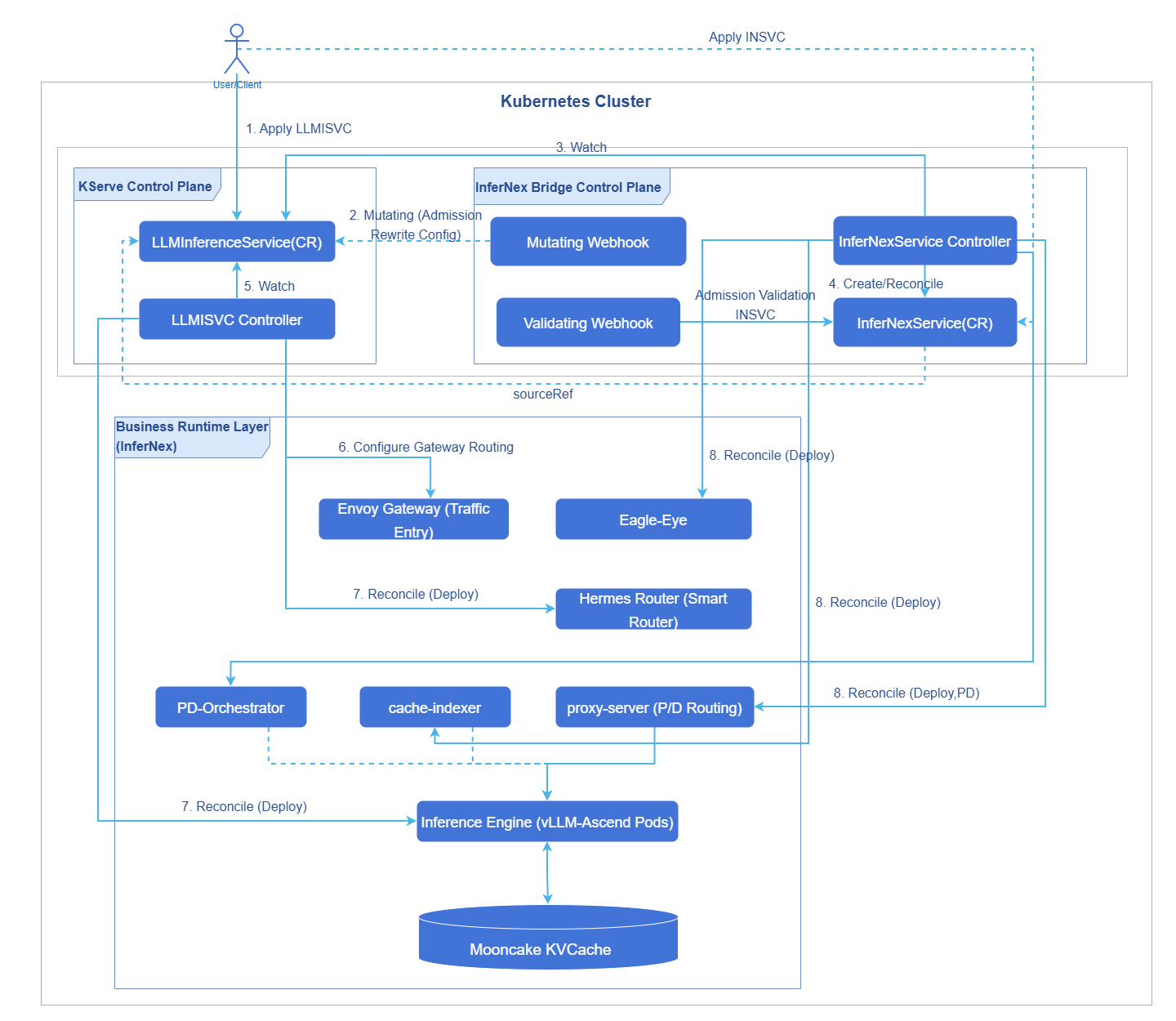
KServe LLMInferenceService controller handles inference engine, Hermes Router, and Gateway/HTTPRoute/InferencePool. InferNex Bridge handles proxy-server (P/D mode), Mooncake KVCache, Cache-Indexer, PD-Orchestrator, Eagle-Eye and other supplementary components. In P/D mode, traffic is split to prefill/decode via proxy-server.
Figure 1 InferNex Bridge Logic View
Deployment View
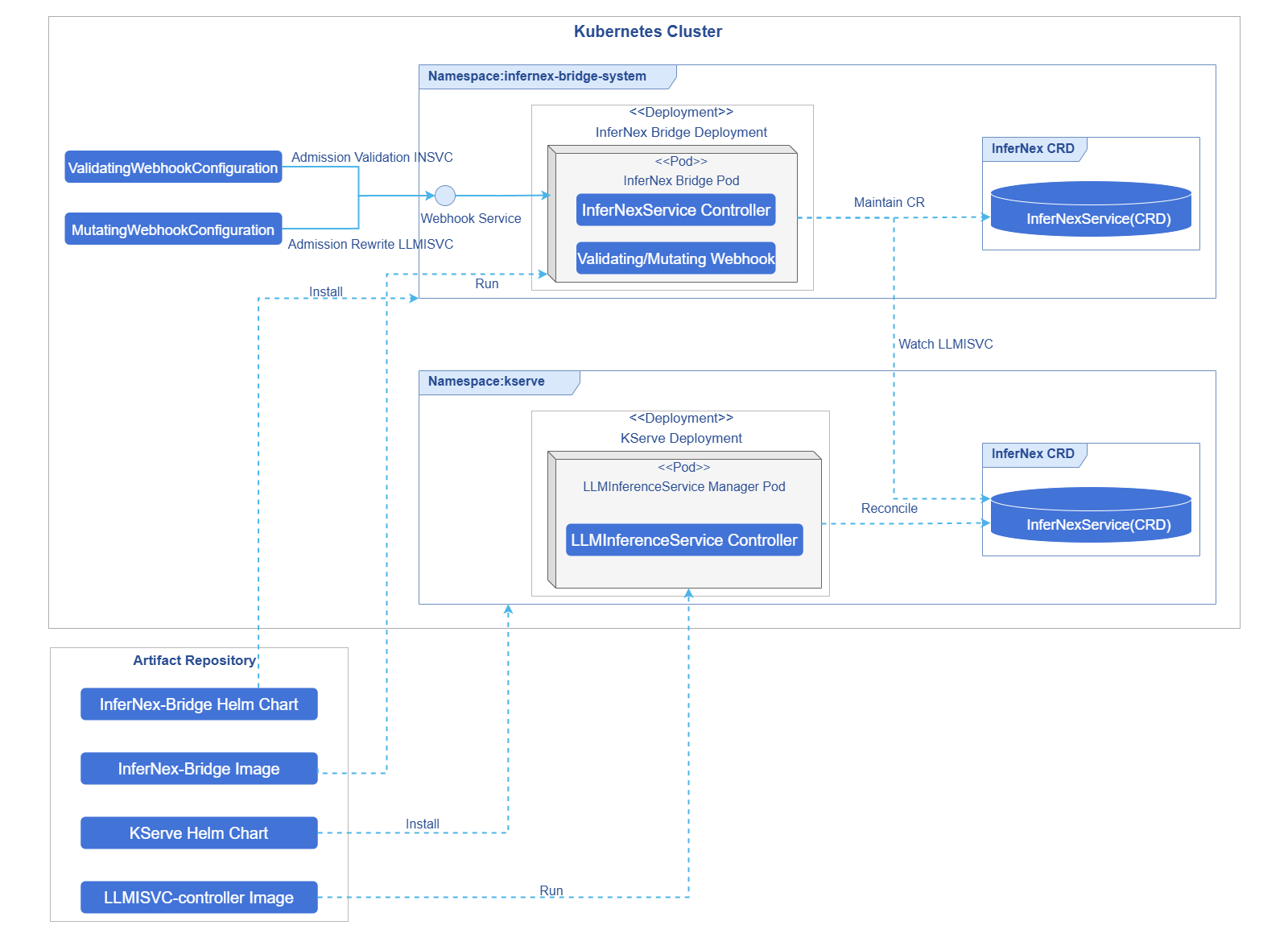
KServe and InferNex Bridge are deployed via independent Helm Charts; InferNex Bridge Pod integrates Mutating/Validating Webhook and InferNexService controller: MutatingWebhookConfiguration patches KServe default LLMInferenceServiceConfig for compatibility; ValidatingWebhookConfiguration performs admission validation on submitted InferNexService (KServe-link auto-created InferNexService with sourceRef skips validation).
Figure 2 InferNex Bridge Deployment View
Runtime View
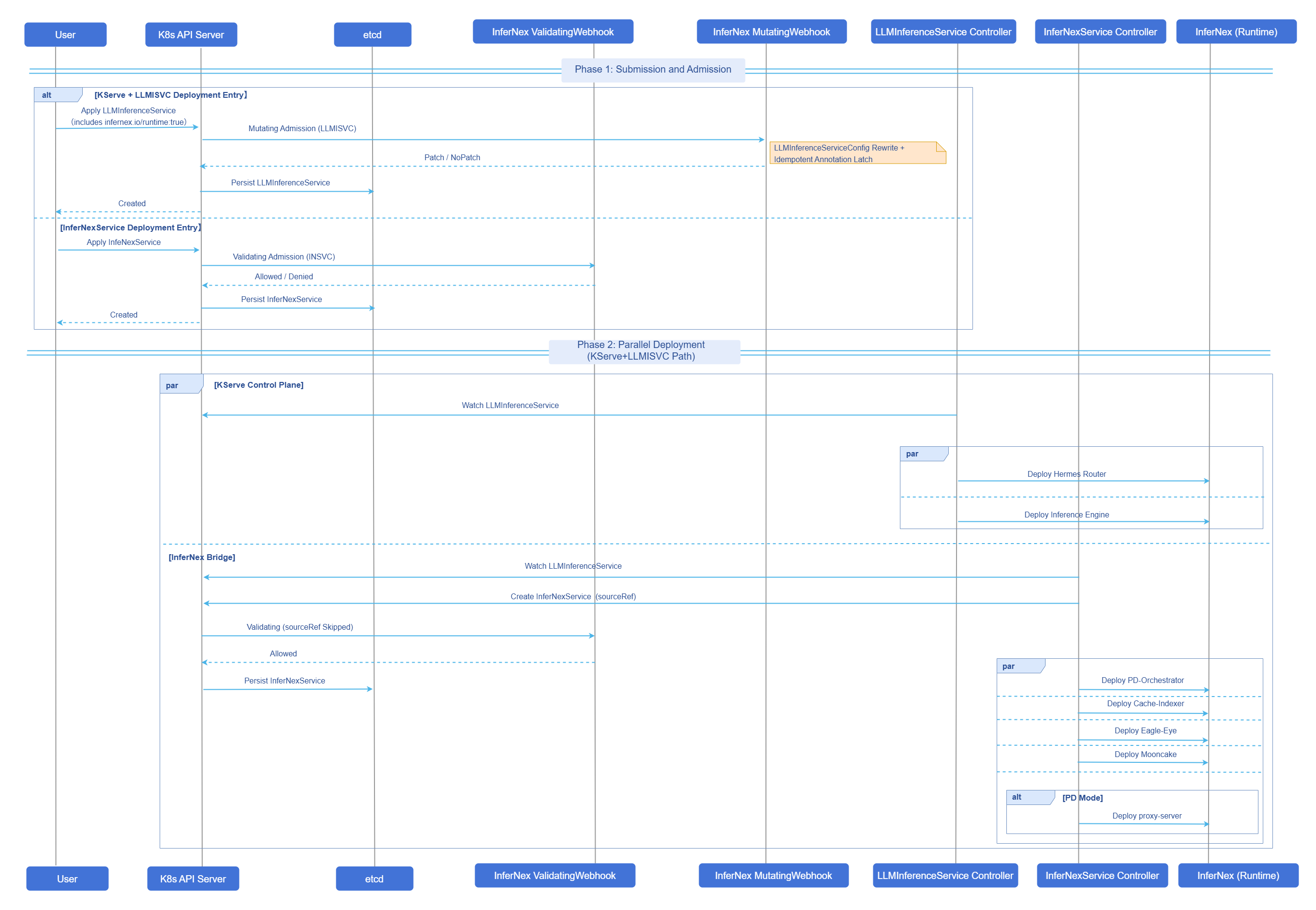
KServe + LLMInferenceService deployment entry: after user submits LLMInferenceService with infernex.io/runtime: "true", it first goes through Mutating Webhook admission rewrite of KServe default LLMInferenceServiceConfig, then KServe and InferNex Bridge deploy their respective workloads in parallel. InferNexService deployment entry: when user directly submits InferNexService, it first goes through Validating Webhook admission validation.
Figure 3 InferNex Bridge Runtime View
Relationship with Related Features
AI Inference Integrated Deployment installs InferNex full-stack (control plane and inference instances) via InferNex main Chart one-click; this document describes InferNex Bridge independent installation, with InferNex Bridge Chart as the deployment entry, covering KServe + LLMInferenceService deployment entry and InferNexService deployment entry, different from the main Chart full-stack entry.
Installation
Prerequisites
InferNex Bridge Control Plane
- Existing Kubernetes cluster with kubectl and Helm (v3 or above) installed.
- KServe: KServe installation version v0.17.0 to v0.19.0; see KServe LLMISVC Prerequisites for installation prerequisites.
- API versions:
LLMInferenceService/LLMInferenceServiceConfigsupports bothserving.kserve.io/v1alpha1andserving.kserve.io/v1alpha2; recommended to useserving.kserve.io/v1alpha2.InferNexService/InferNexServiceConfigisinfernex.infernex.io/v1alpha1. - Envoy Gateway, Gateway API, and Gateway API Inference Extension related CRDs installed; when using KServe +
LLMInferenceServicedeployment, Hermes Router routing andHTTPRoutefor exposing inference services depend on these components. - Cluster can access
cr.openfuyao.cn,hub.oepkgs.net(or equivalent mirror configured). - Recommended namespace
infernex-bridge-systemis Active; avoid repeatedly installing multiple InferNex Bridge Webhooks.
For image list, version compatibility, deployment scenarios, and Webhook patches onLLMInferenceServiceConfig, see Deployment Specifications, Deployment Scenarios, Webhook Patch Details, and Appendix A Default Images. For Hermes Router container naming, see Appendix — Hermes Router Container Naming Convention in this document.
Inference Cluster Environment (General)
Before deploying inference instances (vLLM-Ascend, Mooncake KVCache, PD disaggregation, etc.), hardware, software, and network prerequisites are described in AI Inference Integrated Deployment.
- InferNex installation prerequisites are described in Prerequisites (including cluster version, NPU Operator, LWS, etc.).
- Using AI Inference prerequisites are described in Using AI Inference (including inference node resources, metrics-server, PD + Mooncake KVCache network, etc.).
- Network configuration for PD disaggregation with Mooncake KVCache via HCCS transport is described in Ascend HCCS Device IP Address Configuration Example.
- Custom model weight host mount path and cache directory structure are described in Custom Model Directory Configuration.
- When deploying via InferNex Bridge independent installation, pre-installing the main Chart's inference-backend is not required; Mooncake KVCache, cache-indexer, PD-Orchestrator and other enhancement components are launched by InferNex Bridge per instance.
- When enabling Eagle-Eye, NATS and kube-prometheus-stack must be pre-installed; configuration and usage are described in AI Inference Eagle Eye.
Getting Started with Installation
Method 1: Install Chart from InferNex Source Repository
git clone -b release-26.6.0 https://gitcode.com/openFuyao/InferNex.git
cd InferNex/component/InferNex-Bridge

helm upgrade --install infernex-bridge ./chart/infernex-bridge \
  -n infernex-bridge-system \
  --create-namespace \
  --wait \
  --timeout 10m
The Chart version corresponds to the InferNex release version one-to-one; this release uses 26.6.0. Before installation, execute the following command to view Chart metadata.
helm show chart ./chart/infernex-bridgeMethod 2: Install from OCI Repository (Recommended)
helm upgrade --install infernex-bridge oci://cr.openfuyao.cn/charts/infernex-bridge \
  --version 26.6.0 \
  -n infernex-bridge-system \
  --create-namespace \
  --wait \
  --timeout 10m
--version specifies the Chart version; use 26.6.0 for this release. Before installation, execute the following command to view Chart metadata.
helm show chart oci://cr.openfuyao.cn/charts/infernex-bridge --version 26.6.0Webhook TLS Certificate (Optional)
InferNex Bridge Webhook requires TLS certificates. The Chart supports two methods, toggled via webhooks.certGenerator.enabled (default true) and certManager.enabled (default false).
Table 1 Webhook TLS Certificate Configuration Methods
| Method | Key Parameters | Chart Hook Job | Description |
|---|---|---|---|
| Built-in certGenerator (default) | webhooks.certGenerator.enabled=true, certManager.enabled=false | Pre-install generate-webhook-cert; pre-uninstall cleanup-webhook-cert. | Chart generates webhook-server-cert Secret in the cluster and deploys Mutating/ValidatingWebhookConfiguration. |
| cert-manager | certManager.enabled=true | No certGenerator-related Job created. | Requires cert-manager already installed in cluster; Chart renders Issuer/Certificate, Webhook associates certificate via CA injection annotation. |
When cert-manager is already deployed in the cluster, execute the following command and set certManager.enabled=true.
helm upgrade --install infernex-bridge oci://cr.openfuyao.cn/charts/infernex-bridge \
  --version 26.6.0 \
  -n infernex-bridge-system \
  --create-namespace \
  --set certManager.enabled=true \
  --wait \
  --timeout 10m
Verifying Deployment
helm list -n infernex-bridge-system
kubectl get pods,svc -n infernex-bridge-system
kubectl get secret webhook-server-cert -n infernex-bridge-system
kubectl get mutatingwebhookconfiguration,validatingwebhookconfiguration | grep infernex-bridge
kubectl get endpoints webhook-service -n infernex-bridge-system
Expected results.
- InferNex Bridge controller Pod is
RunningandREADYis1/1. - Webhook certificate, configuration, and Service endpoint are all ready, capable of receiving Admission requests normally.
Uninstalling
Uninstall InferNex Bridge control plane (controller, Webhook, and related Release resources).
helm uninstall infernex-bridge -n infernex-bridge-system
When defaultwebhooks.certGenerator.enabled=trueandcertManager.enabled=false, the pre-delete Hook Jobcleanup-webhook-certadditionally cleans up Mutating/ValidatingWebhookConfiguration andwebhook-server-certSecret; whencertManager.enabled=true, this Job is not created, Webhook configuration is deleted along with Release, and certificate Secret is managed by cert-manager. CRDs deployed by the Chart are not deleted along with Release by default and need to be handled manually. If theinfernex-bridge-systemnamespace has no other resources to retain, you can executekubectl delete namespace infernex-bridge-systemto delete the namespace and its residual resources.
Using InferNex Bridge
The same inference instance should not be redundantly installed with two sets of similar enhancement components via two deployment entries; select either KServe + LLMInferenceService or InferNexService for each instance, do not mix.
Using LLMInferenceService
Suitable for scenarios with KServe already installed: inference engine and Hermes Router are reconciled by KServe; enhancement components are reconciled by InferNex Bridge.
Prerequisites
- InferNex Bridge control plane and inference cluster environment checks in this document's prerequisites have been completed.
- InferNex Bridge and Webhook are running normally.
- Permissions to create
LLMInferenceServiceandLLMInferenceServiceConfig. - Envoy Gateway and GIE-related CRDs are ready (if accessing via gateway is needed).
Background Information
Table 2 Config and LLMISVC Responsibilities
| Resource | Responsibility |
|---|---|
| LLMInferenceServiceConfig | Workload: spec.template (aggregate) or spec.prefill/decode-related templates; engine image, Mooncake KVCache init, etc. |
| LLMInferenceService | spec.baseRefs references Config; spec.router.scheduler (InferencePool + EPP template); spec.storageInitializer; spec.model. |
Setting the infernex.io/runtime label only on Config is ineffective. It is recommended to first create Config, then create LLMISVC with the label and reference Config via spec.baseRefs. For Hermes Router routing policies, plugins, and gateway-side configuration, see AI Inference Hermes Routing.
Usage Limitations
- The
infernex.io/runtimelabel must be placed onLLMInferenceServiceonly; placing it onLLMInferenceServiceConfigis ineffective. - Must use KServe's
LLMInferenceServiceConfigsystem; cannot mix withInferNexServiceConfig. - In the examples,
replicas: 1is the inference engine default fixed replica count; to enable PD-Orchestrator scaling, omitspec.template/spec.prefillreplicasin LLMISVC Config, and LLMISVCspec.replicas,spec.prefill.replicas; see Appendix — Inference Engine Replicas and Scaling.
Operation Steps
Prepare the entry Gateway (as needed).
The example LLMISVC
spec.router.gateway: {},route: {}indicates KServe createsHTTPRouteand mounts it to the default entry Gateway (usuallykserve-ingress-gatewayin thekservenamespace). If it does not exist in the cluster, it must be created first.yamlapiVersion: gateway.networking.k8s.io/v1 kind: Gateway metadata: name: kserve-ingress-gateway namespace: kserve spec: gatewayClassName: envoy infrastructure: labels: serving.kserve.io/gateway: kserve-ingress-gateway listeners: - name: http protocol: HTTP port: 80 allowedRoutes: namespaces: from: AllSave the above YAML as
kserve-ingress-gateway.yaml, then execute the following command to create the entry Gateway and confirm readiness.bashkubectl apply -f kserve-ingress-gateway.yaml kubectl get gateway -n kserve kserve-ingress-gatewayCreate
LLMInferenceServiceConfigand configure engine template.storageInitializer (example default disabled, can be enabled as needed).
yamlstorageInitializer: enabled: falseTable 3
storageInitializer.enabledBehavior DescriptionenabledBehavior false(Recommended)Does not inject KServe storage-initializer init; faster cold start. Models are prepared by node hostPath cache or inference engine initContainers(such as huggingface-download).trueKServe pulls the model built-in per spec.model.uri; first startup is usually slower, consistent with KServe nativehf://flow.Hermes Router EPP container must fix container name
mainand named portgrpc(see Appendix — Hermes Router Container Naming Convention).yamlrouter: scheduler: pool: spec: selector: matchLabels: app.kubernetes.io/name: ex-ag-01-sn-sc endpointPickerRef: kind: Service name: ex-ag-01-sn-sc-epp-service template: spec: containers: - name: tokenizer image: cr.openfuyao.cn/openfuyao/hermes-tokenizer:latest - name: main image: cr.openfuyao.cn/openfuyao/hermes-router:latest ports: - name: grpc containerPort: 9002Fixing
mainis to ensureEndpointPickerRefuniquely locates EPP via Service targetPort when sidecars liketokenizerexist; otherwise it may connect to tokenizer's8000port, often manifesting as HTTP 500 externally.Create
LLMInferenceServicewith the label.When entering InferNex link, only place the label on
LLMInferenceService.yamlmetadata: labels: infernex.io/runtime: "true"Label and baseRefs (aggregate starter example instance name
ex-ag-01-sn-sc).yamlapiVersion: serving.kserve.io/v1alpha2 kind: LLMInferenceService metadata: name: ex-ag-01-sn-sc namespace: kserve labels: infernex.io/runtime: "true" spec: baseRefs: - name: ex-ag-01-sn-sc-config model: uri: hf://Qwen/Qwen2.5-0.5B name: Qwen/Qwen2.5-0.5BDeploy complete example.
Before deployment, modify namespace, node,
nodeName, hostPath, model URI, image tag, etc. per environment. Examples are maintained per scenario in directories (single-node single-card/single-node multi-card/cross-machine MoE + LWS, etc.); complete list is in InferNex repository component/InferNex-Bridge/config/examples/llmisvc/.- Aggregate starter: ag-01-single-node-single-card.yaml (Aggregate mode example directory)
- P/D starter: pd-01-single-node-single-card.yaml (PD disaggregation mode example directory)
bashgit clone -b release-26.6.0 https://gitcode.com/openFuyao/InferNex.git cd InferNex/component/InferNex-Bridge/config/examples/llmisvc kubectl apply -f aggregate/ag-01-single-node-single-card.yaml # or kubectl apply -f disaggregated/pd-01-single-node-single-card.yamlbashkubectl get llminferenceservice,llminferenceserviceconfig -n kserve kubectl get pods -n kserveVerify inference service via gateway.
After instance is Ready, access via Envoy; URL format:
http://<Gateway IP address>:<port>/<path prefix>/v1/chat/completions.5.1 Query gateway IP address and port.
bashkubectl get svc -A | grep -i envoy kubectl get nodes -o wide5.2 Confirm path prefix and send request.
KServe default route path prefix is
/<metadata.namespace>/<metadata.name>, where the first segment is theLLMInferenceServicenamespace and the second segment is the instance name; it is not fixed tokserve. When the starter example YAML namespace and instance name are unchanged, the aggregate reference path is/kserve/ex-ag-01-sn-sc, P/D is/kserve/ex-pd-01-sn-sc. Themodelin the request body must match the deployed YAMLspec.model.name.bashcurl -X POST "http://<Gateway IP>:<port>/kserve/ex-ag-01-sn-sc/v1/chat/completions" \ -H "Content-Type: application/json" \ -d '{"model":"<spec.model.name>","messages":[{"role":"user","content":"hello"}]}'
Follow-up Operations
Delete LLMISVC instance. Delete LLMInferenceService with infernex.io/runtime: "true" (aggregate starter example, namespace kserve; P/D uses instance name ex-pd-01-sn-sc).
kubectl delete llminferenceservice ex-ag-01-sn-sc -n kserve

kubectl get llminferenceservice,insvc -n kserve
kubectl get pods -n kserve | grep ex-ag-01-sn-sc
After deletion, KServe reclaims inference engine, Hermes Router, and HTTPRoute, etc.; InferNex Bridge deletes the auto-created InferNexService of the same name and Mooncake KVCache, cache-indexer, PD-Orchestrator, Eagle-Eye and other enhancement components.
Delete LLMISVCConfig (optional). LLMInferenceServiceConfig is a reusable template and is not automatically deleted with LLMISVC; execute when you need to remove custom Config.
kubectl delete llminferenceserviceconfig ex-ag-01-sn-sc-config -n kserve
Notice:
- If PD-Orchestrator (Elastic-Scaler/ResourceScalingGroup) scaled out additional inference engine replicas, after deleting LLMISVC please check whether residual
Deployment,ElasticScaler,ResourceScalingGroupCRs remain, and manually clean up if necessary.- When namespace is stuck in
Terminatingfor a long time, check whetherInferNexServiceis blocked at the finalizer stage; confirm no residual Pods before handling the finalizer.
Using InferNexService
Suitable for scenarios not dependent on KServe, deploying via InferNex Bridge through InferNexService/InferNexServiceConfig native CRDs: inference engine, Hermes Router, and enhancement components are all reconciled by InferNex Bridge. InferNexService resource short name is insvc, InferNexServiceConfig short name is insvccfg (CRD shortNames); kubectl examples below use abbreviations.
Prerequisites
- InferNex Bridge control plane and inference cluster environment checks in this document's prerequisites have been completed.
- Default templates (
infernex-default-aggregate-template/infernex-default-pd-template) are installed in the template namespace (defaultinfernex-bridge-system); they contain only enhancement component and IGR defaults, without inference engine Pod templates; deploying instances must reference example Config or buildspec.engineyourself. - If external entry is needed: Envoy Gateway,
GatewayClassavailable;spec.intelligentGatewayRouting.router.enabled: trueand configure Gateway/HTTPRoute/InferencePool.
Background Information
InferNexServicereferencesInferNexServiceConfigviaspec.baseRefsto merge configuration;spec.enginecan be written inInferNexServiceorInferNexServiceConfig(examples reference Config viabaseRefs; flat structure: root fields are aggregate/decode workload, P/D additionally hasprefillsub-block),InferNexServiceadditionally writesmodel, IGR, component switches, etc. Chart default templates (infernex-default-aggregate-template/infernex-default-pd-template) contain only enhancement components and IGR defaults, without engine Pod templates; deploying inference instances must reference example Config or build engine templates.- Mooncake KVCache, cache-indexer, proxy-server (PD), PD-Orchestrator, Eagle-Eye, etc. are launched by the controller from built-in assets or merged with platform default Config, without expanding full PodTemplate in user YAML.
- Hermes Router routing policies, plugins, and gateway-side configuration are described in AI Inference Hermes Routing.
spec Field Description
InferNexService and InferNexServiceConfig division: baseRefs merges in order, later overriding earlier; spec.engine can be written in InferNexService or InferNexServiceConfig (examples typically placed in Config), InferNexService additionally writes model, IGR, component switches, etc. The two Config sets and LLMInferenceServiceConfig cannot be mixed.
Table 4 InferNexService Field Description
| Field | Description |
|---|---|
spec.baseRefs | References InferNexServiceConfig (must be in InferNex Bridge template namespace, default infernex-bridge-system). |
spec.model | Model URI and name. |
spec.engine | Inference engine workload template; must be valid after merge. Mode is inferred from whether valid prefill.template exists:- No prefill = aggregate (root fields are aggregate workload). - Has prefill = P/D (root template is decode, prefill is prefill).Can be written in InferNexService or referenced via baseRefs in InferNexServiceConfig; after merge, at least one side must be valid; examples typically place Pod templates in Config. See Table 5 for field details. |
spec.intelligentGatewayRouting | Intelligent Gateway Routing (IGR); in default Chart template router.enabled=false. |
spec.components | Mooncake KVCache, cache-indexer, PD-Orchestrator, Eagle-Eye and other enhancement component switches. |
spec.engine Field Description
spec.engine is a flat structure (no longer using engine.aggregate/engine.pd nested blocks). Each workload segment (root fields or prefill) shares the same set of fields.
Table 5 spec.engine Workload Fields (root fields and prefill both applicable)
| Field | Description |
|---|---|
template | Pod template. Aggregate mode or P/D decode written in root fields; P/D prefill written in prefill.template. |
worker | Optional. LWS non-leader Pod template; omitted or without containers falls back to same-level template. Cannot set valid worker when groupSize==1 (Deployment). |
replicas | Workload horizontal replica count. Deployment is Pod count; LWS is group count (each group contains groupSize Pods). Default is 1 on first creation when omitted; omit to enable PD-Orchestrator external scaling. |
dataParallelSize | Global DP scale (corresponds to vLLM --data-parallel-size), default is 1. |
dataParallelSizeLocal | DP rank count within each Pod, default is 1. groupSize = dataParallelSize / dataParallelSizeLocal; Bridge creates LeaderWorkerSet when groupSize>1, otherwise Deployment. |
Mode determination: After merge, if prefill.template contains valid containers, it is P/D (root fields are decode, prefill must also be configured); otherwise it is aggregate (only root template). Chart default template names still distinguish aggregate/pd, used for component default value fallback, unrelated to spec.engine YAML shape.
Aggregate and P/D YAML skeletons are as follows (complete Pod templates in example Config):
# aggregate
spec:
  engine:
    template:
      spec:
        containers: [...]
    # Optional: replicas, dataParallelSize, dataParallelSizeLocal, worker

# P/D (root template=decode, prefill=prefill)
spec:
  engine:
    template:
      spec:
        containers: [...]   # decode
    prefill:
      template:
        spec:
          containers: [...]
More LWS / Admission constraints and scaling prerequisites are described in Appendix — Inference Engine Replicas and Scaling in this document.
IGR and Gateway Objects
router.enabled: External entry master switch. Whenfalse, only cluster-internal inference engine and enhancement components are deployed; InferNex Bridge does not reconcile Gateway/HTTPRoute/InferencePool.- When
router.enabled: true, Hermes Router EPP template must be configured (container namemain, port namegrpc, see Appendix — Hermes Router Container Naming Convention);gateway,httpRoute,inferencePooleach support two writing methods.ref: References existing resource name in the cluster (Bring Your Own).spec: InferNex Bridge creates or updates managed objects per field.refandspecon the same object are mutually exclusive; cannot fill both.
- When
routeris enabled andrefis not specified forgateway/httpRoute/inferencePool, InferNex Bridge manages corresponding Gateway API objects per default rules (examples typically only write theroutersection).
Component Switches (spec.components)
InferNexService deployment entry created InferNexService (without spec.sourceRef) must explicitly write enabled: true or false for each component block declared in YAML; cannot omit. Common fields.
mooncake.enabled,cacheIndexer.enabledpdOrchestrator.elasticScaler/tidal/resourceScalingGroupeagleEye.hardwareMonitor/hardwareDiagnosis(NATS and kube-prometheus-stack must be pre-installed before enabling)
spec.sourceRef
KServe-link InferNex Bridge auto-creates InferNexService with sourceRef of the same name. Such objects are reconciled by InferNex Bridge only for enhancement components; do not manually modify engine/router; IGR is managed by KServe, InferNex Bridge does not touch Gateway API objects.
Usage Limitations
InferNexServicedeployment entry does not require theinfernex.io/runtimelabel; this label is only for KServe +LLMInferenceServicedeployment entry.- Under
InferNexServicedeployment entry, Hermes Router usesopenfuyao.com/pdRole,openfuyao.com/pdGroupIDand other labels; different from KServe +LLMInferenceServicedeployment entryapp.kubernetes.io/*label system, do not mix. - Under
InferNexServicedeployment entry,InferNexServicewithoutspec.sourceRefmust explicitly writeenabled: trueorfalsefor eachspec.componentscomponent block declared in YAML. - KServe-link auto-created
InferNexServicewithspec.sourceRefmust not be manually modified forengine/routerfields. - In examples,
replicas: 1is the inference engine default fixed replica count; to enable PD-Orchestrator scaling, omitengineroot fields andengine.prefillreplicas; see Appendix — Inference Engine Replicas and Scaling.
Operation Steps
Confirm default templates and namespace.
bashkubectl get insvc,insvccfg -n infernex-bridge-system kubectl get pods -n infernex-bridge-system kubectl get gateway,httproute,inferencepool -n infernex-bridge-systemPrepare
InferNexServiceConfig(customize engine template as needed).Custom engine templates are written in
InferNexServiceConfig, referenced byInferNexServiceviaspec.baseRefs; Chart-installed default templates can also be used.Create
InferNexServiceinstance.yamlapiVersion: infernex.infernex.io/v1alpha1 kind: InferNexService metadata: name: ex-ag-01-sn-sc namespace: infernex-bridge-system spec: baseRefs: - name: ex-ag-01-sn-sc-engine model: uri: hf://Qwen/Qwen2.5-0.5B name: Qwen/Qwen2.5-0.5B intelligentGatewayRouting: router: enabled: trueHermes Router template must fix EPP container name
mainand port namegrpc(see Appendix — Hermes Router Container Naming Convention).Deploy complete example.
Examples are maintained per scenario in directories (single-node single-card/single-node multi-card/cross-machine MoE + LWS, etc.); each YAML contains
InferNexServiceConfig(spec.engine) andInferNexService(model+ IGR) of the same Spec ID. Complete list is in InferNex repository component/InferNex-Bridge/config/examples/insvc/.- Aggregate starter: ag-01-single-node-single-card.yaml (Aggregate mode example directory)
- P/D starter: pd-01-single-node-single-card.yaml (PD disaggregation mode example directory)
bashcd InferNex/component/InferNex-Bridge/config/examples/insvc kubectl apply -f aggregate/ag-01-single-node-single-card.yaml # or kubectl apply -f disaggregated/pd-01-single-node-single-card.yamlVerify inference service via gateway.
Similar to LLMISVC, query
Gateway/HTTPRoutethen curl; path prefix is also/<namespace>/<instance-name>(InferNex Bridge managed routes also generate per this rule).modelmust matchspec.model.name. Aggregate starter instance nameex-ag-01-sn-sc, P/D isex-pd-01-sn-sc(per example YAML).
Follow-up Operations
Delete InferNexService instance. After deleting InferNexService, InferNex Bridge reclaims the inference engine, Hermes Router, enhancement components, and Gateway/HTTPRoute/InferencePool etc. created when IGR was enabled (per controller ownership). Aggregate starter example (namespace infernex-bridge-system).
kubectl delete insvc ex-ag-01-sn-sc -n infernex-bridge-system

kubectl get insvc,pods -n infernex-bridge-system | grep ex-ag-01-sn-sc
kubectl get gateway,httproute,inferencepool -n infernex-bridge-system
Delete InferNexServiceConfig (optional). InferNexServiceConfig is a reusable engine template and is not automatically deleted with InferNexService instances. When deleting instances, typically only insvc needs to be deleted; Config does not need deletion.
- User custom templates (such as example
ex-ag-01-sn-sc-engine). After confirming no otherInferNexServicereferences it viaspec.baseRefs, it can be deleted as needed.
kubectl delete insvccfg ex-ag-01-sn-sc-engine -n infernex-bridge-system- Chart default templates (
infernex-default-aggregate-template,infernex-default-pd-template): Installed by InferNex Bridge Chart in the template namespace, for new instances to reference viabaseRefsor as controller default fallback, not bound to individual inference instances. Do not delete them when deleting aInferNexService; only clean them together when uninstalling InferNex Bridge control plane and confirming the cluster no longer uses the Bridge.
If PD-Orchestrator scaling produced additional workloads, after deleting instances please similarly check whetherDeployment,ElasticScaler,ResourceScalingGrouprelated resources remain, and manually clean up if necessary.
Related Operations
Besides deleting instances, common operations commands are as follows.
View InferNex Bridge control plane.
helm status infernex-bridge -n infernex-bridge-system
kubectl get pods -n infernex-bridge-system
View inference instances (KServe + LLMInferenceService deployment entry).
kubectl get llminferenceservice,insvc -n kserve
kubectl get pods -n kserve -l infernex.io/runtime=true
View inference instances (InferNexService deployment entry).
kubectl get insvc -n infernex-bridge-system
kubectl get pods -n infernex-bridge-system
Appendix
Hermes Router Container Naming Convention
Hermes Router (Endpoint Picker, EPP) runs in the same Pod as sidecars such as tokenizer. When InferencePool.endpointPickerRef points to the EPP Service, the controller resolves the backend by fixed container name and port name; if naming does not meet the convention, traffic may connect to a sidecar (such as tokenizer port 8000), often resulting in HTTP 500 externally.
Table 7 Hermes Router EPP Template Constraints
| Item | Requirement | Description |
|---|---|---|
| EPP container name | Must be main | Hermes Router process container; do not use hermes, router, or other names. |
| EPP port | Must declare named port grpc with containerPort > 0 | Example commonly uses 9002; endpointPickerRef.port.number must match. |
| Sidecar | Any name and order | Such as tokenizer; must not use name main. |
| LLMISVC config path | LLMInferenceService.spec.router.scheduler.template | Written on LLMISVC; overrides scheduler template after Webhook cleanup of KServe preset. |
| InferNexService config path | InferNexService.spec.intelligentGatewayRouting.router.template | Required when router.enabled: true; validated by Validating Webhook on direct submit. |
On the KServe + LLMInferenceService path, Mutating Webhook removes llm-d startup commands and probes from KServe preset kserve-config-llm-scheduler, keeping only main / tokenizer container skeletons; Hermes images, main args, and tokenizer config must be written back in LLMISVC router.scheduler.template. Explicit writable volumes such as tokenizer-tmp and tokenizer-cache are recommended (consistent with Chart examples); see Technical Specification — scheduler configuration notes.
Minimal EPP snippet (tokenizer and main order may be swapped):
containers:
  - name: tokenizer
    image: cr.openfuyao.cn/openfuyao/hermes-tokenizer:latest
  - name: main
    image: cr.openfuyao.cn/openfuyao/hermes-router:latest
    ports:
      - name: grpc
        containerPort: 9002
Inference Engine Replicas and Scaling
PD-Orchestrator (including Elastic-Scaler, Tidal Controller, ResourceScalingGroup) has been adapted for both KServe + InferNex Bridge dual entry points. Whether scaling is effective depends on whether the inference engine omits replicas in YAML (not writing the field, rather than writing 0). Hermes Router, enhancement components, etc. can still have replicas: 1.
Table 6 Inference Engine Scaling Support Comparison Under Two Deployment Methods
| Deployment Method | Reconcile Party | Prerequisite for Scaling Support | When Declaring engine/template replicas |
|---|---|---|---|
KServe + LLMInferenceService deployment entry | KServe | Both LLMInferenceService and LLMInferenceServiceConfig (baseRefs chain) omit spec.template/spec.prefill replicas. | Declarative fixed replicas; PD-Orchestrator and other external scaling is ineffective. |
InferNexService deployment entry | InferNex Bridge | Both InferNexService and InferNexServiceConfig (baseRefs) omit replicas in engine root fields and engine.prefill. | InferNex Bridge reconciles per CR; externally modified Deployment Pod replicas will be rolled back; replicas on LWS represents group count. |
Incomponent/InferNex-Bridge/config/examples,replicas: 1is only for fixed replica demonstration. Before enabling scaling, please deleteengine.replicas(aggregate or decode),engine.prefill.replicas, and LLMISVCspec.replicas,spec.prefill.replicasand other engine/template-related replicas fields. For multi-Pod DP (dataParallelSize/dataParallelSizeLocalmakinggroupSize>1), Bridge uses LeaderWorkerSet, wherereplicasrepresents LWS group count rather than single Pod count.
After omitting engine.replicas, usage of each scaling capability is described in the following documents.
Licensed under the MulanPSL2
 YueGongWangAnBei No.44030002007300