npu-dra-plugin
Feature Introduction
The traditional Device Plugin resource scheduling approach requests device resources based on "countable" interfaces, where users can only request devices in fixed quantities. This makes it difficult to perceive and utilize device internal characteristics, and impossible to perform fine-grained scheduling based on actual workload hardware requirements.
To address this challenge, DRA (Dynamic Resource Allocation) technology was developed, providing Kubernetes with a more flexible and semantically richer resource scheduling mechanism. Based on the Kubernetes native DRA architecture, we have completed deep adaptation for Ascend NPU devices, enabling users to not only request NPU devices but also make scheduling decisions based on device attributes, computing power specifications, and other metadata, thereby achieving higher-performance and higher-quality heterogeneous computing resource scheduling.
Application Scenarios
Users deploy business Pods and use ResourceClaim for resource requests.
Capability Scope
- Supports resource discovery and reporting for Ascend 910B, 910C, and 310P series NPU devices.
- Supports device filtering through
DeviceClass/CEL. - Supports resource requests using
ResourceClaim/ResourceClaimTemplate, enabling binding of businessPodswithResourceSlice. - Supports injecting devices into containers through
CDI. - Supports 910B hard partition (fixed template vNPU) functionality, which can automatically match templates based on requested memory size, partitioning a full card into multiple vNPU instances for different business Pods.
Highlight Features
Completed the adaptation of Ascend NPU devices with DRA technology, supporting 910B, 910C, and 310P chip models; supports 910B hard partition (fixed template vNPU) scheduling capability.
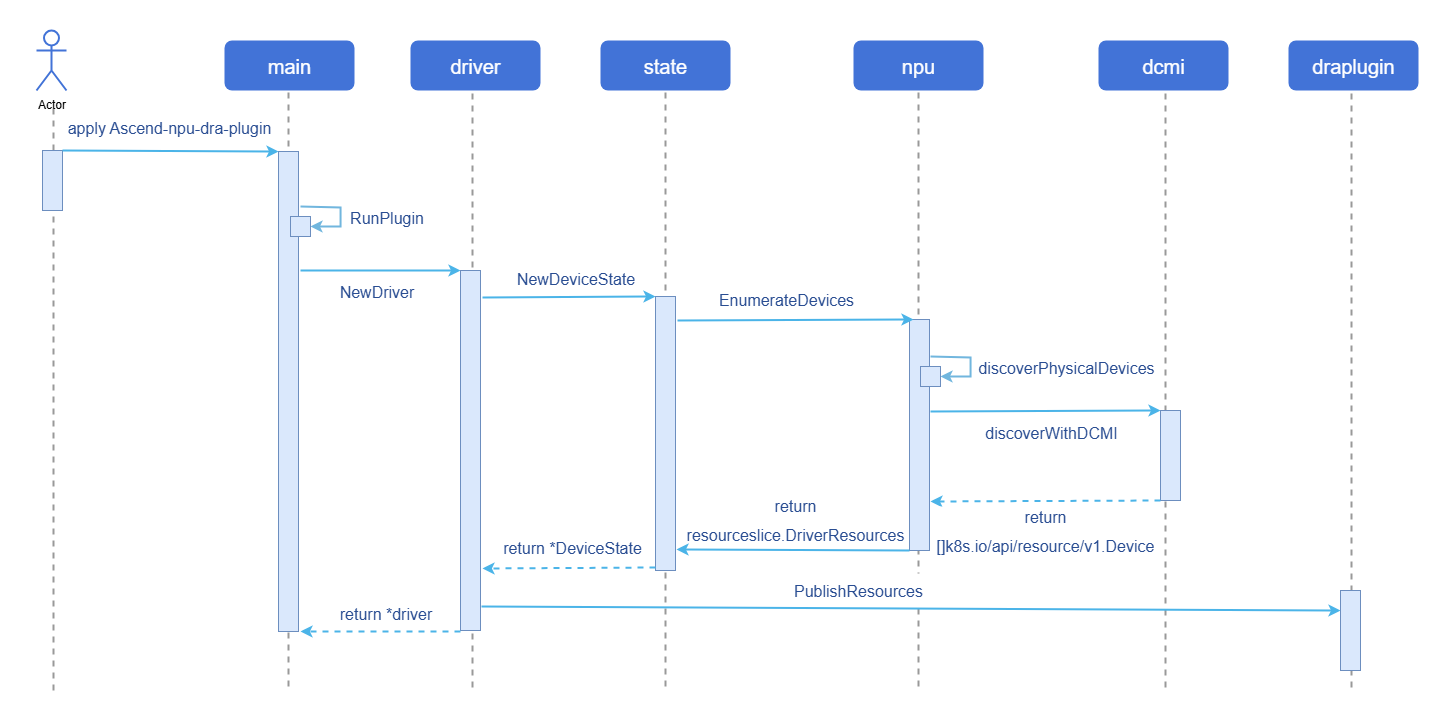
Implementation Principle
Figure 1 Device Discovery and Reporting Implementation Principle Diagram
Relationship with Related Features
Depends on Ascend NPU device interfaces.
Installation
- When not using the hard partition feature, deploy
Ascend-npu-dra-pluginthroughDaemonSet. For details, see Operation Steps. - When using the hard partition feature (only supported on 910B), deployment must be done as a host process and cannot use
DaemonSet. For details, see Hard Partition Deployment Steps.
Using npu-dra
Prerequisites
Kubernetes uses the openFuyao community recommended version v1.34.3.
containerd must use version v1.7.0 or above; the openFuyao community default version v2.1.1 is recommended.
Background Information
This is used for adapting Ascend NPU devices with DRA technology. Through the Operation Steps below, you can execute the npu-smi info command in the container corresponding to the business Pod, completing the full process of device discovery, reporting, allocation, and usage.
Usage Limitations
- The hard partition (fixed template vNPU) feature only supports Ascend 910B series chips; 910C and 310P do not currently support hard partitioning.
- When using the hard partition feature, the driver cannot be deployed using
DaemonSetand must be started as a host process. This is because hard partition operation interfaces can only be executed on the host and cannot be called from within a container.
Operation Steps
Deploy
Ascend-npu-dra-pluginthroughDaemonSet.yamlapiVersion: v1 kind: Namespace metadata: name: ascend-dra --- apiVersion: v1 kind: ServiceAccount metadata: name: ascend-npu-dra-kubeletplugin namespace: ascend-dra --- apiVersion: rbac.authorization.k8s.io/v1 kind: ClusterRole metadata: name: ascend-npu-dra-kubeletplugin rules: - apiGroups: [""] resources: ["nodes"] verbs: ["get"] - apiGroups: ["resource.k8s.io"] resources: ["resourceslices", "resourceclaims"] verbs: ["get", "list", "watch", "create", "update", "patch", "delete"] --- apiVersion: rbac.authorization.k8s.io/v1 kind: ClusterRoleBinding metadata: name: ascend-npu-dra-kubeletplugin roleRef: apiGroup: rbac.authorization.k8s.io kind: ClusterRole name: ascend-npu-dra-kubeletplugin subjects: - kind: ServiceAccount name: ascend-npu-dra-kubeletplugin namespace: ascend-dra --- apiVersion: apps/v1 kind: DaemonSet metadata: name: ascend-npu-dra-kubeletplugin namespace: ascend-dra spec: selector: matchLabels: app: ascend-npu-dra-kubeletplugin template: metadata: labels: app: ascend-npu-dra-kubeletplugin spec: serviceAccountName: ascend-npu-dra-kubeletplugin hostNetwork: true dnsPolicy: ClusterFirstWithHostNet tolerations: - operator: Exists containers: - name: kubeletplugin image: cr.openfuyao.cn/openfuyao/npu-dra-plugin:${IMAGE_TAG} # ${IMAGE_TAG}为渲染占位符,部署时替换为实际版本 imagePullPolicy: IfNotPresent securityContext: privileged: true args: - --node-name=$(NODE_NAME) - --device-profile=npu - --driver-name=npu.huawei.com - --kubelet-registrar-directory-path=/var/lib/kubelet/plugins_registry - --kubelet-plugins-directory-path=/var/lib/kubelet/plugins - --cdi-root=/etc/cdi - --healthcheck-port=-1 env: - name: NODE_NAME valueFrom: fieldRef: fieldPath: spec.nodeName - name: LD_LIBRARY_PATH value: /usr/local/Ascend/driver/lib64:/usr/local/Ascend/driver/lib64/common:/usr/local/Ascend/driver/lib64/driver:/usr/local/Ascend/ascend-toolkit/latest/lib64:/usr/local/Ascend/ascend-toolkit/latest/runtime/lib64 volumeMounts: - name: kubelet-plugins-registry mountPath: /var/lib/kubelet/plugins_registry - name: kubelet-plugins mountPath: /var/lib/kubelet/plugins - name: cdi mountPath: /etc/cdi - name: dev mountPath: /dev - name: sys mountPath: /sys readOnly: true - name: ascend-driver mountPath: /usr/local/Ascend readOnly: true - name: npu-smi-command mountPath: /usr/local/bin/npu-smi readOnly: true volumes: - name: kubelet-plugins-registry hostPath: path: /var/lib/kubelet/plugins_registry type: DirectoryOrCreate - name: kubelet-plugins hostPath: path: /var/lib/kubelet/plugins type: DirectoryOrCreate - name: cdi hostPath: path: /etc/cdi type: DirectoryOrCreate - name: dev hostPath: path: /dev type: Directory - name: sys hostPath: path: /sys type: Directory - name: ascend-driver hostPath: path: /usr/local/Ascend type: Directory - name: npu-smi-command hostPath: path: /usr/local/bin/npu-smi type: FileDeploy
DeviceClass.yamlapiVersion: resource.k8s.io/v1 kind: DeviceClass metadata: name: npu.huawei.com spec: selectors: - cel: expression: |- device.driver == "npu.huawei.com" Note:
Note:The above configuration uses
CELexpressions to filter devices wheredriverisnpu.huawei.com.Define
ResourceClaim/ResourceClaimTemplateand deploy the businessPod.ResourceClaimTemplateusage example.yamlapiVersion: resource.k8s.io/v1 kind: ResourceClaimTemplate metadata: name: npu-claim-template namespace: ascend-dra spec: spec: devices: requests: - name: npu exactly: deviceClassName: npu.huawei.com --- apiVersion: v1 kind: Pod metadata: name: npu-pod namespace: ascend-dra spec: resourceClaims: - name: npu resourceClaimTemplateName: npu-claim-template containers: - name: app image: docker.io/library/ubuntu:22.04 imagePullPolicy: IfNotPresent command: ["sleep", "3600"] resources: claims: - name: npu env: - name: LD_LIBRARY_PATH value: /usr/local/Ascend/driver/lib64:/usr/local/Ascend/driver/lib64/common:/usr/local/Ascend/driver/lib64/driver:/usr/local/Ascend/ascend-toolkit/latest/lib64:/usr/local/Ascend/ascend-toolkit/latest/runtime/lib64 volumeMounts: - name: ascend-driver mountPath: /usr/local/Ascend readOnly: true - name: npu-smi-command mountPath: /usr/local/bin/npu-smi readOnly: true volumes: - name: ascend-driver hostPath: path: /usr/local/Ascend type: Directory - name: npu-smi-command hostPath: path: /usr/local/bin/npu-smi type: FileResourceClaimusage example.yamlapiVersion: resource.k8s.io/v1 kind: ResourceClaim metadata: name: npu-numa-claim namespace: ascend-dra spec: devices: requests: - name: npu exactly: deviceClassName: npu.huawei.com allocationMode: All selectors: - cel: expression: |- device.attributes["npu.huawei.com"].numaNode == 6 --- apiVersion: v1 kind: Pod metadata: name: npu-numa-pod namespace: ascend-dra spec: resourceClaims: - name: npu resourceClaimName: npu-numa-claim containers: - name: app image: docker.io/library/ubuntu:22.04 imagePullPolicy: IfNotPresent command: ["sleep", "3600"] resources: claims: - name: npu env: - name: LD_LIBRARY_PATH value: /usr/local/Ascend/driver/lib64:/usr/local/Ascend/driver/lib64/common:/usr/local/Ascend/driver/lib64/driver:/usr/local/Ascend/ascend-toolkit/latest/lib64:/usr/local/Ascend/ascend-toolkit/latest/runtime/lib64 volumeMounts: - name: ascend-driver mountPath: /usr/local/Ascend readOnly: true - name: npu-smi-command mountPath: /usr/local/bin/npu-smi readOnly: true volumes: - name: ascend-driver hostPath: path: /usr/local/Ascend type: Directory - name: npu-smi-command hostPath: path: /usr/local/bin/npu-smi type: FileNote:Both
ResourceClaimTemplateandResourceClaimcan use CEL expressions for device filtering; here only the usage inResourceClaimis shown as an example.
Hard Partition Deployment Steps
Notice:
When using the hard partition feature (only supported on 910B), the driver must run as a host process and cannot be deployed using
DaemonSet. Hard partition operation interfaces can only be executed on the host and cannot be called from within a container.
Compile the driver binary on the Ascend NPU host (requires Go 1.24+, GCC, and Ascend NPU driver installed).
bashgit clone -b release-1.0.x https://gitcode.com/openFuyao/npu-dra-plugin.git cd npu-dra-plugin/Ascend-npu-dra-plugin go build -o ascend-npu-dra-kubeletplugin ./cmd/ascend-npu-dra-kubeletpluginStart the driver process directly on the host, with the additional
--enable-hard-vnpuparameter.bash./ascend-npu-dra-kubeletplugin \ --node-name=<node-name> \ --device-profile=npu \ --driver-name=npu.huawei.com \ --kubelet-registrar-directory-path=/var/lib/kubelet/plugins_registry \ --kubelet-plugins-directory-path=/var/lib/kubelet/plugins \ --cdi-root=/etc/cdi \ --healthcheck-port=-1 \ --enable-hard-vnpu=true \ --kubeconfig=/root/.kube/configNote:You can also enable the hard partition switch through the environment variable
ENABLE_HARD_VNPU=true.Deploy
DeviceClass.yamlapiVersion: resource.k8s.io/v1 kind: DeviceClass metadata: name: npu.huawei.com spec: selectors: - cel: expression: |- device.driver == "npu.huawei.com"Create
Namespace,ResourceClaimTemplate, and businessPod, specifying the required memory size throughmemCapacity. The driver will automatically match the most suitable vNPU template based on the requested memory.yamlapiVersion: v1 kind: Namespace metadata: name: ascend-dra --- apiVersion: resource.k8s.io/v1 kind: ResourceClaimTemplate metadata: name: vnpu-claim-template namespace: ascend-dra spec: metadata: annotations: npu.huawei.com/strategy: "SpacePartitioning" spec: devices: requests: - name: npu exactly: deviceClassName: npu.huawei.com capacity: requests: memCapacity: 10000 # Request approximately 10Gi memory, automatically matches vir10_3c_16g template --- apiVersion: v1 kind: Pod metadata: name: vnpu-pod namespace: ascend-dra spec: resourceClaims: - name: npu resourceClaimTemplateName: vnpu-claim-template containers: - name: app image: docker.io/library/ubuntu:22.04 imagePullPolicy: IfNotPresent command: ["sleep", "3600"] resources: claims: - name: npu env: - name: LD_LIBRARY_PATH value: /usr/local/Ascend/driver/lib64:/usr/local/Ascend/driver/lib64/common:/usr/local/Ascend/driver/lib64/driver:/usr/local/Ascend/ascend-toolkit/latest/lib64:/usr/local/Ascend/ascend-toolkit/latest/runtime/lib64 volumeMounts: - name: ascend-driver mountPath: /usr/local/Ascend readOnly: true - name: npu-smi-command mountPath: /usr/local/bin/npu-smi readOnly: true volumes: - name: ascend-driver hostPath: path: /usr/local/Ascend type: Directory - name: npu-smi-command hostPath: path: /usr/local/bin/npu-smi type: FileThe 910B hard partition memory request and template mapping relationship is as follows:
Table 1 910B Hard Partition Memory-Template Mapping Table
Memory Request Range Auto-Matched Template Actual Allocation ≤ 8Gi vir05_1c_8g 8G / 1 AI Core 8Gi ~ 16Gi vir10_3c_16g 16G / 3 AI Core
Related Operations
Query DRA-related CR Information
Query all
ResourceSliceresources.bashkubectl get resourceslicesQuery information for a specific
ResourceSlice.bashkubectl get resourceslices <resourceslice_name> -o yamlAt this point, you can view all discovered device information, which can be used in CEL expressions for device filtering. An example is shown below.
yamlapiVersion: resource.k8s.io/v1 kind: ResourceSlice metadata: creationTimestamp: "2026-02-27T01:55:37Z" generateName: master-npu.huawei.com- generation: 1 name: master-npu.huawei.com-9gv8l ownerReferences: - apiVersion: v1 controller: true kind: Node name: master uid: 6ef76e72-da36-44e3-b9c3-93f44684a859 resourceVersion: "2225369" uid: 0c1b399e-4fa8-4279-93f8-b92a1faeff6f spec: devices: - attributes: chipName: string: 910B4 numaNode: int: 6 physicalId: int: 0 topologyGroup: string: ring-0 capacity: memCapacity: value: 32Gi name: npu-0 driver: npu.huawei.com nodeName: master pool: generation: 1 name: master resourceSliceCount: 1Query all
DeviceClassresources.bashkubectl get deviceclassesQuery all
ResourceClaimresources.bashkubectl get resourceclaims -n <namespace>
Licensed under the MulanPSL2
 YueGongWangAnBei No.44030002007300