Logs
Feature Overview
The logging feature can be implemented using an extension, which can be installed through the openFuyao application market. You can view logs of pods and containers, and configure log collection sources, collection tasks, and alerting rules. The openFuyao logging system can effectively improve the error identification efficiency and enhance the monitoring capability of the entire platform.
Applicable Scenarios
The openFuyao logging system is used for log management of the container platform infrastructure. O&M personnel can query, analyze, and quickly locate issues through the logging system. The application scenarios are as follows:
- Querying faulty applications and tracing causes: When an error occurs in an application or service on the container platform, O&M personnel can query the time and container name to locate the specific error log information to quickly locate the root cause and rectify the fault in a timely manner.
- Custom querying and filtering logs of applications: If the application you created is not a native Kubernetes application, it is difficult to obtain the logs using command-line instructions. This can be addressed by customizing the log collection source path. The logging system will automatically collect logs from the custom path.
- Log analysis: The system identifies abnormal modes or error message based on log content and triggers alerts, helping O&M personnel quickly rectify problems or take optimization measures.
Supported Capabilities
-
Viewing logs: You can view logs based on basic filtering criteria, such as the namespace, container name, and log collection path.
-
Log alerting: When logs in the cluster meet the conditions defined in log alerting rules, the logging system sends corresponding alert information to the alerting component.
-
High availability (HA): The logging system can be deployed in HA mode, running multiple instances to prevent single points of failure.
-
Custom log collection sources: You can add or remove log collection sources to allow the platform to flexibly collect logs of various applications.
-
Custom query range and keyword filtering: You can quickly query the expected filtering results through various methods, including searching keywords, customizing time ranges restriction, and filtering logs based on log levels.
Highlights
Efficient Log Collection and Management
You can collect and query logs of various services and containers in real time based on custom filter criteria. The custom filter criteria include, but are not limited to, the namespace, service name, container name, keyword, time range, log collection path, file name, and log type and level. You can combine multiple criteria to achieve precise queries.
Precise Fault Locating
After selecting a log source (for example, a specific container or log path), you can accurately locate all logs with a fine-grained time span. The system also supports contextual log queries by custom time range. After locating a key log, you can query contextual logs as required.
Diversified Log Collection Capabilities
You can set log collection paths to collect logs generated by user-defined applications. You can add a log collection source without changing the default configuration. In addition, you can customize the log collection task, allowing the log collection component to collect logs in the specified path. You can view the logs of the application on the query page using the "path+file name" format.
Sensitive Log Alerting
The system allows users to create log alerting rules when installing log components, and provides log alerting rule templates and preset log alerting rules. When collected logs match alert rules, the system pushes an alert to the alerting component, delivering a one-stop fault detection flow that covers log monitoring, alerting, and root-cause localization.
Log Export and Download
You can export any log content you want to retain from the log component. In the current version, you can filter and export logs. You can filter the logs of a single container by time on the log details page.
Implementation Principles
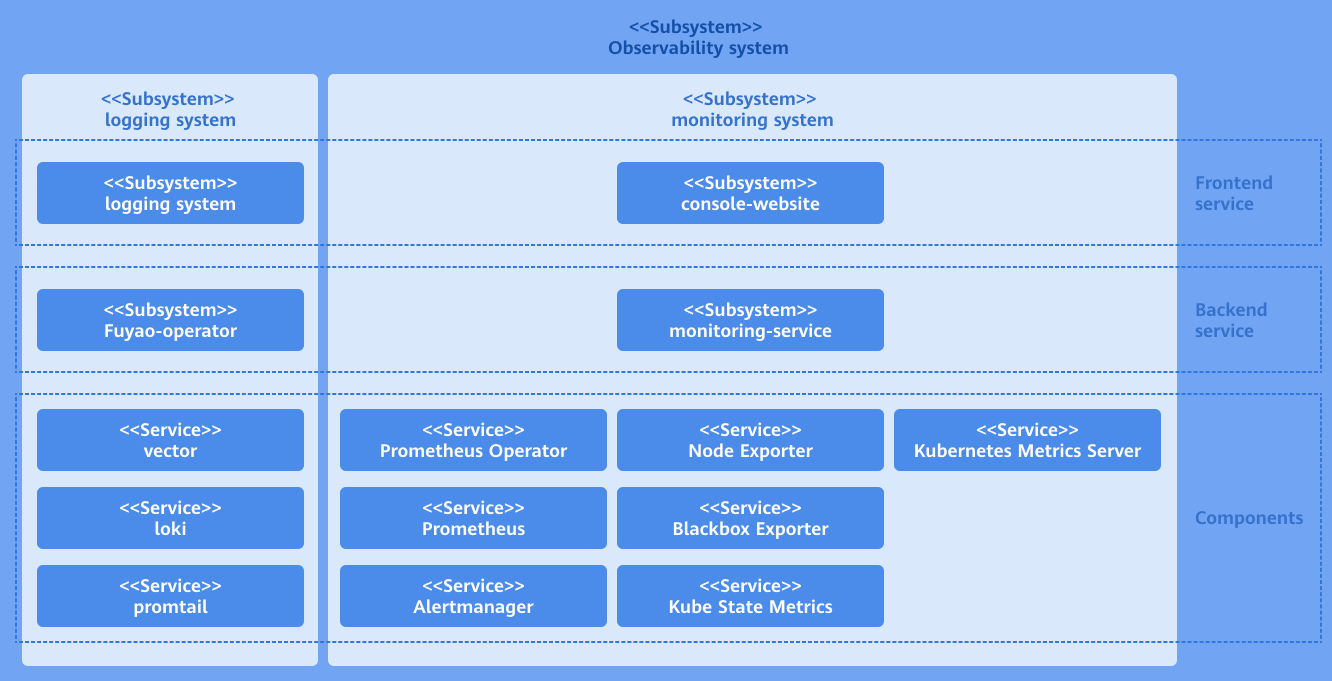
As an ecosystem extension of openFuyao, the log component consists of three parts: log backend layer, log UI layer, and open-source software layer.
Log backend layer
The logging-operator backend is deployed in the cluster as a microservice. It provides core capabilities for the log extension, such as APIs for log query and filtering, APIs for querying log collection sources, APIs for querying log alerting rules, APIs for adding, deleting, modifying, and querying log collection tasks, and APIs for querying contextual log details.
The backend processing logic of the logging-operator is as follows: After receiving a call request from the frontend, it generates a LogQL query statement used by the Loki component based on the specific request content. It assembles this LogQL into a query request for calling the Loki HTTP API to obtain the query and filtering results in the Loki component. Then, it assembles the response based on the specific return logic and returns it to the original calling API. The collection source configuration function calls the client go API of Kubernetes to add, delete, modify, and query Kubernetes cluster resources.
Log UI layer
The frontend UI part of the log component is independently deployed on the openFuyao platform as a scalable, pluggable component. After the UI part is installed and deployed on the openFuyao platform, the log UI is automatically integrated into the left navigation pane of the console-website. You can use the log component directly from the left navigation pane of the openFuyao management plane. If the openFuyao platform is not installed in the cluster, the log UI can be deployed together with the log backend and the log open-source software as an independent log application. In this case, the log UI layer is an independent interface.
Log Open-source Software Layer
The open-source log software provides underlying support capabilities for the logging system. It consists of the log collection component (promtail) and the log storage component (Loki). The log collection component is deployed on each node as a DaemonSet and forwards logs from collection sources to the log storage component based on collection rules. Loki receives the HTTP requests, queries logs in the log database, and returns the results.
Figure 1 Implementation principles
Related Features
The alerting system triggers notifications based on configured alert sources (such as Prometheus and Loki) and associated alert rules.
Installation
Prerequisites
You have permission to log in to the openFuyao management plane.
Procedure
-
Log in to the openFuyao platform. The Summary page is displayed by default. In the left navigation pane, choose Application Market > Applications. The Applications page is displayed.
-
Select Extension under Type on the left.
-
Click the logging-package application card. The application details page is displayed.
-
On the details page, click Deploy in the upper-right corner.
-
In the Installation Information area on the deployment page, set the application name, version information, and namespace. Set the namespace to default.
Figure 2 Installation information

-
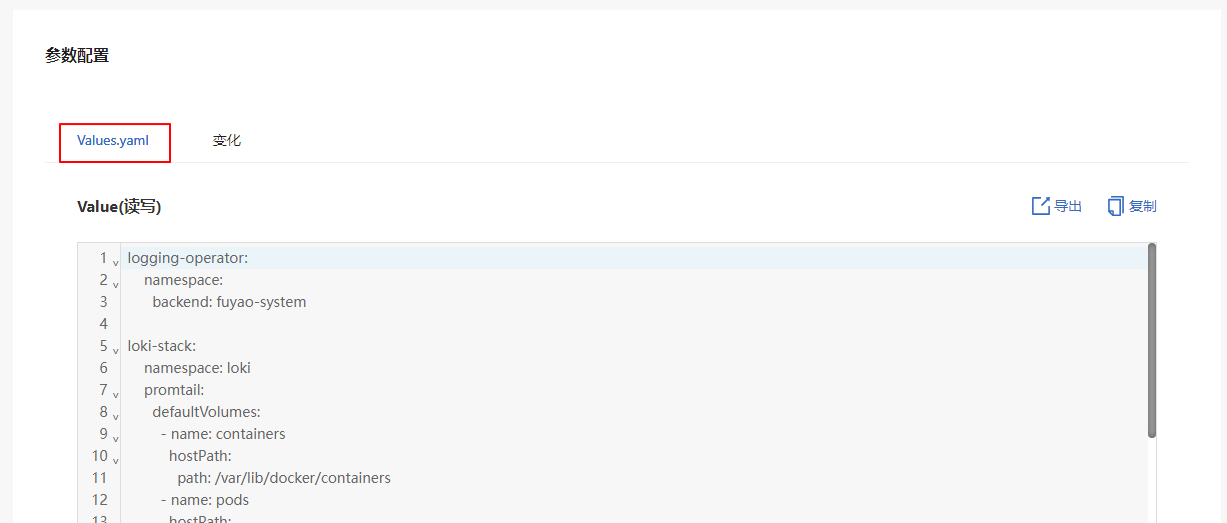
In the Parameter Configuration area, you can view the configuration of each configurable field on the preview page of Values.yaml.
Figure 3 YAML configuration
-
Click OK.
Using the Log Query Function
Prerequisites
Loki and Loki-Promtail have been deployed and configured, and the log collection and storage services are running properly.
Context
The log query system can help you quickly locate issues, monitor the system running state, and rectify faults. By filtering logs with labels, keywords, time ranges, and other criteria, you can extract the desired content from massive log data, accelerating issue identification and analysis.
Restrictions
The log query system may restrict the query complexity and data volume to prevent excessive occupation of system resources. Frequent or complex queries may be restricted.
Procedure
-
In the left navigation pane of the openFuyao platform, choose Observation Center > Logs > Log Query. The Log Query page is displayed.
Figure 3 Log query

-
Query logs by resource type:
 NOTE
NOTE
The Loki component in the log component has a limit on the number of concurrent requests to prevent excessive concurrent requests to the query API.2.1 On the Log Query page, select Query by resource type. You can query logs by the namespace (mandatory), pod, or container.
2.2 Select a log level from the Log level drop-down list. The options include error, warning, info, debug, and critical.
2.3 Click the Time selector to select the time range.
2.4 Click the Keyword text box and enter a keyword for fuzzy search.
2.5 Click Query to query the logs of a specified resource type.
-
Query logs by collection source:
3.1 On the Log Query page, select Query by collection source. Enter a file name (mandatory) for the query.
Figure 3 Query by collection source

3.2 Click Log level to select the log level. The options include error, warning, info, debug, and critical.
3.3 Click the Time selector to select the time range.
3.4 Click the Keyword text box and enter a keyword for fuzzy search.
3.5 Click Query to query the logs of a specified resource type.
Using the Log Configuration Function
In the left navigation pane of the openFuyao platform, choose Observation Center > Logs > Log Configuration. On the Log Configuration page that is displayed, you can select different tabs to view the collection sources, collection tasks, and alert rules.
Creating a Collection Task
Prerequisites
- Loki and Loki-Promtail have been deployed and configured, and the log collection and storage services are running properly.
- The directory for logs to be collected has been created on the host machine, and Promtail must have permission to read the logs.
Context
A log collection task uses Loki-Promtail to collect logs and push them to Loki for real-time monitoring, storage, and analysis. After a collection task is created, log files in different paths can be monitored for subsequent queries and alerting.
Restrictions
- The collection path must be a specific file or directory to prevent a large number of irrelevant files from being collected, which could impact system performance.
- Large-scale collection tasks may consume significant resources. You are advised to assign appropriate priorities and frequencies to collection tasks.
Procedure
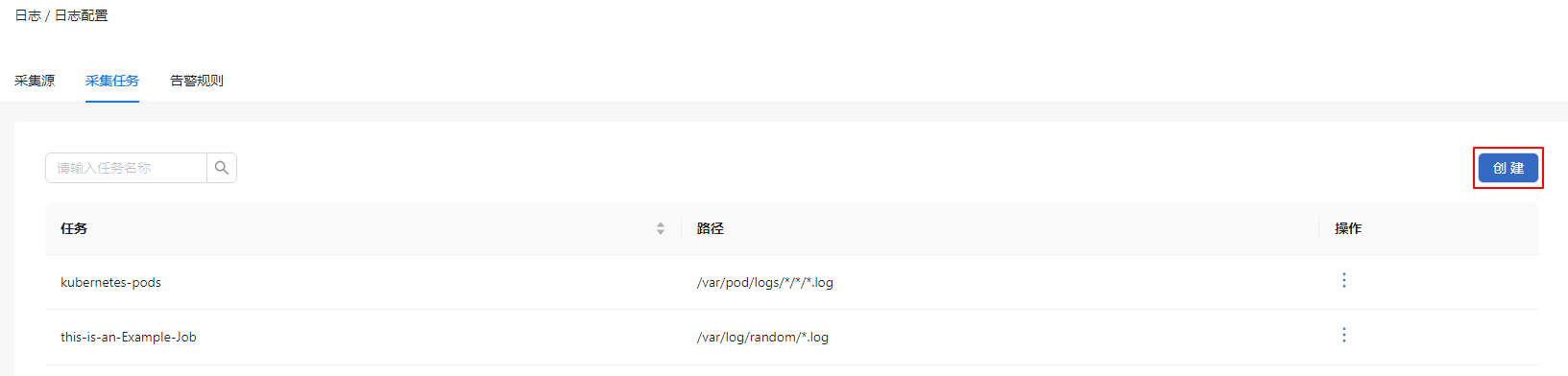
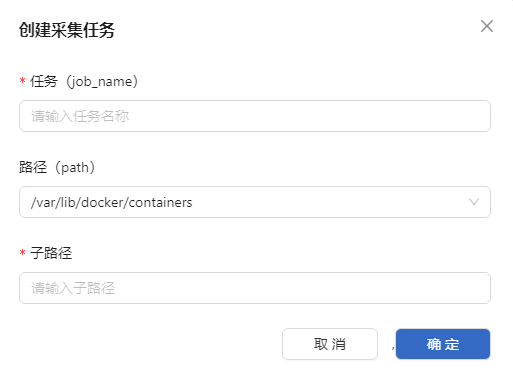
- In the Collection Jobs tab, click Create. The Create Collection Job dialog box is displayed.
Figure 4 Collection task creation page
-
Enter the collection task name.
-
Select the collection source path.
Figure 5 Creating a collection task
-
Click OK.
Related Operations
You can click  in the Operation column on the list page to modify or remove a collection task as required.
Follow-up Operations
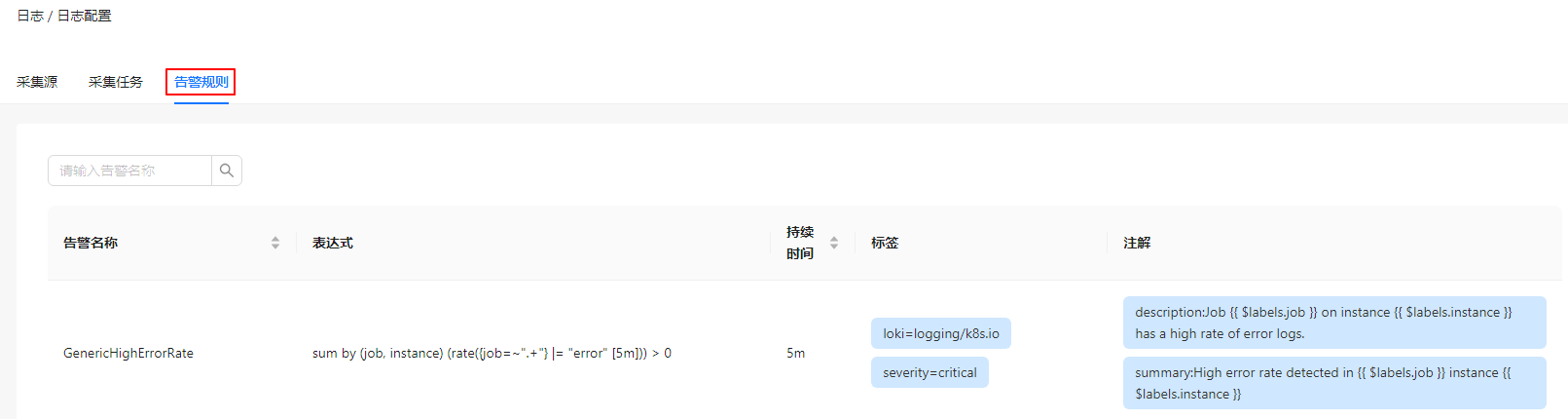
In the Alert Rules tab, view details about the alert rules.
Figure 6 Alert rules