npu-dra-plugin
特性介绍
传统的Device Plugin资源调度方式基于“可计数”的接口来申请设备资源,用户只能以固定数量的方式请求设备,难以感知和利用设备的内部特性,也无法根据实际工作负载的硬件需求进行精细化调度。
为了应对这一挑战,DRA(Dynamic Resource Allocation,动态资源分配)技术应运而生,为Kubernetes提供了更灵活、更语义丰富的资源调度机制。我们在Kubernetes原生DRA架构的基础上,完成了对昇腾NPU设备的深度适配,使得用户不仅能够申请NPU设备,还可以基于设备属性、算力规格等元信息进行调度决策,从而实现更高性能、更高质量的异构计算资源调度。
应用场景
用户下发业务Pod,使用ResourceClaim进行资源申请。
能力范围
- 支持昇腾NPU设备的资源发现和上报。
- 支持通过
DeviceClass/CEL进行设备筛选。 - 支持利用
ResourceClaim/ResourceClaimTemplate进行资源申请,实现业务Pod与ResourceSlice的绑定。 - 支持通过
CDI将设备注入容器。
亮点特征
完成昇腾npu设备与DRA技术的适配。
实现原理
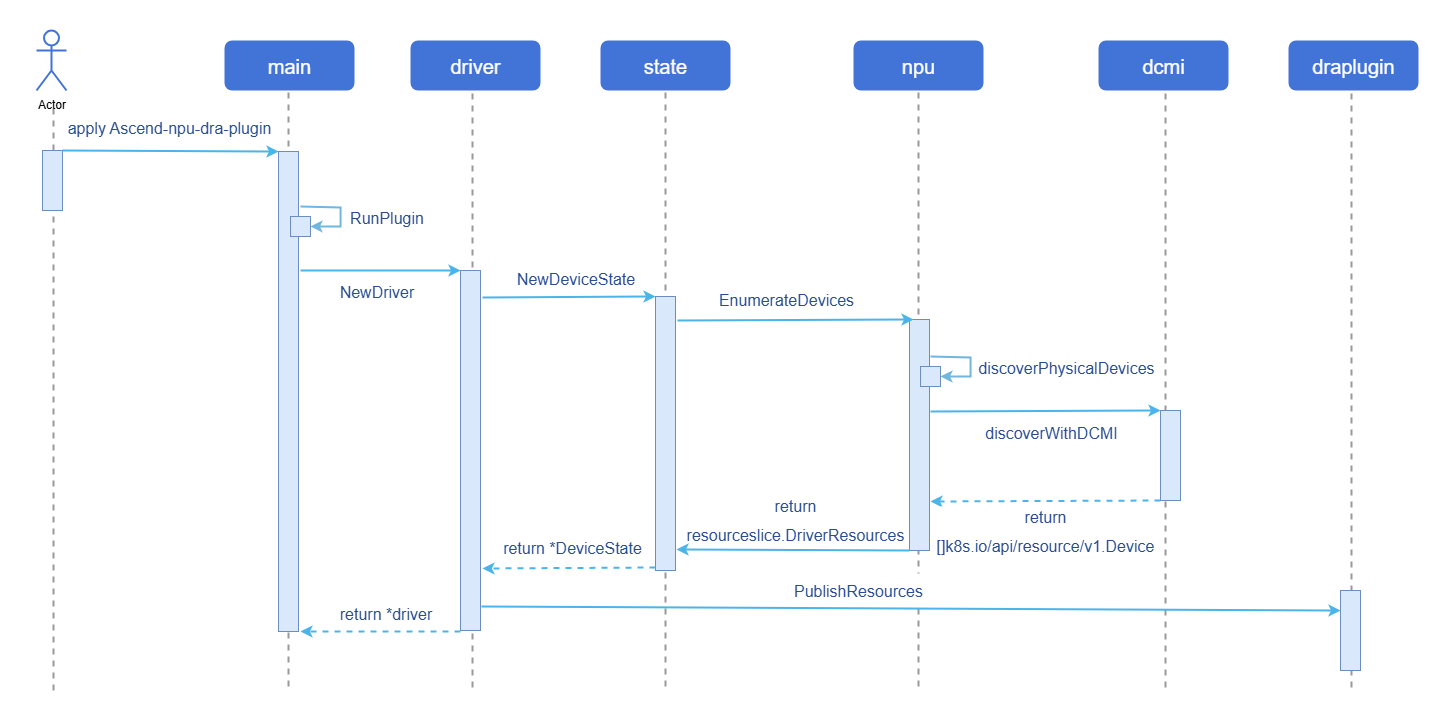
图1 设备发现及上报实现原理图
与相关特性的关系
依赖昇腾npu设备接口。
安装
通过Daemonset部署Ascend-npu-dra-plugin,具体可参见操作步骤。
使用npu-dra
前提条件
Kubernetes使用openFuyao社区推荐版本v1.34.3。
containerd需使用v1.7.0以上版本,推荐使用openFuyao社区默认版本v2.1.1。
背景信息
用于昇腾npu设备适配DRA技术,通过下方操作步骤,可以实现在业务Pod对应的容器中执行npu-smi info命令,完成设备发现、上报、分配、使用的全流程。
使用限制
暂不支持对npu设备的切分。
操作步骤
通过
Daemonset部署Ascend-npu-dra-plugin。yamlapiVersion: v1 kind: Namespace metadata: name: ascend-dra --- apiVersion: v1 kind: ServiceAccount metadata: name: ascend-npu-dra-kubeletplugin namespace: ascend-dra --- apiVersion: rbac.authorization.k8s.io/v1 kind: ClusterRole metadata: name: ascend-npu-dra-kubeletplugin rules: - apiGroups: [""] resources: ["nodes"] verbs: ["get"] - apiGroups: ["resource.k8s.io"] resources: ["resourceslices", "resourceclaims"] verbs: ["get", "list", "watch", "create", "update", "patch", "delete"] --- apiVersion: rbac.authorization.k8s.io/v1 kind: ClusterRoleBinding metadata: name: ascend-npu-dra-kubeletplugin roleRef: apiGroup: rbac.authorization.k8s.io kind: ClusterRole name: ascend-npu-dra-kubeletplugin subjects: - kind: ServiceAccount name: ascend-npu-dra-kubeletplugin namespace: ascend-dra --- apiVersion: apps/v1 kind: DaemonSet metadata: name: ascend-npu-dra-kubeletplugin namespace: ascend-dra spec: selector: matchLabels: app: ascend-npu-dra-kubeletplugin template: metadata: labels: app: ascend-npu-dra-kubeletplugin spec: serviceAccountName: ascend-npu-dra-kubeletplugin hostNetwork: true dnsPolicy: ClusterFirstWithHostNet tolerations: - operator: Exists containers: - name: kubeletplugin image: docker.io/library/dra-npu:latest # image 按照镜像名称修改 imagePullPolicy: IfNotPresent securityContext: privileged: true args: - --node-name=$(NODE_NAME) - --device-profile=npu - --driver-name=npu.huawei.com - --kubelet-registrar-directory-path=/var/lib/kubelet/plugins_registry - --kubelet-plugins-directory-path=/var/lib/kubelet/plugins - --cdi-root=/etc/cdi - --healthcheck-port=-1 env: - name: NODE_NAME valueFrom: fieldRef: fieldPath: spec.nodeName - name: LD_LIBRARY_PATH value: /usr/local/Ascend/driver/lib64:/usr/local/Ascend/driver/lib64/common:/usr/local/Ascend/driver/lib64/driver:/usr/local/Ascend/ascend-toolkit/latest/lib64:/usr/local/Ascend/ascend-toolkit/latest/runtime/lib64 volumeMounts: - name: kubelet-plugins-registry mountPath: /var/lib/kubelet/plugins_registry - name: kubelet-plugins mountPath: /var/lib/kubelet/plugins - name: cdi mountPath: /etc/cdi - name: dev mountPath: /dev - name: sys mountPath: /sys readOnly: true - name: ascend-driver mountPath: /usr/local/Ascend readOnly: true - name: npu-smi-command mountPath: /usr/local/bin/npu-smi readOnly: true volumes: - name: kubelet-plugins-registry hostPath: path: /var/lib/kubelet/plugins_registry type: DirectoryOrCreate - name: kubelet-plugins hostPath: path: /var/lib/kubelet/plugins type: DirectoryOrCreate - name: cdi hostPath: path: /etc/cdi type: DirectoryOrCreate - name: dev hostPath: path: /dev type: Directory - name: sys hostPath: path: /sys type: Directory - name: ascend-driver hostPath: path: /usr/local/Ascend type: Directory - name: npu-smi-command hostPath: path: /usr/local/bin/npu-smi type: File部署
DeviceClass。yamlapiVersion: resource.k8s.io/v1 kind: DeviceClass metadata: name: npu.huawei.com spec: selectors: - cel: expression: |- device.driver == "npu.huawei.com" 说明:
说明:上述配置利用
CEL表达式筛选driver为npu.huawei.com的设备。定义
ResourceClaim/ResourceClaimTemplate并下发业务Pod。ResourceClaimTemplate使用示例。yamlapiVersion: resource.k8s.io/v1 kind: ResourceClaimTemplate metadata: name: npu-claim-template namespace: ascend-dra spec: spec: devices: requests: - name: npu exactly: deviceClassName: npu.huawei.com --- apiVersion: v1 kind: Pod metadata: name: npu-pod namespace: ascend-dra spec: resourceClaims: - name: npu resourceClaimTemplateName: npu-claim-template containers: - name: app image: docker.io/library/ubuntu:22.04 imagePullPolicy: IfNotPresent command: ["sleep", "3600"] resources: claims: - name: npu env: - name: LD_LIBRARY_PATH value: /usr/local/Ascend/driver/lib64:/usr/local/Ascend/driver/lib64/common:/usr/local/Ascend/driver/lib64/driver:/usr/local/Ascend/ascend-toolkit/latest/lib64:/usr/local/Ascend/ascend-toolkit/latest/runtime/lib64 volumeMounts: - name: ascend-driver mountPath: /usr/local/Ascend readOnly: true - name: npu-smi-command mountPath: /usr/local/bin/npu-smi readOnly: true volumes: - name: ascend-driver hostPath: path: /usr/local/Ascend type: Directory - name: npu-smi-command hostPath: path: /usr/local/bin/npu-smi type: FileResourceClaim使用示例。yamlapiVersion: resource.k8s.io/v1 kind: ResourceClaim metadata: name: npu-numa-claim namespace: ascend-dra spec: devices: requests: - name: npu exactly: deviceClassName: npu.huawei.com allocationMode: All selectors: - cel: expression: |- device.attributes["npu.huawei.com"].numaNode == 6 --- apiVersion: v1 kind: Pod metadata: name: npu-numa-pod namespace: ascend-dra spec: resourceClaims: - name: npu resourceClaimName: npu-numa-claim containers: - name: app image: docker.io/library/ubuntu:22.04 imagePullPolicy: IfNotPresent command: ["sleep", "3600"] resources: claims: - name: npu env: - name: LD_LIBRARY_PATH value: /usr/local/Ascend/driver/lib64:/usr/local/Ascend/driver/lib64/common:/usr/local/Ascend/driver/lib64/driver:/usr/local/Ascend/ascend-toolkit/latest/lib64:/usr/local/Ascend/ascend-toolkit/latest/runtime/lib64 volumeMounts: - name: ascend-driver mountPath: /usr/local/Ascend readOnly: true - name: npu-smi-command mountPath: /usr/local/bin/npu-smi readOnly: true volumes: - name: ascend-driver hostPath: path: /usr/local/Ascend type: Directory - name: npu-smi-command hostPath: path: /usr/local/bin/npu-smi type: File说明:ResourceClaimTemplate和ResourceClaim都可以使用CEL表达式进行设备筛选,此处仅以ResourceClaim中的使用为例。
相关操作
查询DRA相关CR信息
查询所有
ResourceSlice。bashkubectl get resourceslices查询对应
ResourceSlice的信息。bashkubectl get resourceslices <resourceslice_name> -o yaml此时可以查看所有发现设备信息,这些信息可用于CEL表达式进行设备筛选,示例如下。
yamlapiVersion: resource.k8s.io/v1 kind: ResourceSlice metadata: creationTimestamp: "2026-02-27T01:55:37Z" generateName: master-npu.huawei.com- generation: 1 name: master-npu.huawei.com-9gv8l ownerReferences: - apiVersion: v1 controller: true kind: Node name: master uid: 6ef76e72-da36-44e3-b9c3-93f44684a859 resourceVersion: "2225369" uid: 0c1b399e-4fa8-4279-93f8-b92a1faeff6f spec: devices: - attributes: chipName: string: 910B4 numaNode: int: 6 physicalId: int: 0 topologyGroup: string: ring-0 capacity: memCapacity: value: 32Gi name: npu-0 driver: npu.huawei.com nodeName: master pool: generation: 1 name: master resourceSliceCount: 1查询所有
DeviceClass。bashkubectl get deviceclasses查询所有
ResourceClaim。bashkubectl get resourceclaims -n <namepspace>
遵循 木兰宽松许可证第2版(MulanPSL2)
