NUMA亲和调度开发指南
特性简介
在现代高性能计算和大规模分布式系统中,非统一内存访问(NUMA)架构越来越普遍。NUMA架构通过将内存划分到不同的节点(NUMA节点),每个节点有其自己的局部内存和CPU,旨在减少内存访问延迟,提高系统性能。然而,NUMA架构的复杂性增加了系统资源管理的难度,特别是在多任务、多线程环境中。为了充分利用NUMA架构的优势,需要对系统资源进行精细化管理和监控。NUMA资源监控可视化旨在通过直观的图形界面,实时展示系统中NUMA资源的分配和使用情况,帮助用户更好地理解和管理NUMA资源,从而提升系统性能和资源利用率。在容器集群中,丰富多样的调度器提供了资源调度能力。本特性将分为三个角度,提供针对优先级高、中、低三种不同类型的任务,不同种类的优化方式,在集群调度以及节点内NUMA调度的层面上,保证Pod达到最优的分配效果,在性能提升上达到了显著效果。 详情请参见《NUMA亲和调度》。
约束与限制
拓扑策略与功能的依赖关系
功能 依赖的Kubelet配置 说明 NUMA亲和调度策略(numa-aware) topologyManagerPolicy: best-effort / restricted / single-numa-node 工作负载指定的拓扑策略需与节点Kubelet配置的策略匹配,调度器才会将Pod调度到该节点 最优NUMA Distance topologyManagerPolicy: best-effort / restricted / single-numa-node 需配置非none的拓扑策略,Kubelet才会在分配资源时考虑NUMA距离 Pod亲和性优化 无特殊要求 该功能作用于运行时,不依赖拓扑策略配置 使用NUMA亲和调度或最优NUMA Distance功能时,需要配置节点Kubelet的拓扑策略。具体配置方法请参见用户指南-拓扑策略配置说明。
 说明:
说明:- 开启相关策略时,组件会自动配置
cpuManagerPolicy: static并重启Kubelet,用户只需手动配置topologyManagerPolicy。 - 修改节点的拓扑策略会重启Kubelet,可能导致部分Pod重新调度,现网环境请谨慎使用。
- 开启相关策略时,组件会自动配置
使用运行时Pod亲和优化功能时,需要提前修改系统配置,具体步骤如下。
修改containerd的配置文件。
vi /etc/containerd/config.toml将其中的内容修改,关闭disable开关。
[plugins."io.containerd.nri.v1.nri"]
disable=false
重启containerd以应用更新:
systemctl restart containerd安装依赖项。 注:此过程中如果有依赖的rpm包未下载,则需要按照依赖项逐一下载。 以openEuler 22.03 sp3环境为例,需要下载的包有:
yum install -y numactl-devel numactl
yum install -y boost boost-devel
yum install -y graphviz graphviz-devel
yum install -y log4cplus log4cplus-devel
yum install -y yaml-cpp yaml-cpp-devel
yum install -y strace sysstat
yum install -y libboundscheck
yum install -y libnl3
从以下链接下载libkperf:
https://dl-cdn.openeuler.openatom.cn/openEuler-22.03-LTS-SP4/update/aarch64/Packages/下载后执行:
rpm -ivh libkperf-v1.2-2.oe2203sp4.aarch64.rpm安装NRI插件和oeAware rpm包下载链接如下:
https://eulermaker.compass-ci.openeuler.openatom.cn/package/download?osProject=openEuler-22.03-LTS-SP4:epol&packageName=resaware_nri_plugins
https://eulermaker.compass-ci.openeuler.openatom.cn/package/download?osProject=openEuler-22.03-LTS-SP4:everything&packageName=oeAware-manager
从以上链接下载好rpm包,保存到本地后执行:
rpm -ivh oeAware-manager-v2.1.1-4.oe2203sp4.aarch64.rpm
rpm -ivh resaware_nri_plugins-0.0.1-2.oe2203sp4.aarch64.rpm
启用插件:
systemctl start oeaware
systemctl start netrela
systemctl start nriplugin
如果希望停止插件功能:
systemctl stop oeaware
systemctl stop netrela
systemctl stop nriplugin
运行时Pod亲和优化功能目前只支持ARM环境+openEuler 22.03环境使用。
使用集群NUMA监控功能时,需要提前配置普罗米修斯。
配置Prometheus Operator接入NUMA Exporter参考任务场景2。
配置Prometheu接入NUMA Exporter参考任务场景3。
环境准备
环境要求
- 已部署Kubernetes v1.21及以上。
- 已部署Prometheus。
- 已部署Containerd v1.7及以上。
检验搭建环境
以使用Volcano为例:当所有volcano-system namespace下的Pod状态为“Running”时,表示环境搭建成功。
volcano-system volcano-admission-xx-xx           1/1  Running  0  xmxxs
volcano-system volcano-admission-init-xx         1/1  Running  0  xmxxs
volcano-system volcano-controllers-xx-xx         1/1  Running  0  xmxxs
volcano-system volcano-schedulers-xx-xx          1/1  Running  0  xmxxs
volcano-system volcano-exporter-daemonset-xx     n/n  Running  0  xmxxs
volcano-system volcano-config-website-xx-xx      1/1  Running  0  xmxxs
volcano-system volcano-config-xx-xx              1/1  Running  0  xmxxs
volcano-system numa-exporter-xx                  n/n  Running  0  xmxxs
default        numaadj-xx                      n/n  Running  0  xmxxs
任务场景1:修改Volcano调度策略
任务场景概述
配置Volcano调度策略。
系统架构
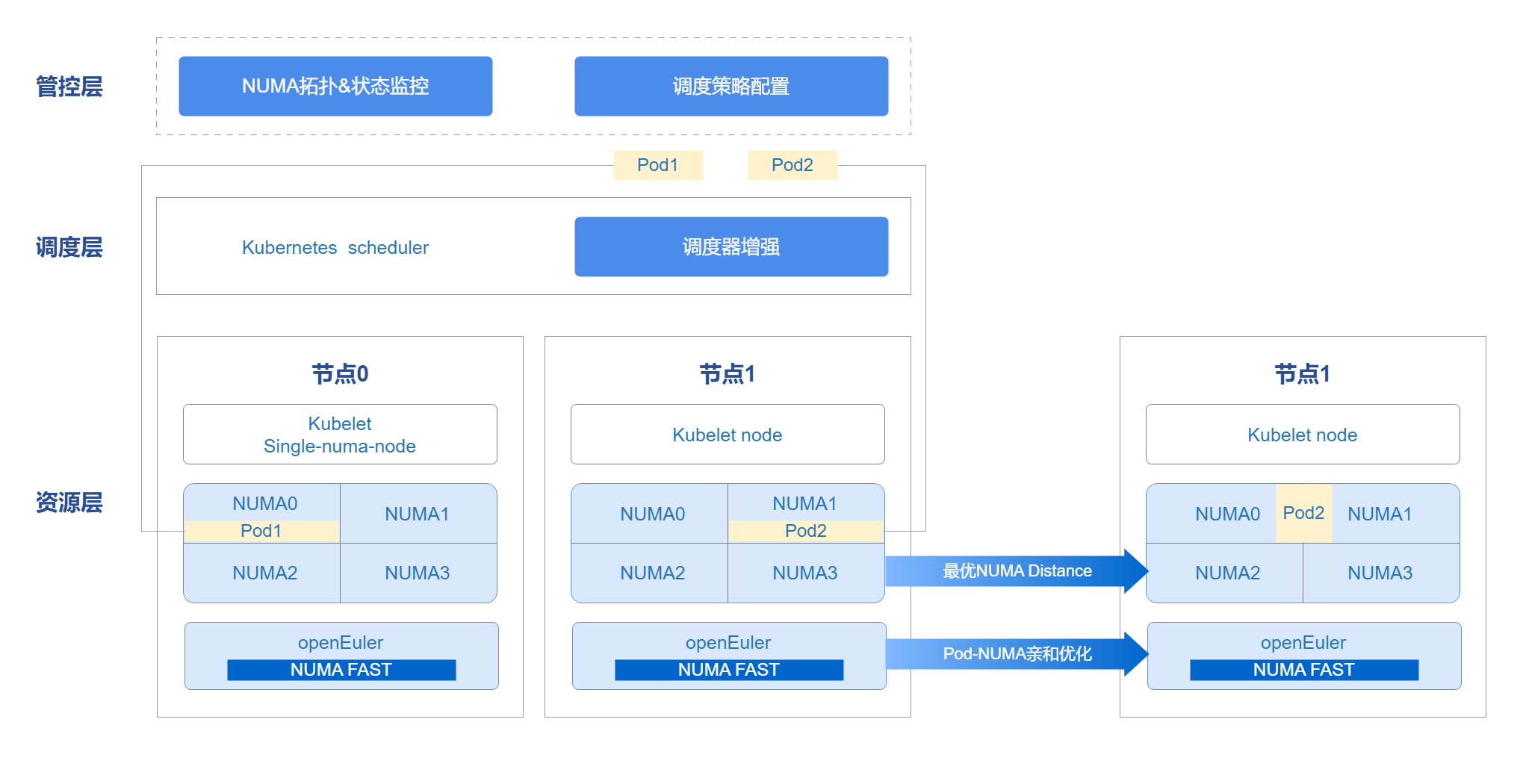
管控层借用openFuyao平台console-website能力,前端展示NUMA拓扑、状态监控以及调度策略配置前端界面。管理调度器在集群中不仅可以使用Kubernetes scheduler,也支持用户自定义调度器。通过调度器,配合Kubelet能力,将资源调度至节点上。Pod运行时使用Oeware+NUMA-nri plugin能力,进行Pod亲和优化,把网络亲缘关系较强的Pod调度至同一NUMA上,提高性能,完成整体端到端的调度优化方案。
图 1 NUMA亲和调度架构关系
接口说明(以numa-aware为例)
表 1 主要接口说明
| 接口名 | 描述 |
|---|---|
| GET /rest/scheduling/v1/numaaware | 查询NUMA亲和性调度策略。 |
| PUT /rest/scheduling/v1/numaaware | 修改NUMA亲和性调度策略。 |
开发步骤
通过查看配置文件的方法,判断numa-aware插件是否可用。同时可对配置文件进行修改,即开启/关闭numa-aware扩展调度策略,核心代码如下。
func methodPut(clientset kubernetes.Interface, plugin string, status string) (*httputil.ResponseJson, int) {
    // 获取volcano配置文件
    configmap, err := k8sutil.GetConfigMap(clientset, constant.VolcanoConfigServiceConfigmap,
       constant.VolcanoConfigServiceDefaultNamespace)
    if err != nil {
       zlog.Errorf("GetConfigMap failed, %v", err)
       return httputil.GetDefaultServerFailureResponseJson(), http.StatusInternalServerError
    }

 // 获取配置文件具体内容
    configContent, exists := configmap.Data[constant.VolcanoConfigServiceConfigmapName]
    zlog.Infof("configContent: %v", configContent)
    if !exists {
       zlog.Errorf("GetConfigMap failed, content is empty")
       return httputil.GetDefaultServerFailureResponseJson(), http.StatusInternalServerError
    }

 // 修改策略状态
    str := "name: " + plugin
    if status == "open" {
       if !strings.Contains(configContent, str) {
          configContent = insertPlugin(configContent)
       }
    } else if status == "close" {
       if strings.Contains(configContent, str) {
          configContent = removePlugin(configContent, plugin)
       }
    } else {
       zlog.Errorf("status is not open or close, %v", err)
       return httputil.GetDefaultServerFailureResponseJson(), http.StatusInternalServerError
    }

 // 更新配置文件
    configmap.Data[constant.VolcanoConfigServiceConfigmapName] = configContent
    configmap, err = k8sutil.UpdateConfigMap(clientset, configmap)
    if err != nil {
       zlog.Errorf("UpdateConfigMap failed, %v", err)
       return httputil.GetDefaultServerFailureResponseJson(), http.StatusInternalServerError
    }

 // 重启调度器
    err = k8sutil.DeleteVolcanoPod(clientset, constant.VolcanoConfigServiceDefaultNamespace)
    if err != nil {
       zlog.Errorf("delete pod volcano-scheduler failed, %v", err)
       return httputil.GetDefaultServerFailureResponseJson(), http.StatusInternalServerError
    }

    return &httputil.ResponseJson{
       Code: constant.Success,
       Msg:  "success",
    }, http.StatusOK
}
调测验证
调用本任务场景对应的接口,确认能否正常查看或修改调度策略。
调用接口。 将service中ClusterIP改为NodePort,并调用NodePort端口号。
curl -X GET "http://192.168.100.59:NodePort/rest/scheduling/v1/numaaware"在集群中查看Volcano配置文件。
kubectl edit configmaps volcano-scheduler-configmap -n volcano-system查看其中是否有- numa-aware项,有则表示NUMA亲和调度策略已开启。
验证调度策略是否正确生效。
创建一个Deployment,设置亲和到single-numa-node的节点上,使用调度器为Volcano,观察是否按预期进行调度。
   apiVersion: apps/v1
   kind: Deployment
   metadata:
     name: nginx
   spec:
     replicas: 1
     selector:
       matchLabels:
         app: nginx
     template:
       metadata:
         labels:
           app: nginx
         annotations:
           # 指定numa亲和性
           volcano.sh/numa-topology-policy: single-numa-node
       spec:
         # 指定调度器为Volcano
         schedulerName: volcano
         containers:
         - name: nginx
           image: nginx
           imagePullPolicy: IfNotPresent
           resources:
             limits:
               cpu: 1
               memory: 100Mi
             requests:
               cpu: 1
               memory: 100Mi
任务场景2:配置Prometheus Operator接入NUMA Exporter
任务场景概述
Prometheus Operator主要使用自定义资源(CRD)来管理Prometheus的配置,包括Prometheus、Alertmanager、ServiceMonitor和PodMonitor等。ServiceMonitor旨在定义Prometheus应该如何发现和抓取特定服务的监控数据。它用来指定一个或多个Kubernetes服务作为Prometheus的抓取目标。
开发步骤
编写ServiceMonitor的YAML文件。
创建一个名为numaExporter-serviceMonitor.yaml的YAML文件,内容如下。
yamlapiVersion: monitoring.coreos.com/v1 kind: ServiceMonitor metadata: labels: name: numa-exporter name: numa-exporter namespace: volcano-system spec: endpoints: - interval: 30s port: https selector: matchLabels: app: numa-exporter namespaceSelector: matchNames: - volcano-system应用ServiceMonitor资源,使Prometheus可以发现NUMA Exporter并抓取监控数据。
执行如下命令,使用kubectl将ServiceMonitor资源应用到Kubernetes集群中。
kubectl apply -f numaExporter-serviceMonitor.yaml
调测验证
登录Prometheus。
访问Prometheus界面:浏览器中输入“http://prometheus-server:9090”。
说明:
如果Prometheus配置了身份验证或其他安全措施,输入必要的凭据登录。验证监控目标。
2.1 检查Prometheus Targets。
在Prometheus web界面中,访问Targets页面(通常在“Status”菜单下),检查“numa-exporter”监控目标是否已被正确发现和抓取。
2.2 查看数据。
在查询输入框中输入“numa_node_cpus_count”以获取指标数据。
任务场景3:配置Prometheus接入NUMA Exporter
任务场景概述
在Kubernetes集群中,通常使用ConfigMap来管理和更新Prometheus的配置文件(prometheus.yml)。
开发步骤
编辑ConfigMap。
找到存储prometheus.yml的ConfigMap,执行以下命令。
kubectl get configmap -n monitoring使用编辑器打开并修改这个ConfigMap。
kubectl edit configmap <prometheus-config-name> -n monitoring在编辑器中,添加或修改scrape_configs部分。
scrape_configs:
- job_name: 'numa-exporter'
 static_configs:
 - targets: ['numa-exporter.volcano-system:9201']
重新加载Prometheus配置。
保存并退出编辑器,并通过热加载来重新加载配置。
curl -X POST http://prometheus-server:9090/-/reload #替换为Prometheus实际运行的主机名或IP地址及其端口号。
调测验证
登录Prometheus。
访问Prometheus界面:浏览器中输入“http://prometheus-server:9090”。
说明:
如果Prometheus配置了身份验证或其他安全措施,输入必要的凭据登录。验证监控目标。
检查Prometheus Targets:在Prometheus web界面中,访问“Targets”页面(通常在“Status”菜单下),检查“numa-exporter”监控目标是否已被正确发现和抓取。
查看数据:在查询输入框中输入“numa_node_cpus_count”以获取指标数据。
任务场景4:非独占的Pod亲和至同一NUMA上
任务场景概述
Pod之间存在很多的网络互访行为,可以将他们视作一组具有亲缘关系的Pod。如果将这一组具有亲缘关系的Pod分配在同一Numa节点上,可以有效的降低他们跨Numa访问的次数,从而提升系统的吞吐率。
系统架构
- 获取Pod亲和性:通过OS的oeAware模块统计线程亲和性,进而转化为Pod亲和性。
- 运行时亲和优化:利用NRI感知resource-aware并存储Pod间亲和关系,创建时修改Pod的cpuset/memset,从而将亲和性Pod的资源分配至同一NUMA。 Pod亲和性实现原理如下图所示。
图 2 Pod亲和性优化原理图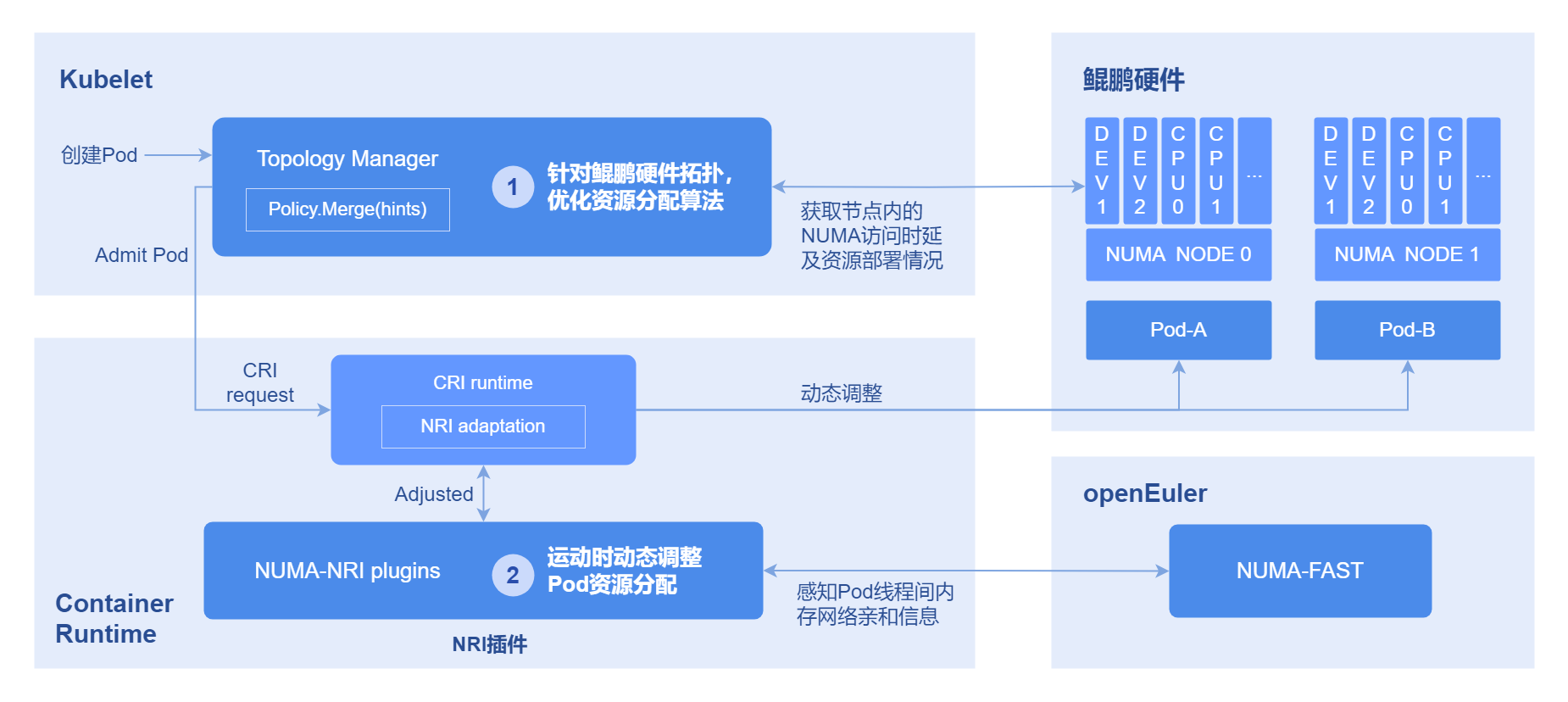
开发步骤
执行如下命令,可查看Pod间亲缘关系。
kubectl get oenuma podafi -n tcs -o yaml在spec.node.numa字段中,可以看到Pod间亲缘关系。
调测验证
比较部署前后,具有线程亲和关系的Pod是否被调度到同一NUMA上。
- 执行如下命令,查找线程号,以部署nginx为例。
ps -ef | grep nginx- 执行如下命令,获取到pid。
cat /proc/#pid/status查看Cpus_allowed字段,如果修改到了一个NUMA上,则具有亲和关系的Pod绑核成功。
FAQ
怎么处理NUMA亲和策略不生效?
现象描述
工作负载配置了NUMA亲和策略为single-numa-node,使用调度器为Volcano,但是没有正确调度到拓扑策略为single-numa-node的节点上。
可能原因
- 未在配置文件中开启numa-aware插件。
- 工作负载配置了反亲和或者污点,导致无法分配到该节点上。
- 节点资源已满。
解决办法
开启numa-aware插件,并查看是否有反亲和配置,清理节点资源。
遵循 木兰宽松许可证第2版(MulanPSL2)
