serverlessdb-operator
Feature Introduction
Traditional databases are designed for long-term steady-state workloads, whereas in Serverless scenarios, database compute instances have short lifecycles (minutes to tens of minutes), with bursty and unpredictable workloads. This requires database scaling to become a runtime capability: on-demand creation, automatic scaling, and idle release.
serverlessdb operator is a Serverless database control plane Operator designed for short-lifecycle, bursty workload scenarios. Based on the Kubernetes Operator extension mechanism, it maintains a pool of pre-warmed database compute instances and exposes a REST interface to support on-demand allocation, release, and in-place vertical scaling of database compute instances. It uses a Headless Service to ensure that the connection address remains unchanged after instance release/re-allocation.
Figure 1 Serverless DB Capability Panorama
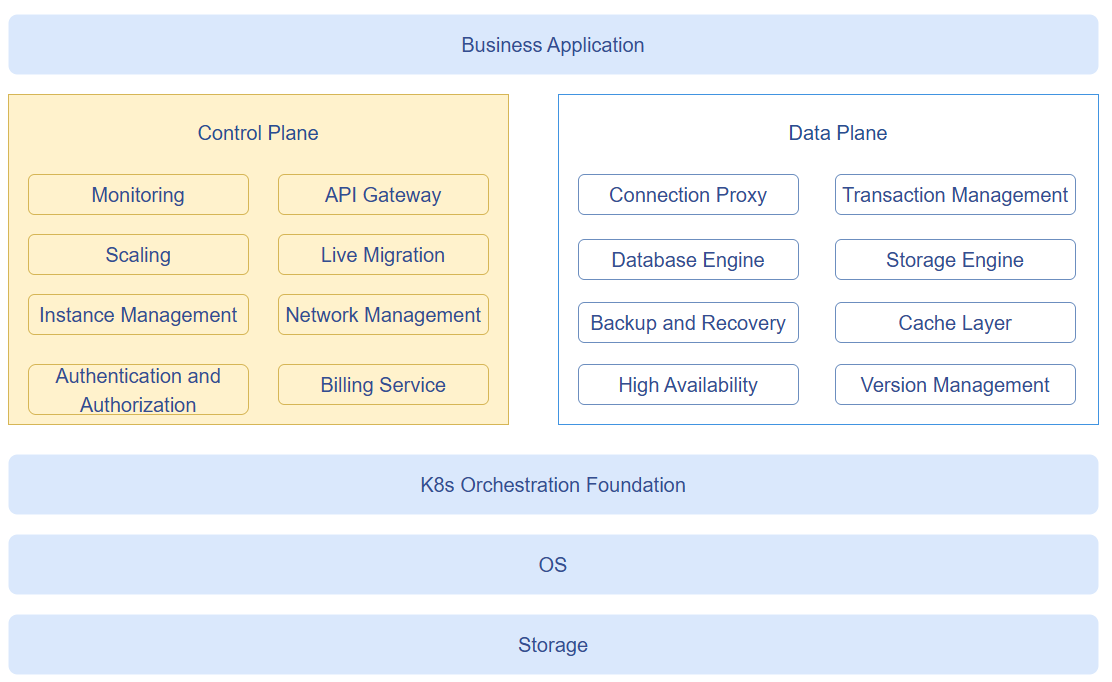
As shown in Figure 1, the Serverless DB capabilities are divided into two layers: control plane and data plane:
- Control Plane: Focuses on cost efficiency and user experience, primarily responsible for instance lifecycle management, fast resource scheduling and startup, instance traffic monitoring, access security, and operations (serverlessdb operator focuses on this layer).
- Data Plane: Focuses on data correctness and performance, primarily responsible for data storage and retrieval, connection transaction management, backup and recovery, etc. (implemented by the database engine, not within the scope of this Operator).
Application Scenarios
- Upper-layer DB Manager or business services request database compute instances through the REST API from the Operator. After obtaining the connection address, business applications connect to the database via the Service domain name.
- When workloads change, call the scaling interface to adjust resources in place.
- After business is completed, release the instance; the connection address is retained for future reuse.
Capability Scope
- Supports maintaining a specified number/specification of pre-warmed database compute instances through the
DBResourcePoolCR, with the Reconciler automatically reconciling to replenish. - Supports millisecond-level instance allocation through the REST API (only label/status changes, allocated from the pre-warmed pool, no cold start required).
- Supports instance release: deletes the DBInstance CR and its Pod, while the Headless Service is retained for connection address reuse.
- Supports in-place vertical scaling based on the K8s
pods/resizesub-resource, without Pod rebuild. - Supports multi-tenant authentication and authorization: passes through the caller's Bearer Token to the K8s API Server for authentication, and verifies the tenant's RBAC permissions on the target namespace through
SelfSubjectRulesReview. - Supports HTTPS transport encryption for the REST API: the server certificate is pre-configured by the cluster administrator and signed with the cluster CA (the same trust system as the K8s API Server). Clients verify the server with the cluster CA and authenticate with the SA Token; the Operator itself does not participate in certificate issuance.
- Supports high-availability deployment based on K8s Lease leader election, with automatic failover to standby instances when the leader fails.
- Supports periodic cleanup of orphaned Headless Services that have no backing Pod and exceed the TTL.
Highlight Features
- Millisecond-level allocation: Allocating instances only involves label/status changes, distributed from the pre-warmed pool in seconds, no cold start required.
- Connection address persistence: Each
app_refcorresponds to a Headless Service. After an instance is released, the DNS address is retained and can be reused for re-allocation. - In-place vertical scaling: Implements in-place vertical scaling based on the K8s
pods/resizesub-resource without Pod rebuild, and automatically maintains the Pod's QoS class to pass K8s validation.
Implementation Principle
Figure 2 serverlessdb operator Interaction Flow Diagram
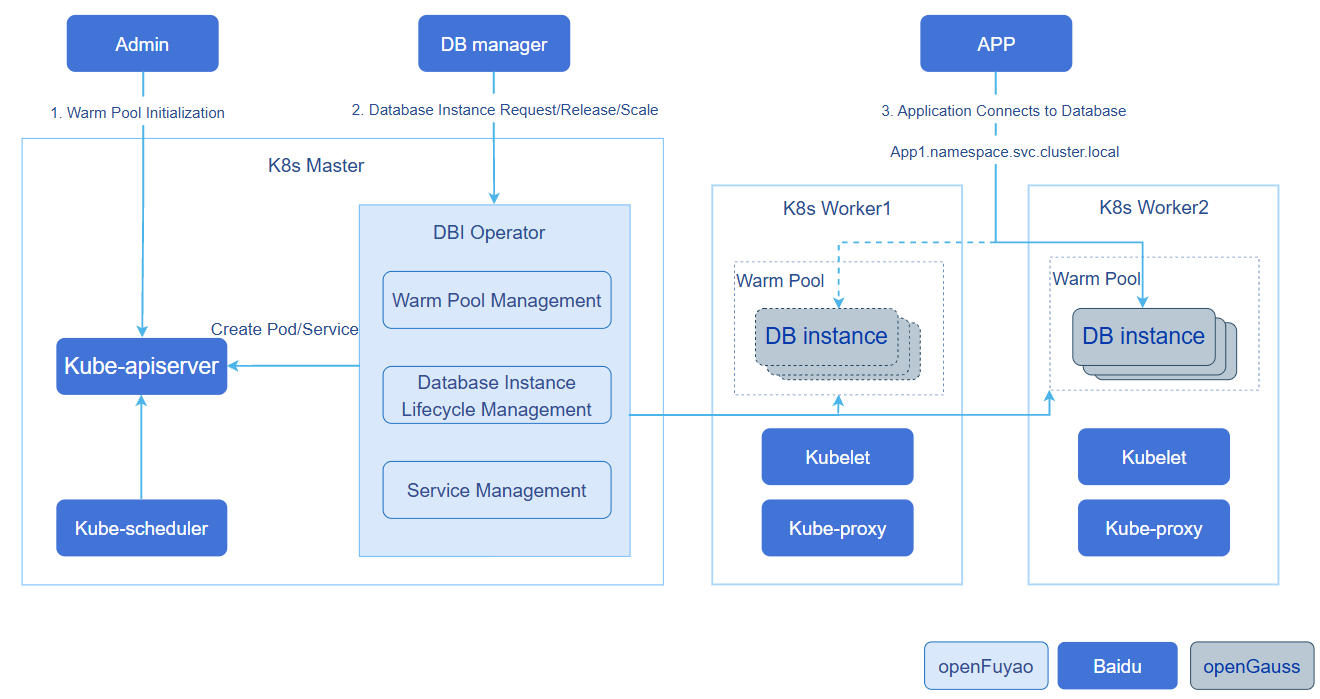
As shown in Figure 2, the core interaction flow of serverlessdb operator is as follows:
- The cluster administrator deploys a database compute instance pre-warmed resource pool CR (
DBResourcePool). The Operator initializes the database compute instances, creates the corresponding Pods, which are scheduled to appropriate nodes to run, forming the pre-warmed resource pool. - The DB Manager calls the Operator's REST interface based on application requirements and traffic monitoring results to allocate, release, and scale database compute instances.
- When allocating a database compute instance, the Operator creates a Headless Service corresponding to the
app_ref, associates it with the DBInstance through labels, and K8s reconciles the corresponding routing rules. Applications connect to the database through the Service domain name.
Two components run simultaneously within the Operator process:
- Controller Manager (controller-runtime): Runs
DBResourcePoolReconciler, reconciles resource pool and instance status, maintains pre-warmed instance count, syncs instance status, performs in-place scaling, and cleans up orphaned Services. - Gin HTTP Server: Exposes the REST API externally, completes authentication and authorization through
TokenCache, and then callsK8sInstanceServiceto handle allocation/release/scaling requests.
Instance allocation flow: The Operator matches pre-warmed instances from the in-memory cache by PostgreSQL (PG) version and resource specification, completes allocation by patching the DBInstance and its Pod's labels (associating app_ref), and creating/reusing a Headless Service named after app_ref. In memory, the instance is marked as Running, and the status is asynchronously persisted by the Reconciler. The connection address <app_ref>.<namespace>.svc.cluster.local:<pg_port> is returned.
Scaling flow: The Operator writes the resize-spec annotation on the DBInstance and sets phase=Scaling. The Reconciler submits an in-place scaling request through the pods/resize sub-resource, and restores Running upon completion.
Relationship with Related Features
- Depends on the Kubernetes ≥ 1.32 Pod in-place vertical scaling feature (
pods/resizesub-resource). - Depends on Kubernetes Lease (
coordination.k8s.io/leases) for leader election high availability.
Using serverlessdb operator
Prerequisites
Kubernetes uses the openFuyao community recommended version v1.34.3 (requires ≥ 1.32 to support Pod in-place vertical scaling).
Helm 3 is installed.
The database compute image (e.g.,
postgres:17) is prepared. If nodes cannot directly pull images, import images offline on each node in advance or configureimagePullSecrets:bash# Offline import image to node nerdctl load -i compute-v17.4.tar
Background Information
Through the Operation Steps below, you can achieve the full process of deploying the Operator, creating a pre-warmed resource pool, and allocating/scaling/releasing database compute instances, enabling business applications to connect to on-demand allocated database compute instances through a fixed Service domain name.
Usage Restrictions
- The first container in the
DBResourcePoolPod template should be namedcompute, and its resource configuration is used for resource pool matching (if this convention is violated, resource matching will degrade to the default value without error). - PostgreSQL major versions only support
16and17. - In-place vertical scaling cannot change the Pod's QoS class (Burstable ↔ Guaranteed); the Operator automatically adjusts limits to maintain the original QoS class.
- The upper-layer service calling the REST API must hold RBAC permissions for the required resources in the target namespace (see step 4 of Operation Steps).
- When REST API HTTPS is enabled, callers must access the REST API through the Service domain name, not the Pod IP directly (the server certificate SAN does not cover the Pod IP).
Operation Steps
Build and push the image.
1.1 Compile the binary and build the Docker image.
bash# Local compilation go build -o bin/serverlessdb-operator ./cmd # Build single-architecture Docker image REGISTRY=<your-registry> TAG=1.0.0 ./build/build.sh # Build multi-architecture manifest (requires building and pushing each architecture image first) REGISTRY=<your-registry> TAG=1.0.0 ./build/build.sh manifest Note:
Note:Supports
linux/amd64andlinux/arm64architectures. Multi-architecture manifest mode requiresREGISTRYto be set.Install the Operator via Helm.
2.1 Install the Chart using Helm. The Chart includes CRD (
dbresourcepool/dbinstance), Deployment, Service (in-cluster access entry for the REST API), ServiceAccount, and ClusterRole/ClusterRoleBinding.bashhelm install serverlessdb-operator ./build/chart \ -n serverlessdb --create-namespace \ --set namespace=serverlessdb Note:- The Chart pulls the image from
cr.openfuyao.cn/openfuyao/serverlessdb-operator/serverlessdb-operator:latestby default. To use a custom image, override with--set image.registry,--set image.repository,--set image.tag. - You can adjust ports, leader election parameters, resources, TTL, QPS, etc. in
build/chart/values.yaml. Authentication uses the in-cluster ServiceAccount Token by default. For full parameter descriptions, see Operator Configuration Parameters.
2.2 (Optional) Enable REST API HTTPS.
Whether the Operator enables HTTPS is determined by whether the certificate is configured, with no separate switch: if
tlsis not configured in values, the REST API is served over HTTP; after configuringtls, HTTPS is enabled. The server certificate is pre-signed by the cluster administrator with the cluster CA (the same trust system as the K8s API Server). Clients access with the cluster CA + SA Token, and the Operator does not participate in certificate issuance.2.2.1 The administrator signs the certificate and creates the Secret (kubeadm cluster example,
<ns>is the Operator deployment namespace).bashNS=<ns> # 1. Generate the private key and CSR; the SAN covers the Service domain names openssl genrsa -out tls.key 2048 openssl req -new -key tls.key -out tls.csr -subj "/CN=serverlessdb-operator.${NS}.svc" \ -addext "subjectAltName=DNS:serverlessdb-operator,DNS:serverlessdb-operator.${NS},DNS:serverlessdb-operator.${NS}.svc,DNS:serverlessdb-operator.${NS}.svc.cluster.local" # 2. Sign with the cluster CA (/etc/kubernetes/pki is the default kubeadm path) openssl x509 -req -in tls.csr -CA /etc/kubernetes/pki/ca.crt -CAkey /etc/kubernetes/pki/ca.key \ -CAcreateserial -out tls.crt -days 3650 \ -extfile <(printf "subjectAltName=DNS:serverlessdb-operator,DNS:serverlessdb-operator.${NS},DNS:serverlessdb-operator.${NS}.svc,DNS:serverlessdb-operator.${NS}.svc.cluster.local") # 3. Create the Secret (must be completed before helm install/upgrade) kubectl create secret tls serverlessdb-operator-tls -n "${NS}" --cert=tls.crt --key=tls.key2.2.2 Configure
tlsinvalues.yamland install/upgrade the Chart (secretNameis customizable; certificate mount paths have default values).yamltls: secretName: serverlessdb-operator-tls Note:- After HTTPS is enabled, callers access the REST API through the Service domain name
https://serverlessdb-operator.<ns>.svc:8080. Do not access the Pod IP directly (the certificate SAN does not cover the Pod IP). - Callers verify the server certificate with the cluster CA (inside a Pod,
/var/run/secrets/kubernetes.io/serviceaccount/ca.crtcan be used directly), and authentication is still performed throughAuthorization: Bearer <token>. - When the certificate expires or is rotated, the administrator updates the Secret and then runs
kubectl rollout restart deployment/serverlessdb-operatorto reload it. Removing thetlsconfiguration from values reverts to HTTP.
2.3 (Optional) If you need to authenticate the communication between the Operator and the API Server using client certificates, configure in
values.yaml:yamlclientCert: enabled: true secretName: "operator-tls" certPath: /etc/serverlessdb/tls/tls.crt keyPath: /etc/serverlessdb/tls/tls.key username: "serverlessdb-operator" # Or group, used for binding ClusterRole2.4 Confirm the Operator Pod is in Running state.
bashkubectl -n serverlessdb get pods -l app=serverlessdb-operator- The Chart pulls the image from
Create a DBResourcePool resource pool.
3.1 Deploy the
DBResourcePoolCR, defining the desired number of instances, PG version, and Pod template.yamlapiVersion: serverlessdb.openfuyao.cn/v1 kind: DBResourcePool metadata: name: pool-small namespace: serverlessdb spec: replicas: 5 # Total number of instances maintained (warm + allocated) minAvailable: 2 # Minimum pre-warmed available instances pgVersion: 17 # PostgreSQL major version (16 | 17) controlPlaneUrl: "http://control-plane:8080" podTemplate: # Complete Pod template, compute container's resources used for pool matching metadata: labels: app: compute annotations: compute.openfuyao.cn/priority: "0" prometheus.io/scrape: "true" prometheus.io/port: "3080" spec: hostNetwork: false dnsPolicy: ClusterFirst securityContext: fsGroup: 1000 runAsUser: 1000 containers: - name: compute # First container should be named compute image: "cr.openfuyao.cn/openfuyao/compute/compute:v17.4" imagePullPolicy: IfNotPresent resizePolicy: # In-place scaling policy, NotRequired means no container restart required - resourceName: cpu restartPolicy: NotRequired - resourceName: memory restartPolicy: NotRequired env: - name: MY_POD_NAME valueFrom: fieldRef: fieldPath: metadata.name - name: NAMESPACE valueFrom: fieldRef: fieldPath: metadata.namespace - name: COMPUTE_ID value: "$(NAMESPACE)_$(MY_POD_NAME)" args: - /var/db/postgres/compute - -C - postgresql://cloud_admin@localhost/postgres - -b - /usr/local/bin/postgres - --compute-id - $(COMPUTE_ID) - --dev ports: - name: pg containerPort: 5432 resources: requests: { cpu: "1000m", memory: "1Gi" } limits: { cpu: "2000m", memory: "2Gi" } Note:replicasis the total number of instances maintained (warm + allocated);minAvailableis the minimum pre-warmed available instances, below which the Reconciler automatically replenishes.- The
computecontainer'sresourcesare used for resource pool matching when requesting instances. SetresizePolicytoNotRequiredto support in-place scaling without container restart. controlPlaneUrlis injected as an environment variable into the compute container and init/heartbeat containers.- The above example is a minimal viable template that allows pre-warmed instances to reach
WarmReadywithout initContainers. In production environments, if you need to register Pods with the control plane, add aregister-podcontainer inspec.initContainersand use it withcontrolPlaneUrl.
3.2 Confirm the resource pool is ready and pre-warmed instances have reached the WarmReady state.
bashkubectl -n serverlessdb get dbresourcepool pool-smallExpected output (
Availableshould gradually reach thereplicasvalue):textNAME TOTAL WARM AVAILABLE ALLOCATED PG-VERSION AGE pool-small 5 5 5 0 17 2mGrant RBAC permissions to the caller.
The upper-layer DB Manager must hold permissions for the following resources in the target namespace for the Operator to complete operations using its Token:
serverlessdb.openfuyao.cngroup: get/list/patch/delete ofdbinstances, patch ofdbinstances/status- Core API: get/patch of
pods, get/create/delete ofservices
Example Role and RoleBinding (bound to the ServiceAccount used by the caller):
yamlapiVersion: rbac.authorization.k8s.io/v1 kind: Role metadata: name: serverlessdb-tenant namespace: serverlessdb rules: - apiGroups: ["serverlessdb.openfuyao.cn"] resources: ["dbinstances"] verbs: ["get", "list", "patch", "delete"] - apiGroups: ["serverlessdb.openfuyao.cn"] resources: ["dbinstances/status"] verbs: ["patch"] - apiGroups: [""] resources: ["pods"] verbs: ["get", "patch"] - apiGroups: [""] resources: ["services"] verbs: ["get", "create", "delete"] --- apiVersion: rbac.authorization.k8s.io/v1 kind: RoleBinding metadata: name: serverlessdb-tenant namespace: serverlessdb subjects: - kind: ServiceAccount name: <caller-serviceaccount> namespace: <caller-namespace> roleRef: kind: Role name: serverlessdb-tenant apiGroup: rbac.authorization.k8s.io4.1 Create the caller ServiceAccount and obtain the Bearer Token.
bash# Create the caller ServiceAccount (if it does not exist) kubectl -n <caller-namespace> create serviceaccount <caller-serviceaccount> # Issue a Bearer Token through the TokenRequest API (default validity period is 1 hour) kubectl -n <caller-namespace> create token <caller-serviceaccount> Note:- K8s ≥ 1.24 no longer automatically generates long-term Tokens for ServiceAccounts; use
kubectl create tokento issue through the TokenRequest API. - The Token is valid for 1 hour by default. After expiration, calling the REST API will return
401, and the Token must be re-issued. - For a long-term Token, create a Secret of type
kubernetes.io/service-account-tokenand annotate it with the corresponding ServiceAccount. The K8s control plane will automatically populate the long-term Token into the Secret.
Allocate an instance.
5.1 Determine the REST API base address (
<operator-ns>is the Operator deployment namespace,serverlessdbin this example):- HTTPS enabled (
tlsconfigured in values):https://serverlessdb-operator.<operator-ns>.svc:8080. Callers must hold the cluster CA certificate (inside a Pod,/var/run/secrets/kubernetes.io/serviceaccount/ca.crt). - HTTPS not enabled (default):
http://serverlessdb-operator.<operator-ns>.svc:8080.
5.2 The caller carries the Bearer Token and sends an instance allocation request to the Operator.
httpPOST /api/v1/instances?namespace=serverlessdb Authorization: Bearer <token> { "app_ref": "app1", "pg_version": 17, "resources": { "cpu": "1000m", "memory": "1Gi" } }curl example when HTTPS is enabled:
bashcurl --cacert /var/run/secrets/kubernetes.io/serviceaccount/ca.crt \ -X POST "https://serverlessdb-operator.serverlessdb.svc:8080/api/v1/instances?namespace=serverlessdb" \ -H "Authorization: Bearer <token>" \ -H "Content-Type: application/json" \ -d '{"app_ref":"app1","pg_version":17,"resources":{"cpu":"1000m","memory":"1Gi"}}'Response
200:json{ "endpoint": "app1.serverlessdb.svc.cluster.local:5432", "pod_name": "pool-small-abc12", "pod_id": "4b295d49-7886-4dc7-a4b1-528886c5eb97" }5.3 The business application uses the returned
endpointto connect to the database. Note:Allocating instances only involves label/status changes, distributed from the pre-warmed pool in seconds, no cold start required. For HTTP API error codes and their meanings, see HTTP API Error Codes.
- HTTPS enabled (
Vertical scaling.
6.1 Call the PATCH interface to perform in-place vertical scaling on a running instance.
httpPATCH /api/v1/instances/app1?namespace=serverlessdb Authorization: Bearer <token> { "containers": [ { "name": "compute", "resources": { "cpu": "2000m", "memory": "2Gi" } } ] }The Operator writes the resize-spec annotation on the DBInstance and sets phase=
Scaling. The Reconciler submits an in-place scaling request through thepods/resizesub-resource, and restoresRunningupon completion. Note:Scaling does not change the Pod's QoS class. If the adjustment would cause a Burstable → Guaranteed change, the Operator automatically raises the limit to maintain the original QoS class, avoiding rejection by K8s.
Release the instance.
7.1 Call the DELETE interface to release the instance.
httpDELETE /api/v1/instances/app1?namespace=serverlessdb Authorization: Bearer <token>Response
204. The DBInstance CR is deleted (the Pod is cascade-deleted via ownerRef), and the Headless Service is retained for connection address reuse. Note:After release, re-allocating an instance with the same
app_refwill reuse the same DNS connection address.
Related Operations
Query Resource Pool Status
Query all
DBResourcePool.bashkubectl -n serverlessdb get dbresourcepoolExample output:
textNAME TOTAL WARM AVAILABLE ALLOCATED PG-VERSION AGE pool-small 5 3 3 2 17 10mQuery resource pool details.
bashkubectl -n serverlessdb get dbresourcepool pool-small -o yamlAdjust the resource pool scale online through the
/scalesub-resource.bashkubectl -n serverlessdb scale dbresourcepool pool-small --replicas=10
Query Instance Status
Query all
DBInstance.bashkubectl -n serverlessdb get dbinstanceQuery allocated instances by
app_ref.bashkubectl -n serverlessdb get dbinstance -l app-ref=app1Query instance details, view phase, podName, podIP, connection address, etc. For
.status.phasevalues and their meanings, see DBInstance Status Description.bashkubectl -n serverlessdb get dbinstance -l app-ref=app1 -o yamlExample output:
yamlapiVersion: serverlessdb.openfuyao.cn/v1 kind: DBInstance metadata: name: pool-small-ins-0 namespace: serverlessdb labels: dbresourcepool: pool-small app-ref: app1 spec: {} status: phase: Running podName: pool-small-abc12 podIP: 10.244.1.10 podUID: 4b295d49-7886-4dc7-a4b1-528886c5eb97 connectionString: app1.serverlessdb.svc.cluster.local:5432 pgPort: 5432 allocatedAt: "2026-07-20T10:00:00Z"
View Operator Logs
kubectl -n serverlessdb logs -l app=serverlessdb-operator --tail=100REST API Debugging (port-forward)
The Operator's Gin HTTP Server binds to the Pod IP (not 0.0.0.0). kubectl port-forward depends on 127.0.0.1 being reachable within the Pod, so direct forwarding will fail:
E ... failed to connect to localhost:8080 inside namespace
dial tcp4 127.0.0.1:8080: connect: connection refused
During debugging, first obtain the Pod IP and send requests directly to the Pod IP:
# Get the Operator Pod IP
POD_IP=$(kubectl -n serverlessdb get pod -l app=serverlessdb-operator \
  -o jsonpath='{.items[0].status.podIP}')

# HTTPS not enabled (default): call directly over HTTP
curl http://${POD_IP}:8080/api/v1/instances?namespace=serverlessdb \
  -H "Authorization: Bearer <token>"

# HTTPS enabled: the certificate SAN covers only Service domain names, so verification fails when connecting to the Pod IP directly. Add -k to skip verification for debugging
curl -k https://${POD_IP}:8080/api/v1/instances?namespace=serverlessdb \
  -H "Authorization: Bearer <token>"
When HTTPS is enabled, calling through the Service domain name from a Pod inside the cluster is recommended (certificate verification passes, --cacert specifies the cluster CA):
curl --cacert /var/run/secrets/kubernetes.io/serviceaccount/ca.crt \
  "https://serverlessdb-operator.serverlessdb.svc:8080/api/v1/instances?namespace=serverlessdb" \
  -H "Authorization: Bearer <token>"
If you need to use kubectl port-forward, start a local proxy inside the Pod to forward 127.0.0.1 to the Pod IP:
# Start a local proxy inside the Operator Pod (example: 9090 -> PodIP:8080)
kubectl -n serverlessdb exec <pod> -- bash -c \
  'nohup socat TCP-LISTEN:9090,fork TCP:$(hostname -I | awk "{print \$1}"):8080 &'

# port-forward to the proxy port
kubectl -n serverlessdb port-forward <pod> 8080:9090
The above workaround is for debugging only. In production environments, the REST API should be exposed through a Service. When HTTPS is enabled, always access it via
https://serverlessdb-operator.<ns>.svc:8080.
Reference Information
DBInstance Status Description
Table 1 DBInstance Status Description
.status.phase | Description |
|---|---|
WarmReady | Pre-warmed and ready, pending allocation. |
Running | Allocated to an app_ref, running. |
Scaling | Vertical scaling in progress. |
WakingUp | Pod is starting. |
Hibernated | Hibernated. |
Failed | Abnormal. |
HTTP API Error Codes
Table 2 HTTP API Error Codes
| HTTP | Description |
|---|---|
| 400 | Invalid request parameters / no matching resource pool. |
| 401 | Token authentication failed. |
| 403 | Token authorization failed (insufficient RBAC). |
| 404 | Instance does not exist / no available pre-warmed instances. |
| 409 | An instance is already allocated for this app_ref. |
Operator Configuration Parameters
Operator startup parameters (see internal/config/config.go), adjustable through the args section of Helm values.yaml:
Table 3 Operator Configuration Parameters
| Parameter | Default Value | Description |
|---|---|---|
--gin-port | 8080 | REST API port. |
--metrics-port | 8081 | Prometheus metrics port. |
--health-port | 8082 | Health probe port (/healthz, /readyz). |
--log-file | /var/log/openFuyao/serverlessdb-operator/serverlessdb-operator.log | Log file path. |
--leader-election | true | Whether to enable leader election. |
--leader-election-id | serverlessdb-operator.openfuyao.cn | Leader election Lease ID. |
--leader-election-namespace | empty | Namespace for leader election Lease; injected by namespace in values.yaml during Helm deployment. |
--lease-duration | 15s | Lease duration. |
--renew-deadline | 10s | Renewal deadline. |
--retry-period | 2s | Retry period. |
--service-ttl | 30m | Orphan Service cleanup TTL, 0 means disabled. |
--token-cache-ttl | 5m | Token client and authorization result cache duration. |
--tenant-client-qps | 100 | Per-tenant K8s client QPS. |
--tenant-client-burst | 200 | Per-tenant K8s client burst. |
--client-cert / --client-key | empty | Client certificate authentication (optional). |
--tls-cert / --tls-key | empty | REST API server certificate and private key paths. HTTPS is enabled only when both are configured; HTTP is used by default (injected via the tls section in values during Helm deployment). |
Licensed under the MulanPSL2
 YueGongWangAnBei No.44030002007300