Cluster Deployment Issue Diagnosis Guide
This document provides preliminary guidance for diagnosing and locating issues during cluster deployment using the openFuyao cluster installation tool.
Background Information
The bke cluster installation tool provided by the openFuyao community offers the following functions.
- Bootstrap node initialization: uses nerdctl to bring up containers such as k3s, registry, and nginx. The k3s container further brings up a k3s cluster using the built-in default flannel network plugin, while the registry and nginx containers serve as the image source and file source services respectively.
- The bootstrap cluster brings up the management cluster and the business cluster, using the calico network plugin to assign Pod IP addresses, with containerd as the runtime to bring up containers.
- The management cluster brings up the business cluster.
Prerequisites
Clusters deployed using the bke cluster installation tool from the openFuyao community.
Usage Restrictions
None.
Usage Scenarios
- Offline installation package preparation failure.
- Bootstrap node initialization failure.
- Bootstrap cluster K8s cluster deployment failure.
Reference Documents
For detailed questions related to installation and deployment, please refer to the Installation and Deployment FAQ.
Offline Installation Package Preparation Failure
When using the openFuyao installation tool to deploy a cluster in an offline environment, the offline installation package must be prepared in advance.
Common Issues and Information Collection
The offline installation package preparation process is non-interruptible and completed in a single pass. When an interruption occurs, it indicates a preparation failure. The main diagnostic input information is as follows.
- Terminal echo logs near the interruption point during the offline package preparation process.
- Run
docker pull cr.openfuyao.cn/openfuyao/installer-service:26.9.0to manually pull the image and provide the terminal echo result.
Bootstrap Node Initialization Failure
Execute the following command to perform bootstrap node initialization.
# Online environment. If you do not need to install the openFuyao management plane, you can add the parameter --installConsole=false
bke init --onlineImage cr.openfuyao.cn/openfuyao/bke-online-installed:26.9.0

# Offline environment. If you do not need to install the openFuyao management plane, you can add the parameter --installConsole=false
bke init
After the bootstrap cluster is successfully installed, you can execute the following commands to view the container and cluster Pod information.
# View the containers brought up by nerdctl. All container statuses should be UP
nerdctl ps -a
# You can use the following command to enter a specific container
nerdctl exec -it <container-id> -- sh

# View the Pod information of the k3s cluster. The kubeconfig will be copied from /etc/rancher/k3s/k3s.yaml to /root/.kube/config
kubectl get pod -A -owide
# Note: If the k8s cluster brought up by the k3s cluster is co-deployed, use the following command to view the pods of the k3s cluster
kubectl --kubeconfig /etc/rancher/k3s/k3s.yaml get pod -A -owide
Common Issues and Information Collection
This section introduces some common errors and the diagnostic input information that needs to be collected.
nerdctl Container Startup Failure
Bootstrap node initialization uses nerdctl to bring up containers, described as follows.
- bocloud_nfs_registry: provides network file management functionality, currently unused, startup failure does not affect operations.
- bocloud_chart_registry: provides chart package source service, a local http chart source, commonly used as the chart source during offline installation.
- bocloud_yum_registry: provides file source service, essentially an nginx server, required for both online and offline installation.
- bocloud_image_registry: provides image source service, used as the image source during offline installation.
- kubernetes: k3s container, used to subsequently bring up cluster Pods, defaults to the flannel network plugin.
If a container fails to start, the main diagnostic input information is as follows.
- The echo logs output to the terminal during the init initialization process.
nerdctl ps aprovides container status information.nerdctl inspect container-idprovides detailed information about the abnormal container.
k3s Cluster Pod Startup Failure
After the k3s container starts successfully, the k3s cluster Pods are subsequently deployed. A brief introduction by namespace is provided below.
openfuyao-system: the namespace where openFuyao components reside, mainly including authentication, user management, plugin management, console, and cluster management related Pods, which can be optionally deployed.ingress-nginx: provides the ingress entry service, works with the Pods in theopenfuyao-systemnamespace to provide the openFuyao management plane functionality.kube-system: this namespace only contains coredns, which works with the Pods in theopenfuyao-systemnamespace to provide the openFuyao management plane functionality.cluster-system: deploys cluster-api reconciler related Pods, providing cluster management capabilities, must be deployed.
If a Pod fails to start, the main diagnostic input information is as follows.
kubectl get pod -A -owideprovides Pod status information.kubectl logs -n ns pod-nameprovides log information of the abnormal Pod.
Bootstrap Cluster Installing K8s Cluster
Execute the following command to install the K8s cluster.
# Use the backend to install the K8s cluster. Replace the files specified by the -f and -n parameters as needed
bke cluster create -f /bke/cluster/1master-cluster.yaml -n /bke/cluster/1master-node.yaml

# Install using the openFuyao management plane on the bootstrap node. Log in directly to https://<bootstrap-node-ip>:30010 and enter the cluster information to perform the installation
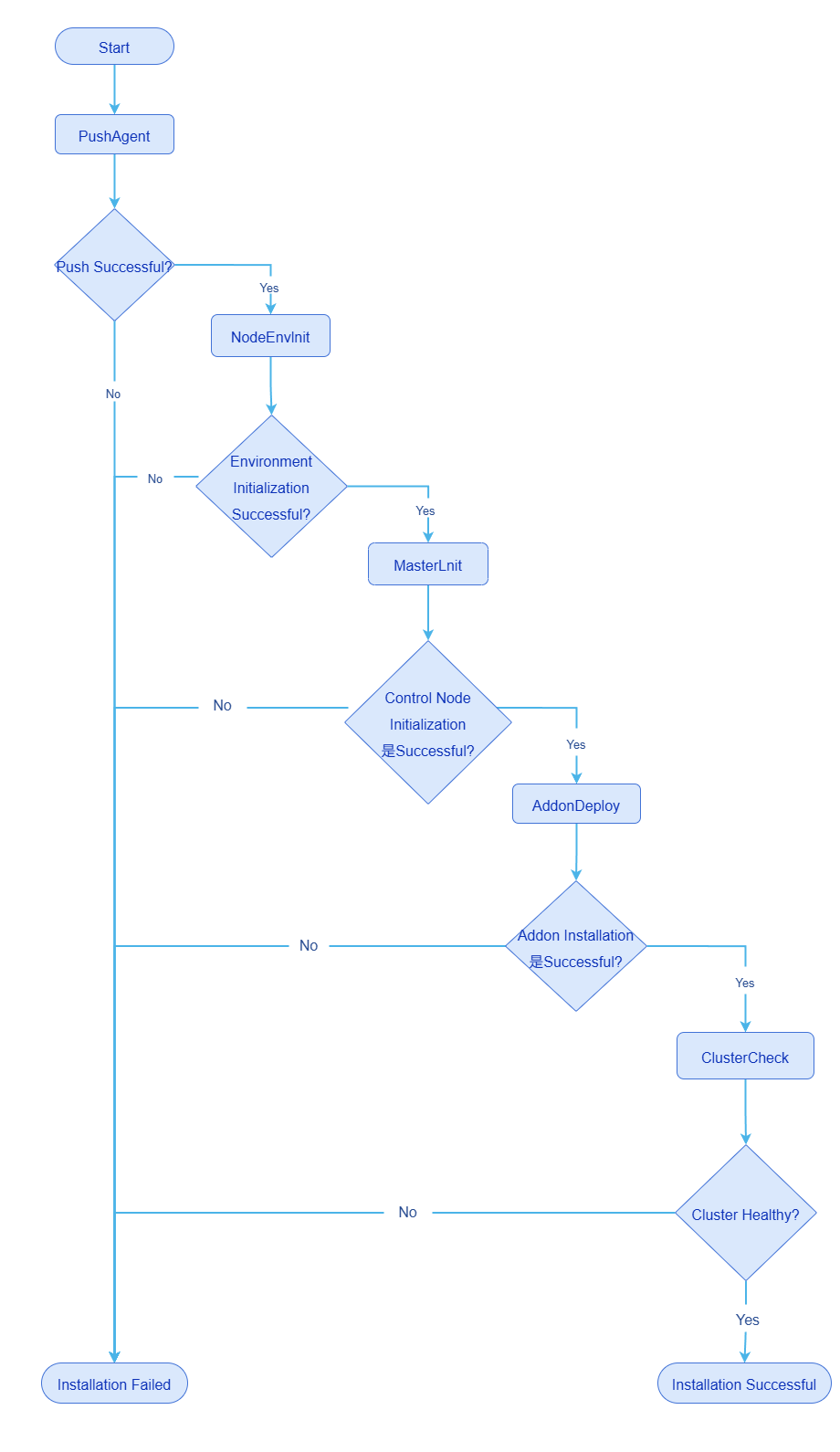
The simplified flow of the bootstrap cluster installing a K8s cluster is as follows.
Figure 1 Simplified flow of the bootstrap cluster installing a K8s cluster
After the K8s cluster is successfully installed, you can execute the following commands to view the container and cluster Pod information.
# View the containers brought up by containerd. Each node can only view the containers on its own node
crictl ps -a

# View the Pod information of the k8s cluster
kubectl get pod -A -owide
Common Issues and Information Collection
Execute kubectl get bc -A on the bootstrap node to view the cluster status and determine the current failure stage.
PuashAgent Failure
The bootstrap cluster pushes the bkeagent node agent to each node of the cluster to be installed. bkeagent runs as a system service and listens to the APIServer of the bootstrap cluster.
If pushing bkeagent fails, the main diagnostic input information is as follows.
The logs of the
bke-controller-manager-xxxxxxPod on the bootstrap node, obtained by executing the following command.bash# Note: bke-controller-manager-xxxxxx needs to be replaced with the actual Pod name kubectl logs -n cluster-system bke-controller-manager-xxxxxx -c managerThe bkeagent logs on each node of the cluster. For new versions, the log path is
/var/log/openFuayo/bkeagent.log; for v25.12 and earlier versions, the log path is/var/log/bkeagent.log.
NodeEnvInit Failure
After bkeagent is successfully pushed, the bootstrap cluster dispatches commands (a custom CRD). When the bkeagent on the node detects the commands, it performs environment initialization operations, mainly as follows.
- Install containerd.
- Download scripts and perform prerequisite operations.
- Set kernel parameters.
When environment initialization fails, it is mainly due to containerd installation failure. The main diagnostic input information is as follows.
systemctl status containerdto query the containerd status.journalctl -xu containerd -n 200to view the containerd service logs.- The bkeagent logs on each node of the cluster. For new versions, the log path is
/var/log/openFuayo/bkeagent.log; for v25.12 and earlier versions, the log path is/var/log/bkeagent.log.
MasterInit Failure
After environment initialization succeeds, the management node initialization operation continues, with the main operations as follows.
- Generate static Pod yaml files in the
/etc/kubernetes/manifestsdirectory, including etcd, kube-apiserver, kube-controller-manager, and kube-scheduler. - Install kubelet.
- Pre-pull the images of k8s components, including etcd, kube-apiserver, kube-controller-manager, and kube-scheduler.
When MasterInit fails, the main diagnostic input information is as follows.
- Execute the command
systemctl status kubeletto query the kubelet status. - Execute the command
journalctl -xu kubelet -n 200to view the kubelet service logs. - Execute the command
crictl imagesto query the pre-pulled images, andcrictl ps -ato view the container status. - Execute the command
crictl logs container-idto query the logs of the abnormal container.
AddonDeploy Failure
After the management node initialization succeeds, addons continue to be installed. The K8s cluster brought up by openFuyao brings up Pods at the addon granularity. Common community addons include calico, coredns, bkeagent-deployer, cluster-api, and openfuyao-system-controller. User-defined addons can also be installed. This operation obtains the addon yaml file from the bke-controller-manager Pod on the bootstrap node, renders the parameters, and delivers it to the APIServer through the k8sClient of the K8s cluster, thereby bringing up the corresponding Pods.
When AddonDeploy fails, the main diagnostic input information is as follows.
The logs of the
bke-controller-manager-xxxxxxPod on the bootstrap node, obtained by executing the following command.bash# Note: bke-controller-manager-xxxxxx needs to be replaced with the actual Pod name kubectl logs -n cluster-system bke-controller-manager-xxxxxx -c managerExecute the following commands on the K8s cluster nodes to view information.
bash# View Pod information kubectl get pod -A -owide # View Pod logs. Replace ns-name with the actual namespace and pod-name with the actual Pod name kubectl logs -n ns-name pod-name # View detailed Pod information. Replace ns-name with the actual namespace and pod-name with the actual Pod name kubectl describe pod -n ns-name pod-name
Licensed under the MulanPSL2
 YueGongWangAnBei No.44030002007300