Multi-Core Scheduling Development Guide
Feature Overview
This feature supports explicit labeling of service characteristics (I/O-intensive, memory-sensitive, and computing-intensive) for workloads. The scheduler uses the multi-dimensional weighted scoring algorithm based on labels to dynamically select the target node with the minimum resource contention. The scoring dimensions include the proportion of resource requests of the same-type services and the available resources on the node. For details, see Multi-Core Scheduling.
Restrictions
This feature is enabled as an extended scheduling component of Volcano and must be enabled together with Volcano.
Environment Preparation
Environment Requirements
- Kubernetes 1.21 or later has been deployed.
- containerd 1.7 or later has been deployed.
Environment Verification
Take Volcano as an example. If the status of all pods in the volcano-system namespace is Running, the environment is successfully set up.
volcano-system volcano-admission-xx-xx           1/1  Running  0  xmxxs
volcano-system volcano-admission-init-xx         1/1  Running  0  xmxxs
volcano-system volcano-controllers-xx-xx         1/1  Running  0  xmxxs
volcano-system volcano-schedulers-xx-xx          1/1  Running  0  xmxxs
volcano-system volcano-config-website-xx-xx      1/1  Running  0  xmxxs
volcano-system volcano-config-xx-xx              1/1  Running  0  xmxxs
Scenario 1: Balanced Scheduling Based on the Service Type Configured in the Annotations
Usage Scenario Overview
Workloads are evenly scheduled to nodes based on the service type labels set for the workloads.
System Architecture
Figure 1 System architecture in scenario 1
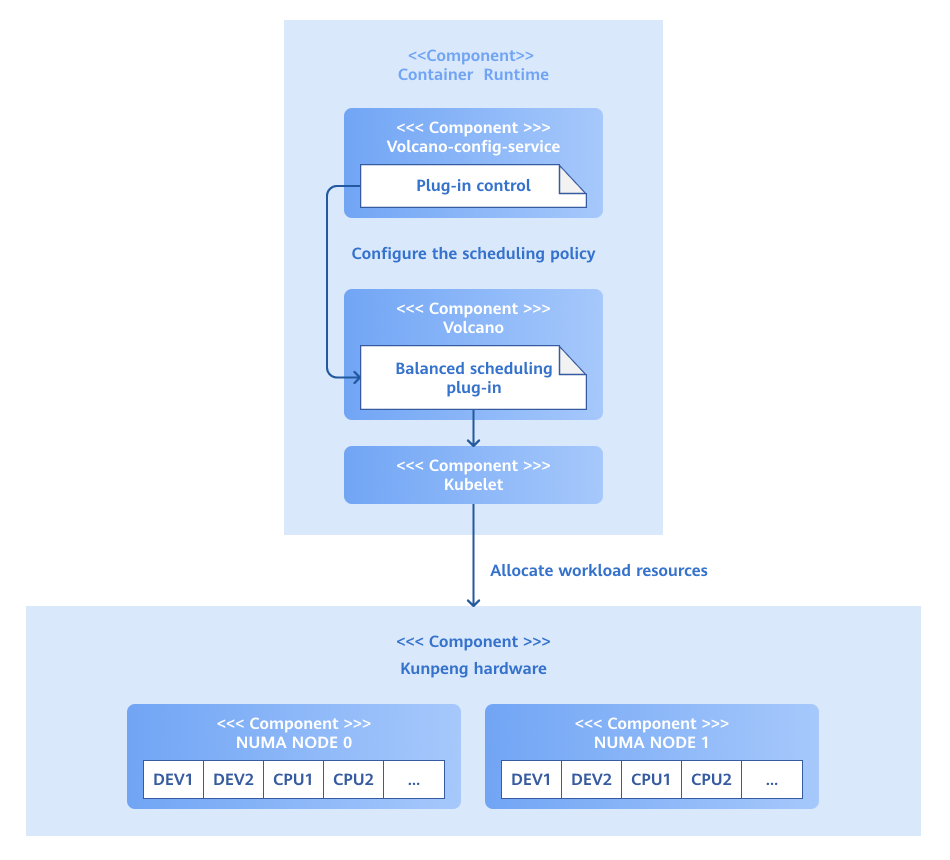
The backend APIs provided by volcano-config-service can be used to enable or disable this scheduling policy. Workloads are scheduled to pods based on the service type of the workloads and the score of each node.
Development Procedure
The following code is used as an example:
// calculateTypeScore computes the score for a specific business type based on resource usage
func calculateTypeScore(businessType string, cpuUsage, memUsage, diskIOUsage float64) float64 {
	switch businessType {
	case iOIntensiveType:
		return (1-diskIOUsage)*mainWeight + (1-cpuUsage)*minorWeight + (1-memUsage)*minorWeight
	case memorySensitiveType:
		return (1-memUsage)*mainWeight + (1-cpuUsage)*minorWeight + (1-diskIOUsage)*minorWeight
	case computeIntensiveType:
		return (1-cpuUsage)*mainWeight + (1-memUsage)*minorWeight + (1-diskIOUsage)*minorWeight
	default:
		// If unknown type, use balanced scoring
		return (1-cpuUsage)*averageWeight + (1-memUsage)*averageWeight + (1-diskIOUsage)*averageWeight
	}
}
Calculate different scores based on the parsed service types and perform scheduling based on the scores.
Debugging and Verification
Create a pod and add a service type to the annotations. The following uses compute-intensive as an example.
apiVersion: v1
kind: Pod
metadata:
  annotations:
    # Core business type label
    business.workload/type: "compute-intensive"
After the scheduling policy is deployed, workloads are preferentially scheduled to nodes with low CPU utilization.
Scenario 2: Intercepting Error Requests Using WebHook and Displaying Prompts
Usage Scenario Overview
You can explicitly specify the service type through annotations in the YAML file of a workload. The system supports the following service types:
- I/O-intensive
- Memory-sensitive
- Computing-intensive
Configuration example:
apiVersion: v1
kind: Pod
metadata:
  annotations:
    # Core business type label
    business.workload/type: "io-intensive" # Optional: io-intensive/memory-sensitive/compute-intensive
In addition, this policy supports configuring multiple service types for a workload. The following is an example:
apiVersion: v1
kind: Pod
metadata:
  annotations:
    business.workload/type: "io-intensive,memory-sensitive" # Separate multiple business types by commas.
If you add a core service type label to a workload but the configuration is incorrect, the WebHook intercepts the request and displays a suggestion for correction.
System Architecture
Figure 2 System architecture in scenario 2
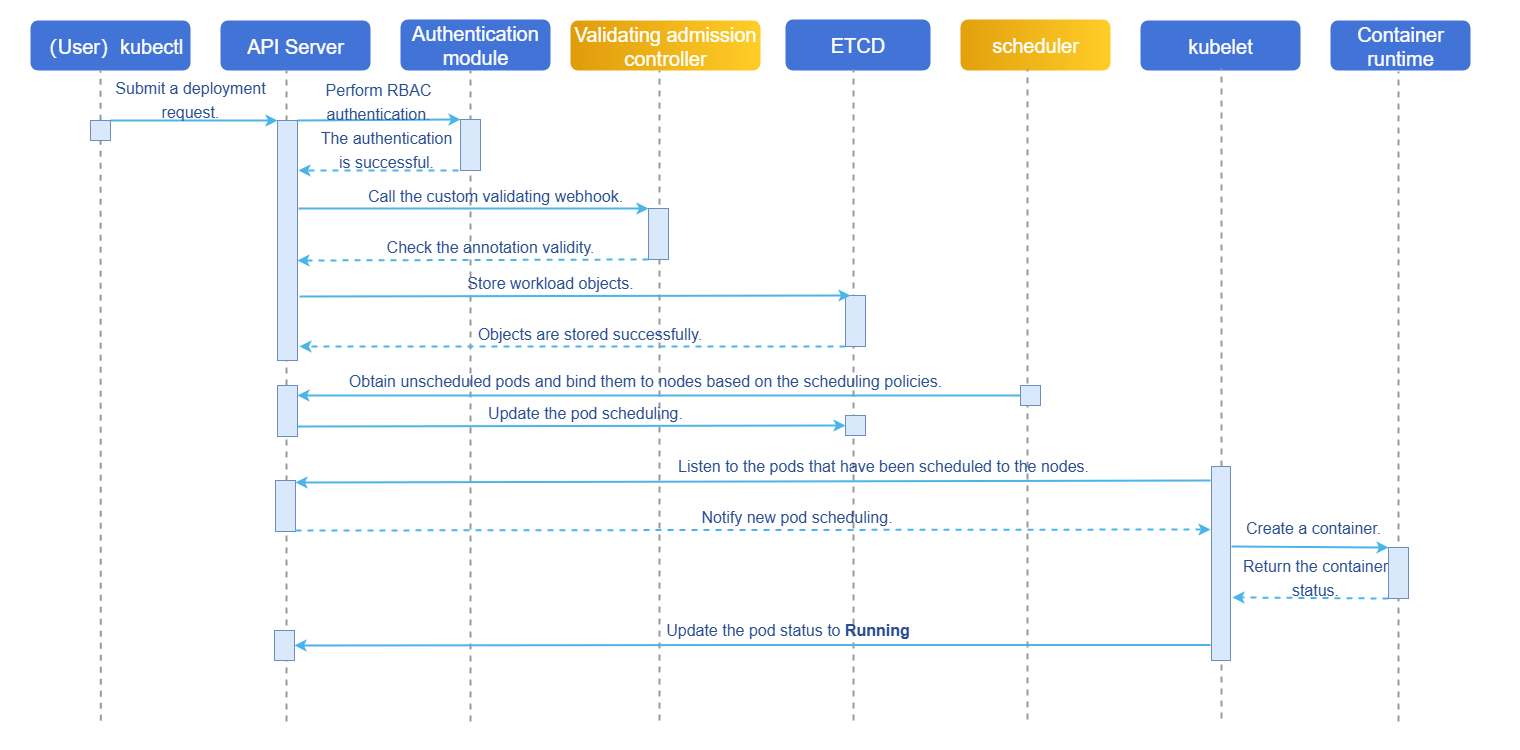
After a workload deployment request is created, the system performs authorization using role-based access control (RBAC) and checks whether the annotations comply with relevant specifications using WebHook. After the verification is successful, workloads are scheduled to nodes with the fewest workloads of the same service type based on the load-balancing scheduling policy, and the pod status is updated to Running.
Development Procedure
Determine whether the service type is available by parsing. If it is unavailable, a message is displayed. The core code is as follows:
// validateBusinessType validates the business type annotations and provides enhanced error messages
func validateBusinessType(annotations map[string]string) (bool, string) {
	if annotations == nil {
		return true, ""
	}

	businessType, exists := annotations[BusinessTypeAnnotation]
	if !exists {
		return true, ""
	}

	if strings.TrimSpace(businessType) == "" {
		return false, fmt.Sprintf("The business type annotation '%s' cannot be empty. Set it to one of the following valid values: %s",
			BusinessTypeAnnotation, strings.Join(getAllowedTypesList(), ","))
	}

	// Parse multiple business types.
	types := strings.Split(businessType, TypeSeparator)
	var invalidTypes []string

	for _, t := range types {
		t = strings.TrimSpace(t)
		if t == "" {
			continue
		}
		if !allowedBusinessTypes[t] {
			invalidTypes = append(invalidTypes, t)
		}
	}

	// Return detailed error message if invalid types are found.
	if len(invalidTypes) > 0 {
		allowedList := strings.Join(getAllowedTypesList(), ",")
		if len(invalidTypes) == 1 {
			// Check for common typos and provide suggestions.
			suggestion := getSuggestion(invalidTypes[0])
			if suggestion != "" {
				return false, fmt.Sprintf("Invalid business type: '%s'. Do you want to set it to '%s'?\nValid business types include: %s",
					invalidTypes[0], suggestion, allowedList)
			}
			return false, fmt.Sprintf("Invalid business type: '%s'.\nValid business types include: %s",
				invalidTypes[0], allowedList)
		} else {
			return false, fmt.Sprintf("%d invalid business types found: %s.\nValid business types include: %s",
				len(invalidTypes), strings.Join(invalidTypes, ","), allowedList)
		}
	}

	return true, ""
}
Debugging and Verification
Create a pod, add a service type to the annotations, and check whether the WebHook takes effect.
-
Create a pod. YAML configuration example 1:
apiVersion: v1
kind: Pod
metadata:
  annotations:
    # Core business type label
    business.workload/type: "io-intensive"
In this case, the WebHook does not intercept the request.
-
Create a pod. YAML configuration example 2:
apiVersion: v1
kind: Pod
metadata:
  annotations:
    # Core business type label
    business.workload/type: "io-iiiintensive"
In this case, the WebHook intercepts the request and displays a message indicating how to modify it.
FAQ
Why is the workload not scheduled as expected after a pod is created and an annotation is added?
-
Symptom
The annotation of the workload is set to
business.workload/type: "compute-intensive", but the workload is not scheduled to a node with low CPU utilization. -
Possible Causes
- The scheduler is not set to volcano.
- The load-balancing scheduling policy is not enabled.
-
Solution
- Specify volcano as the scheduler in the workload's deployment YAML.
- Modify the configuration file of the Volcano scheduler and restart the pod running the scheduler for the scheduling policy to take effect.