众核调度开发指南
特性介绍
本特性支持为工作负载显式标注业务特征标签(I/O密集型、内存敏感型、算力密集型),调度器基于标签采用多维加权评分算法动态选择资源竞争最小的目标节点,评分维度包括同类业务资源请求占比和节点剩余资源量。 详情请参见《众核调度》。
约束与限制
本特性是以volcano的扩展调度组件形式启用,需要与volcano共同启用。
接口说明
表 1 接口说明
| 接口名 | 描述 |
|---|---|
| GET /rest/scheduling/v1/balance | 查询均衡调度策略。 |
| PUT /rest/scheduling/v1/balance | 修改均衡调度策略。 |
环境准备
环境要求
- 已部署Kubernetes v1.21及以上。
- 已部署Containerd v1.7及以上。
检验搭建环境
以使用Volcano为例:当所有volcano-system namespace下的Pod状态为“Running”时,表示环境搭建成功。
volcano-system volcano-admission-xx-xx           1/1  Running  0  xmxxs
volcano-system volcano-admission-init-xx         1/1  Running  0  xmxxs
volcano-system volcano-controllers-xx-xx         1/1  Running  0  xmxxs
volcano-system volcano-schedulers-xx-xx          1/1  Running  0  xmxxs
volcano-system volcano-config-website-xx-xx      1/1  Running  0  xmxxs
volcano-system volcano-config-xx-xx              1/1  Running  0  xmxxs
使用场景1:根据注解中配置的业务类型进行均衡调度
使用场景概述
根据工作负载设置的业务类型标签,将其均匀的调度到各个节点上。
系统架构
图1 场景1系统架构图
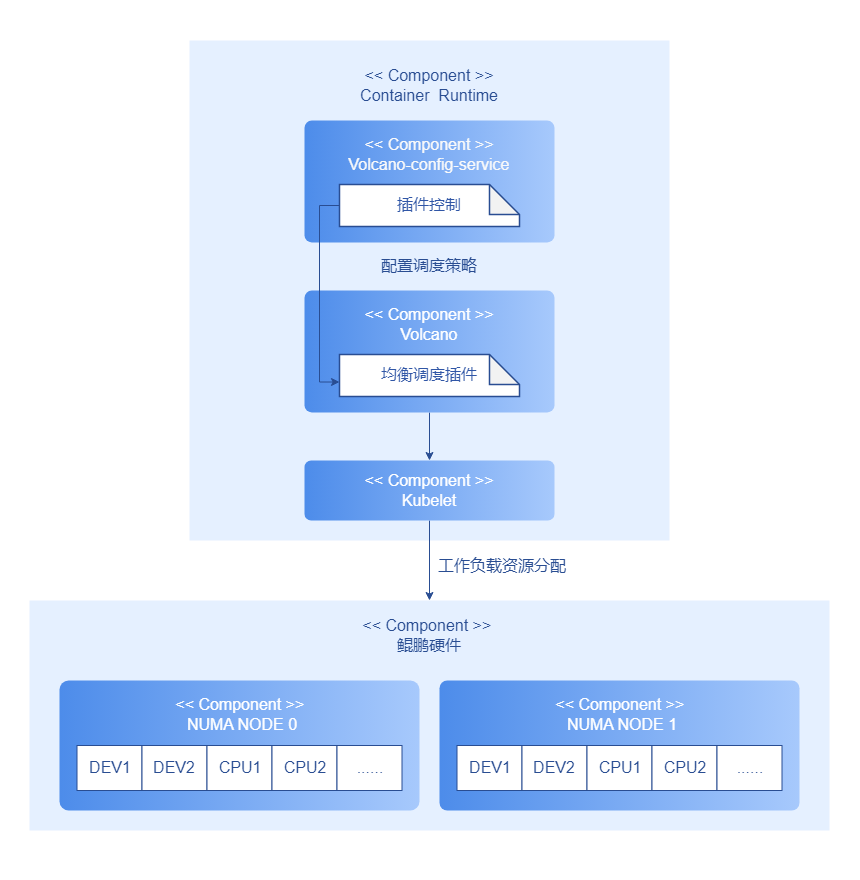
支持通过volcano-config-service提供的后端接口控制本调度策略的开启或关闭。Pod调度时,根据工作负载的业务类型以及各个节点的打分进行调度。
开发步骤
以如下代码为例:
// calculateTypeScore computes the score for a specific business type based on resource usage
func calculateTypeScore(businessType string, cpuUsage, memUsage, diskIOUsage float64) float64 {
    switch businessType {
    case iOIntensiveType:
        return (1-diskIOUsage)*mainWeight + (1-cpuUsage)*minorWeight + (1-memUsage)*minorWeight
    case memorySensitiveType:
        return (1-memUsage)*mainWeight + (1-cpuUsage)*minorWeight + (1-diskIOUsage)*minorWeight
    case computeIntensiveType:
        return (1-cpuUsage)*mainWeight + (1-memUsage)*minorWeight + (1-diskIOUsage)*minorWeight
    default:
        // If unknown type, use balanced scoring
        return (1-cpuUsage)*averageWeight + (1-memUsage)*averageWeight + (1-diskIOUsage)*averageWeight
    }
}
通过解析出的不同业务类型,计算不同的得分,以此为依据进行调度。
调测验证
创建Pod,annotation中增加业务类型,以如下compute-intensive为例。
apiVersion: v1
kind: Pod
metadata:
  annotations:
    # 核心业务类型标签
    business.workload/type: "compute-intensive"
将其部署到节点上之后,应会优先调度至CPU利用率低的节点上。
使用场景2:Webhook拦截错误请求,并给出提示
使用场景概述
您可以通过工作负载的YAML注解(annotation)指定业务类型,该配置需用户显式声明。系统支持以下三种业务类型。
- I/O密集型(io-intensive)
- 内存敏感型(memory-sensitive)
- 算力密集型(compute-intensive)
配置示例如下。
apiVersion: v1
kind: Pod
metadata:
  annotations:
    # 核心业务类型标签
    business.workload/type: "io-intensive"  # 可选值:io-intensive/memory-sensitive/compute-intensive
同时,本策略支持将一个应用配置多种业务类型,示例如下。
apiVersion: v1
kind: Pod
metadata:
  annotations:
    business.workload/type: "io-intensive,memory-sensitive"   # 多种业务类型以逗号隔开
如果您给工作负载打上了核心业务类型标签,但是配置错误,webhook会拦截请求,并给出建议修改提示。
系统架构
图2 场景2系统架构图
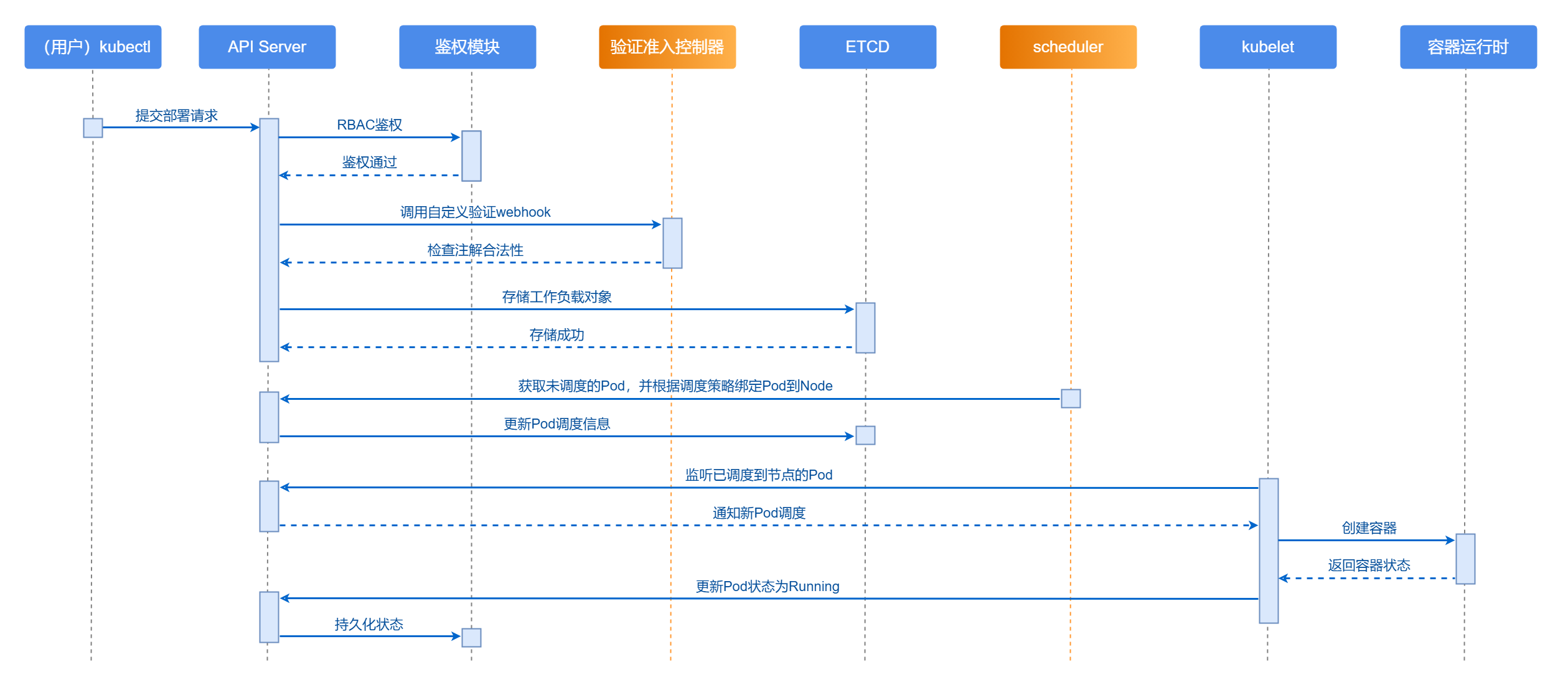
创建工作负载部署请求后,通过RBAC鉴权及Webhook验证注解是否符合规范。检验通过后,根据均衡调度策略将其调度至同类型业务最少的节点上,并更新Pod状态为Running。
开发步骤
通过解析,判断业务类型是否可用。如果不可用的话,给出提示。核心代码如下。
// validateBusinessType 验证业务类型注解 - 增强错误提示
func validateBusinessType(annotations map[string]string) (bool, string) {
    if annotations == nil {
        return true, ""
    }

    businessType, exists := annotations[BusinessTypeAnnotation]
    if !exists {
        return true, ""
    }

    if strings.TrimSpace(businessType) == "" {
        return false, fmt.Sprintf("业务类型注解 '%s' 不能为空。请设置为以下有效值之一: %s",
            BusinessTypeAnnotation, strings.Join(getAllowedTypesList(), "、"))
    }

    // 解析多个业务类型
    types := strings.Split(businessType, TypeSeparator)
    var invalidTypes []string

    for _, t := range types {
        t = strings.TrimSpace(t)
        if t == "" {
            continue
        }
        if !allowedBusinessTypes[t] {
            invalidTypes = append(invalidTypes, t)
        }
    }

    // 如果有无效类型,返回详细的错误信息
    if len(invalidTypes) > 0 {
        allowedList := strings.Join(getAllowedTypesList(), "、")
        if len(invalidTypes) == 1 {
            // 检查是否是常见的拼写错误,提供纠正建议
            suggestion := getSuggestion(invalidTypes[0])
            if suggestion != "" {
                return false, fmt.Sprintf("无效的业务类型: '%s'。您是否想要设置为 '%s'?\n有效的业务类型包括: %s",
                    invalidTypes[0], suggestion, allowedList)
            }
            return false, fmt.Sprintf("无效的业务类型: '%s'。\n有效的业务类型包括: %s",
            invalidTypes[0], allowedList)
        } else {
            return false, fmt.Sprintf("发现 %d 个无效的业务类型: %s。\n有效的业务类型包括: %s",
                len(invalidTypes), strings.Join(invalidTypes, "、"), allowedList)
        }
    }

    return true, ""
}
调测验证
创建Pod,annotation中增加业务类型,判断Webhook是否生效。
-
创建Pod,YAML部分示例1。
apiVersion: v1
kind: Pod
metadata:
  annotations:
    # 核心业务类型标签
    business.workload/type: "io-intensive"
此时Webhook不进行拦截。
-
创建Pod,YAML部分示例2。
apiVersion: v1
kind: Pod
metadata:
  annotations:
    # 核心业务类型标签
    business.workload/type: "io-iiiintensive"
此时Webhook对请求进行拦截,并提示应该如何修改。
常见问题
创建Pod后,添加annotation后未按照预期进行调度。
-
现象描述
工作负载配置了annotation为
business.workload/type: "compute-intensive",但是没有正确调度到CPU利用率低的节点上。 -
可能原因
- 未指定调度器为volcano。
- 未开启均衡调度策略。
-
解决办法
- 在工作负载的部署YAML中指定调度器为volcano。
- 通过修改volcano调度器的配置文件,并重启调度器pod以生效调度策略。