OS Consistency Check Tool Development Guide
Feature Overview
In the container scenario, various workloads depend less on the OS runtime environment, but the container platform depends more on the OS runtime environment due to its expanded responsibilities. To address this, oschecktool provides a standalone check tool that checks whether a given runtime environment meets the environment requirements of the container platform in the openFuyao scenario. This helps reduce deployment failures or function failures caused by environment dependencies.
Constraints
- Only the Linux operating system (OS) can be checked. The Windows OS cannot be checked.
- This tool only performs preliminary analysis on environment dependencies. The analysis result cannot replace the actual compatibility test.
- The check tool requires each component to provide specific check items before the corresponding checks can be performed.
- Some system files need to be read during the check. Therefore, the check tool must be run by the root user.
Environment Preparation
Environment Requirements
As a standalone tool, it can run on a general-purpose Linux environment.
Environment Setup
Download the latest version from the following links and decompress it using tar: x86_64 Version Download Arm64 Version Download
Environment Verification
To use the oschecktool tool, you only need to run the ./oschecktool command in the oschecktool directory. An example of the command output is shown as follows.
Figure 1 Default command output of oschecktool
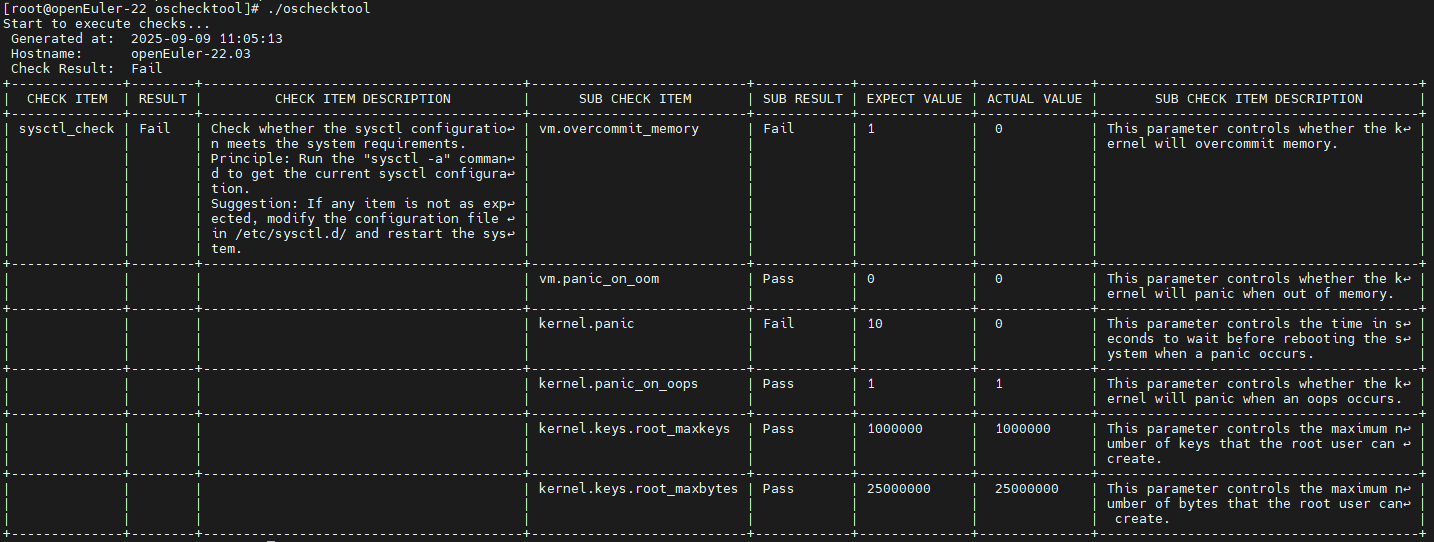
If the preset check items can be executed, the environment is set up successfully.
Application Scenario: Extending Check Items
Overview
oschecktool provides only some basic check items. You can extend check items according to your requirements.
Description of the Check Item Organizational Structure
The check tool is a standalone tool and runs on the node to be checked. It directly generates the check result without contextual dependencies. The check logic depends on check items.
Check items are stored in the conf directory of the tool.
- The check-items directory stores the configuration files of all check items.
- The check-sets directory stores the configuration files of all check sets.
The check item organizational structure is as follows.
Figure 2 Check item organizational structure
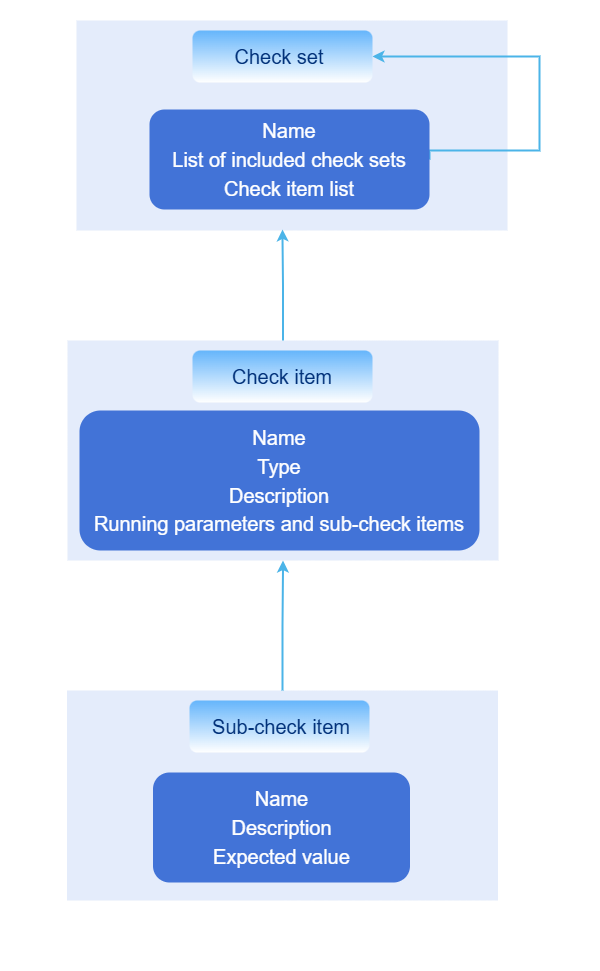
Check sets support nesting, which meets the nesting association of components in openFuyao.
Development Process
-
Creating the Configuration File of a Check Item
Directory for storing the configuration file of the check item: ./conf/check-items/
Format description:
name: sysctl-check
kind: kv-checker
doc: |
Run the **sysctl -a** command to check whether sysctl meets Kubernetes runtime requirements.
spec:
...
Where:
name: Check item name, which uniquely identifies a check item. The check set uses thenamefield to apply the check item, and the result also contains thenamefield.kind: Check item type. Thekindfield is used to distinguish different check item types.doc: Check item description. The report also contains thedocfield, in which you can describe the principles of the check item.spec: Specific parameters of each check item. Thespecstructure varies depending on the value of thekindfield of a check item.
Currently, the following
kindvalues are supported:kv-checker: Parses data from a specific source into simple key-value pairs and checks whether a specific key meets the expectation. It can also be simplified askv.command-checker: Uses a command as a sub-check item and checks the command output. It can also be simplified ascommand.ping-checker: Checks whether the target host is reachable using ICMP. It can also be simplified asping.kernel-module-checker: Checks the loading status and loading parameters of kernel modules. It can also be simplified askernel-module.
Check items of the command-checker type
This type of check item runs a command and checks the command output (combining stdout and stderr). The following is an example of the
specfield format definition:spec:
- name: echo command exist #[mandatory] name
command: which echo && echo "Exist" || echo "Not Exist"
type: string
expect: "Exist"
doc: Checks whether the {name} command exists. The configuration depends on the **echo** command.Description of each field in
spec:spec[].name: (Mandatory) Check item name.spec[].command: (Mandatory) Command to be executed and the parameters, which are actually used as the parameters ofsh -c.spec[].doc: (Optional) Generated description in a report.spec[].typeandspec[].expect: (Optional) Same askv-checker. If they are not specified, the return value ofspec[].commandis used as the judgment result. The value 0 indicates success, and a non-0 value indicates failure. If they are specified, the command output is checked based on the value ofspec[].expect.
In the preceding information,
spec[].typeindicates the data type of the value of spec[].expect, andspec[].expectindicates the expected result. The following data types are supported:string: character string. The system directly compares whether the character strings are exactly equal.regex: regular expression. The system uses a regular expression to check whether character strings match.int: integer. The system checks whether the command output is consistent with the value of expect.version-range: version type. The system checks whether the command output is consistent with the version range specified in expect. The version number is in the dot-separated numeric format, for example, 1.1.1. The value of expect is a range, for example,(1.2.3, 1.5), indicating that the version number is greater than 1.2.3 and less than 1.5.[1.2.3, ]indicates that the version number is greater than or equal to 1.2.3.int-range: integer range type. The system checks whether the command output is consistent with the integer range specified in expect. The value of expect is a range, for example,(1, 10]indicates that the integer is greater than 1 and less than or equal to 10.
Check items of the kv-checker type
This type of check item parses the command output or specific file content into key-value pairs and checks whether a specific key meets the expectation. The following is an example of the
specfield format definition:spec:
source: #Specifies the data source, which can be a command or a file. Each row of data is split by the splitter into a key and a value.
file:
- /etc/sysctl.conf
command:
- sysctl -a
kvParser: #Optional. Specifies how to parse the key and value from the source. If this parameter is not specified, null characters are used for splitting by default. If the splitting fails, skip this row.
reSplitter: = # Uses a regular expression to split the key and value.
subItems: #Sub-check items.
- name: kernel.threads-max
key: kernel.threads-max #If a key is specified, the key is used for matching. Otherwise, the name is used. The key supports regular expressions for wildcard matching.
type: int-range #Integer range.
expect: "[409600,)"
doc: If the minimum number of threads is less than 409,600, the system may fail to operate properly.Where:
spec.source.file: (Optional) Specifies the path of the file to be read. The content of multiple files will be combined.spec.source.command: (Optional) Specifies the output of a command used as the subsequent data source. The outputs of multiple commands will be combined. Ifspec.source.fileis specified, this parameter will be ignored.spec.kvParser: (Optional) Specifies how to parse the key and value from the source. If this parameter is not specified, null characters are used for splitting by default. If the splitting fails, skip this row.spec.kvParser.reGroup: (Optional) The value of this field is used as a regular expression to match each row. The regular expression must contain two or more unnamed groups. If there are more than two matching groups, the value of the last group is used as the value, and the values of the other groups are joined by hyphens (-) to form the key.spec.kvParser.reSplitter: (Optional) Specifies the separator between the key and value. The separator is used as a regular expression. If there are multiple matching values, the first matching value is used for splitting. Ifspec.kvParser.reGroupis specified, this parameter is invalid.spec.kvParser.reIgnore: (Optional) Matching rows are ignored and not parsed.spec.subItems[]: Specifies the content to be checked.keymatches the parsed key, andexpectmatches the parsed value. Ifkeyis left empty,nameis used as the key. The meanings of other fields are the same as the fields with the same name incommand-checker.
Check items of the ping-checker type
This type of check item checks whether the target host is reachable using ICMP. Each check has a timeout of 5 seconds, and five checks are performed by default. If the check succeeds three times or more, it is considered a success. Otherwise, the check fails. IPv4 and IPv6 addresses are supported. The following is an example of the
specfield format:spec:
targets:
- 192.168.1.1@hostnameSpecifically:
spec.targets[]: List of target hosts to be checked. The format isip@Node name. If the node name is not specified, the IP address is used as the node name by default. The node name is used to be displayed in a report.
Check items of the kernel-module-checker type
This type of check item parses the
/proc/modulesand/sys/moduledirectories to check whether the specified kernel modules are loaded and whether the loading parameters meet the expectation. The following is an example of thespecfield format:spec:
- name: ip_vs
doc: Checks whether the ip_vs module is properly loaded.
detail:
- name: parameters/conn_tab_bits
expect: "[0, )"
type: int-range
- name: not_exist_module
doc: If the module to be tested does not exist, the check should fail.
- name: nf_conntrack
doc: The module to be tested exists, but the loading parameters do not meet the requirements.
detail:
- name: parameters/expect_hashsize
expect: "(, 0)"
type: int-rangeSpecifically:
spec[].name: (Mandatory) Kernel module name.spec[].doc: (Optional) Generated description in a report.spec[].detail[]: (Optional) Module parameter check item. Each parameter check item is a key-value pair. The key is the parameter path (the relative path based on the basic path/sys/module/<Module name>),expectis the expected value, andtypeis the data type of the value. The meanings of theexpectandtypefields are the same as the fields with the same name of check items of the earlier mentioned types.
Extended parameters
Since some parameters can only be determined at runtime, oschecktool supports specifying certain extended parameters in check items, which can then be bound and assigned values in the command using the -p parameter. The following is an example:
name: ping_check
kind: ping
doc: Simulates the check to verify if the target IP address is reachable. The target IP address is specified by using the **-p** parameter.
params:
- name: ping-addr
    desc: Checks whether the target IP address is reachable.
    multi: true
spec:
targets: '{{ping-addr}}'
Specifically:
params[].name: (Mandatory) Parameter name. Valid characters:A-Za-z0-9_-.params[].desc: (Optional) Description.params[].multi: (Optional) Whether the parameter is a multi-value parameter. The default value is false. If the parameter is a multi-value parameter, the value will be set to a character string array. If the parameter is a single-value parameter, the value will be set to a character string.
In
spec,{{param.name}}can be used to reference parameter values. However, only a YAML field can be set as a parameter value. -
Defining a Check Set
A check set is used to organize multiple check items for easy selection and execution. The check set archive directory is
<Tool directory>/conf/check-sets. The following is an example of the check set format:name: default
desc: default check set
include:
- other_check_set
items:
- sysctl_checkSpecifically:
name: (Mandatory) Check set name.desc: (Optional) Description.include: (Optional) Imports other check sets. The imported check sets are merged into the current check set. Thenamefield of other check sets is referenced.items: (Optional) Check item list, which references the name field of check items.
-
Verifying Check Items
Run oschecktool and use
-sto specify the check set to be added:<Tool directory>/oschecktool -s <Check set name>. If-sis not specified, all check items are executed by default. If the check result is Error, locate and analyze the fault based on the logs in<Tool directory>/log.