Cluster Lifecycle Management
Feature Overview
For a PaaS platform, the installation and deployment process marks the beginning of the customer journey, making it a vital indicator of the product's capability. openFuyao adopts a Cluster API–based approach to install and deploy the system and uses Kubernetes-style declarative APIs to manage multiple Kubernetes clusters. This simplifies cluster lifecycle management, optimizes cluster installation workflows and management details, and enhances automation during installation. This document describes how to install service clusters and manage the cluster lifecycle after the management cluster is installed.
Applicable Scenarios
Deploy and manage an openFuyao cluster on the GUI.
Supported Capabilities
This feature enables the installation and deployment of the entire container platform. It enables you to manage the lifecycle of service clusters, including creating, removing, scaling up, scaling down, and upgrading service clusters.
Highlights
Based on a Cluster API–based approach, Kubernetes-style declarative APIs are used to manage multiple Kubernetes clusters, simplifying cluster lifecycle management and enhancing automation during installation.
Implementation Principles
-
General Process
-
Download the BKE installation tool and initialize the bootstrap node.
-
The bootstrap node pushes an agent to the management cluster node. On the management cluster node, deploy a Kubernetes cluster and Cluster API to create the management cluster.
-
On the openFuyao management plane, the user can create, uninstall, and dynamically scale up or down service clusters, and upgrade Kubernetes versions (including dynamic scaling of the management cluster).
 NOTE
NOTE- The bootstrap node is responsible for setting up a management cluster, the management cluster is responsible for setting up service clusters, and the service clusters are responsible for running the customer's programs.
- In the current installation and deployment tool, you can initialize the bootstrap node and set up the management cluster on the bootstrap node using commands. You can use the Cluster Lifecycle Management page of openFuyao to create service clusters in the management cluster.
-
-
Process and System Logical Architecture
Figure 1 Installation and deployment process
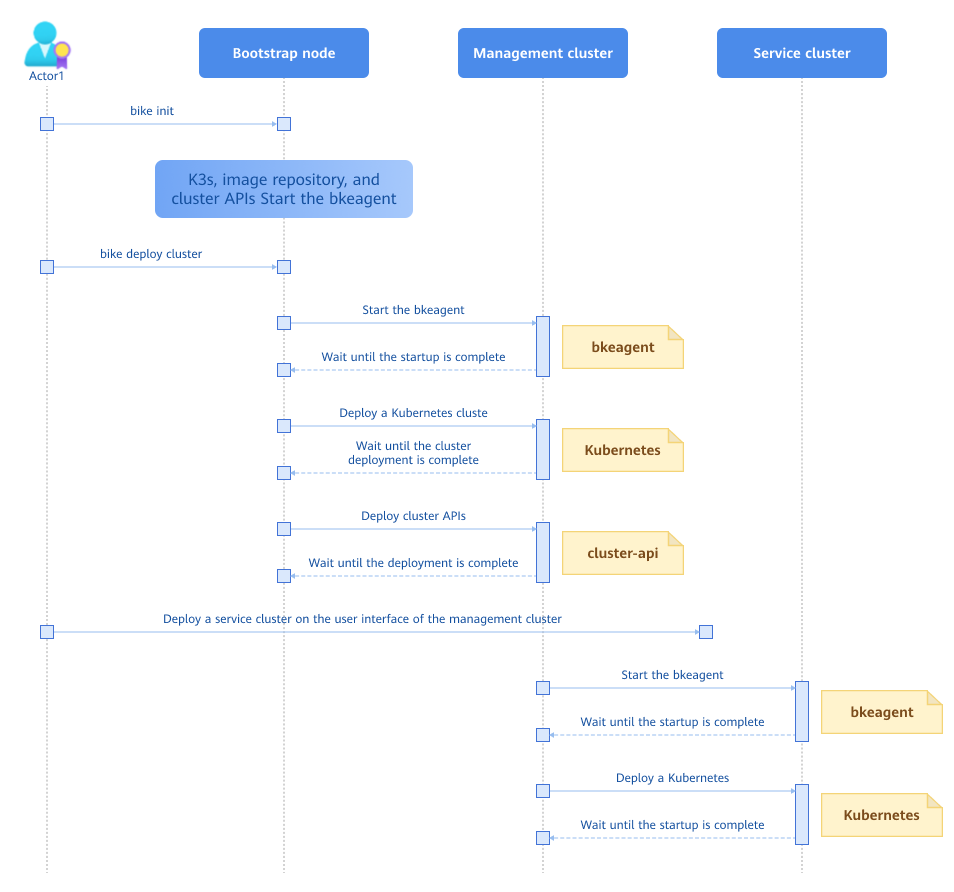
The BKE component in the figure consists of the bkeadm, bkeagent, and Cluster API. The details are as follows:
bkeadm
It is a BKE installation tool and is used only as a binary file on the bootstrap node. Its main functions include starting the image repository and YAML repository, starting the K3s cluster and installing the Cluster API, and submitting the management cluster configuration.
bkeagent
It is a cloud-native host machine management tool that listens to kube-apiserver instructions and executes the instructions on the host machine. Its main functions include listening to CRD resources and reporting execution results, switching the Kubernetes cluster to be listened to, and providing multiple built-in tasks, such as node environment check, Docker installation, and shell script execution.
Cluster API
It is a controller that distributes and starts the bkeagent on all nodes, creates instructions to direct the bkeagent, summarizes the results of the deployed clusters, and updates the results to bkecluster events.
Figure 2 Logical architecture of the system
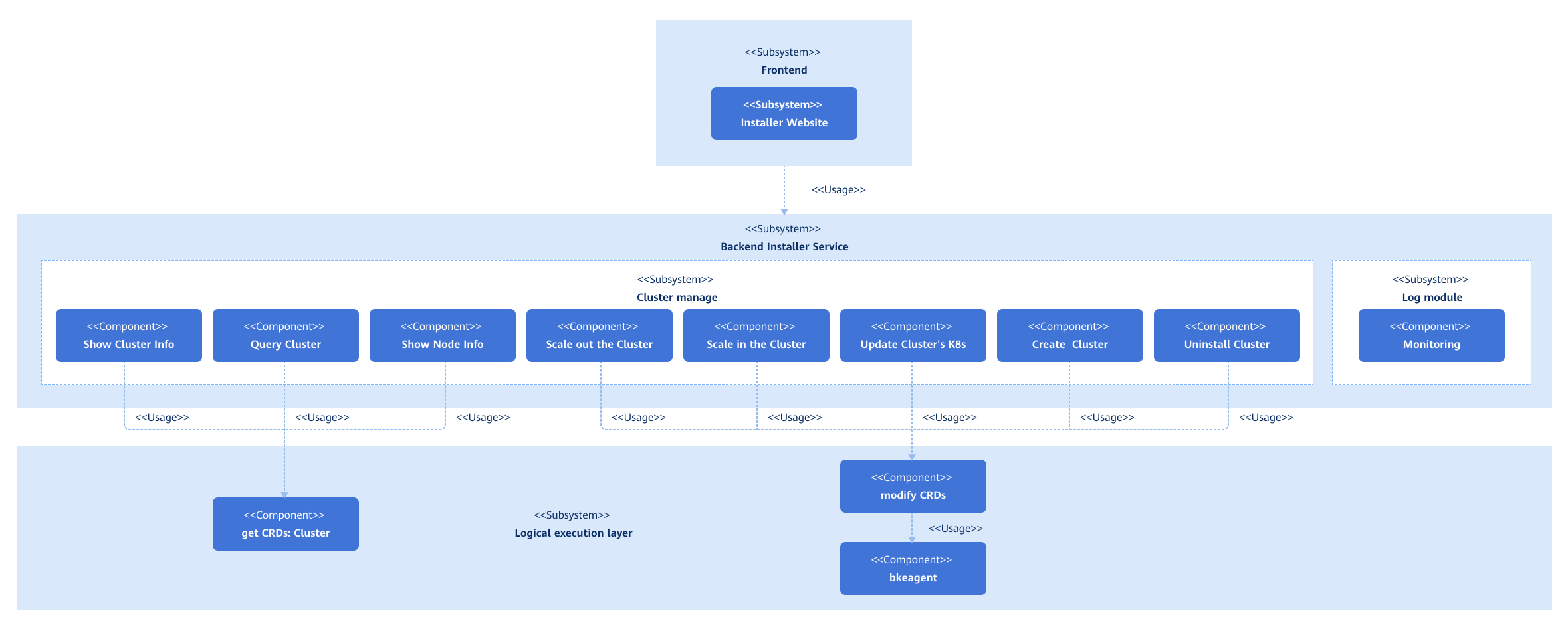
After the cluster configuration items are modified, the frontend submits the configuration file to the backend. The backend processes the configuration file, calls the APIs, and submits the configuration file to the corresponding Kubernetes API server to perform cluster management operations.
Related Features
None.
Instances
Code links:
https://gitcode.com/openfuyao/installer-website
https://gitcode.com/openfuyao/installer-service
Installation
The installation generally consists of management cluster installation and service cluster installation. For details about how to install the management cluster, see Online Management Cluster Installation (../4_Installation_Guide/Cluster_API_Installation/Online_Management_Cluster_Installation.md) and Offline Management Cluster Installation (../4_Installation_Guide/Cluster_API_Installation/Offline_Management_Cluster_Installation.md). For details about how to install the service cluster, see the following sections.
Logging In to the Management Plane
Enter "https://login IP address of the management plane:web service port of openFuyao" in the address box of a browser, and enter the username and password to log in to the openFuyao management plane.
- Change the password upon the first login.
- The default web service port of openFuyao is 31616.
Adding a Cluster
Prerequisites
-
The bootstrap node has been configured.
-
The management cluster has been installed.
Context
You can create a service cluster on the openFuyao management plane of the management cluster.
Restrictions
-
Ensure that the node IP address, username, and password are correct.
-
When creating an HA cluster, ensure that the IP address of the load balancer is correct.
Procedure
-
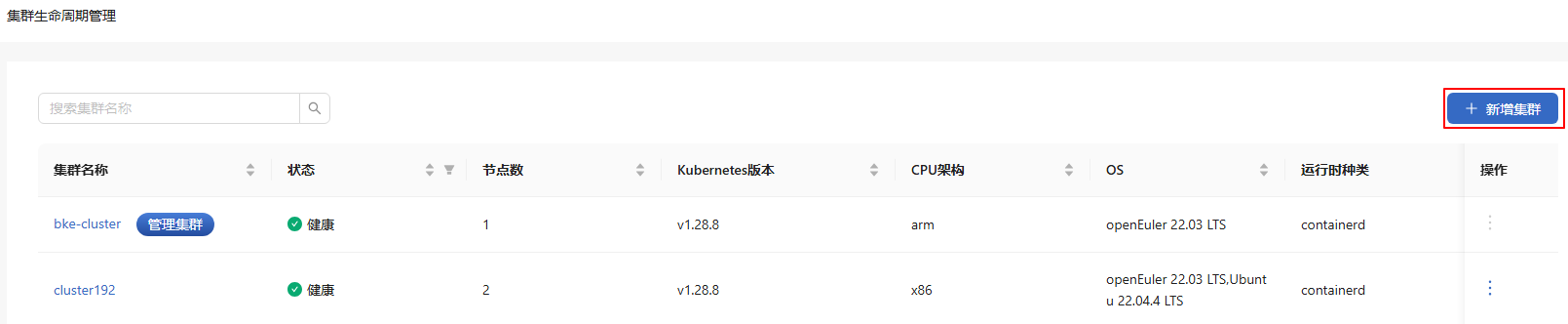
In the left navigation pane of the openFuyao platform, choose Cluster Lifecycle Management. A cluster list is displayed on the Cluster Lifecycle Management page. Cluster information, including the cluster name, status, and number of nodes, is provided.
-
Click Add Cluster in the upper-right corner of the list. The Add Cluster page is displayed.
Figure 3 Adding a cluster
-
Enter related information on the page.
Table 1 Page description
Section Name Description Basic Information Name of the cluster. Master Information Information about the master node in the service cluster in this section. Click  to add more master nodes. Click
  in the Operation column to remove the added node.
Node Information Information about the node in the service cluster. Advanced Settings By default, the preconfigured image repository address, image repository IP address, and chart repository address are used. For online installation, the default value of Repository is the address of the online repository. For offline installation, the default value of Repository is the address configured on the initialized node. -
Click Create at the bottom. The Cluster Information dialog box is displayed.
-
After all the cluster information is displayed, click OK.
-
The system returns to the list page. Installing is displayed in the Status column.
-
Check the status later to determine whether the cluster is added.
If error information is displayed in Cluster Information, locate and resolve the error.
Removing a Cluster
Prerequisites
A cluster has been created on the Cluster Lifecycle Management page.
Context
You can remove a service cluster on the openFuyao management plane of the management cluster.
Restrictions
Currently, only clusters that have been successfully created can be removed. For a cluster that fails to be created, you need to troubleshoot the issue and then manually remove it on each node of the cluster. The procedure for manually removing a cluster is as follows:
-
Download and automatically install bkeadm on each node of the cluster.
curl -sfL https://openfuyao.obs.cn-north-4.myhuaweicloud.com/openFuyao/bkeadm/releases/download/latest/download.sh | bash -
Initialize the configuration.
bke reset --all --mount -
Remove the BKE file.
which bke | xargs rm -rf
Procedure
-
On the Cluster Lifecycle Management page, click
 in the Operation column and select Delete.
 -
In the dialog box that is displayed, select "I understand that the deletion operation is permanent and cannot be undone."
-
Click Delete. The message "Deleting... Please wait." is displayed, and Deleting is displayed in the Status column.
-
A cluster is removed when information about it is cleared from the list.
NOTE
The removal process usually takes 10–20 minutes, depending on network conditions.
Upgrading a Cluster
Prerequisites
A cluster has been created on the Cluster Lifecycle Management page.
Context
You can perform an in-place Kubernetes upgrade for a service cluster on the openFuyao management plane of the management cluster.
Restrictions
-
Only upgrades to a higher Kubernetes version are supported. Version rollbacks are not supported.
-
In the current version, Kubernetes 1.28.8 is installed by default and can be upgraded to 1.29.1.
Precautions
-
An upgrade is irreversible. Proceed with caution.
-
Before upgrading a cluster, ensure that the cluster is healthy. You are advised not to perform any operation on the cluster during an upgrade.
-
Only in-place upgrades are supported. During an upgrade, services are unavailable.
Procedure
-
Method 1: On the Cluster Lifecycle Management page, click
in the Operation column and select Upgrade.Method 2: In the upper-right corner of the Cluster Details page, click Upgrade Cluster.
-
In the Upgrade Cluster dialog box that is displayed, select the target version from the drop-down list.
-
Confirm that all information is correct and click OK. The system automatically returns to the list page, and the Status column displays Upgrading. After the Status column indicates a successful upgrade, the cluster upgrade is complete.
After the upgrade is complete, you can view the latest Kubernetes version of the cluster in Kubernetes version on the cluster list page.
Scaling Up a Cluster
Prerequisites
A service cluster has been created on the openFuyao management plane of the management cluster, and the cluster state is Healthy.
Context
You can scale up a service cluster on the openFuyao management plane of the management cluster.
Restrictions
During cluster scale-up, ensure that the nodes used for scale-up are not in use. During cluster scale-up, only nodes can be added.
Procedure
-
On the Cluster Lifecycle Management page, click a cluster name. The Node Details page is displayed.
NOTE
On the Node Details page, the master node is displayed before worker nodes in the node list. -
Click Add Node in the upper-right corner of the list.
NOTE
All newly added nodes must be worker nodes. -
In the dialog box that is displayed, enter related information, such as the node name, port number, IP address, username, and password.
-
Click
to add more nodes. -
Click
in the Operation column to remove the added node.
-
-
Then, click Next.
-
The Cluster Information dialog box is displayed. After all information is displayed, click OK. The system returns to the Cluster Lifecycle Management page, and the status of the cluster is Installing.
-
Check the status of the cluster later to determine whether the cluster scale-up is complete.
- If the scale-up fails, the status of the cluster is Installation failed.
- If the scale-up is successful, the status of the cluster is Healthy.
NOTE
Do not perform any other operations on the cluster until the scale-up succeeds because the cluster is unstable during the scale-up.
Scaling Down a Cluster
Prerequisites
A service cluster has been created on the openFuyao management plane of the management cluster, and the cluster state is Healthy.
Context
You can scale down a service cluster on the openFuyao management plane of the management cluster.
Restrictions
During cluster scale-down, only worker nodes can be removed. Removed nodes cannot be restored. Proceed with caution.
Procedure
-
On the Cluster Lifecycle Management page, click a cluster name. The Node Details page is displayed.
-
Select a removal mode.
-
Removing nodes in batch
-
Click the check boxes next to Node name to select the nodes to be removed.
-
Click Delete above the list.
-
-
Removing a single node
-
Select the node to be removed.
-
Click
in the Operation column. -
In the dialog box that is displayed, select "I understand that the deletion operation cannot be undone".
-
In the dialog box that is displayed, click Delete to remove the selected node.
-