Quick Start
The openFuyao community edition uses the "core platform + pluggable components" architecture. The core platform is deeply optimized based on open-source Kubernetes and provides out-of-the-box containerized cluster management capabilities, covering basic functions such as resource orchestration, auto scaling, and multi-dimensional monitoring, and meeting basic O&M requirements of enterprise-level production environments. This edition provides various industry-level high-value components through the built-in application market. It offers key capabilities such as hybrid scheduling of intelligent and general-purpose computing power, unified management of heterogeneous resources, dynamic intelligent scheduling, and enhanced end-to-end observability.
This section describes how to quickly install a single-node service cluster in all-in-one (AIO) mode on a node running openEuler 22.03 LTS, access the openFuyao's cluster management plane, and deploy an application from the application market.
Quick Installation
Prerequisites
The openFuyao platform solution can be installed and used on the following operating systems and architectures:
| Operating System | Version | Architecture |
|---|---|---|
| openEuler | 22.03 | Arm64 and x86_64 |
| Ubuntu | 22.04 | Arm64 and x86_64 |
NOTE
Tests in other operating systems have not yet been performed, and unexpected issues may occur.
The resource configuration requirements for a node are as follows:
| Configuration Specifications | vCPUs | Memory (GB) |
|---|---|---|
| Recommended configuration | 4 | 16 |
| Minimum configuration (openfuyao-system not installed) | 2 | 4 |
When simultaneous multithreading (SMT) or hyper-threading is disabled, a vCPU is equivalent to a physical core. After SMT or hyper-threading is enabled, the following formula is used for calculating the number of vCPUs: Number of vCPUs = (Number of threads per core x Number of cores) x Number of sockets.
Node Requirements
- The node can connect to the external network.
- You can log in to the node as the root user.
NOTE
It is recommended that the node environment be clean and have no Kubernetes components installed. Otherwise, version conflicts may occur and the installation may fail.
Version Download
| openFuyao Software Package | Operating System | Version | x86_64 | Arm64 |
|---|---|---|---|---|
| openFuyao v25.03 LTS | openEuler | 22.03 | Download | Download |
| Ubuntu | 22.04 | Download | Download |
Installing a Cluster with openFuyao
-
Log in as the root user to the node where openFuyao will be installed.
-
Configure and test passwordless login.
NOTE
If passwordless login has already been configured, test it directly. Ensure that passwordless login is supported. Otherwise, the subsequent installation will fail.-
Configure passwordless login.
if [ ! -f "$HOME/.ssh/id_rsa" ] || [ ! -f "$HOME/.ssh/id_rsa.pub" ]; then
    ssh-keygen -t rsa-sha2-512 -P "" -f $HOME/.ssh/id_rsa && ls $HOME/.ssh;
fi

echo "" >> $HOME/.ssh/authorized_keys && \
           echo "$(cat $HOME/.ssh/id_rsa.pub)" >> $HOME/.ssh/authorized_keys && \
awk ' !x[$0]++{print > "'$HOME'/.ssh/authorized_keys"}' $HOME/.ssh/authorized_keys -
Test passwordless login. If you have already logged in, run the
exitcommand to log out.ssh root@<node IP address eg: 192.168.0.2>
-
-
Download the installation package and installation script.
NOTE
If the installation package has already been downloaded, upload it to the local host.curl -sfL https://openfuyao.obs.cn-north-4.myhuaweicloud.com/openFuyao/installer/releases/download/v25.03/download.sh | bash -By default, the installation package of openFuyao 25.03 is downloaded by running the preceding command. To download the installation package of another version, run the following command with VERSION set to the desired version:
export VERSION=x.y.z

curl -sfL https://openfuyao.obs.cn-north-4.myhuaweicloud.com/openFuyao/installer/releases/download/v25.03/download.sh | bash - -
Perform the installation in the installation package directory.
./fuyao create cluster -A -
Verify the installation.
After the automatic installation is complete, record the username and password for logging in to the openFuyao management plane.
In addition, check the information about all pods on the host. If all pods are in running status, the environment is ready.kubectl get pod -ANOTE- It takes about 20 minutes to install openFuyao on a single node. The installation is complete when all pods are in running status. The actual time may vary depending on actual network conditions.
- The openFuyao authentication and authorization mechanism uses self-signed keys. All authentication and authorization keys and configuration files are stored under
/etc/kubernetes/webhookon all master nodes. After the installation is complete, you may choose to remove the files in this path. However, if the files are removed and the API server is restarted, authentication will fail. - The components deployed using the installation and deployment tool are configured with default settings and are intended only for testing the openFuyao platform's functions. For a production environment, adjust the security configurations of Kubernetes, container runtime, and network plug-in components.
Logging In to the Management Plane
Enter "https://login IP address of the management plane:web service port of openFuyao" in the address box of a browser, and enter the username and password to log in to the openFuyao management plane.
- Change the password upon the first login.
- The default web service port of openFuyao is 31616.
For details about the functions and usage of the openFuyao management plane, see User Guide.
Using the openFuyao Management Plane
The following uses Apache as an example to describe how to deploy an application on the openFuyao management plane.
-
In the left navigation tree of the openFuyao platform, choose Application Market > Repository Configuration. The Repository Configuration page is displayed.
-
Click Add Repository, enter the repository name and address, and click OK.
Code link:https://charts.bitnami.com/bitnami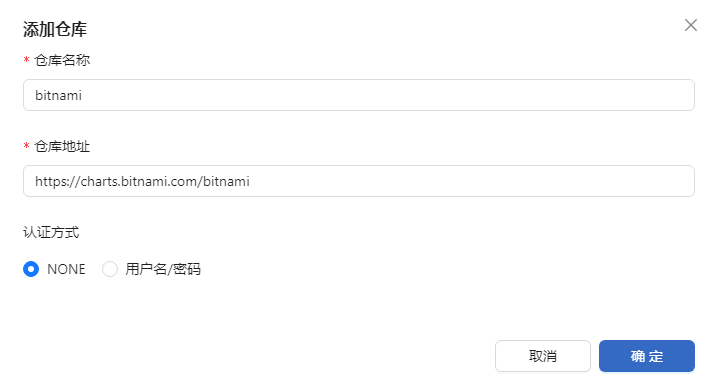
-
After the repository is added, you can view the added repository.

-
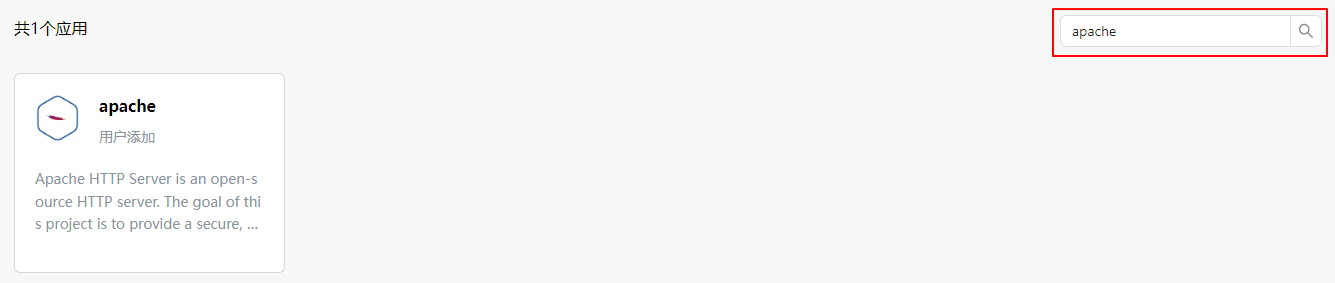
In the left navigation pane, choose Application Market > Applications. The Applications page is displayed. Search for apache in the search box in the upper-right corner. The Apache application is displayed.
-
Click apache. The application details page is displayed.
-
On this page, click Deploy to deploy the application.
NOTE
The openFuyao platform does not verify the security of applications deployed by users through third-party repositories. You need to ensure the security of applications to be deployed. -
On the deployment page, enter the installation information. You can customize the application name and namespace.
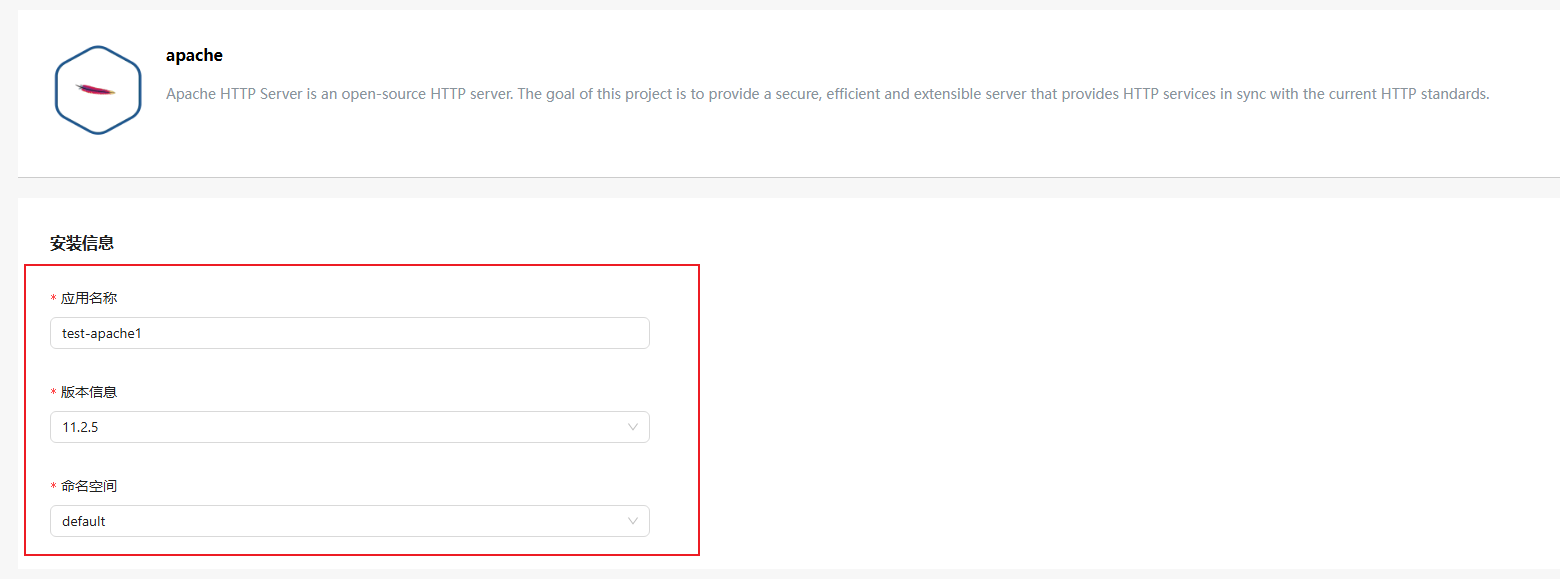 NOTE
NOTE
Currently, openFuyao does not support chart packages complying with OCI specifications. -
Click OK in the lower-right corner of the page to start deploying the application.
-
After the deployment is complete, you can go to the Application Management page to view the deployment result.

Congratulations! The Apache application has been installed.
For more details about the openFuyao management plane, see User Guide and Developer Guide.