NPU Operator
Feature Overview
Kubernetes provides access to special hardware resources (such as Ascend NPU) through device plug-ins. However, multiple software components (such as drivers, container runtimes, or other libraries) are required to configure and manage a node having these hardware resources. Installation of these components is complex, difficult, and error-prone. The NPU Operator uses the Operator Framework in Kubernetes to automatically manage all software components required for configuring Ascend devices. These components include the Ascend driver and firmware, as well as the MindCluster device plug-in, which enables end-to-end cluster operations such as job scheduling, O&M monitoring, and fault recovery. By installing corresponding components, you can manage NPU resources, optimize workload scheduling, and containerize training and inference tasks, so that AI jobs can be deployed and run on NPU devices as containers.
Table 1 Components that can be installed
| Component | Deployment Mode | Function |
|---|---|---|
| Ascend driver and firmware | Containerized deployment managed by NPU Operator | Acts as the bridge between hardware devices and the operating system (OS), enabling the OS to recognize and communicate with the hardware. |
| Ascend Device Plugin | Containerized deployment managed by NPU Operator | Device discovery: Enables device discovery, device allocation, and device health status reporting of Ascend AI processors based on Kubernetes' device plug-in mechanism, so that Kubernetes can manage Ascend AI processor resources. |
| Ascend Operator | Containerized deployment managed by NPU Operator | Environment configuration: Serves as a Volcano-supporting component that manages Volcano-like resources (acjob, equivalent to vcjob in Volcano) and injects environment variables required for AI training workloads (MindSpore, PyTorch, or TensorFlow) into containers, which are then scheduled by Volcano. |
| Ascend Docker Runtime | Containerized deployment managed by NPU Operator | Ascend container runtime: Serves as a container engine plug-in that provides NPU-based containerization support for all AI jobs so that AI jobs can run smoothly on Ascend devices as Docker containers. |
| NPU Exporter | Containerized deployment managed by NPU Operator | Real-time monitoring of Ascend AI processor resource data: Collects resource data of Ascend AI processors in real time, including the processor usage, temperature, voltage, and memory usage. In addition, it can monitor the virtual NPUs (vNPUs) of Atlas inference series products, including key metrics such as the AI Core usage, total memory of the vNPUs, and used memory. |
| Resilience Controller | Containerized deployment managed by NPU Operator | Dynamic scaling: Removes the faulty resources and continues the training with reduced specifications if a fault occurs during task training and no sufficient healthy resources are available for replacement, and restores the training tasks with the same specifications as the original tasks after the resources are sufficient. |
| ClusterD | Containerized deployment managed by NPU Operator | Collects task, resource, and fault information of clusters, determines the fault handling level and policy in a unified manner, and controls the process recalculation of the training containers. |
| Volcano | Containerized deployment managed by NPU Operator | Obtains resource information about a cluster from underlying components and selects the optimal scheduling policy and resource allocation based on the network connection mode between Ascend chips. Reschedules the task in case of failures of resources allocated to a task. |
| NodeD | Containerized deployment managed by NPU Operator | Detects the resource monitoring status and fault information of nodes, reports the fault information, and prevents new tasks from being scheduled to faulty nodes. |
| MindIO | Containerized deployment managed by NPU Operator | Generates and saves an end-of-life checkpoint after a model training interruption, rectifies UCE faults in the on-chip memory online during model training, provides the capability of restarting or replacing nodes to rectify faults and resume model training, and optimizes checkpoint saving and loading. |
For details about these components, see MindCluster Introduction.
Applicable Scenarios
In scenarios where a cluster is built based on Ascend devices and convenient job scheduling, O&M monitoring, and fault recovery are required, the NPU Operator can be used to automatically identify Ascend nodes in the cluster and perform component installation and deployment. In training scenarios, the NPU Operator supports resource detection, full NPU scheduling, static vNPU scheduling, resumable training, and elastic training. In inference scenarios, the NPU Operator supports resource detection, full NPU scheduling, static vNPU scheduling, dynamic vNPU scheduling, inference card fault recovery, and rescheduling.
Supported Capabilities
- Automatically discovers nodes equipped with Ascend NPUs and labels them.
- Automatically deploys the Ascend NPU driver and firmware.
- Supports automated deployment, installation, and lifecycle management of the cluster scheduling component in a MindCluster.
Highlights
The NPU Operator can automatically identify Ascend nodes and device models in a cluster and install the required version of AI runtime components, significantly reducing the complexity of configuring the Ascend ecosystem. It provides automated deployment of components and full lifecycle management of installed components. The NPU Operator is also able to monitor the installation status of components and generate detailed logs for debugging.
Implementation Principles
- The NPU Operator can monitor changes of custom resources (CRs) instantiated from custom resource definitions (CRDs) and update the state of managed components accordingly.
- Based on the labels marked by the Node Feature Discovery (NFD) service on nodes, the NPU Operator uses the Npu-Feature-Discovery component to mark nodes with labels that match the scheduling requirements of Ascend components.
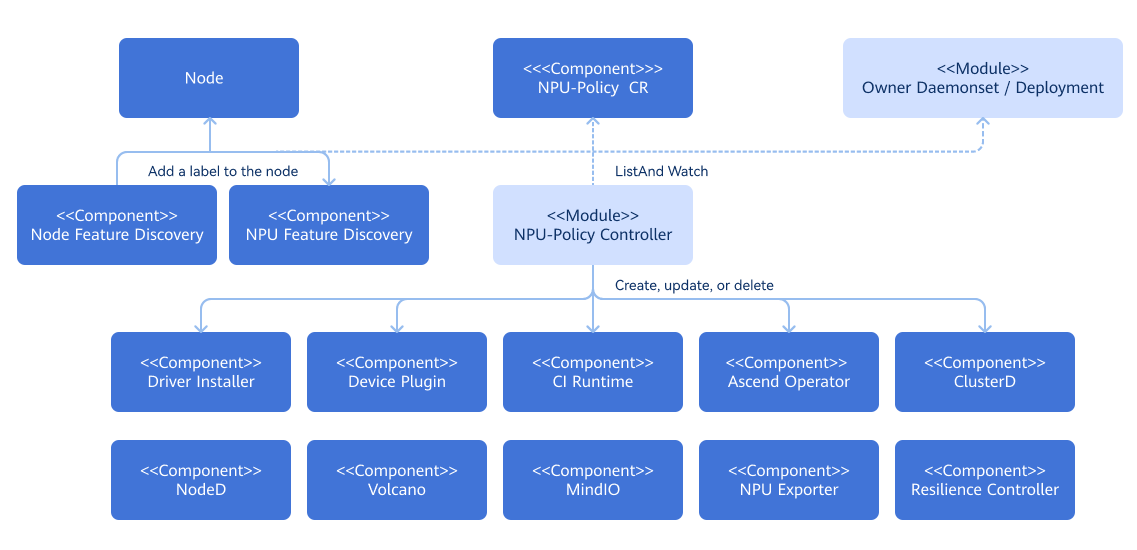
Related Features
Ensure that application-management-service and marketplace-service are running properly so that this feature can be properly installed from the application market.
Security Context for the Operator
Certain pods managed by the NPU Operator (for example, driver containers) require elevated privileges as follows:
privileged: truehostPID: truehostIPC: truehostNetwork: true
The reasons for elevating privileges are as follows:
- To access the file system and hardware devices of the host and install driver, firmware, and SDK service on the host
- To modify device permissions to enable usage by non-root users
Installation
Deployment on the openFuyao Platform
Online Installation
Prerequisites
Ensure that kubectl and Helm CLI are installed on your current host, or that a configurable application store or repository is available in the cluster.
Ensure that the bash tool exists in the environment. Otherwise, the driver and firmware installation script may fail to be parsed.
All worker nodes or node groups running NPU workloads in a Kubernetes cluster must operate in the openEuler 22.03 LTS or Ubuntu 22.04 (Arm architecture) operating system (OS).
Worker node or node groups that run CPU workloads only may operate in any OS because the NPU Operator does not perform any configuration or management operation on a node that is not dedicated to NPU workloads.
The running environment of the components installed by the NPU Operator must use Ascend 910B or Ascend 310P NPU chips. For details on the OS and hardware compatibility mapping, see MindCluster Documentation.
Node-Feature-Discovery and NPU-Feature-Discovery are dependencies for the Operator on each node.
 NOTE
NOTE
By default, the NFD master node and worker nodes are automatically deployed by the operator. If the NFD is already running in the cluster, its deployment must be disabled during operator installation. Similarly, if NPU-Feature-Discovery has been deployed in the cluster in advance, you need to disable the deployment of NPU-Feature-Discovery when installing the operator.values.yaml
yamlnfd: enabled: false npu-feature-discovery: enabled: falseCheck the NFD label on the nodes to determine whether the NFD is running in the cluster.
shkubectl get nodes -o json | jq '.items[].metadata.labels | keys | any(startswith("feature.node.kubernetes.io"))'If the command output is
true, the NFD is already running in the cluster. In this case, configurenodefeaturerulesto install the custom NPU node discovery rules.yamlnfd: nodefeaturerules: trueBy default, nfd is set true, npu-feature-discovery is set true, and nodefeaturerules is set to false.
Procedure
Download the NPU Operator extension from the openFuyao application market and install it.
- Log in to the openFuyao platform. In the left navigation pane, choose Application Market > Applications.
- Search for npu-operator in the application list and find the NPU Operator extension.
- Click the NPU Operator card. The application details page is displayed.
- On the details page, click Deploy in the upper-right corner. In the Installation Information area on the deployment page, set the application name, version information, and namespace.
- Click OK.
Offline Installation
Prerequisites
For details, see Prerequisites for Online Installation.
Downloading offline images: Download all images required to install components to the local device.
Prepare the driver and firmware package and the MindIO SDK package.
- Download the packages. For the driver and firmware package, find the config.json file in the GitCode repository of the npu-driver-installer, and download the package based on the NPU model and OS architecture of the corresponding node through the corresponding link provided. For the MindIO SDK package, find the config.json file in the GitCode repository of the npu-node-provision, and download the SDK package based on the NPU model and OS architecture of the corresponding node through the corresponding link provided.
Save the .zip file of the driver and firmware package to the path of the node where the offline installation is to be performed.
/opt/openFuyao-npu-driver/npu-driver/NPU-model/For example, if the node uses the Ascend 310P NPU, the storage path is as follows:
/opt/openFuyao-npu-driver/npu-driver/310p/Save the .zip file of the MindIO package to the path of the node where the offline installation is to be performed.
/opt/openFuyao/mindio/Check whether the target node contains the following tools.
- For systems using Yum as the package manager, the following package need to be installed: "jq wget unzip which initscripts coreutils findutils gawk e2fsprogs util-linux net-tools pciutils gcc make automake autoconf libtool git patch kernel-devel-
(uname -r) dkms". - For systems using apt-get as the package manager, the following package need to be installed: "jq wget unzip debianutils coreutils findutils gawk e2fsprogs util-linux net-tools pciutils gcc make automake autoconf libtool git patch dkms linux-headers-$(uname -r)".
- For systems using dnf as the package manager, the following package need to be installed: "jq wget unzip which initscripts coreutils findutils gawk e2fsprogs util-linux net-tools pciutils gcc make automake autoconf libtool git patch kernel-devel-
(uname -r) dkms"
- For systems using Yum as the package manager, the following package need to be installed: "jq wget unzip which initscripts coreutils findutils gawk e2fsprogs util-linux net-tools pciutils gcc make automake autoconf libtool git patch kernel-devel-
Procedure
For details, see Online Installation Procedure.
Standalone Deployment
Online Installation
Prerequisites
For details, see Prerequisites for deployment on the openFuyao platform.
Procedure
Add an openFuyao Helm repository.
shellhelm repo add openfuyao https://harbor.openfuyao.com/chartrepo/openfuyao-catalog && helm repo updateInstall the NPU Operator.
Install the operator using the default configurations.
shellcd npu-operator/charts helm install <npu-operator release name> npu-operator
If the operator is installed using the Helm application store or application market, add the https://harbor.openfuyao.com/chartrepo/openfuyao-catalog repository and install it on the user interface (UI). For details, see Common Customization Options.
- After the NPU Operator is installed, it automatically applies NPU resource–related labels to nodes based on their environments. These labels are associated with cluster scheduling components. Among them, the accelerate-type label requires an exact match between the node's hardware server and the NPU card. For details about the compatibility mapping, see Creating a Node Label in the MindCluster Documentation.
- For the A800I A2 inference server, the server-usage=infer label cannot be automatically added. You need to run the following command to manually add the label:
kubectl label nodes <Node name> server-usage=inferCommon Customization Options
The following options are available when you use the Helm chart. These options can be used with --set when you install the operator using Helm.
Table 2 lists the most commonly used options.
| Option | Description | Default |
|---|---|---|
nfd.enabled | Deploys the NFD service. If the NFD service is already running in the cluster, set this parameter to false.
| true |
nfd.nodefeaturerules | If this option is set to true, you need to install the CRs for the rules to detect NPU devices through the NFD. | true |
node-feature-discovery.image.repository | Specifies the image path of the NFD service. | registry.k8s.io/nfd/node-feature-discovery |
node-feature-discovery.image.pullPolicy | Specifies the image pulling policy of the NFD service. | Always |
node-feature-discovery.image.tag | Specifies the image version of the NFD service. | v0.16.4 |
npu-feature-discovery.image.repository | Specifies the image path of the NPU-Feature-Discovery component. | harbor.openfuyao.com/openfuyao/npu-feature-discovery |
npu-feature-discovery.image.pullPolicy | Specifies the image pulling policy of the NPU-Feature-Discovery component. | latest |
npu-feature-discovery.image.tag | Specifies the image version of the NPU-Feature-Discovery component. | Always |
npu-feature-discovery.enabled | The switch that controls the deployment of the NPU-Feature-Discovery component. If the NPU-Feature-Discovery component is already running in the cluster, set this option to false. | true |
operator.image | Specifies the image path of the NPU Operator. | harbor.openfuyao.com/openfuyao/npu-operator |
operator.version | Specifies the image version of the NPU Operator. | latest |
operator.imagePullPolicy | Specifies the image pulling policy of the NPU Operator. | IfNotPresent |
daemonSets.labels | Specifies the custom label to be added to all pods managed by the NPU Operator. | {} |
daemonSets.tolerations | Specifies the custom tolerance to be added to all pods managed by the NPU Operator. | [] |
driver.enabled | By default, the operator deploys the NPU driver and firmware on the system as a container. | true |
driver.registry | Specifies the image repository of the driver and firmware. Specify another image repository if using a custom driver image. | harbor.openfuyao.com |
driver.repository | Specifies the image path of the driver and firmware. | openfuyao/ascend-image/ascend-operator |
driver.tag | Specifies the image version of the driver and firmware installation service. | v6.0.0 |
driver.version | Specifies the version number of the driver and firmware. | 24.1.RC3 |
devicePlugin.enabled | By default, the operator deploys the NPU device plug-in on the system. When using the operator on a system where the device plug-in is pre-installed, set this parameter to false.
| true |
devicePlugin.registry | Specifies the image repository of the device plug-in. | harbor.openfuyao.com |
devicePlugin.repository | Specifies the image path of the device plug-in. | openfuyao/ascend-image/ascend-k8sdeviceplugin |
devicePlugin.tag | Specifies the image version of the device plug-in. | v6.0.0 |
trainer.enabled | By default, the NPU Operator installs the Ascend operator. Set this value to false if the Ascend operator is not required. | true |
trainer.registry | Specifies the image repository of the Ascend operator. Specify another image repository if using a custom driver image. | harbor.openfuyao.com |
trainer.repository | Specifies the image path of the Ascend operator. | openfuyao/ascend-image/ascend-operator |
trainer.tag | Specifies the image version of the Ascend operator. | v6.0.0 |
ociRuntime.enabled | By default, the operator installs the Ascend Docker Runtime. Set this value to false if the Ascend Docker Runtime is not required. | true |
ociRuntime.registry | Specifies the image repository of the Ascend Docker Runtime installer. Specify another image repository if using a custom program image. | harbor.openfuyao.com |
ociRuntime.repository | Specifies the image path of the Ascend Docker Runtime. | openfuyao/npu-container-toolkit |
ociRuntime.tag | Specifies the image version of the Ascend Docker Runtime. | latest |
nodeD.enabled | By default, the operator installs the nodeD. Set this value to false if installation is not required. | true |
ndoeD.registry | Specifies the image repository of the nodeD. Specify another image repository if using a custom program image. | harbor.openfuyao.com |
nodeD.repository | Specifies the image path of the nodeD. | openfuyao/ascend-image/nodeD |
nodeD.tag | Specifies the image version of the nodeD. | v6.0.0 |
clusterd.enabled | By default, the operator installs the clusterD. Set this value to false if installation is not required. | true |
clusterd.registry | Specifies the image repository of the clusterD. Specify another image repository if using a custom program image. | harbor.openfuyao.com |
clusterd.repository | Specifies the image path of the clusterD. | openfuyao/ascend-image/clusterd |
clusterd.tag | Specifies the image version of the clusterD. | v6.0.0 |
rscontroller.enabled | By default, the operator installs the resilience controller component. Set this value to false if installation is not required. | true |
rscontroller.registry | Specifies the image repository of the resilience controller component. Specify another image repository if using a custom program image. | harbor.openfuyao.com |
rscontroller.repository | Specifies the image path of the resilience controller component. | openfuyao/ascend-image/resilience-controller |
rscontroller.tag | Specifies the image version of the resilience controller component. | v6.0.0 |
exporter.enabled | By default, the operator installs the NPU Exporter component. Set this value to false if installation is not required. | true |
exporter.registry | Specifies the image repository of the NPU Exporter. Specify another image repository if using a custom program image. | harbor.openfuyao.com |
exporter.repository | Specifies the image path of the NPU Exporter. | openfuyao/ascend-image/npu-exporter |
exporter.tag | Specifies the image version of the NPU Exporter. | v6.0.0 |
mindiotft.enabled | By default, the operator installs the MindIO Training Fault Tolerance. Set this value to false if installation is not required. | true |
mindiotft.registry | Specifies the image repository of the MindIO Training Fault Tolerance. Specify another image repository if using a custom program image. | harbor.openfuyao.com |
mindiotft.repository | Specifies the image path of the MindIO Training Fault Tolerance. | openfuyao/npu-node-provision |
mindiotft.tag | Specifies the image version of the MindIO Training Fault Tolerance. | latest |
mindioacp.enabled | By default, the operator installs the MindIO Async Checkpoint Persistence. Set this value to false if installation is not required. | true |
mindioacp.registry | Specifies the image repository of the MindIO Async Checkpoint Persistence. Specify another image repository if using a custom program image. | harbor.openfuyao.com |
mindioacp.repository | Specifies the image path of the MindIO Async Checkpoint Persistence service. | openfuyao/npu-node-provision |
mindioacp.tag | Specifies the image version of the MindIO Async Checkpoint Persistence service. | latest |
mindioacp.version | Specifies the version of the MindIO Async Checkpoint Persistence. | 6.0.0 |
Offline Installation
Prerequisites
For details, see Prerequisites for Deployment on the openFuyao Platform.
Procedure
Prepare the chart package of the NPU Operator.
Install the operator using the default configurations.
shellcd npu-operator/charts helm install <npu-operator release name> npu-operatorFor common customization options, see Table 2.
Upgrade
The NPU Operator supports dynamic updates to existing resources. This ensures that NPU policy settings in the cluster are always kept up to date.
Because Helm does not support automatic upgrades of existing CRDs, the NPU Operator Chart can be upgraded either manually or by enabling the Helm hook.
Updating the CRs for the NPU Policy
The NPU Operator supports dynamic updates to the npuclusterpolicy CR through kubectl.
kubectl get npuclusterpolicy -A
# If the default settings of npuclusterpolicy are not modified, the default name of npuclusterpolicy is cluster.
kubectl edit npuclusterpolicy cluster
After the editing is complete, Kubernetes automatically updates the application to the cluster. The components managed by the NPU Operator are also updated to their expected statuses.
Verifying the Installation Status
Viewing Component Statuses Through the Custom Resource
You can use the npuclusterpolicies.npu.openfuyao.com Custom Resource to check the status of components. Specifically, check the state field of each component in the status field to determine the current status of the component. The following is an example of the status when the driver installer is running properly.
status:
  componentStatuses:
    - name: /var/lib/npu-operator/components/driver
      prevState:
        reason: Reconciling
        type: deploying
      state:
        reason: Reconciled
type: running- View the custom resource.
$ kubectl get npuclusterpolicies.npu.openfuyao.com cluster -o yaml
apiVersion: npu.openfuyao.com/v1
kind: NPUClusterPolicy
metadata:
  annotations:
    meta.helm.sh/release-name: npu
    meta.helm.sh/release-namespace: default
  creationTimestamp: "2025-03-11T13:22:39Z"
  generation: 2
  labels:
    app.kubernetes.io/managed-by: Helm
    app.kubernetes.io/name: npu-operator
  name: cluster
  resourceVersion: "2240086"
  uid: 0d1498c5-143a-4e05-a5dc-376d2e6c96ea
spec:
  clusterd:
    imageSpec:
      imagePullPolicy: Always
      imagePullSecrets: []
      registry: harbor.openfuyao.com
      repository: openfuyao/ascend-image/clusterd
      tag: v6.0.0
    logRotate:
      compress: false
      logFile: /var/log/mindx-dl/clusterd/clusterd.log
      logLevel: info
      maxAge: 7
      rotate: 30
    managed: true
  daemonsets:
    imageSpec:
      imagePullPolicy: IfNotPresent
      imagePullSecrets: []
    labels:
      app.kubernetes.io/managed-by: npu-operator
      helm.sh/chart: npu-operator-0.0.0-latest
    tolerations:
    - effect: NoSchedule
      key: node-role.kubernetes.io/master
      operator: Equal
      value: ""
    - effect: NoSchedule
      key: node-role.kubernetes.io/control-plane
      operator: Equal
      value: ""
  devicePlugin:
    imageSpec:
      imagePullPolicy: Always
      imagePullSecrets: []
      registry: harbor.openfuyao.com
      repository: openfuyao/ascend-image/ascend-k8sdeviceplugin
      tag: v6.0.0
    initImageSpec:
      imagePullPolicy: Always
      imagePullSecrets: []
      registry: ""
      repository: harbor.openfuyao.com/docker.io/library/busybox:latest
      tag: ""
    logRotate:
      compress: false
      logFile: /var/log/mindx-dl/devicePlugin/devicePlugin.log
      logLevel: info
      maxAge: 7
      rotate: 30
    managed: true
  driver:
    imageSpec:
      imagePullPolicy: Always
      imagePullSecrets: []
      registry: harbor.openfuyao.com
      repository: openfuyao/npu-driver-installer
      tag: latest
    initImageSpec:
      imagePullPolicy: Always
      imagePullSecrets: []
      registry: ""
      repository: harbor.openfuyao.com/openfuyao/npu-driver-installer:latest
      tag: ""
    logRotate:
      compress: false
      logFile: /var/log/mindx-dl/driver/driver.log
      logLevel: info
      maxAge: 7
      rotate: 30
    managed: true
    version: 24.1.RC3
  exporter:
    imageSpec:
      imagePullPolicy: Always
      imagePullSecrets: []
      registry: harbor.openfuyao.com
      repository: openfuyao/ascend-image/npu-exporter
      tag: v6.0.0
    logRotate:
      compress: false
      logFile: /var/log/mindx-dl/npu-exporter/npu-exporter.log
      logLevel: info
      maxAge: 7
      rotate: 30
    managed: true
  mindioacp:
    imageSpec:
      imagePullPolicy: Always
      imagePullSecrets: []
      registry: harbor.openfuyao.com
      repository: openfuyao/npu-node-provision
      tag: latest
    managed: false
    version: 6.0.0
  mindiotft:
    imageSpec:
      imagePullPolicy: Always
      imagePullSecrets: []
      registry: harbor.openfuyao.com
      repository: openfuyao/npu-node-provision
      tag: latest
    managed: false
  nodeD:
    heartbeatInterval: 5
    imageSpec:
      imagePullPolicy: Always
      imagePullSecrets: []
      registry: harbor.openfuyao.com
      repository: openfuyao/ascend-image/noded
      tag: v6.0.0
    logRotate:
      compress: false
      logFile: /var/log/mindx-dl/noded/noded.log
      logLevel: info
      maxAge: 7
      rotate: 30
    managed: true
    pollInterval: 60
  ociRuntime:
    imageSpec:
      imagePullPolicy: Always
      imagePullSecrets: []
      registry: harbor.openfuyao.com
      repository: openfuyao/npu-container-toolkit
      tag: latest
    initConfigImageSpec:
      imagePullPolicy: Always
      imagePullSecrets: []
      registry: ""
      repository: harbor.openfuyao.com/openfuyao/npu-container-toolkit:latest
      tag: ""
    initRuntimeImageSpec:
      imagePullPolicy: Always
      imagePullSecrets: []
      registry: ""
      repository: harbor.openfuyao.com/openfuyao/ascend-image/ascend-docker-runtime:latest
      tag: ""
    interval: 300
    managed: true
  operator:
    imageSpec:
      imagePullPolicy: IfNotPresent
      imagePullSecrets: []
    runtimeClass: ascend
  rscontroller:
    imageSpec:
      imagePullPolicy: Always
      imagePullSecrets: []
      registry: harbor.openfuyao.com
      repository: openfuyao/ascend-image/resilience-controller
      tag: v6.0.0
    logRotate:
      compress: false
      logFile: /var/log/mindx-dl/resilience-controller/run.log
      logLevel: info
      maxAge: 7
      rotate: 30
    managed: true
  trainer:
    imageSpec:
      imagePullPolicy: Always
      imagePullSecrets: []
      registry: harbor.openfuyao.com
      repository: openfuyao/ascend-image/ascend-operator
      tag: v6.0.0
    initImageSpec:
      imagePullPolicy: Always
      imagePullSecrets: []
      registry: ""
      repository: harbor.openfuyao.com/docker.io/library/busybox:latest
      tag: ""
    logRotate:
      compress: false
      logFile: /var/log/mindx-dl/ascend-operator/ascend-operator.log
      logLevel: info
      maxAge: 7
      rotate: 30
    managed: true
  vccontroller:
    controllerResources:
      limits:
        cpu: 1000m
        memory: 1Gi
      requests:
        cpu: 1000m
        memory: 1Gi
    imageSpec:
      imagePullPolicy: Always
      imagePullSecrets: []
      registry: harbor.openfuyao.com
      repository: openfuyao/ascend-image/vc-controller-manager
      tag: v1.9.0-v6.0.0
    managed: true
  vcscheduler:
    imageSpec:
      imagePullPolicy: Always
      imagePullSecrets: []
      registry: harbor.openfuyao.com
      repository: openfuyao/ascend-image/vc-scheduler
      tag: v1.9.0-v6.0.0
    managed: true
    schedulerResources:
      limits:
        cpu: 200m
        memory: 1Gi
      requests:
        cpu: 200m
        memory: 1Gi
status:
  componentStatuses:
  - name: /var/lib/npu-operator/components/driver
    prevState:
      reason: Reconciling
      type: deploying
    state:
      reason: Reconciled
      type: running
  - name: /var/lib/npu-operator/components/oci-runtime
    prevState:
      reason: Reconciling
      type: deploying
    state:
      reason: Reconciled
      type: running
  - name: /var/lib/npu-operator/components/device-plugin
    prevState:
      reason: Reconciling
      type: deploying
    state:
      reason: Reconciled
      type: running
  - name: /var/lib/npu-operator/components/trainer
    prevState:
      reason: Reconciling
      type: deploying
    state:
      reason: Reconciled
      type: running
  - name: /var/lib/npu-operator/components/noded
    prevState:
      reason: Reconciling
      type: deploying
    state:
      reason: Reconciled
      type: running
  - name: /var/lib/npu-operator/components/volcano/volcano-controller
    prevState:
      reason: Reconciling
      type: deploying
    state:
      reason: Reconciled
      type: running
  - name: /var/lib/npu-operator/components/volcano/volcano-scheduler
    prevState:
      reason: Reconciling
      type: deploying
    state:
      reason: Reconciled
      type: running
  - name: /var/lib/npu-operator/components/clusterd
    prevState:
      reason: Reconciling
      type: deploying
    state:
      reason: Reconciled
      type: running
  - name: /var/lib/npu-operator/components/resilience-controller
    prevState:
      reason: Reconciling
      type: deploying
    state:
      reason: Reconciled
      type: running
  - name: /var/lib/npu-operator/components/npu-exporter
    prevState:
      reason: Reconciling
      type: deploying
    state:
      reason: Reconciled
      type: running
  - name: /var/lib/npu-operator/components/mindio/mindiotft
    prevState:
      reason: Reconciling
      type: deploying
    state:
      reason: ComponentUnmanaged
      type: unmanaged
  - name: /var/lib/npu-operator/components/mindio/mindioacp
    prevState:
      reason: Reconciling
      type: deploying
    state:
      reason: ComponentUnmanaged
      type: unmanaged
  conditions:
  - lastTransitionTime: "2025-03-11T13:25:41Z"
    message: ""
    reason: Ready
    status: "False"
    type: Error
  - lastTransitionTime: "2025-03-11T13:25:41Z"
    message: all components have been successfully reconciled
    reason: Reconciled
    status: "True"
    type: Ready
  namespace: default
  phase: Ready
Manually Checking the Installation Status and Running Result of Each Component
Checking the Driver Installation Status
Run the
npu-smi infocommand to check the driver installation. If information similar to the following is displayed, the driver has been installed.shell+------------------------------------------------------------------------------------------------+ | npu-smi 24.1.rc2 Version: 24.1.rc2 | +---------------------------+---------------+----------------------------------------------------+ | NPU Name | Health | Power(W) Temp(C) Hugepages-Usage(page)| | Chip | Bus-Id | AICore(%) Memory-Usage(MB) HBM-Usage(MB) | +===========================+===============+====================================================+ | 0 910B3 | OK | 99.1 55 0 / 0 | | 0 | 0000:C1:00.0 | 0 0 / 0 3162 / 65536 | +===========================+===============+====================================================+ | 1 910B3 | OK | 91.7 53 0 / 0 | | 0 | 0000:C2:00.0 | 0 0 / 0 3162 / 65536 | +===========================+===============+====================================================+ | 2 910B3 | OK | 98.2 51 0 / 0 | | 0 | 0000:81:00.0 | 0 0 / 0 3162 / 65536 | +===========================+===============+====================================================+ | 3 910B3 | OK | 93.2 49 0 / 0 | | 0 | 0000:82:00.0 | 0 0 / 0 3162 / 65536 | +===========================+===============+====================================================+ | 4 910B3 | OK | 98.8 55 0 / 0 | | 0 | 0000:01:00.0 | 0 0 / 0 3163 / 65536 | +===========================+===============+====================================================+ | 5 910B3 | OK | 96.2 56 0 / 0 | | 0 | 0000:02:00.0 | 0 0 / 0 3163 / 65536 | +===========================+===============+====================================================+ | 6 910B3 | OK | 96.9 53 0 / 0 | | 0 | 0000:41:00.0 | 0 0 / 0 3162 / 65536 | +===========================+===============+====================================================+ | 7 910B3 | OK | 97.6 55 0 / 0 | | 0 | 0000:42:00.0 | 0 0 / 0 3163 / 65536 | +===========================+===============+====================================================+ +---------------------------+---------------+----------------------------------------------------+ | NPU Chip | Process id | Process name | Process memory(MB) | +===========================+===============+====================================================+ | No running processes found in NPU 0 | +===========================+===============+====================================================+ | No running processes found in NPU 1 | +===========================+===============+====================================================+ | No running processes found in NPU 2 | +===========================+===============+====================================================+ | No running processes found in NPU 3 | +===========================+===============+====================================================+ | No running processes found in NPU 4 | +===========================+===============+====================================================+ | No running processes found in NPU 5 | +===========================+===============+====================================================+ | No running processes found in NPU 6 | +===========================+===============+====================================================+ | No running processes found in NPU 7 | +===========================+===============+====================================================+Checking the Installation Status of the MindCluster Components
Run the
kubectl get pod -Acommand to check all pods. If all pods are in the running state, the components are started successfully. For details about how to verify the status of each component, see MindCluster Official Documentation.bashNAMESPACE NAME READY STATUS RESTARTS AGE default ascend-runtime-containerd-7lg85 1/1 Running 0 6m31s default npu-driver-c4744 1/1 Running 0 6m31s default npu-operator-77f56c9f6c-fhx8m 1/1 Running 0 6m32s default npu-feature-discovery-zqgt9 1/1 Running 0 7m12s default mindio-acp-43f64g63d2v 1/1 Running 0 7m21s default mindio-tft-2cc35gs3c2u 1/1 Running 0 6m32s kube-system ascend-device-plugin-fm4h9 1/1 Running 0 6m35s mindx-dl ascend-operator-manager-6ff7468bd9-47d7s 1/1 Running 0 6m50s mindx-dl clusterd-5ffb8f6787-n5m82 1/1 Running 0 6m48s mindx-dl noded-kmv8d 1/1 Running 0 7m11s mindx-dl resilience-controller-6727f36c28-wjn3s 1/1 Running 0 7m20s npu-exporter npu-exporter-b6txl 1/1 Running 0 7m22s volcano-system volcano-controllers-373749bg23c-mc9cq 1/1 Running 0 7m31s volcano-system volcano-scheduler-d585db88f-nkxch 1/1 Running 0 7m40s
Uninstallation
To uninstall an operator, perform the following steps:
Run the following command to remove the operator through the Helm CLI or application management page:
shellhelm delete <npu-operator release name>By default, Helm does not remove existing CRDs when a chart is removed.
shellkubectl get crd npuclusterpolicies.npu.openfuyao.comRemove the CRDs manually by running the following command:
shellkubectl delete crd npuclusterpolicies.npu.openfuyao.com
After the operator is uninstalled, the driver may still exist on the host machine.
Remarks on Component Installation and Uninstallation
Installation and Uninstallation Fields for Each Component
During the first installation of the NPU Operator, if the enabled field of the corresponding component in values.yaml is set to
true, the component resources, regardless of whether they already exist in the cluster, will be replaced with the resources managed by the NPU Operator.If a component (for example, volcano-controller) already exists in the cluster and the
enabledfield of the component in values.yaml is set tofalseduring the first installation of the NPU Operator, the existing component resources in the cluster will not be removed.After the NPU Operator is installed, you can modify the corresponding fields of the CR instance to manage the image path, resource configuration, and lifecycle of the corresponding component.
MindIO Installation Dependencies
To install MindIO components, the Python environment must be pre-installed on the node (with the pip3 tool available). Supported Python versions are 3.7 through 3.11. Without the required environment, the installation will fail. When using MindIO, you can mount the installed SDK to the training container.
The installation path for the MindIO Training Fault Tolerance (TFT) component is /opt/sdk/tft. Prebuilt .whl packages for different Python versions are provided in /opt/tft-whl-package to meet customized needs. For details, see the "Fault Recovery Acceleration" section in the MindCluster Documentation.
The installation paths for the MindIO Async Checkpoint Persistence (ACP) component are /opt/mindio and /opt/sdk/acp. Prebuilt .whl packages for different Python versions are provided in /opt/acp-whl-package. You can install the component using the corresponding package as required. For detailed instructions, see the "Checkpoint Saving and Loading Optimization" section in the MindCluster Documentation.
When a MindIO component is uninstalled, the SDK folder and other folders related to the MindIO component will be removed. This may cause the task container that uses the service to operate abnormally. Proceed with caution.
Licensed under the MulanPSL2
 YueGongWangAnBei No.44030002007300